We're moving! The community forums are migrating to a new platform on September 22. Learn more
×Community resources
Community resources
Community resources
“Linked issues” column unavailable in new List view – recommended pattern for cross-project visibili


Hi everyone,
If Atlassian had never allowed “Linked issues” as a List column before, how would you design this today from scratch? Is there a better way to think about surfacing cross-project relationships?
In the legacy Jira experience, we could add a “Linked issues” column to the List view to see which issues in one project were linked to issues in another.
In the new Projects experience (company-managed), I can no longer add “Linked issues” to the column list. It does not appear as an available field when configuring columns.
My goal is to:
- View linked issues directly in the List view
- See cross-project relationships without opening each individual issue
- Allow PMs to quickly scan related work and click into those linked issues
As a workaround, I tried creating a custom text field and using automation:
- Trigger: when a work item is linked
- Branch to the linked work item
- Populate the custom field with the linked issue summary
However, this feels like duplicating relational data just to make it visible in a flat view.
So I’m trying to understand:
- Is the “Linked issues” column intentionally unavailable in the new List view?
- Is there a supported way to display linked issue summaries in List view?
- Is automation the only viable workaround?
Circling back to my original question: if this were being designed today in the new experience, what would be the recommended pattern for allowing a Project Manager to quickly scan linked work across projects and drill into it?
Any insight would be appreciated.
2 answers

Hi @Ashley Schultz ,
Welcome to Atlassian community and thank you for your post.
I guess that the function you are searching is implemented in Plans, available only in Jira Premium/Enterprise
Kind regards

@Ashley Schultz You'll find more details about Plans and the dependency views here https://support.atlassian.com/jira-software-cloud/docs/what-is-the-summary-view-of-your-plan/
This YouTube video may also be helpful https://www.youtube.com/watch?v=qd1_EQXZoh4
You must be a registered user to add a comment. If you've already registered, sign in. Otherwise, register and sign in.

Hi @Ashley Schultz,
Welcome to the Atlassian Community.
In Jira search results or List View you can add the Linked Work Items column; it will display the keys of the issue links, but not the link type, summary, status or other details of the linked issues.

If this is not enough, another alternative would be to install a plugin from Atlassian Marketplace that offers a better view over the issues and linked issues.
If you are willing to try a plugin, I would recommend using the Work Breakdown Structure gadget offered by our Great Gadgets app.
This gadget can display the issue from a JQL or filter (cross-project) along with their linked issues. This is my "recommended pattern for allowing a Project Manager to quickly scan linked work across projects and drill into it".
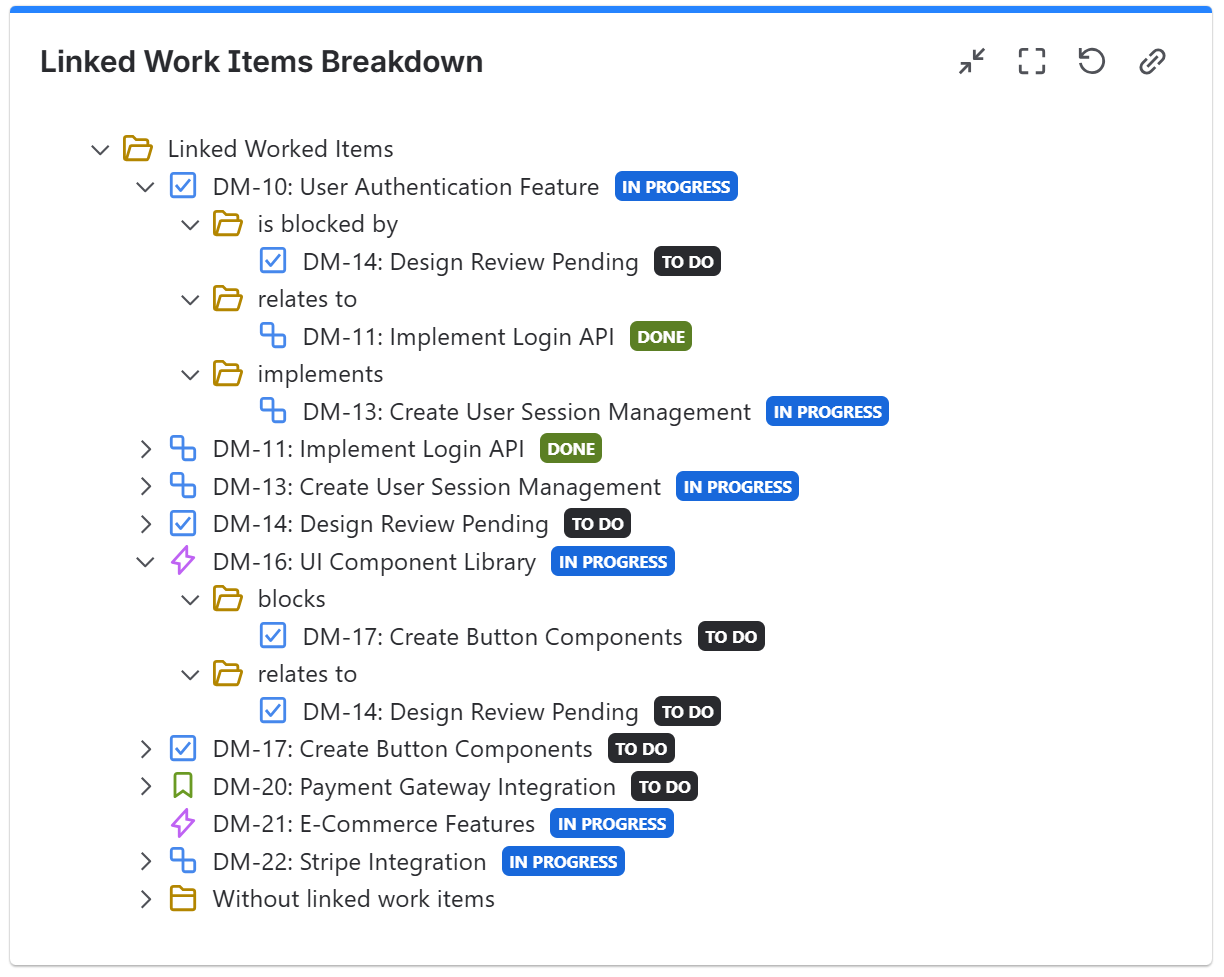 The same gadget can display the issues by hierarchy (Initiative > Epic > Story > Sub-task) which can be of great help for your Project Manager to get a quick overview.

See also this article: https://community.atlassian.com/forums/App-Central-articles/How-to-Visualize-Linked-Issues-and-Their-Status-in-Jira/ba-p/3150240
Hope this helps.
Danut.
You must be a registered user to add a comment. If you've already registered, sign in. Otherwise, register and sign in.

You must be a registered user to add a comment. If you've already registered, sign in. Otherwise, register and sign in.