The Atlassian Community Forums are currently in read-only mode. We will be relaunching on a new platform on September 22 (read more here). We apologize for the extended downtime. For concerns or questions, please email communitymanagers@atlassian.com. See you on the other side, on the new Atlassian Community Forums! :)
×Community resources
Community resources
Community resources
Add custom email account (office 365) for incoming mail

When connecting via the option Microsoft or the option other, I get a AUTHENTICATE FAILED. The username and password are correct.
1 answer
Comments for this post are closed
Community moderators have prevented the ability to post new answers.

Hello @Bianca de Weerd
Welcome to Atlassian Community!
Per your description, I understand you are trying to add a custom inbound e-mail address to receive tickets through e-mail in one of your Service Desk projects under project settings > E-mail requests. Is that correct?
Since you have double-checked that the e-mail account you configured is working and the password is correct, the most common reason that causes the authentication error is that your E-mail provider is blocking the Jira Service Desk application to access your account due to a specific requirement from your e-mail domain (2FA authentication, VPN block, etc).
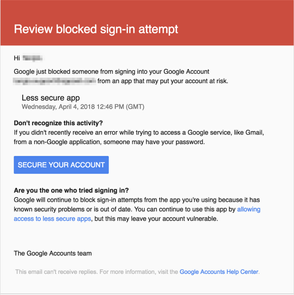
In fact, you may have even received an e-mail notification similar to the one below (This one is for Gmail) with a warning about the login attempt from Jira Service desk app:
That being said, check the following with your e-mail domain admins:
1 - Confirm if your account is not configured with two-step authentication
2 - Check if there are any restrictions from Apps not using the Oauth authentication methods
3 - Check if there are no redirections from the e-mail login page
4 - Check if your e-mail can be accessed from out of your network or VPN.
Additionally, check the tips in the thread below to further investigate all the possible blocks that your e-mail provider could be applying:
Unable to connect to Gmail (Google Apps) for custom email address in Service Desk
Let us know if you have any questions.

You must be a registered user to add a comment. If you've already registered, sign in. Otherwise, register and sign in.