We’re excited to announce a major upgrade to the Jira Software project timeline. Soon, you’ll experience a better timeline that designed to help software teams plan, track, and deliver work with greater clarity and speed.
When? We will roll this out starting in July month.
What’s changing?
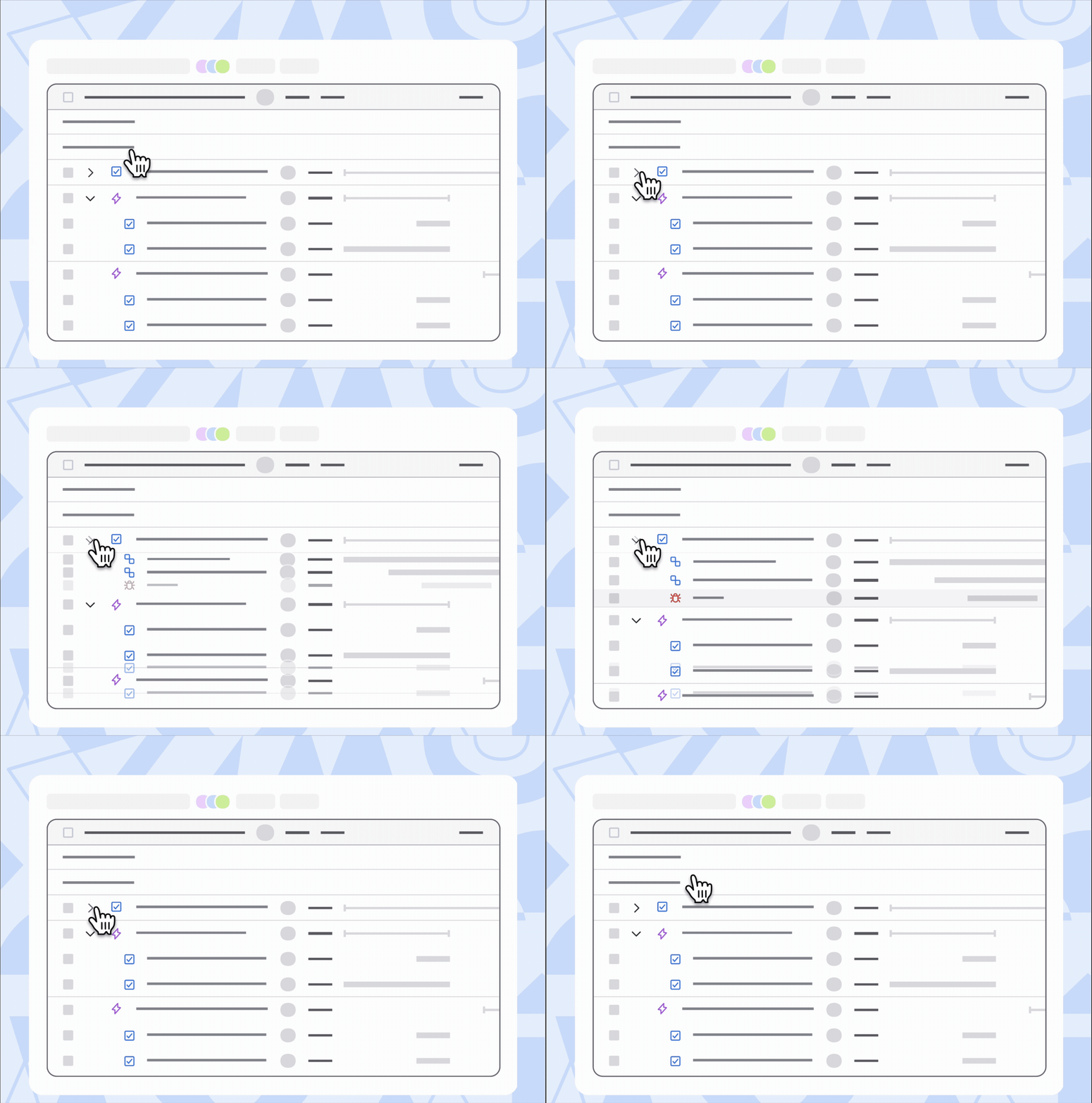
✅ Display all levels including subtasks
The timeline now shows all work items, so nothing gets missed. Subtasks now appear as individual items, making it easier to track progress and update them directly Work items are no longer limited to the epic level; you can now see items above that level.
Note: Work items without parent will only be shown when the list is in flat layout.
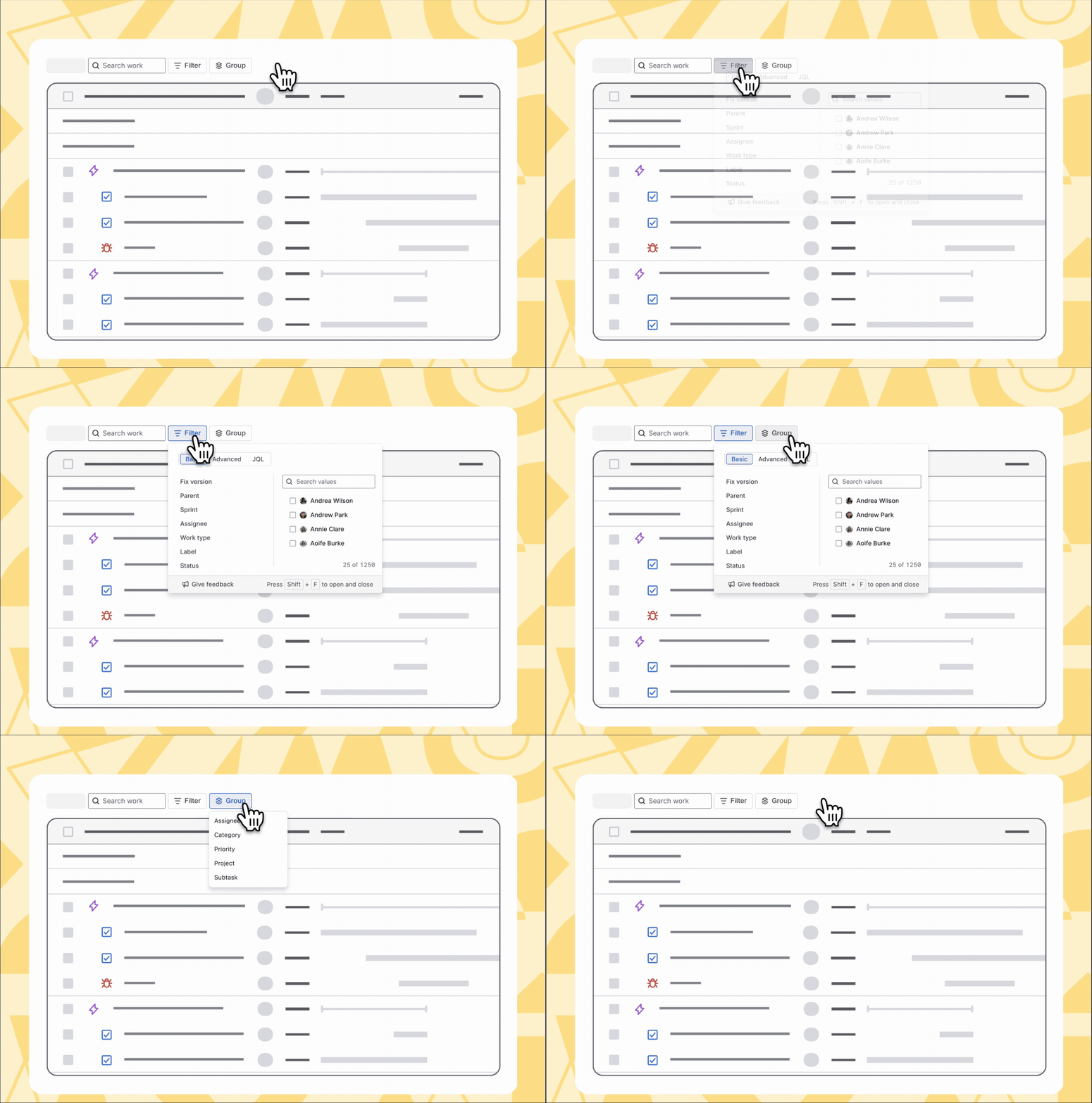
✅ Enhanced filtering (Sorting and Grouping are coming soon!)
Filter and group work items by more fields to quickly find what matters and organise your timeline your way. Sorting currently supports specific work item fields(key, summary, assignee and status); we will add more soon.
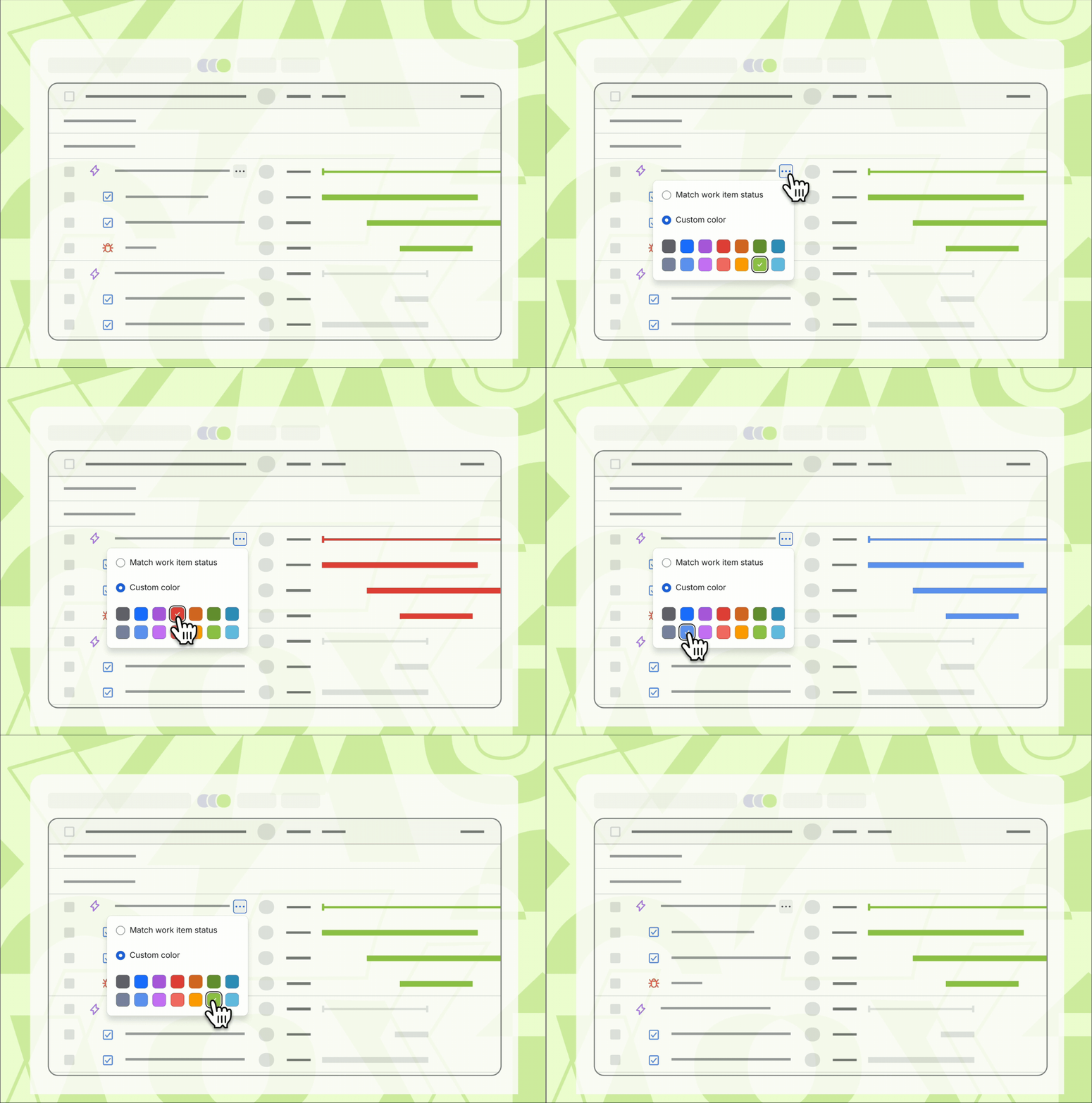
✅ Display duration bar according to status or custom colour
Choose to display work items by status color or custom color (from epic level) for better visual organization.
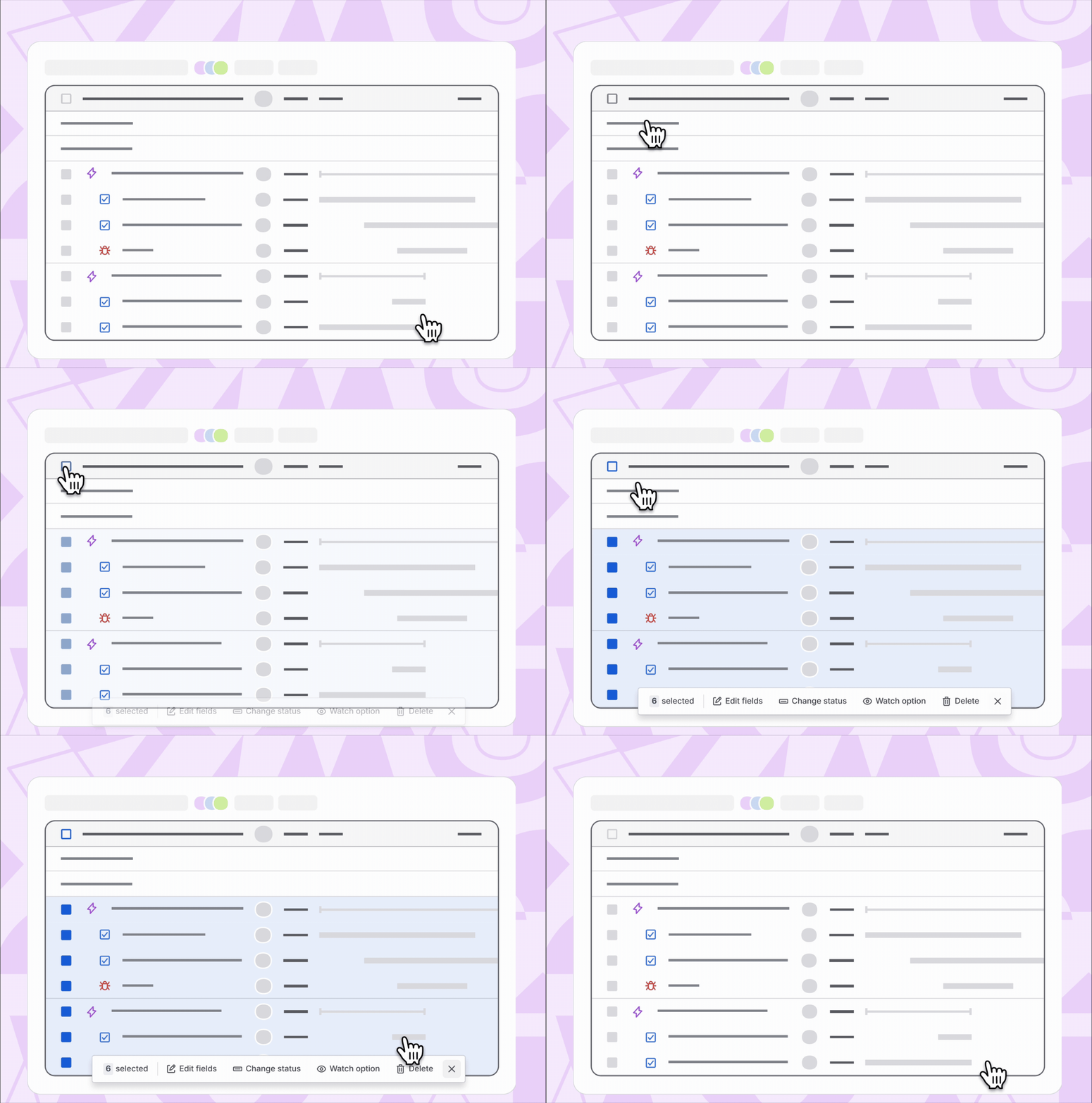
✅ Bulk update more work item fields
You can now bulk update more fields, not just dates, for multiple work items at once.
Note: Schedule by X days bulk edit is no longer available. You can bulk move the children work items by dragging the parent timeline bar.
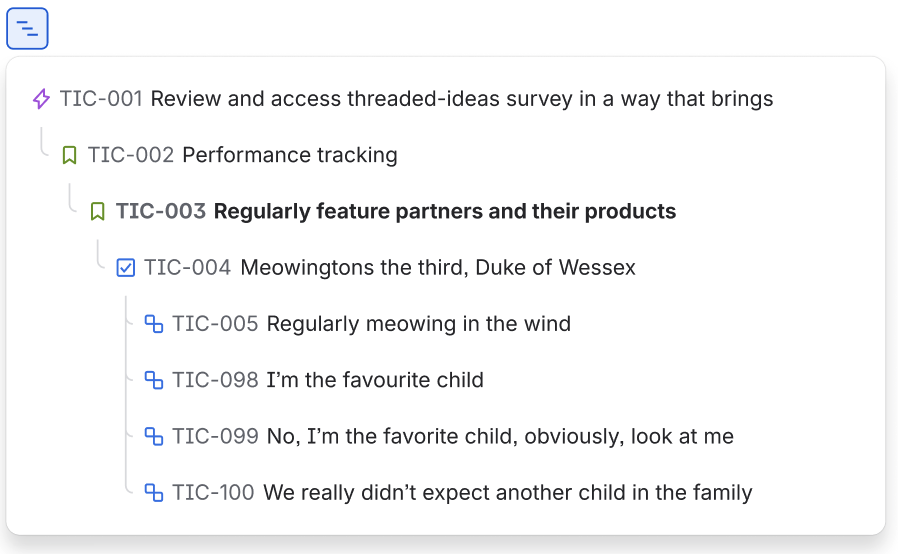
🔄 [Changed] Hierarchy displays as a flyout modal when filter is active
The modal shows hierarchy relationships between the matched parent item (and its grandparent) and their immediate children when filter.
If you see this without view level filter is active and you are in CMP Software timeline: Check with your admin as your board is using board-level filter which will activate the new experience.
Why? Your filtered results will continue to respect your filter — only matching items appear in the table. To see an item's parent or children (which may not match your filter), you'll open the flyout rather than seeing them inline in the table. This keeps your filtered view clean while giving you quick access to context when you need it.
Other changes including:
-
Move timeline settings from space level to view level: Timeline settings are now easier to access and customize in context.
-
Enhanced smart link embedding capabilities: The Jira timeline now stays editable even after pasting content from outside of Jira.
-
'Show completed item' has been replaced with 'Hide done item': This update mirrors other Jira views (List and Board), giving users the option to hide done tasks and streamline their timeline view
- Expand/Collapse parent work items is now moved to the work column header
What’s next?
Drop your thoughts below or reach out directly – your input shapes what we build next!
This is a step toward simplifying Jira and making it work better for you, your team, and your workflow. We’re excited about where this is heading, and as always, we’d love your feedback.
Thanks for being part of the journey,
The Jira Cloud team
🟩 27 Aug 2026
We have now rolling out the inline hierarchy feature which allow you to see your work items in two levels hierarchy when filter is active.
- If Show inline hierarchy is turned ON, subtasks and work items without parent (standalone items) will not appear in your filtered results. They are hidden until you toggle the setting OFF to see them in flyout mode.
- Show inline hierarchy will set to turn OFF automatically if you start hierarchy level to above Level 1 (higher-level work type than Epic/Workstream). Filtered results will always show as a flat layout with flyout hierarchy mode in this configuration.

🟩 5 Aug 2026: Inline hierarchy layout when apply view level filter coming soon
We're currently working on inline hierarchy when filtering in Timeline view and expect to have it available later this quarter.
In this release, applying a view level filter will display results in an inline hierarchy layout — no more flat list with flyout modal. Please note that this release supports Epic and Task levels (and their equivalents) only. Subtask-level results will not be included at this stage, and support for additional levels coming in future updates.
Read this community post for more inline hierarchy detail
Thank you for your patience as we continue to improve your experience.
You can also follow and vote on the JAC ticket here: JRACLOUD-98720
🟩 30 Jul 2026 — The two new timeline view controls (Hierarchy level and Hide non-epic item controls) and board level filter hierarchy are now live!
We've begun opting affected customers back into the new timeline experience starting 30 Jul 2026. If you were previously opted out, you may find yourself back on the new timeline shortly.
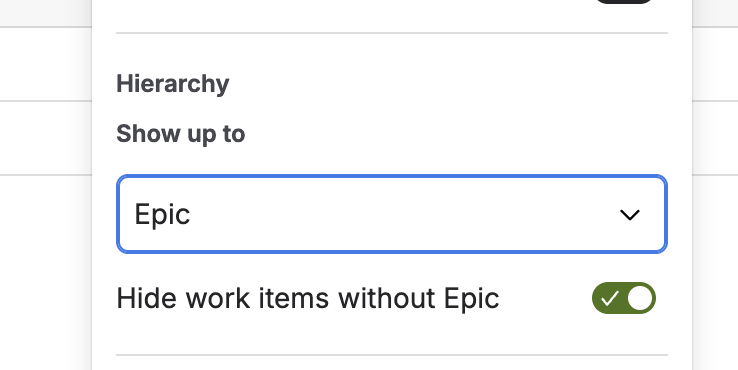
- Hide work items without Epic (standalone items) toggle: On by default, so the timeline opens clean, showing only work items that belong to an Epic, just like before. Turn it off whenever you want full visibility.
- Hierarchy level control: Choose the top level of hierarchy shown on your timeline. Defaults to Epic (or equivalent), matching the old Software Timeline experience. This control only appears when your space has levels above Epic, so it won't add noise for teams that don't need it.
- Board-level filter (for company-managed timeline): When your board-level filter is active, the timeline will respect your hierarchy settings and display work in the correct structure.
If you're still experiencing issues or the new controls don't address your specific workflow, we'd love to hear from you. Your continued feedback is what helps us prioritise what to fix next. Please keep it coming in this ticket.
Thank you again for your patience, we know this has been disruptive and we genuinely appreciate everyone who took the time to share their experience. 🙏
🟩 6 Jul 2026 — Update on the new Timeline experience: what's coming
Thank you to everyone who has shared feedback. I want to share what we're doing about it, but first, some context on why this change happened at all.
The new timeline was rebuilt from the ground up to unlock something teams have long asked for: full visibility of your work hierarchy, including subtasks.
For the first time, you can see your complete work breakdown — Epics, Stories, Tasks, and Subtasks — all in one place on the timeline. That required a fundamental architectural change, and we know that in making room for that, we disrupted some existing workflows in ways we didn't get right. We're actively fixing it in coming 2 weeks.
Our first step is to give you back control over what you see, reducing noise while keeping the full hierarchy available to those who want it.
- Hide work items without Epic (standalone items) toggle: On by default, so the timeline opens clean, showing only work items that belong to an Epic, just like before. Turn it off whenever you want full visibility.
- Hierarchy level control: Choose the top level of hierarchy shown on your timeline. Defaults to Epic (or equivalent), matching the old Software Timeline experience. This control only appears when your space has levels above Epic, so it won't add noise for teams that don't need it.
On filtering and hierarchy — here's what's coming and when:
- Board-level filter (company-managed): Hierarchy is coming back. When your board-level filter is active, the timeline will respect your hierarchy settings and display work in the correct structure. This is actively being worked on.
- View-level filter: When a view-level filter is active, the timeline will continue to show a flat list with the flyout for hierarchy context for now. Full inline hierarchy while a view filter is applied is significantly more complex — we're committed to it, but it will take longer.
Both new controls will be highlighted via an in-product spotlight when you first land on the new timeline, so you won't need to go hunting for them.
We'll share more as these ship. In the meantime, if your planning is being impacted right now — grab some time with me: https://calendar.app.google/rkCse8eDx1QyTNCL8
You can also follow and vote on the JAC ticket here: JRACLOUD-98720
🟩 1 Jul 2026: Mid-rollout Update
Hi everyone,
I want to be upfront: reading through your comments, I can see this change has hit harder than we anticipated. What you're describing isn't minor friction — for many of you, this has broken workflows you depend on for planning right now, including those with PI planning underway. I'm sorry. That's on us.
Let me address the main themes I'm seeing:
📌 Filtered hierarchy view: Epic grouping, sprint visibility, Initiative-level hierarchy, and multi-team filters
These are all rooted in the same underlying challenge: how do you maintain a meaningful hierarchy when a filter is applied? This is something we researched deeply: we tested two different solutions with real Jira users and found them nearly split on what worked best for their workflow.
Here's the honest context: we are in the middle of a significant rebuild of the timeline's foundation, one that will remove the current 5,000 work item limit and bring proper pagination, so teams with large backlogs are no longer capped. To make that possible, the inline hierarchy view had to be rebuilt from scratch alongside it. The flyout was shipped first as a way to give you hierarchy context in the interim while we complete that work. The inline levelled view, the experience many of you are describing is what we're actively building now and is our top priority to deliver.
I've raised a JAC ticket to track this. You can follow and vote here: [JRACLOUD-98720]
In the meantime, the flyout and glance panel are available and do give you a hierarchy-aware filtered view but I understand that's not the same as what you had before.
📌 Work item "noise" These items already exist in your backlog, board, and list view. The timeline is now surfacing them. If there are items that genuinely shouldn't exist, the bulk operations toolbar lets you multi-select and delete them in one go.
⏸️ The ask for an opt-out window or a more phased rollout is fair. If you'd like to opt out of the new timeline while we work through these gaps, please contact support to opt out.
I want to be clear: we are not trying to force you into a different way of working. In fact, we know from our own research that users are split on what works best, which is exactly why we're building both solutions. Your feedback here is what shapes what we prioritise and how fast we move.
If this is affecting time-sensitive planning right now, please book a time with me directly: https://calendar.app.google/rkCse8eDx1QyTNCL8


