The Atlassian Community Forums are currently in read-only mode. We will be relaunching on a new platform on September 22 (read more here). We apologize for the extended downtime. For concerns or questions, please email communitymanagers@atlassian.com. See you on the other side, on the new Atlassian Community Forums! :)
×Community resources
Community resources
Community resources
Jira Tips and Tricks Collection: Jira REST API Links

Tip Relates To
| Application Type | Jira, Jira Service Management |
| Deployment Type | Cloud, Data Center |
| Audience | End Users |
| Category | Work Items |
Tip
Visit these helpful REST API links in your browser to access raw Jira data!
- Item details: https://your-jira-site.atlassian.net/rest/api/latest/issue/issue-key?expand=names
- Filter contents: https://your-jira-site.atlassian.net/rest/api/latest/search/jql?jql=project=dev%20and%20status=done
- Board contents: https://your-jira-site.atlassian.net/rest/agile/latest/board/board-id
- User details: https://your-jira-site.atlassian.net/rest/api/latest/user?accountId=account-id
- Also: https://your-jira-site.atlassian.net/rest/api/latest/myself
- Sprint details: https://your-jira-site.atlassian.net/rest/agile/latest/sprint/sprint-id (Results pictured above.)
- Items in a sprint: https://your-jira-site.atlassian.net/rest/agile/latest/sprint/sprint-id/issue
- Velocity metrics: https://your-jira-site/rest/greenhopper/latest/rapid/charts/velocity?rapidViewId=board-id&sprintId=sprint-id
- Note: GreenHopper was the original name of the plugin that provided agile and board functionality. It was integrated with Jira in 2015. Boards were originally called Rapid Boards. E.g., “rapidViewId” in the example link means “board ID”.
Explanation
Even if you’re not developing your own custom features and building apps you can still leverage the REST APIs to access Jira data.
For example, want to know details about a specific board? Visit a board, note its ID in the URL, and use the "Board contents" query above to see board attributes like name, type, and associated space.
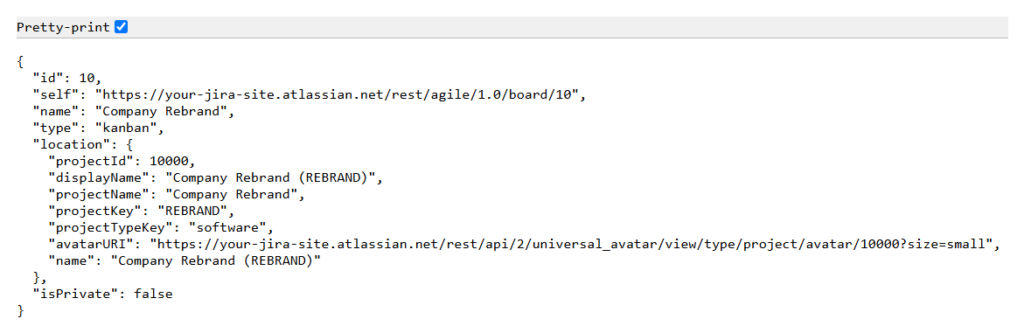
You don’t need any special programming skills to use the links above. Just make sure you’re logged in to Jira when pasting URLs in your browser’s address bar. The REST API respects all permission settings. This trick does not expose information users can’t already access in Jira.
Bonus tip: In Chrome, click the "pretty print" checkbox at the top left to improve readability. (Pictured)
See also: Using Jira REST API URLs to Access Data
Resources
- Cloud documentation – https://developer.atlassian.com/cloud/jira/platform/rest
- Data Center documentation – https://developer.atlassian.com/server/jira/platform/rest/
Was this helpful?
Thanks!

Rachel Wright
2 comments