We're moving! The community forums are migrating to a new platform on September 22. Learn more
×Community resources
Community resources
Community resources
Jira Tips and Tricks Collection: Finding Specific Automation Flows

Tip Relates To
| Application Type | Jira, Jira Service Management, Confluence, and more |
| Deployment Type | Cloud, Data Center |
| Audience | Application Administrators, Space Administrators |
| Category | Automation, Documentation |
Tip
You know there's an automation flow that does X or includes variable Y but there are hundreds of flows! How do you find the one you're looking for?
Option 1: Comb though individual steps in each flow. (Yuck!)
Option 2: Export flows in JSON format and search the code for keywords. (Better!)
Option 3: Document the relevant parts of flows so you can search for keywords later. (Best!)
Here's how I document automation rules in Confluence so I can search and understand them later.
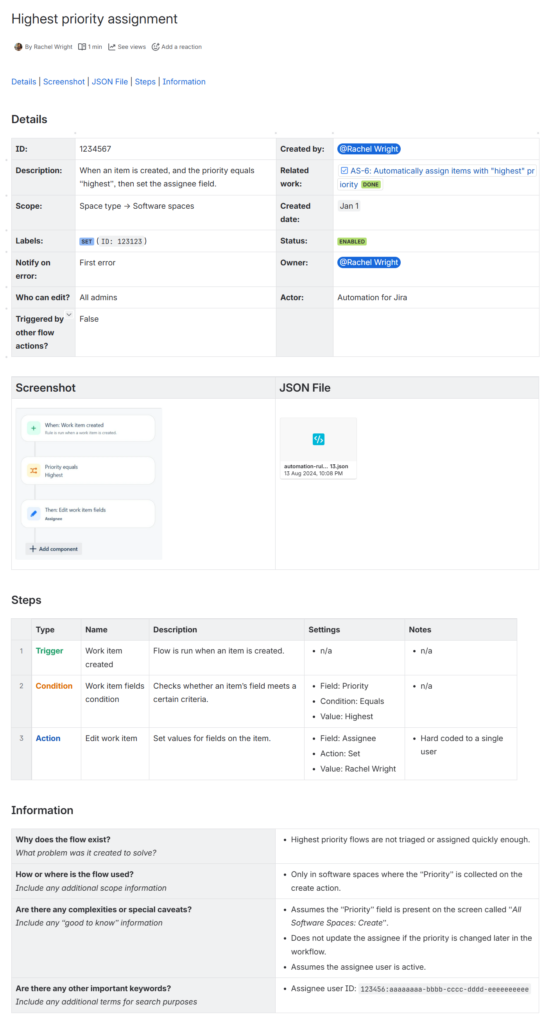
Explanation
Let's say you're looking for a flow but all you remember about it is that a user's name is hard coded in one of the steps. If you've documented your rules, you could do a simple keyword search for the phrase "hard coded" (highlighted below), the user's name (highlighted below), or the user's ID (pictured at the bottom of the previous screenshot.) The documentation page containing that information is returned in seconds and there's no need to hunt through flow settings.
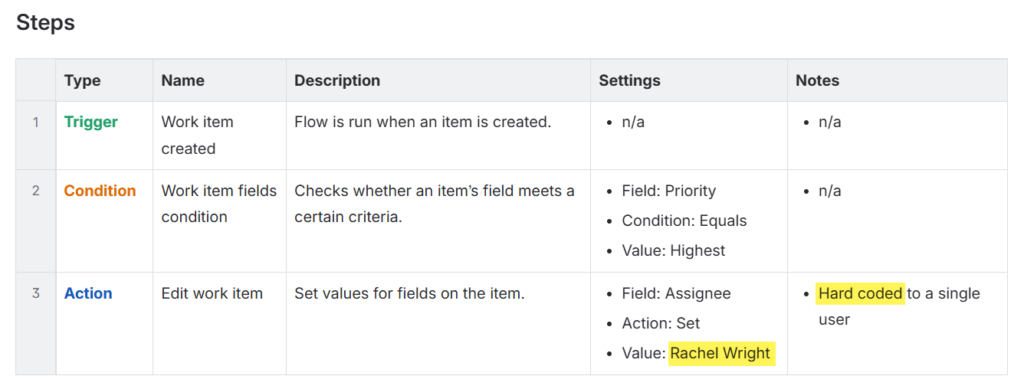
PS: It's not too late to document existing flows - so get to it!
Note: Automation flows were previously called automation rules. The individual parts of a flow, previously called components, and now called steps. Read more
Resources
- Export Jira automation flows to a JSON file – https://support.atlassian.com/cloud-automation/docs/import-and-export-jira-automation-rules
Was this helpful?
Thanks!

Rachel Wright
8 comments