The Atlassian Community Forums are currently in read-only mode. We will be relaunching on a new platform on September 22 (read more here). We apologize for the extended downtime. For concerns or questions, please email communitymanagers@atlassian.com. See you on the other side, on the new Atlassian Community Forums! :)
× Create
Turn on suggestions
Auto-suggest helps you quickly narrow down your search results by suggesting possible matches as you type.
Showing results for
Community resources
Community resources
Community resources
Set Start Date and Due Date of newly created Sub-task Ticket

Bernd W Neumann
March 20, 2025 edited
Hi!
I am creating subtasks and need to set the start date and due date with an offset to today. How can I do that with JWT?
Kind regards
Bernd
1 answer
Comments for this post are closed
Community moderators have prevented the ability to post new answers.

Pasam Venkateshwarrao
Rising Star 
Rising Star
Rising Stars are recognized for providing high-quality answers to other users. Rising Stars receive a certificate of achievement and are on the path to becoming Community Champions.
March 20, 2025 edited
Welcome to the community,
This requirement of your was a nice exercise for me! It was a bit tricky to accomplish that, but everything turns out great! You can create the following rule which I'll explain just below:
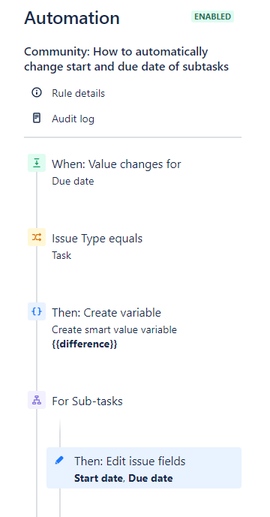
- Starting off, you create your trigger to which you select "Due date" and only for the edit operation.
- Next you should add a condition about this rule continuing only if the issue type is task (you don't want this to get triggered for Epic or subtasks)
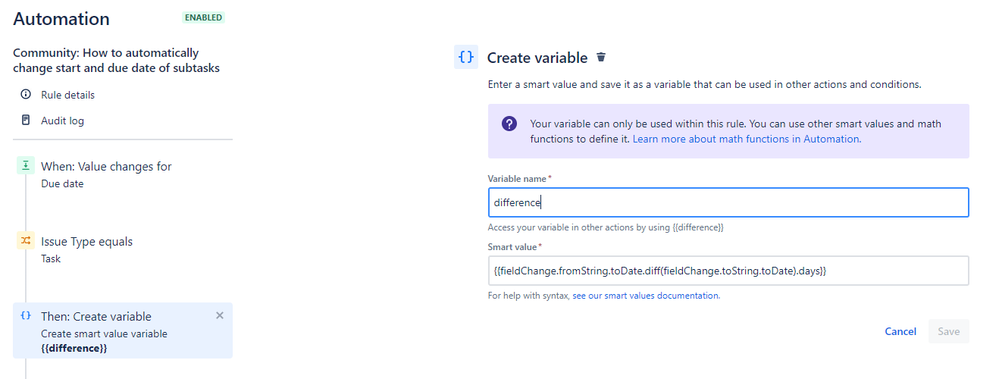
- Then you create a variable called "difference" or whatever else you choose and in that you type the below smart value, which will give you the difference number of days for the changed field.
{{fieldChange.fromString.toDate.diff(fieldChange.toString.toDate).days}}
- After that you create your branch and you choose "For Sub-tasks"
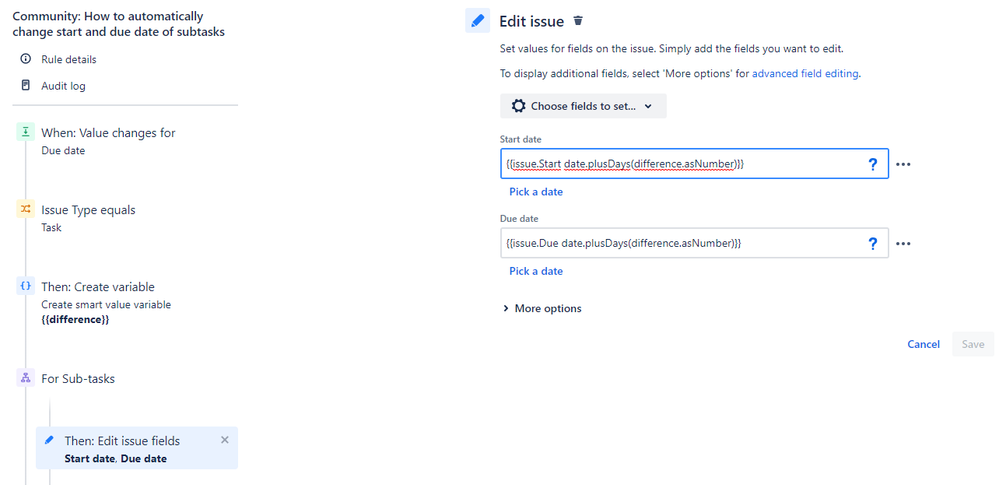
- Then you add an Edit Issue component and you select your two fields, Start and Due date
- Then you paste as a value the following:
- {{issue.Start date.plusDays(difference.asNumber)}}
- {{issue.Due date.plusDays(difference.asNumber)}}
Some things to take into account:
- If the subtasks have values but your task does not, then changing the values from the task, will erase the values from your subtask. So be careful with that
- Take a look at that @Tessa Tuteleers wrote about the business days. Increasing or decreasing days without taking into account weekends, can result in having a Start or Due date falling into a weekend. To avoid that try on the Edit Issue component to replace plusDays with plusBusinessDays
Hope this helps

Was this helpful?
Thanks!
DEPLOYMENT TYPE
SERVERVERSION
9.12.15Community showcase
Atlassian Community Events
Copyright © 2026 Atlassian
You must be a registered user to add a comment. If you've already registered, sign in. Otherwise, register and sign in.