The Atlassian Community Forums are currently in read-only mode. We will be relaunching on a new platform on September 22 (read more here). We apologize for the extended downtime. For concerns or questions, please email communitymanagers@atlassian.com. See you on the other side, on the new Atlassian Community Forums! :)
×Community resources
Community resources
Community resources
I’m very new to jira. How do I add a checklist to a jira tickets along w/ indicating the status?

3 answers
Comments for this post are closed
Community moderators have prevented the ability to post new answers.

Hi @Kevin miller!
It's worth knowing that Jira does have a native checklist option now, called Action Items. You can add them inside the description of any ticket. Each item has a checkbox you can tick off as work gets done. For simple to-do lists, this can be enough. We have a full walkthrough here if you want to see how it works: Jira Action Items.
That said, Action Items are pretty basic. They're just plain text lines with a checkbox. There's no way to set a status on each item beyond "checked" or "unchecked". So if you need to actually see the current status of every item on your list, like you mentioned, you'll want something more structured.
For that, our solution Smart Checklist for Jira is a good fit. It adds a feature-rich checklist right inside the Jira ticket. Each item has its own status - the defaults are To Do, In Progress, Skipped, and Done. You can also set up custom statuses if your team needs them.
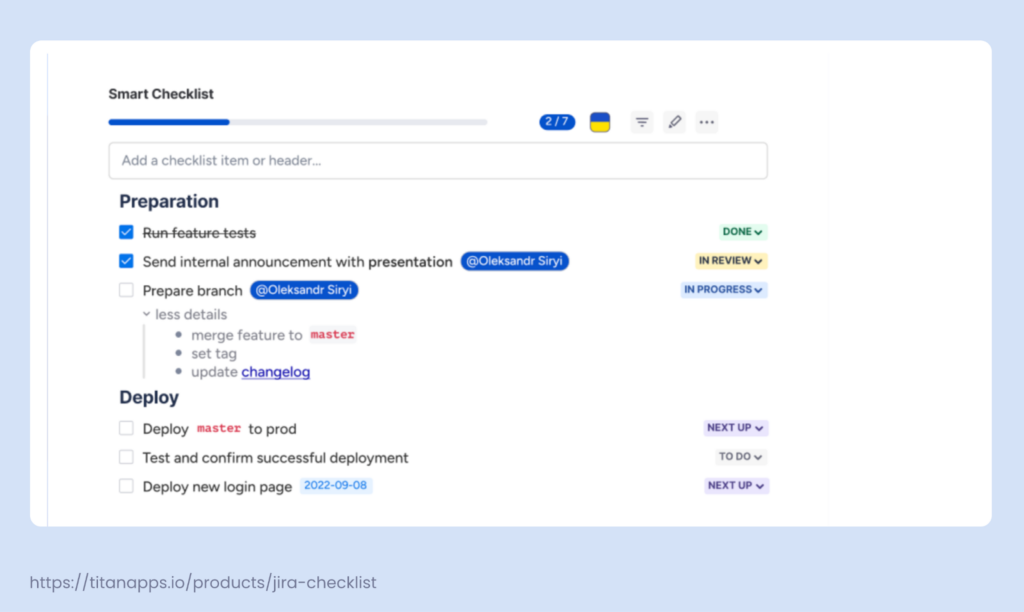
A few things that might be useful:
- Each item shows its current status at a glance
- Overall progress appears as a percentage on the ticket card, so you can see how far along things are without opening the ticket
- The checklist lives inside the ticket itself, so nothing gets scattered across sub-tasks
There's a free version on the Atlassian Marketplace that supports up to 20 items per ticket. Enough to get a feel for how it works.
One small tip, since you mentioned you don't have Jira to practice on: Atlassian offers a free Jira Cloud plan for up to 10 users. You can set it up in a few minutes and try both Action Items and Smart Checklist inside it. A great way to get some hands-on experience before your interview.
Good luck with the job!

I work for Elements, which makes a Checklist app.
If you want to see some examples of a checklist app in action, this blog post about Elements Checklist could be helpful: https://blog.valiantys.com/en/apps/four-ways-to-boost-productivity-with-smart-checklists-in-jira-issues/
You must be a registered user to add a comment. If you've already registered, sign in. Otherwise, register and sign in.


Jira doesn't have a checklist out of the box. You could set up 'Sub Tasks' to do this. I'd recommend keeping the workflow/fields for a sub-task dead simple so it operates like a checklist.
Alternatively you could also buy a Checklist 'app' from the marketplace.
You must be a registered user to add a comment. If you've already registered, sign in. Otherwise, register and sign in.
Steven:
I don't mean to be difficult. May I get more specifics on Sub Tasks? Is there a knowledge base article? To be honest, I"m applying for a job that uses JIRA. I'm in a stage where they have us research many questions where just one is about JIRA. I have no way to use the software to learn how to do it hands on. If you could be so kind as to give as much info as possible I would be very grateful! This would be a great help to me and the family. Thank you Steven
You must be a registered user to add a comment. If you've already registered, sign in. Otherwise, register and sign in.
Okay, well, I can give you pointers but I probably won't just spell the answer out for you. Foremost it's quite important, is this referring to Jira Cloud or the Jira Server/Data Center on-premise package? They are quite different so it's important to be specific.
Documentation:
- Cloud: https://confluence.atlassian.com/adminjiracloud/configuring-sub-tasks-818578898.html
- Server/Data Center: https://confluence.atlassian.com/adminjiraserver/configuring-sub-tasks-938847874.html
Regardless, in both cases there is the concept of 'Screens' and 'Workflows' though they're quite different now between Cloud and Server/Data Center.
- In both cases you'll want to keep them quite simple. Ideally you can have a Sub-Task 'Screen' or set of fields that are like "Summary, Description" and nothing else.
- Additionally, you'd want to keep the workflow simple since it doesn't really need to do much. Just having a 'Open' -> 'Closed' workflow should be sufficient.
You must be a registered user to add a comment. If you've already registered, sign in. Otherwise, register and sign in.
Comments for this post are closed
Community moderators have prevented the ability to post new answers.

You must be a registered user to add a comment. If you've already registered, sign in. Otherwise, register and sign in.