The Atlassian Community Forums are currently in read-only mode. We will be relaunching on a new platform on September 22 (read more here). We apologize for the extended downtime. For concerns or questions, please email communitymanagers@atlassian.com. See you on the other side, on the new Atlassian Community Forums! :)
×Community resources
Community resources
Community resources
How to roll up dates not-consecutive?

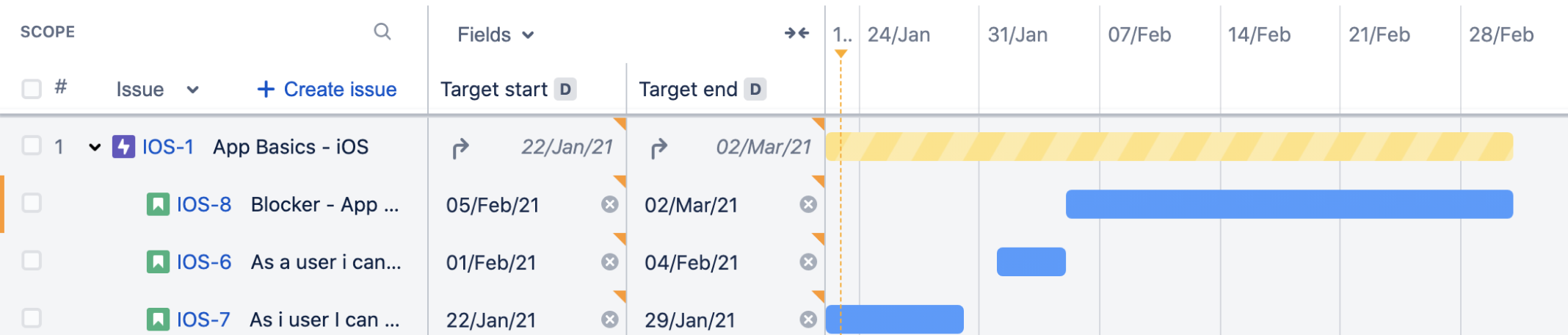
How can I roll up dates such that the parent issue shows the rolled up dates not as a consecutive date (i.e. min of all start dates through max of all end dates)?
Here is an example of the current view (example taken from here: https://support.atlassian.com/jira-software-cloud/docs/how-advanced-roadmaps-rolls-up-dates). I would like there to be a roll up date shown for Jan 22 - Jan 29, then a space until Feb 1, after which there will be a consecutive date from Feb1 through Mar 21 because there is no break in time for iOS-8 and iOS-6.
How do I do this?
1 answer
Comments for this post are closed
Community moderators have prevented the ability to post new answers.

Hello @Rachel Stein
Welcome to the Atlassian community.
That is not a feature available natively in the Jira timeline views. The timeline is intended to show the span of time from the date work started until the final date when all work was completed.
In this post one vendor suggested alternative ways to illustrate the breaks, and another suggested use of their app to achieve that goal.

You must be a registered user to add a comment. If you've already registered, sign in. Otherwise, register and sign in.