The Atlassian Community Forums are currently in read-only mode. We will be relaunching on a new platform on September 22 (read more here). We apologize for the extended downtime. For concerns or questions, please email communitymanagers@atlassian.com. See you on the other side, on the new Atlassian Community Forums! :)
× Create
Turn on suggestions
Auto-suggest helps you quickly narrow down your search results by suggesting possible matches as you type.
Showing results for
Community resources
Community resources
Community resources
How to rest issue key after deleting all issues in backlog

Abdul Wahab
I'm New Here 
I'm New Here
Those new to the Atlassian Community have posted less than three times. Give them a warm welcome!
April 3, 2025 edited
Hello All,
I would like to know if there is any way to reset the issue key after deleting issues from the backlog. Thanks in advance for the support
2 answers
Comments for this post are closed
Community moderators have prevented the ability to post new answers.

Hi Abdul,
If this is not a service project (but a software or business project), you could try the following:
- Go to project settings > Details of your project
- Change the project key of the existing project to something temporary (in the project where you deleted all the issues)
- For instance, if the key was 'BUGS', change it to 'BUGSTEMP'
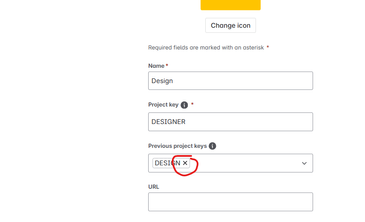
- Still in Project Settings > Details, you can now remove the 'previous project keys' to make your favorite project key available again. See the screenshot below - don't forget to hit 'Save' at the bottom.
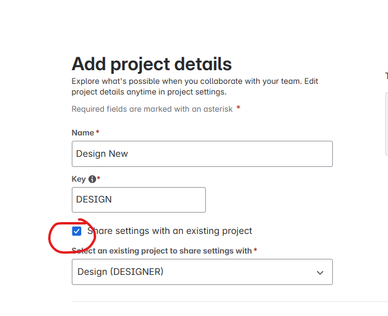
- Then, create a new project, use the old/desired project key and select 'Share settings with an existing project', and then select the project where you deleted the issues from
- Then, validate if all the desired configuration is in place in the new project (you might have to re-set configuration like components, project roles, etcetera.
- Now you'll have a project where the issue key starts at 1 again!

Vishal Biyani
Rising Star 
Rising Star
Rising Stars are recognized for providing high-quality answers to other users. Rising Stars receive a certificate of achievement and are on the path to becoming Community Champions.
April 3, 2025 edited
In JIRA Cloud this is not possible.
You must be a registered user to add a comment. If you've already registered, sign in. Otherwise, register and sign in.

Was this helpful?
Thanks!
DEPLOYMENT TYPE
CLOUDPRODUCT PLAN
FREEPERMISSIONS LEVEL
Product AdminTAGS
Community showcase
Atlassian Community Events
Copyright © 2026 Atlassian
You must be a registered user to add a comment. If you've already registered, sign in. Otherwise, register and sign in.