The Atlassian Community Forums are currently in read-only mode. We will be relaunching on a new platform on September 22 (read more here). We apologize for the extended downtime. For concerns or questions, please email communitymanagers@atlassian.com. See you on the other side, on the new Atlassian Community Forums! :)
× Create
Turn on suggestions
Auto-suggest helps you quickly narrow down your search results by suggesting possible matches as you type.
Showing results for
Community resources
Community resources
Community resources
How to change System Dashbord to private on Jira Cloud?

Right now, on Jira Cloud, the System Dashboard is configured as Public. How to change to Private or to logged-in users only?
1 answer
Comments for this post are closed
Community moderators have prevented the ability to post new answers.

Hi @Ricardo Cardoso D_ Oliveira , I was curious about this, so I tried it out in my Jira Cloud instance and learned the following:
- If you visit https://<your-jira-name>.atlassian.net/secure/Dashboard.jspa?selectPageId=10000, and aren't logged in, all you see is the "Introduction" gadget. Any issue data, that's normally displayed to a logged in user, should be hidden.
- Note: 10000 is the ID of the default system dashboard. Change the ID in the URL to test other dashboards.
- If you've entered custom copy in the "Introduction" area, it will show to both logged in and non-logged in users. So, be careful with the information you're displaying!
- To modify the copy in the "Introduction" area, navigate to Jira Settings > System > General configuration". Then click the "Edit Settings" button at the top.
- If you remove ALL the custom copy in the "Introduction" area, you'll instead see generic default copy. It reads: "Welcome to Internal Jira New to Jira? Check out the Jira User's Guide."
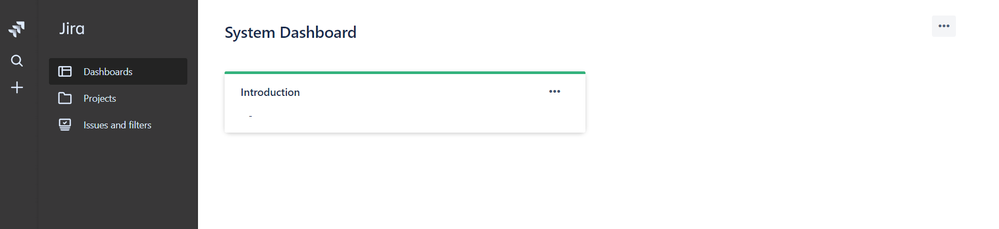
- If you enter a single character in the "Introduction" area (a space doesn't work) you effectively get an empty gadget labeled "Introduction". See screenshot.
In Jira Server, you could use proxy tools to redirect non-authenticated traffic somewhere else. I don't know of a way to hide or redirect this page in Jira Cloud however.
Hope this helps a little!
Rachel Wright

Was this helpful?
Thanks!
TAGS
Community showcase
Atlassian Community Events
Copyright © 2026 Atlassian
You must be a registered user to add a comment. If you've already registered, sign in. Otherwise, register and sign in.