We're moving! The community forums are migrating to a new platform on September 22. Learn more
×Community resources
Community resources
Community resources
How to Sync the Status of Linked Issues Regardless of Their Current Status?


Hi everyone,
I’m trying to find out whether Jira Automation allows creating a rule that synchronizes the status of linked issues, regardless of the current status those issues are in.
In other words:
If Issue A transitions to a new status, I want all linked issues (e.g., “relates to,” “is blocked by,” “blocks,” etc.) to automatically transition to that same status — even if their current workflow status normally wouldn’t allow this transition.
Is there a way to configure such a rule, or a workaround that allows syncing statuses across linked issues independently of their existing status conditions?
Any guidance or best practices would be greatly appreciated.
Thanks in advance!
2 answers

Hi @AnCha Hesse
Jira Automation can react to Issue A’s transition and try to transition linked issues, but only if that transition exists in their current workflow.
It cannot bypass workflow rules or force a status change when the linked issue doesn’t offer that transition.
As an alternative to Jira Automation, I can suggest trying our app Elements Copy & Sync which allows you to synchronize statuses between linked issues.
How to configure the app
1. Install the app and create a new recipe
-
Click on Create a new recipe and select Synchronize linked work items
- Define your Source and target projects
2. Enable Status synchronization
-
In the Workflows tab, choose the Source workflow of the issue that will be copied by the recipe.
Define the target workflow that should be synced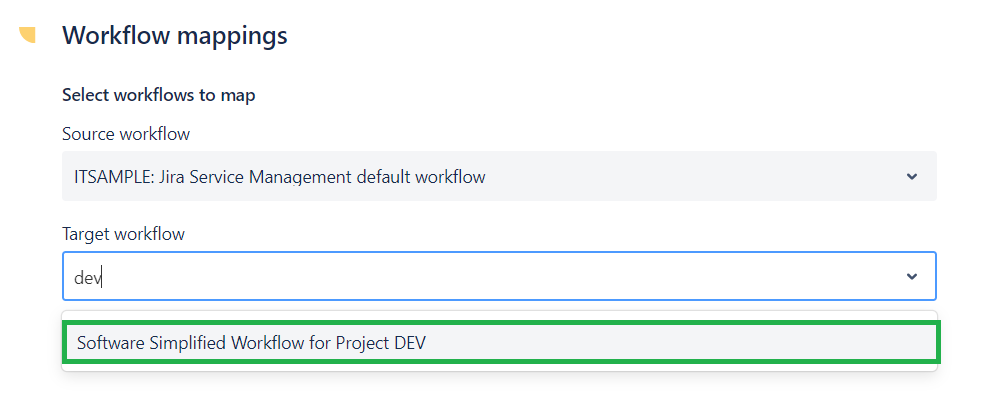 3. Define the status mapping
For example:
-
When the source issue moves to In Progress → linked issue moves to In Progress
-
When the source issue moves to Done → linked issue moves to Done

4.Choose the sync direction
-
One-way
-
Or bidirectional
5. Save your configuration
The app will now transition linked issues automatically each time the source issue changes status.
Let me know if you have any question!

Hi and welcome to the community!
Short answer: No, not possible since the workflow defines from which to which status transitions are possible. Otherwise there would not be any purpose in a workflows.
Longer answer :-):
Yes, but it would indeed be a workaround. Assuming that you know exactly which work items and work types you are linking to, you could change the workflow of those linked work items to include "Any" transitions on all desired statuses.
To prevent users from performing those transitions you could put a condition on them that blocks all users (this way the transition is only possible from API or automation).
Hope this helps!
You must be a registered user to add a comment. If you've already registered, sign in. Otherwise, register and sign in.

You must be a registered user to add a comment. If you've already registered, sign in. Otherwise, register and sign in.