The Atlassian Community Forums are currently in read-only mode. We will be relaunching on a new platform on September 22 (read more here). We apologize for the extended downtime. For concerns or questions, please email communitymanagers@atlassian.com. See you on the other side, on the new Atlassian Community Forums! :)
×Community resources
Community resources
Community resources
How do you prepare change management evidence from Jira for auditors (ISO 27001 / SOC 2 / DORA)?


When our auditors ask for change management evidence (e.g. "show me the full history for these 20 changes from the audit period"), we end up manually collecting screenshots and CSV exports from Jira — ticket history, status transitions, approvals, who did what and when. It takes days and feels error-prone.
How does your team handle this? Do you have a process, a template, an app, or something built in-house? And if you could push a button and get an auditor-ready evidence pack per release or per audit sample, what would it absolutely need to contain to be accepted by your auditors?
8 answers
1 accepted
Comments for this post are closed
Community moderators have prevented the ability to post new answers.


Hi @Nicoleta Mircea ,
We've had similar requests from our auditors.
One report we've used quite a bit is Time in Status. It gives a nice timeline of how the change moved through the workflow and how long it spent in each status, which has been useful during audits.
https://marketplace.atlassian.com/apps/1222051/status-time-reports-free-time-in-status
We don't have a single button that generates an "audit package," unfortunately. It's usually a combination of a few reports, but that's been enough for our ISO audits.
I'm curious to see what others are using as well, especially if anyone has found a good app or built something that automates the whole process.
Thank you very much for your quick response @Gor Greyan , I'll look into Time in Status for now.
You must be a registered user to add a comment. If you've already registered, sign in. Otherwise, register and sign in.
Hey @Nicoleta Mircea
Happy to help!
You must be a registered user to add a comment. If you've already registered, sign in. Otherwise, register and sign in.

Hi @Nicoleta Mircea ,
If you are open to using apps available on Atlassian Marketplace, I recommend trying Issue History for Jira (Work Item History) from the SaaSJet team.
This app is used by many companies in highly regulated industries that need to prepare for internal or external audits such as ISO 27001, SOC 2, and HIPAA.
It lets you generate reports with the complete Jira work item history using flexible filters in minutes, including:
- Status transitions with exact timestamps
- Field changes (before/after values)
- User activity (who changed what and when)
- Comments and edit history
- Assignee, priority, sprint, and other workflow changes
- Deleted work items
You can easily export the reports to Excel or CSV, or access the data via the API.

Using the app, you can save hours per month needed for passing the audits.
Also, I think that this article may be interesting for you: How to Generate Jira History Reports for Audit, Security and Compliance
You must be a registered user to add a comment. If you've already registered, sign in. Otherwise, register and sign in.

Hi @Nicoleta Mircea,
The tools mentioned above cover the extraction side well (issue history, time-in-status, exports). Let me take your second question instead, since I think it's the harder and more important one: what a pack needs to be accepted, not just complete.
In my experience the packs that sail through aren't the ones with the most detail per change — they're the ones that prove the control operated across the whole population, consistently. That usually means:
A reproducible sample definition — the exact JQL that defines both the population and your sample, saved and re-runnable, so the auditor can see the 20 changes weren't hand-picked. e.g. project = ABC AND status changed during ("2026/01/01","2026/03/31").
Per-change trail — status transitions with timestamps and the actor, the approval, field before/after, and (for DORA especially) the link from the change to the actual deployment/PR.
Sequencing, not just presence — proof the approval happened before implementation, and that approver ≠ implementer where segregation of duties applies. Auditors check order, not just that the fields exist.
Integrity — data exported from the system of record, not screenshots, which auditors trust less because they can be edited.
A one-line control mapping — each artifact tied to the control it satisfies, so the auditor doesn't have to infer it.
The piece that's easy to miss: the exceptions matter as much as the clean changes. The fastest-accepted packs I've seen also show you looked for the changes that skipped a step and can account for them — e.g. items that reached Done without ever passing through an approval status. That's a second saved filter, roughly project = ABC AND resolved during ("2026/01/01","2026/03/31") AND NOT (status WAS "Approved") (swap in your real status names). Running that before the audit turns "days of screenshots" into a short, defensible story — and it's usually what makes auditors trust the rest of the pack.
I'm on the marketing side at Everview (execution intelligence over Jira + GitHub). I'm deliberately not pitching it — audit-evidence packaging isn't what it's for — but "what deviated from the expected path" is the lens we look at Jira data through, so I wanted to share that rather than another app link.
Hope it's useful, and good luck with the audit.
You must be a registered user to add a comment. If you've already registered, sign in. Otherwise, register and sign in.

Hi @Nicoleta Mircea ,
In my experience, preparing change management evidence is usually about two different types of change, and both are important during audits.
1. Configuration change evidence
This answers questions like:
- What was changed in the Jira configuration?
- What was the impact of the change?
- Where is this configuration used?
- Is it safe to modify or remove?
For this, understanding the relationships within your Jira configuration is essential. At Simitech we developed:
- Fields Usage for Jira – helps understand where custom fields are used across projects, screens, screen schemes, issue type screen schemes and workflows.
- Roles Usage for Jira – provides visibility into project role assignments across projects, users and groups.
- Versions Usage for Jira – helps analyse version usage across projects and issues.
These apps are also available together as Config Insights for Jira, giving administrators a comprehensive view of Jira configuration usage, which can be extremely valuable when preparing evidence for configuration governance, change reviews and compliance audits.
2. Work item (issue) and Assets change evidence
This is the evidence auditors most commonly request:
- Who changed what?
- When was it changed?
- How did the work item progress through the workflow?
- How long did approvals or implementation take?
- What discussions or approvals were recorded?
For this we provide:
- Assets History & Snapshots Reporter for Jira – provides complete Assets (CMDB) history, point-in-time asset snapshots, snapshot comparison and CSV export, making it easy to demonstrate how assets and their attributes changed over time for audit, compliance and change management purposes.
- Issue History & Snapshots Reporter for Jira – complete issue history, point-in-time issue snapshots, snapshot comparison and CSV export.
- Time in Status Reporter for Jira – workflow progression, time spent in each status, cycle time, lead time and transition reporting.
- Advanced Comment Search for Jira – search and export comments across Jira, which is particularly useful when approvals, implementation notes or review discussions are captured in comments.
These apps are also bundled as Issue Insights for Jira.
From my experience, there isn't a single report that satisfies every ISO 27001, SOC 2 or DORA audit. Different auditors ask different questions. What has worked well is having tools that allow you to quickly produce the specific evidence requested, whether that's configuration governance, complete issue history, workflow progression, point-in-time issue state, or discussions captured in comments, instead of spending days manually collecting screenshots and exports.
Disclosure: I'm part of the Simitech Ltd. team that develops and publishes these Marketplace apps.
Regards,
Petru Simion
Simitech Ltd.
You must be a registered user to add a comment. If you've already registered, sign in. Otherwise, register and sign in.

Hi @Nicoleta Mircea,
I'd build on @Melika-Everview's answer, because she named the thing that actually gets an evidence pack accepted (the bundle you hand an auditor to prove a control worked): auditors care less about the volume of history and more about sequencing and integrity. Did the approval happen before implementation, was the approver different from the implementer, and is the evidence verifiably unaltered rather than an editable export?
That lens exposes a gap most extraction tools don't fully close. Time-in-status, issue history, and CSV exporters are great at reconstructing the trail after the fact, but the raw material they reconstruct from is often the weak link: approvals that only ever lived in a comment ("approved, go ahead"), an email, or a screenshot. You can export those, but auditors trust them less because they're editable, and you can't prove ordering from a free-text comment.
The more defensible approach is to capture the approval as a structured, verifiable record at decision time, rather than reconstructing it later:
- The decision (approve/return), who made it, and the exact timestamp, stored as structured data, not a comment.
- Segregation of duties enforced at the point of decision (the approver is not the assignee or reporter), so the pack proves it instead of you demonstrating it afterward.
- Decision integrity through locking (a configurable setting): once an issue moves beyond the status where an approval was recorded, that approval is locked, so it can't be quietly changed or withdrawn after the fact. The decision is preserved exactly as it stood at that point in the workflow.
- Deliberate re-review when scope changes: workflow automation can reset approvals on chosen transitions, and because Jira can't detect a code or scope change on its own, the requester/assignee resets approvals deliberately when re-approval is needed. That makes the re-approval an explicit, logged event rather than an assumption.
- A tamper-evident trail: each event is SHA-256 hashed and chained to the previous one (a hash chain plus sequence numbers), with a verification step that detects and pinpoints any altered or missing record. So the evidence isn't just "exported from the system of record," it's provably unmodified.
Full disclosure: this gap is exactly what I built for. I publish Business Sign-off & Approval for Jira on the Atlassian Marketplace (built on Forge), which captures approvals this way. But even if you never look at an app, the principle holds: move the approval out of comments and screenshots and into structured, verifiable records, and the "days of screenshots" problem largely disappears at the source rather than at export time.
Happy to go deeper on the hash-chain verification or the decision-locking and reset mechanics if useful.
Regards,
Jim
(Cahaba Forge)
You must be a registered user to add a comment. If you've already registered, sign in. Otherwise, register and sign in.
This is a great addition, Jim — you've named the part I glossed over. My angle was about proving the control operated across the whole population; yours is about making each individual record defensible in the first place, and both have to be true for a pack to hold up. The point about ordering being unprovable from a free-text comment is the one I'd underline for anyone reading: "approved, go ahead" in a comment field looks like evidence right up until an auditor asks you to prove it wasn't edited after the fact.
The re-review-on-scope-change point is also easy to underestimate in practice that's where a lot of otherwise-clean packs fall down, because the approval was real but stale by the time the code shipped.
Good thread all around, Nicoleta picked a genuinely hard question :D
You must be a registered user to add a comment. If you've already registered, sign in. Otherwise, register and sign in.

Hi @Nicoleta Mircea
Native Jira keeps the raw material (each issue's History tab, status transitions, and who changed what), and you can pin down the audit sample reproducibly with a saved JQL filter, for example `project = ABC AND status changed during ("2026/01/01", "2026/03/31")`. What it won't do is package that into a clean, repeatable evidence pack, so the per-issue History plus CSV export is exactly the manual, days-long process you described.
For an auditor-ready pack, the pieces that tend to matter are: the sample scoped by a saved filter, status transitions with timestamps and the actor, approvals, field before/after values, and everything exportable so it can be attached to the audit. Having that as a saved, re-runnable view is what turns "days of screenshots" into a button.
If you're open to a Marketplace app, JXL for Jira can cover a good part of that. You build a sheet scoped to the audit sample, add columns for status, assignee, and approvers, plus history-based columns like Time in status, Number of status changes, and Date of status change, then export the whole thing to Excel or CSV in one go.
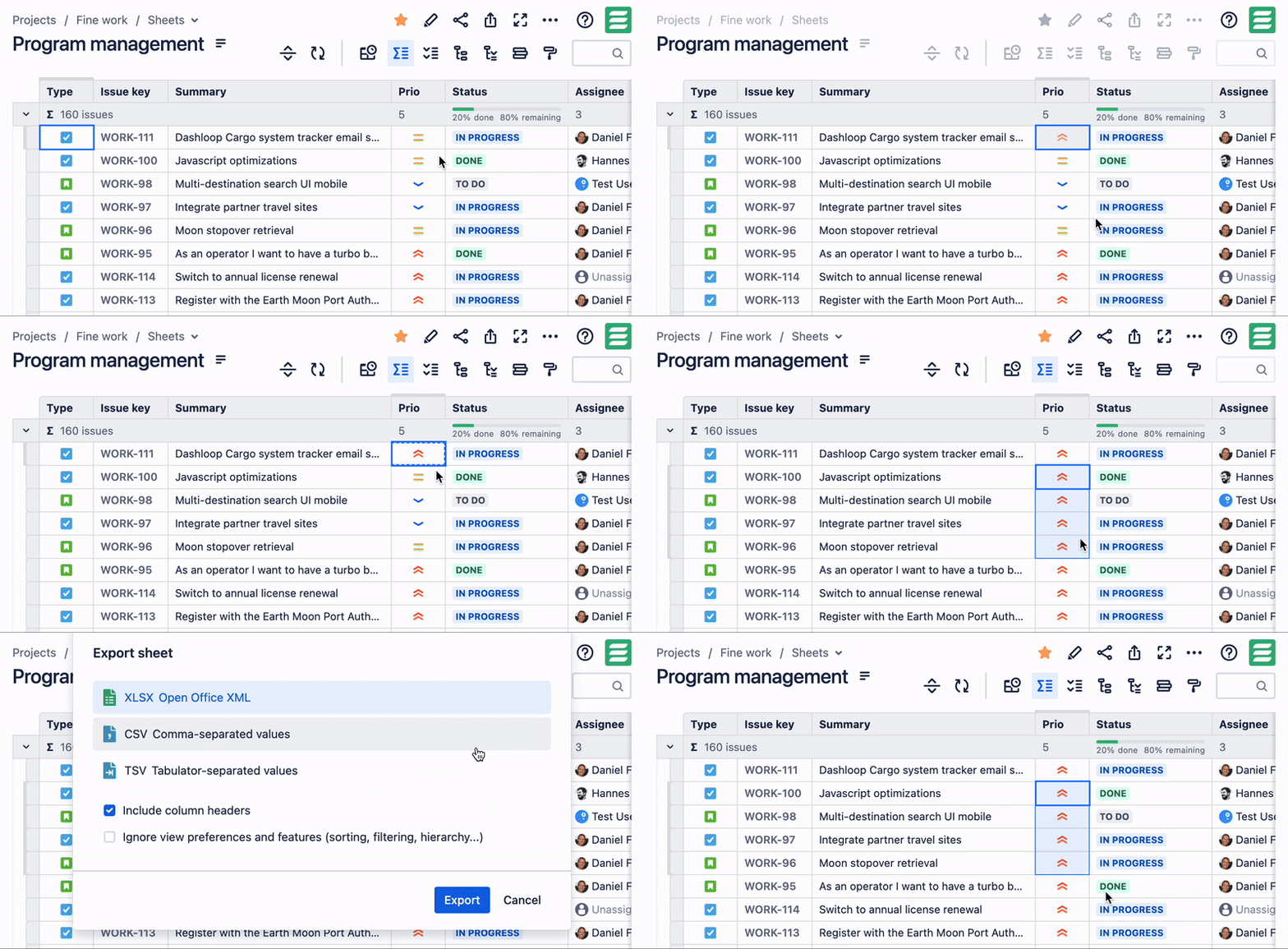
Disclosure: I'm part of the team behind JXL.
Best regards,
Danylo
You must be a registered user to add a comment. If you've already registered, sign in. Otherwise, register and sign in.

Hi @Nicoleta Mircea !
Pulling audit evidence together by hand is indeed painful, and you're right that it eats up days. Auditors usually want to see that each change followed a consistent, documented process.
Native Jira keeps the history and transitions, but it won't package them into a clean evidence pack. One practical option is our solution, Smart Checklist for Jira. You can attach a standard compliance checklist to every change, so each ticket shows the same required steps. Think approvals, testing sign-off, rollback plan, and reviewer feedback.
Smart Checklist also has a dedicated Smart Checklist History tab inside the issue's Activity section (it’s separate from Jira’s native work item History). It logs every checklist event with a timestamp and the user who made the change. You can see who added or removed items, changed item statuses, applied a template, and more. That gives you a repeatable, per-issue audit trail instead of ad-hoc exports.
Here's what this can look like on a change ticket:

You can also make key steps mandatory, so the work item can't move forward until approvals are done. That consistency is usually what auditors care about most.
I hope this helps!
You must be a registered user to add a comment. If you've already registered, sign in. Otherwise, register and sign in.

Hi @Nicoleta Mircea ,
I hope you're doing well.
Many of our customers generate these reports at the release level rather than the individual work item level. This provides a complete audit trail of the release, including workflow stages, approvals, timestamps, and the time spent in each status.
We follow the same approach for our own internal reporting, having maintained SOC 2 compliance for the past two years.
If you use Jira Releases (Fix Versions) to group work items and manage your deliveries, our Release Management app can help. It provides cross-project release management and the release-level reporting required for audit, compliance, and governance purposes.

Please let me know if you'd like to see how this works in practice.
Cheers,
Yuri
You must be a registered user to add a comment. If you've already registered, sign in. Otherwise, register and sign in.
Comments for this post are closed
Community moderators have prevented the ability to post new answers.

You must be a registered user to add a comment. If you've already registered, sign in. Otherwise, register and sign in.