Hello everyone,
My name is Atul Setlur, Group Product Manager for Atlassian Cloud. I'm excited to announce that Multiple Sandboxes, which allows for the creation of multiple sandboxes per production site, will transition from an open beta to General Availability today! The ability to create multiple sandboxes per production site is available to Atlassian apps on a Premium* or Enterprise plan. With Multiple Sandboxes, you can now accelerate safe change management with isolated sandboxes linked to one site. Whether you’re testing new configurations and features or onboarding new apps, you can do it with confidence.
With the general availability of Multiple Sandboxes, we will also be introducing two additional changes that impact Premium and Enterprise plans
-
Atlassian apps on an Enterprise plans will include five complimentary sandboxes that can be allocated across any site associated with the plan. (Atlassian apps on a Premium plan will continue to include only one complimentary sandbox.)
-
Additional sandboxes can be purchased for annually-billed Atlassian apps on Premium and Enterprise plans for $10,000 per sandbox, per year.
*Atlassian apps on a Premium plan can get access to multiple sandboxes per production site by purchasing additional sandboxes (more-below).
Multiple Sandboxes, Sandbox Limits, and Marketplace Apps
Reminder: Sandboxes are available for Jira, Confluence, Jira Service Management, and Jira Product Discovery. By default, our Platform Apps are included in sandboxes. Rovo can be added or removed from your sandbox at any time, based on your preferences.
Benefits of Multiple Sandboxes
Multiple Sandboxes enables organizations to scale and optimize their change management processes by running tests and staging changes against their app's production sites in parallel. Organizations can now implement either industry-standard Dev -> Test -> Prod pipelines or parallel change processes, reducing risk and eliminating development bottlenecks.
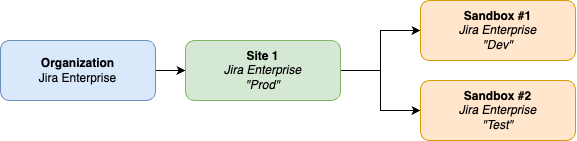
Org Admins can flexibly allocate sandboxes to any eligible site and purchase additional ones as their organization’s needs evolve, all managed from the Atlassian Administration Sandbox tab.
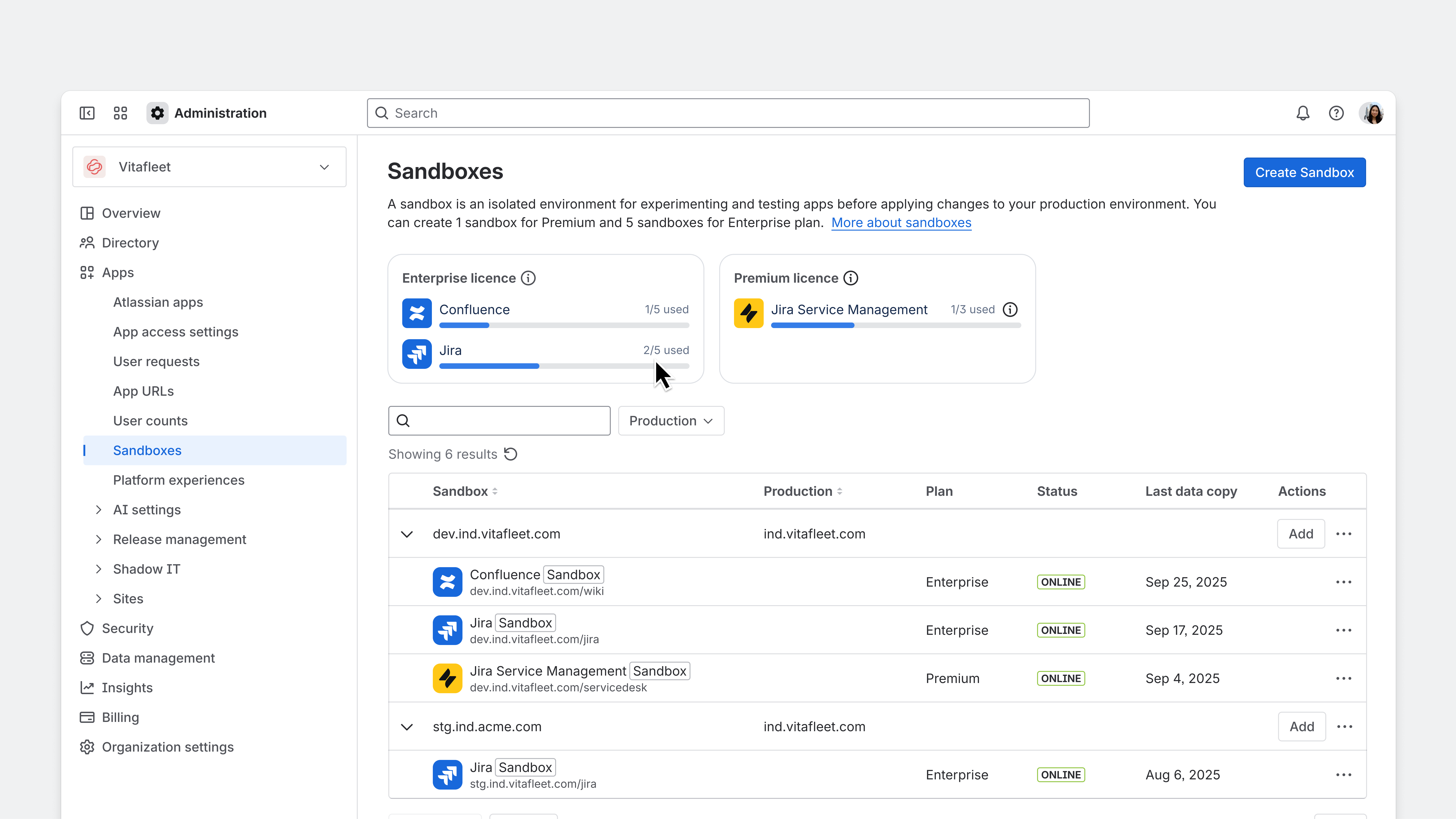
For more details about Sandboxes please see our support documentation.
Sandbox Limits
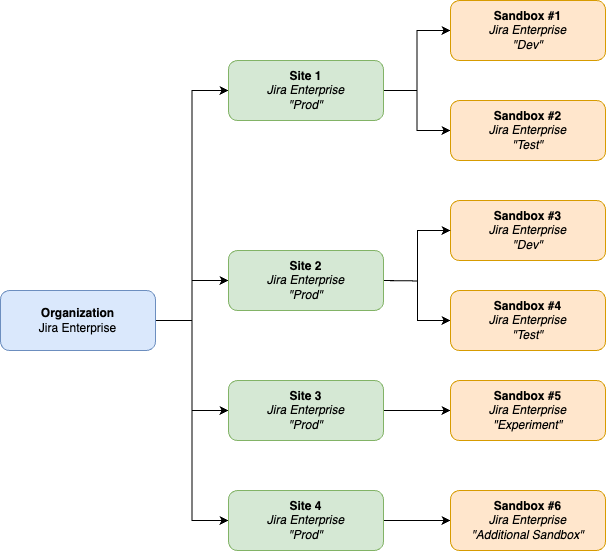
With the general availability of Multiple Sandboxes, Atlassian apps on Enterprise plans will include five complimentary sandboxes. These sandboxes can be assigned to any site(s) within an organization. For example, suppose a customer has a Jira Enterprise license and has four sites, with two sandboxes allocated to Site 1, two sandboxes allocated to Site 2, and one sandbox allocated to Site 3. In this scenario the sixth sandbox cannot be assigned to Site 4 as only five sandboxes can be active concurrently.
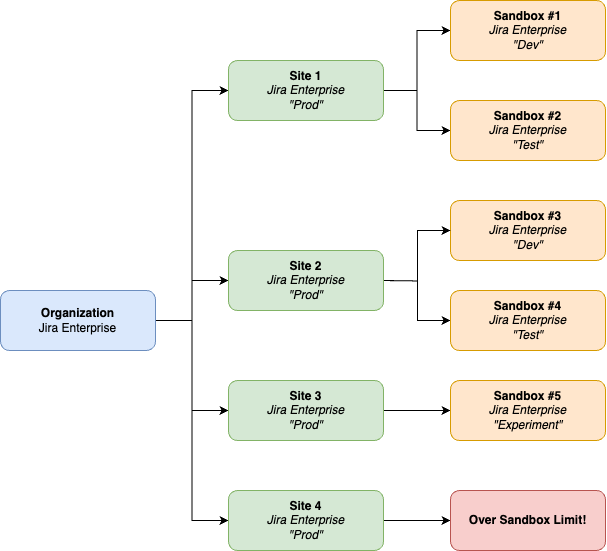
In the above scenario, Org Admins can do one of two things:
-
If you don't need all sandboxes running at the same time, you can delete a sandbox from one site and reassign that allocation to Site 4, i.e.,
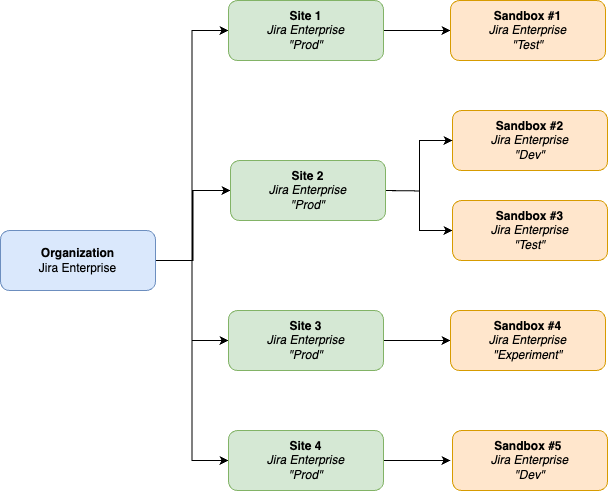
- If your organization needs 6 concurrent sandboxes, you can purchase an additional sandbox to expand your sandbox pool, i.e.,
How does Multiple Sandboxes work with apps purchased from the Atlassian Marketplace?
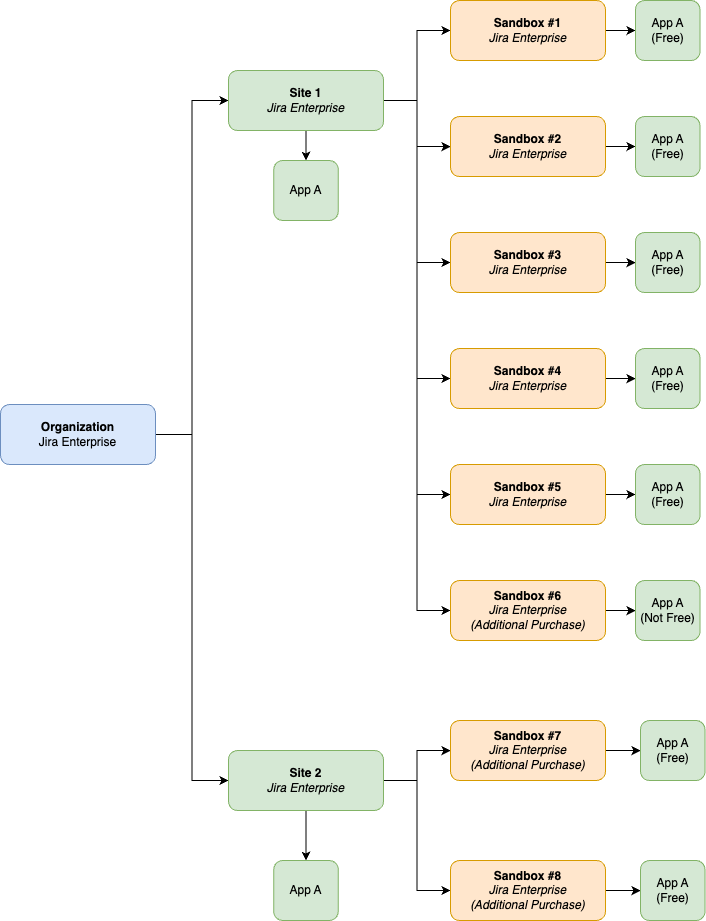
Each site with a Marketplace app can install that Marketplace app on up to five sandboxes associated with that site. If you need the Marketplace app on additional sandboxes beyond this limit, you'll need to purchase additional licenses.
Let's say a customer has two Jira Enterprise sites. Their Enterprise license includes five sandboxes, and they've purchased three additional sandboxes. If they have App A licensed for both sites, they can use App A on five of the sandboxes associated with Site 1, i.e., Sandboxes 1-5, and the two sandboxes associated with Site 2, i.e., Sandboxes 7-8. However, on Sandbox 6 associated with Site 1 they can't use App A unless they purchase an additional Marketplace app license or remove App A from other sandboxes associated with Site 1.
Additional Sandboxes
Understanding additional sandboxes
Customers can purchase additional sandboxes for Atlassian apps that are on a Premium or Enterprise plan and are being billed annually. Additional sandboxes cost $10,000 per sandbox, per app and can only be purchased if the associated app plan is billed annually. For example if you need one Jira Sandbox and one Confluence Sandbox you will need to purchase one for each.
Please note that additional sandboxes can be purchased off-cycle and they will be pro-rated from the date or purchase to the start of your next billing cycle.
How do additional sandboxes work with your license?
Atlassian Apps on an Enterprise plan
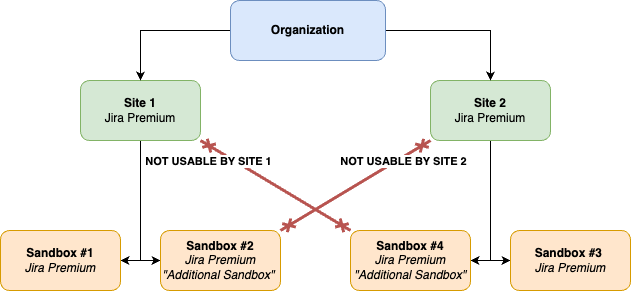
For Atlassian apps on an Enterprise plan, additional sandboxes can be allocated to any site associated with your app's Enterprise plan
Atlassian Apps on a Premium plan
Atlassian apps on a Premium plan are site specific, therefore additional sandboxes are site-specific. Each Premium site that needs an additional sandbox requires a separate purchase. Need more than two sandboxes? Upgrade to Cloud Enterprise for five sandboxes you can use across any linked site. Talk to your Account Executive to learn more.
How to purchase additional sandboxes?
You can purchase additional sandboxes through admin.atlassian.com/billing by
- Select Subscriptions > choose app license
- Click Add-on tab > Explore add-ons
- Select "Additional sandboxes"
- Enter desired number of sandboxes
- Add payment method
- Review and Accept legal terms
Or by contacting sales directly. Reminder, additional sandboxes can only be purchased for app plans billed annually.
The Future of enterprise Change Management
Sandboxes are essential for safe, scalable change. They provide isolated spaces to experiment, validate, and refine changes - eliminating production disruptions and costly rollbacks. Atlassian sandboxes enable admins and teams to:
-
Test new workflows, automations, and integrations without impacting production
-
Run parallel tests across multiple sandboxes to drive innovation safely
-
Experiment with and validate AI-powered automations, workflows, and integrations
Our vision is clear: help you de-risk operational changes and navigate transformational shifts through purpose-built, enterprise-grade Sandboxes that adapt to your needs.
We're prioritizing operational change workflows first, reducing manual effort and risk when promoting changes from Sandbox to production. Our enhanced Sandboxes streamline change management, making it simpler and safer to validate and deploy updates without business disruption.
Our Sandbox config deployment, now in closed beta, enables you to safely promote Jira configuration changes from sandboxes to production.
Share your Sandbox success stories or tell us what features you'd like to see next in the comments below!
Additional Resources:


![Photo of Paul Pasler [Seibert]](https://avatar-management--avatars.us-west-2.prod.public.atl-paas.net/557058:16d1f9bb-612b-43a6-ac1b-8857c60c5182/e35f4b50-5f2f-4df0-87f3-7d1be5a76df6/128)


