Community resources
Community resources
Community resources
How to use custom fields in Work Management projects with global automation

Hey, I am desperately trying to have custom fields created on a global aspect (issues > fields > custom fields) show up and be usable in business projects, especially for automation.
My idea:
- I created a simple text field with a few options (as mentioned under issues > fields > custom fields)
- if in a business project an issue under certain conditions is created, a new issue with pre-filled information, among them the custom field, will be created
- neither does the custom field show up in the project's issue types settings nor does (global) automation recognise the field:
"Unknown fields set during create, they may be unavailable for the project/type. Check your custom field configuration. Fields ignored -" (followed by the field name) - also the field does not show up in the new project's task configuration screen (which is most likely to be related to the error)
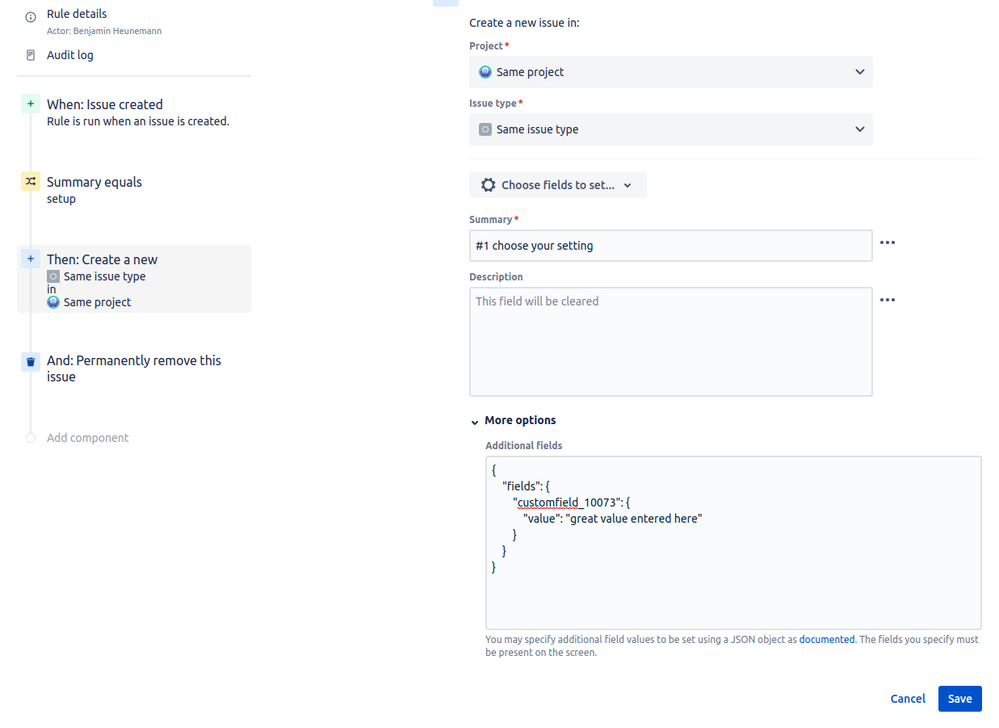
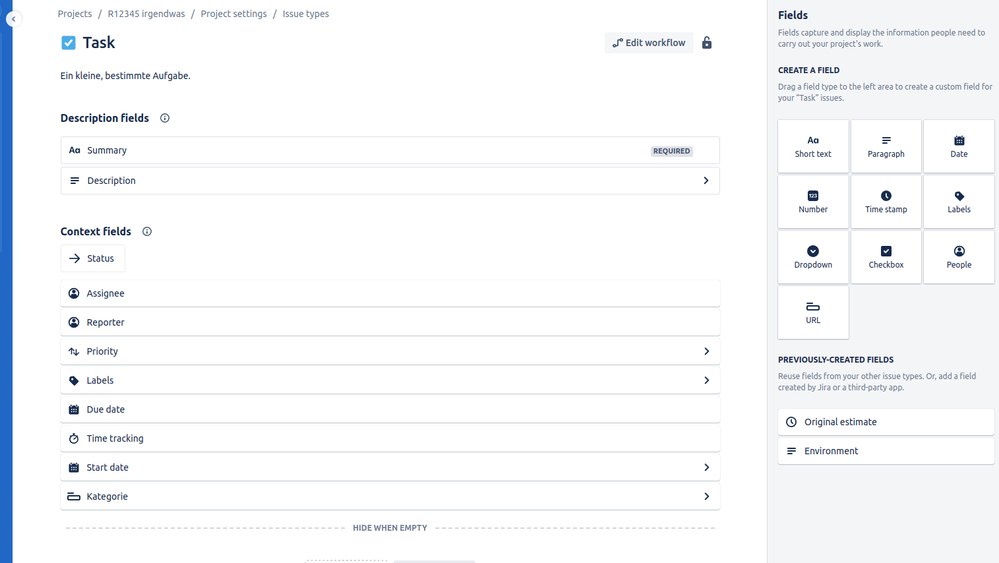
I have no idea what to do and feel like I've looked everywhere. Does anyone have a hint?
2 answers


At least one of those is your script field code, from the stack trace and if you are using an inline script, you cannot tell which one it is. I would consider moving that code to a file, then from the thread dump you can see which of your fields is misbehaving.
It's probably worth doing a quick audit of your script fields... how many do you have, what do they do etc.
You must be a registered user to add a comment. If you've already registered, sign in. Otherwise, register and sign in.

You may be able to reimplement the scripted fields as a plugin but they may be going too much overall
You must be a registered user to add a comment. If you've already registered, sign in. Otherwise, register and sign in.
Hrm... if you do a direct translation of your code to java you will have the same problem, IF the issue is in your code and not Script Runner as I suspect. If you fix it in java, you could apply the same fix to your script and the problem will go away.
You must be a registered user to add a comment. If you've already registered, sign in. Otherwise, register and sign in.

It's not directly the script runner causing the problem, it's going to be the scripts being run by it.
It's almost impossible to tell what the scripts are doing from the fragments of log report you've given, we need to see the scripts themselves really. The best I can do from them is tell you one of the scripts looks like it is looking at custom field value data, possibly over a wide range of issues, which might chew up a lot of time or memory, but it's hard to say more.
You must be a registered user to add a comment. If you've already registered, sign in. Otherwise, register and sign in.

Sure. I guess the worst case scenario is that it's not some error / logical problem caused by my scripts, but rather occurring through use. I'm currently working to make this project / its workflow less reliant on Script Runner in hopes to improve the performance. Thanks for the answer.
You must be a registered user to add a comment. If you've already registered, sign in. Otherwise, register and sign in.

You must be a registered user to add a comment. If you've already registered, sign in. Otherwise, register and sign in.