Community resources
Community resources
Community resources
How to use custom fields in Work Management projects with global automation

Hey, I am desperately trying to have custom fields created on a global aspect (issues > fields > custom fields) show up and be usable in business projects, especially for automation.
My idea:
- I created a simple text field with a few options (as mentioned under issues > fields > custom fields)
- if in a business project an issue under certain conditions is created, a new issue with pre-filled information, among them the custom field, will be created
- neither does the custom field show up in the project's issue types settings nor does (global) automation recognise the field:
"Unknown fields set during create, they may be unavailable for the project/type. Check your custom field configuration. Fields ignored -" (followed by the field name) - also the field does not show up in the new project's task configuration screen (which is most likely to be related to the error)
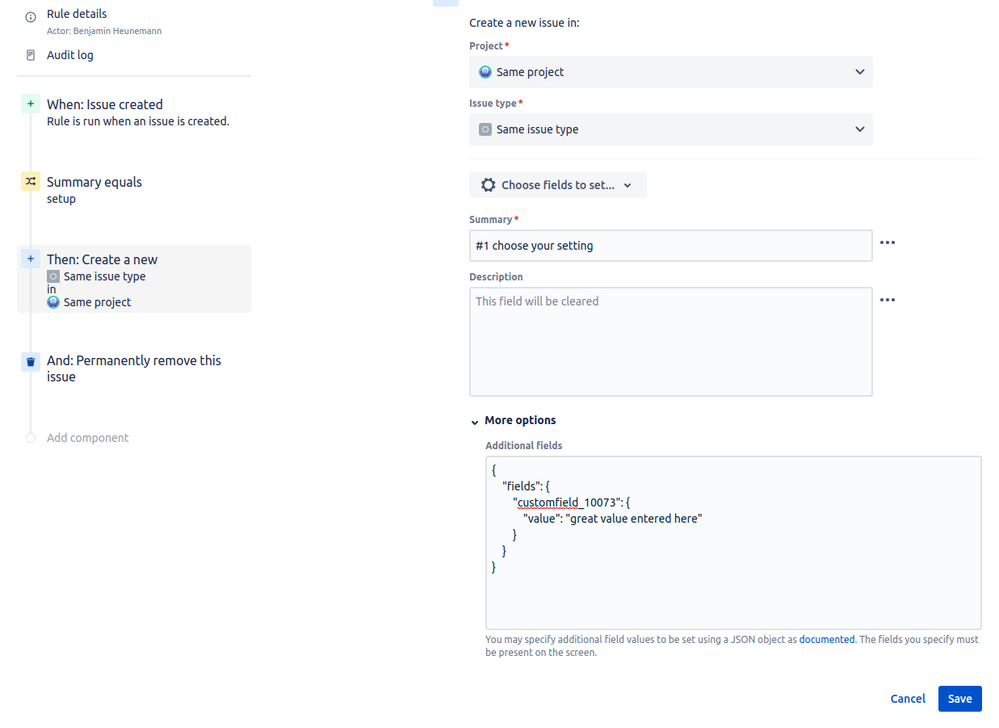
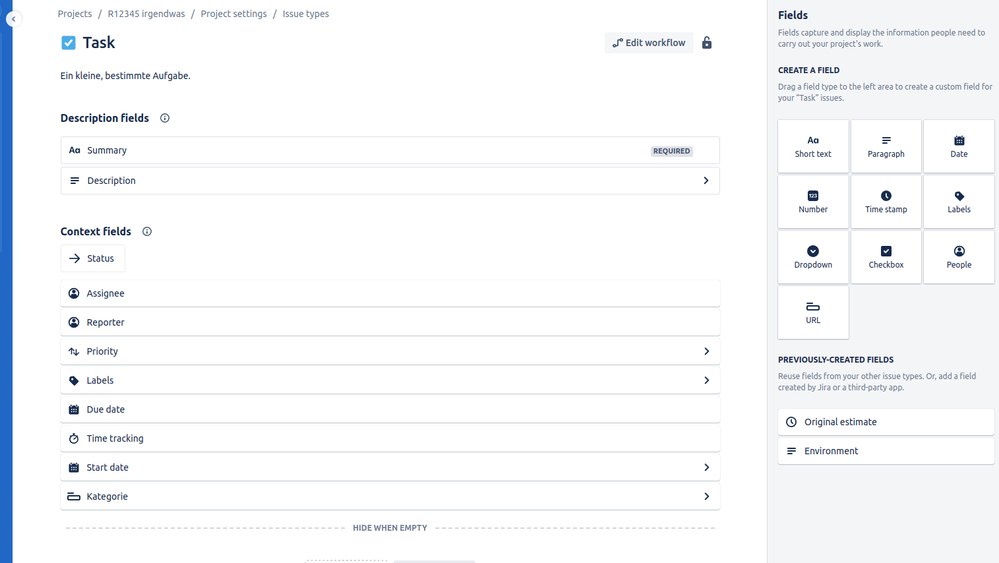
I have no idea what to do and feel like I've looked everywhere. Does anyone have a hint?
3 answers

I think the REST API is not supporting getting all the group names. However, one workaround is to use the FIND groups GET endpoint /rest/api/2/groups/picker, and add a space as query {"query" : " "}. Below is an example of the query I made in postman.

Please note this: "The number of groups returned is limited by the system property "jira.ajax.autocomplete.limit"
You must be a registered user to add a comment. If you've already registered, sign in. Otherwise, register and sign in.


That is not completely true. I think it should say "The number of groups returned is by default limited by the system property jira.ajax.autocomplete.limit unless parameter maxResults is specified"
I am not sure if there is an upper limit but it seems you could just get the default number of groups (20), look at "total" attribute returned in the json data, then call again specifying maxResult to what "total" revealed. At least this works for a couple of thousand groups.
You must be a registered user to add a comment. If you've already registered, sign in. Otherwise, register and sign in.

You must be a registered user to add a comment. If you've already registered, sign in. Otherwise, register and sign in.
You must be a registered user to add a comment. If you've already registered, sign in. Otherwise, register and sign in.

Thanks, I should have mentioned that our version 6.3.15 does not have this call available. In any case, how can you use this call to get all the groups. It seems to only match sub-strings in the group names. What can you give the query parameter that will match all group names?
You must be a registered user to add a comment. If you've already registered, sign in. Otherwise, register and sign in.

How about getGroup? https://docs.atlassian.com/jira/REST/latest/#api/2/group-getGroup
You must be a registered user to add a comment. If you've already registered, sign in. Otherwise, register and sign in.
I tried getGroup but the groupname parameter is required and doesn't accept a regex.
You must be a registered user to add a comment. If you've already registered, sign in. Otherwise, register and sign in.

You must be a registered user to add a comment. If you've already registered, sign in. Otherwise, register and sign in.