Community resources
Community resources
Community resources
Resolution field in new issue view
I want to update/edit the resolution field like other fields in the new jira view, especially when I mark an issue as done/complete. I am not able to see the resolution field on the new jira issue view, I need to switch back to old view and then update resolution when needed.
I have tried adding new screens, workflows and everything, but that only works for the old view.

Hi everyone,
My name is Loretta and I am a Product Manager in the Jira Cloud team. I am pleased to announce that the ability to edit the resolution field of an issue is now available on the new issue view.
The resolution field appears when an issue is closed and if the resolution field has been configured to the issue type in the screen scheme (issues > screens > configure). When this field is added, the resolution will appear as a select list when the issue is moved to a done status:
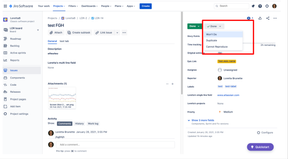
As part of https://jira.atlassian.com/browse/JRACLOUD-70476 we have also recently released the display of the resolved date and time.
Thanks
Jira Cloud Team
2 answers
![Jobin Kuruvilla [Adaptavist]](https://avatar-management--avatars.us-west-2.prod.public.atl-paas.net/557058:3e04e228-4ce2-4b19-8845-c9d1d168cdeb/14b658ae-e54e-43b0-a73d-4b8fe17750b6/128 "Jobin Kuruvilla [Adaptavist]")

Take a look at ConnectAll for this requirement. You can achieve this functionality with the help of filters while synchronizing data between the two instances.

Hi Tod,
All the integration you can get between two JIRA Cloud instance is the ability to link issues to each other. Unfortunately there is no such automation as you want. That might be possible with some add-ons, but I'm not completely sure about any specific one though. I just heard Bob Swift has some integration plug-ins, but I never had the chance to test them.
Cheers,
Paulo
You must be a registered user to add a comment. If you've already registered, sign in. Otherwise, register and sign in.

You must be a registered user to add a comment. If you've already registered, sign in. Otherwise, register and sign in.