Community resources
Community resources
Community resources
Change Workflow Transition IDs

I have some workflows I am trying to clean up and one item is to update the existing transition IDs so that they are in some logical sequence (e.g. 10, 20, 30 etc..) so in the future, new workflow items can be added without issue.
Is there a way to update the existing workflow transition IDs without having to rebuild entire workflow?
Thanks in advance!
Robert

3 answers
2 accepted

Hi Brianna,
I have the same issue where the resolution is not set in my workflows. Can I ask how you managed to resolve the issue?
Thanks
Natalie

Hello Natalie,
You can follow the instructions in this documentation to know how you can Bulk set the resolution of your issues:
- Backup your instance.
- Copy the workflow for the affected project.
- Add a transition for the affected status(es) called 'Fix Resolution' with the destination as the step it originated from (so it doesn't change the status).
- Add the 'Update Issue Field' post-function to that transition, as in the example below:
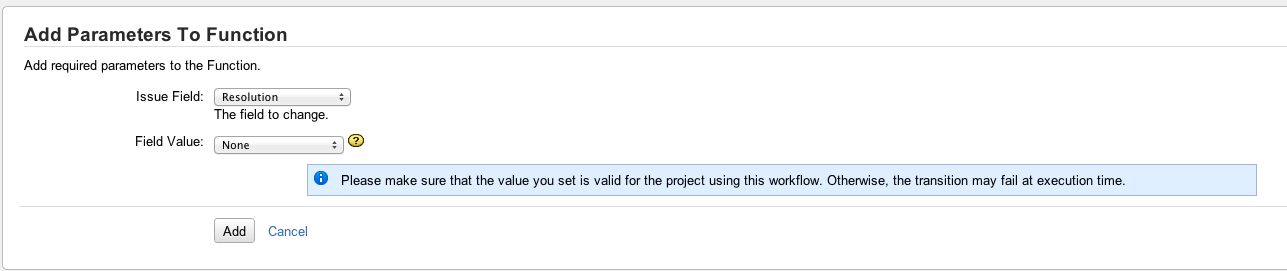
- Make sure the transition has been configured to fire Issue Resolved event to get Resolution Date set properly.
- As in our Configuring workflow schemes, add a new workflow scheme and associate the appropriate Issue Types to the new workflow.
- Modify the project so that it uses the new workflow.
- Using a Bulk Operation to edit those issues using the 'Fix Resolution' transition. This will reset the field to None.
- Change the project back to the original workflow.
Let me know if this information helps.
You must be a registered user to add a comment. If you've already registered, sign in. Otherwise, register and sign in.
Hello Brianna,
The resolved date can be changed by import, however, the history of the cannot be changed.
Here are the steps to perform it:
- Export the issues (CSV format) which resolution was wrongly added after the change to status resolved
- Get the data the issues were change to the status
- Change the field resolved on the CSV file to the correct one
- Import the CSV file again, properly mapping the issue-key field
Let me know if it helps.
You must be a registered user to add a comment. If you've already registered, sign in. Otherwise, register and sign in.


There is a way to retroactively update this -- our free addon (Quantify) has a special "resolution checker" tool. Because we deal with things like time in status, throughput and other Kanban metrics we have the data to fix this.
You must be a registered user to add a comment. If you've already registered, sign in. Otherwise, register and sign in.

You must be a registered user to add a comment. If you've already registered, sign in. Otherwise, register and sign in.