Community resources
Community resources
Community resources
Cannot edit users in the Jira Internal Directory after a system import

I'm working on a migration where I am using exported data from Jira Cloud (generated for server) to restore a Jira server instance. I then enabled the recovery_admin to be able to edit the users despite not having a login in any of the migrated user accounts.
The only problem is I can't edit the Jira Internal Directory at all. I cannot add users. I cannot edit existing users. It's behaving like a read-only directory, but I don't understand how that can be the case. In performing the restore Jira had no issue writing the users into the database in the first place. Just in case, I updated the jdbc driver as suggested in similar articles, but with no luck. The FS permissions were verified to be owned by the user that runs the application. The dbconfig.xml has the correct schema for the database. I have never seen this issue before and cannot find anything about it online either.
6 answers

Your theme can work without calling in the Header template, but it'll be missing several essential pieces. Without the call to the Header template, your blog resembles this image:

The Sidebar template
The filename of the Sidebar template is sidebar.php. Typically, the sidebar appears on the right or left side of your WordPress template. In the default Twenty Ten theme, the sidebar is displayed on the right side of the template, by default:
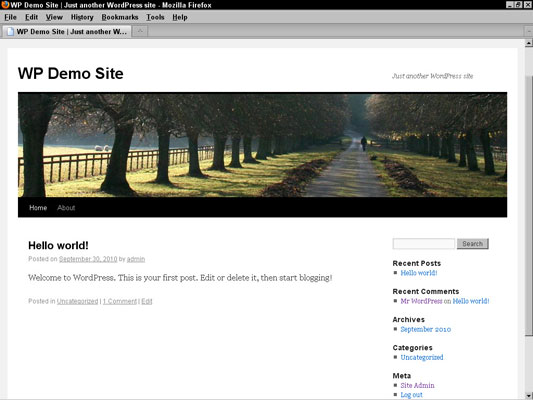
Similarly to the Header template, the Sidebar template is called into the Main Index template.
You must be a registered user to add a comment. If you've already registered, sign in. Otherwise, register and sign in.
![Jobin Kuruvilla [Adaptavist]](https://avatar-management--avatars.us-west-2.prod.public.atl-paas.net/557058:3e04e228-4ce2-4b19-8845-c9d1d168cdeb/14b658ae-e54e-43b0-a73d-4b8fe17750b6/128 "Jobin Kuruvilla [Adaptavist]")

I faced the same issue with a customer a while back and found out the browser monitoring broke it. Also reported to Atlassian. See https://confluence.atlassian.com/pages/viewpage.action?pageId=317194835 for more details.
This was with JIRA Agile but might be the same issue in transition screen.
You must be a registered user to add a comment. If you've already registered, sign in. Otherwise, register and sign in.
Thanks for your input Jobin, I'll try to see if switching off browser monitoring does the trick. Haven't any need for RUM though, but the same workaround might still work.
You must be a registered user to add a comment. If you've already registered, sign in. Otherwise, register and sign in.
I also received the answer from NewRelic:
This issue may be related to our RUM trying to instrument into your Jira instance, and currently RUM does not work with Atlassian Jira. What you will want to do is set auto_instrument: false in your YAML and make sure that in your UI under settings that the Real User Monitoring is not enabled. Give that a try and let us know if you are still having this issue.
I will try it out as soon as I have a new service window.
I'll keep this question open untli I have performed some tests.
You must be a registered user to add a comment. If you've already registered, sign in. Otherwise, register and sign in.

You must be a registered user to add a comment. If you've already registered, sign in. Otherwise, register and sign in.