We're moving! The community forums are migrating to a new platform on September 22. Learn more
×Community resources
Community resources
Community resources
When an attachment added then send an email with the attachment

Hi,
i am trying an automation: when comment is added to a work item and a document is attached to that comment, then send an email (to a non Jira user) with the attachment (or with a link to the attachment the client can access).
I've found this article: https://support.atlassian.com/jira/kb/how-to-send-customers-a-notification-with-the-most-recent-attachment-using-automation/
I have followed their steps:
- I have created my custom field
Last Attachment:

- I have created my automation rule:


3 - I have created my webhook:

Now, if I add an attachment to an issue, nothing happens:
What am I doing wrong? What am I missing? I am new to webhook, and I am not sure I fully understand it...
Thanks for your help!
Priscille

3 answers
2 accepted

Hello @Priscille Lesne
I don't yet have a solution, but I did some investigation and can add some more information about this scenario.
I followed the instructions you used to create an Incoming Webhook automation rule and a System Webhook Listener and was getting the same result - no record in the rule audit log that the rule was triggered. I had made the following changes to the System Webhook:
- I appended /?issue=${issue.id} to the URL, as per the instructions
- I copied the Secret from the Incoming Webhook trigger to the Secret field in the System Webhook.
In the Incoming Webhook trigger there is a link to a document for how to verify your trigger works:
Following that guidance I tested the URL of the Incoming Webhook with the issue id information appended to it and with the secret from the Incoming Webhook trigger:
%  curl -X POST -H 'Content-type: application/json' -H 'X-Automation-Webhook-Token:c5953d9c7e8c87365b086fcbfd1e284ba236bdf6' https://api-private.atlassian.com/automation/webhooks/jira/a/abc6438f-e093-47e5-8bbc-fd3fadf63e1b/019a5f56-27a2-7bdb-a1d4-bbee26d2384b/?issue=ACK-3

zsh: no matches found: https://api-private.atlassian.com/automation/webhooks/jira/a/abc6438f-e093-47e5-8bbc-fd3fadf63e1b/019a5f56-27a2-7bdb-a1d4-bbee26d2384b/?issue=ACK-3

%
As you can see, this indicate that they URL could not be found. As a result there was no entry in the automation rule audit log.
I then tried the same without the issue information appended to the URL:
%  curl -X POST -H 'Content-type: application/json' -H 'X-Automation-Webhook-Token:c5953d9c7e8c87365b086fcbfd1e284ba236bdf6' https://api-private.atlassian.com/automation/webhooks/jira/a/abc6438f-e093-47e5-8bbc-fd3fadf63e1b/019a5f56-27a2-7bdb-a1d4-bbee26d2384b

%
As you can see there is no error message, and this time the rule was triggered. The audit log for the rule recorded an error because no issue data was provided with the call.
I notice that in the article that tells how to set this all up the URL of the rule Incoming Webhook starts with https://automation.atlassian.com which does not match the URL currently produced for Incoming Webhook triggers; https://api-private.atlassian.com
There was a change to the Incoming Webhook functionality that included changing the URL. I'm wondering if the article is now not valid based on the new functionality. I am going to open an Atlassian support ticket to see if I can get more information.
I did some additional experimenting before opening a support case and found the following.
I was sure that the Secret from the Incoming Webhook needed to be provided within the System Webhook somehow. First I tried inserting it into the Secret field in the System Webhook, but that did not help.
The chatbot for Atlassian's support portal suggested that if the calling app could not create a custom header to submit the secret, then it could be appended to the Incoming Webhook URL thus:
<Incoming webhook URL>/<Incoming webhook secret>
So I tried that, appending to the end of that the required syntax to provide the issue key. The rule was triggered and also recognized that an issue was identified.
https://api-private.atlassian.com/automation/webhooks/jira/a/abc6438f-e093-47e5-8bbc-fd3fadf63e1b/019a5f56-27a2-7bdb-a1d4-bbee26d2384b/c5953d9c7e8c87365b086fcbfd1e284ba236bdf6/?issue=${issue.id}
You must be a registered user to add a comment. If you've already registered, sign in. Otherwise, register and sign in.
Hi @Trudy P Claspill ,
thank you very much for your answer and your help.
My initial rule does nothing when i add a document to my work item.
However, I built a second rule that works:


Also, i have added an action: Create Variable to display the attachment URL, but it returns blank. I don't think I need that, but I don't understand why it's blank.

Thanks for your help.
Best,
Priscille
You must be a registered user to add a comment. If you've already registered, sign in. Otherwise, register and sign in.
It doesn't appear that {{attachment}} has an attribute named {{url}}
https://support.atlassian.com/cloud-automation/docs/jira-smart-values-issues/#--attachment--
You must be a registered user to add a comment. If you've already registered, sign in. Otherwise, register and sign in.


Hello @Priscille Lesne
It seems that the webhook URL is not correct. In the tutorial, it says to append "/?issue=${issue.id}". Instead, you appended "{issue.id}"
Also, please uncheck the "issue updated" in the "Issue related events" conditions, otherwise yoou webhook will trigger whenever the ticket gets updated.
Please update the webhook URL and try again.
You must be a registered user to add a comment. If you've already registered, sign in. Otherwise, register and sign in.
Hi @Tudor Tofan ,
thank you for your reply. I have updated my webhook URL.
Best,
Priscille
You must be a registered user to add a comment. If you've already registered, sign in. Otherwise, register and sign in.

I'm not sure if you are open to using third-party apps to solve this problem, however, I'd like to point out that our app is capable of providing attachment files in the notification emails, not just their URLs.
Notification Assistant for Jira - Email allows you to extract the attachments directly to the email making it possible for people to download the attachments without being logged into Jira or being redirected, as in the example below:
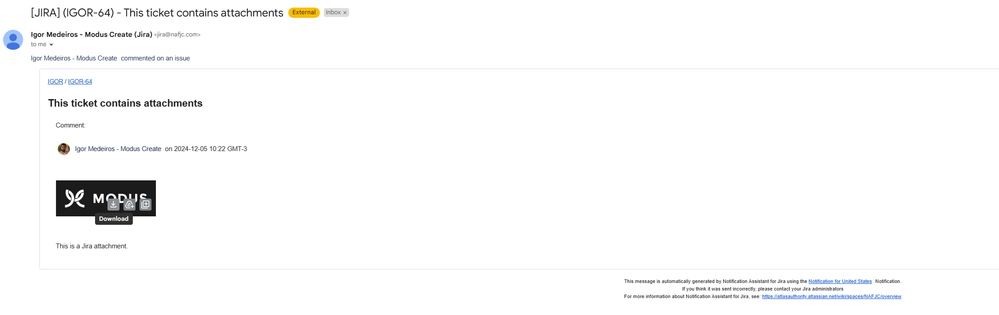
Feel free to reach out if this interests you.
You must be a registered user to add a comment. If you've already registered, sign in. Otherwise, register and sign in.

You must be a registered user to add a comment. If you've already registered, sign in. Otherwise, register and sign in.