The Atlassian Community Forums are currently in read-only mode. We will be relaunching on a new platform on September 22 (read more here). We apologize for the extended downtime. For concerns or questions, please email communitymanagers@atlassian.com. See you on the other side, on the new Atlassian Community Forums! :)
×Community resources
Community resources
Community resources
Using Manual Trigger Input to Populate Fields in a Cloned Issue Automation Rules

Hi everyone,
I'm working on an automation to clone work items from project A to project B. And I want to use the Manual trigger Inputs to populate fields only available in project B.
So far the automation clones everything correctly, easy enough. But I have troubles setting the custom fields:
Manual trigger field example:

Clone node (using Json to set fields):

Log error:
Anyone has any insight?
Thanks beforehand,

Asier
5 answers
1 accepted
Comments for this post are closed
Community moderators have prevented the ability to post new answers.

To use a form (prompt for input) the identical values used on the custom field must be used.
how-to-link-a-custom-field-with-the-prompt-action-input-with-manual-triggers-in-jira-automation
You can only use custom fields in relation to the options available in the prompt, so you can't use fields of type Asset of multi-select.

However, what you can do is to look up the Asset object based on the input values. You can have a Lookup Objects action that uses the prompt input in an AQL statement. The return will have the Object(s) that match your AQL. You can then take that value and use it to update the cloned item.
You can do the same thing, with a little more work, if the custom field is a User Picker field. In that case, you would have a Webhook Action that sends a REST call to retrieve the accountId based on the name that is provided. It takes a more work, but I wanted to mention it for completeness.
You must be a registered user to add a comment. If you've already registered, sign in. Otherwise, register and sign in.
Hi @Marc -Devoteam- ,
That guide works, just to note that you can write in the selector the full smart value even if it is just a selector of the possible values for the field.
Thanks! Regards
You must be a registered user to add a comment. If you've already registered, sign in. Otherwise, register and sign in.

Hi @Asier Vadillo I'm the community manager at Exalate.
You can’t directly “link” an Assets field or a true multi-select field the same way you would a simple single select. The prompt inputs don’t behave like those field types, so that direct mapping approach won’t work the same way.
That said, it doesn’t mean they’re impossible to populate. For Assets, you can capture something like an object key/name from the prompt and then use a Lookup Objects action (AQL) before setting the field via JSON. For multi-select fields, you just need to pass an array structure in JSON, like this:
{ "value": "{{userInputs.option1}}" }
]
So if you’re getting errors, it’s usually either a mismatch between the input value and the actual option name, or a JSON structure issue, not a hard limitation of the field type itself.
You must be a registered user to add a comment. If you've already registered, sign in. Otherwise, register and sign in.

If this cloning flow is business-critical (or you’ll be maintaining it long-term), it’s often easier to move the cloning into an app like our Deep Clone for Jira.
With Deep Clone you can also use the Field Editor feature to set values of fields that are only available in project/space B.
You must be a registered user to add a comment. If you've already registered, sign in. Otherwise, register and sign in.

Automation rules are often prone to errors and pretty hard to maintain on the long term. It becomes even more true when you have a large number of rules running.
As an alternative, I can suggest trying our app Elements Copy & Sync to manually clone issues from one project to another. It should save you a lot of time.
In the app you only have to:
- Create a new recipe
- Define your source project (A)
- Define your target project (B)
- Map your fields between your two projects
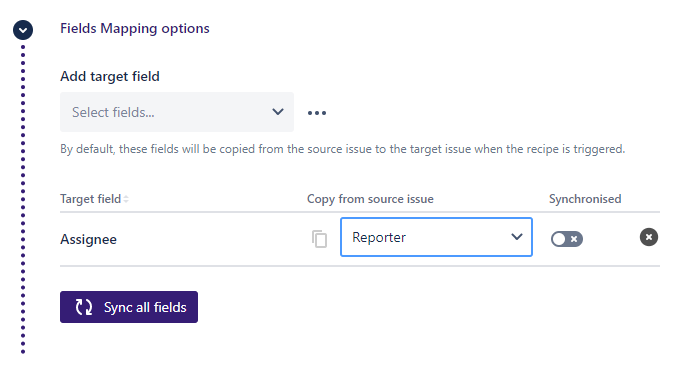
This recipe will allow you to clone your issues and set custom fields as desired and can be triggered by an Automation or manually.
The app is for free during 30 days (and it stays free under 10 users) so don’t hesitate to try it on your use case.
You must be a registered user to add a comment. If you've already registered, sign in. Otherwise, register and sign in.


Hello @Asier Vadillo
From the error it mentioned that when you create a new work-item there is a an asset object field that needs to be set.
customfield_10892
see which fields are mandatory when creating a new work-item.
you must match all the mandatory fields when you are cloning the work-item.
Asset object fields are not copied when you clone it, so if you need it, just set a copy of the value to pass to the new work-item on clone.
hope that helps.
Ariel.
You must be a registered user to add a comment. If you've already registered, sign in. Otherwise, register and sign in.
Comments for this post are closed
Community moderators have prevented the ability to post new answers.

You must be a registered user to add a comment. If you've already registered, sign in. Otherwise, register and sign in.