The Atlassian Community Forums are currently in read-only mode. We will be relaunching on a new platform on September 22 (read more here). We apologize for the extended downtime. For concerns or questions, please email communitymanagers@atlassian.com. See you on the other side, on the new Atlassian Community Forums! :)
×Community resources
Community resources
Community resources
Timestamp for Status

6 answers
Comments for this post are closed
Community moderators have prevented the ability to post new answers.

An option could be to write your own custom solution using Jira Rest API's. However this could be a lengthy and time taking project. Or if you would like to explore a mktplace app for this requirement, you can try out
With this app you generate time in each workflow status for multiple issues with multiple filter and grouping options.
With Status grouping feature, can help you define your own issue age time and view the averages of the same. Also the app has 20+ reports to meet a variety of use cases.
Also the app has a custom calendar option to define your working hours and days which will be taken in calculation for time in status.
I have added the screen grab of Status Transition details reports, where in it shows the date and timestamp of the status transition.
Disclaimer : I am part of the app team for this add-on


To see the time a bug issue spends in each workflow status and the exact transition timestamps directly in Jira, you would normally need to review each issue’s history. However, doing this manually is time-consuming and error-prone. Instead, you can use Timepiece - Time in Status for Jira.
To calculate the total time each bug spends in all four of its workflow statuses, you can use Timepiece’s Status Duration and/or Duration Between Statuses reports.
With Status Duration Report, you can see how long each bug spent in every status. You can track the time spent in each status individually, helping to identify bottlenecks and understand workflow efficiency. Specific statuses can also be excluded from the calculation if needed.

With Duration Between Statuses Report, you can create a consolidated column by selecting statuses to include. You can calculate the total duration across the selected statuses.
To see transition time:
Timepiece has a different type of report for it: Date reports.

With Timepiece, you can see the first and last transition reports to see the exact dates each issue transitioned to or from a status.
I hope this is helpful. Please let me know if you have any follow-up questions. To check it out, you can visit Timepiece’s Atlassian Marketplace page.
Disclosure: I am part of the OBSS team, the creators of Timepiece.
Best,
Birkan
You must be a registered user to add a comment. If you've already registered, sign in. Otherwise, register and sign in.

Hi @Ashwin Kurundkar ,
If you’re open to using a third-party app, you might want to try Time in Status (developed by my team).
It helps you generate detailed time-in-status reports for any work item types, so you can see exactly how long issues spend in each workflow step. This makes it easier to spot bottlenecks, compare performance across teams or projects, and understand where time is being spent throughout the process.

Hope you find it useful!
You must be a registered user to add a comment. If you've already registered, sign in. Otherwise, register and sign in.

If you are looking for a straightforward way to get these timestamps and calculations, I recommend trying Time Metrics Tracker (developed by my team at SaaSJet). It was specifically designed to measure workflow connections and transition times.
Here is how it can help with your specific request:
- Custom Cycle and Lead Time: You can count the time between any two points in your workflow by setting start, stop, and pause statuses. To get highly detailed data, you can even select the first or last transition to/from a specific status.
- Business Hours & Calendars: You can configure your working hours so that the report only counts the time your team is actually working, excluding weekends and holidays.
- Visual Time Limits: You can determine time limits for specific transitions to highlight overdue issues, making it easy to spot bugs that are stuck.
- Full Control Over Timers: You have the flexibility to set start/stop/pause timers to get the exact "Time in Status" data you need.
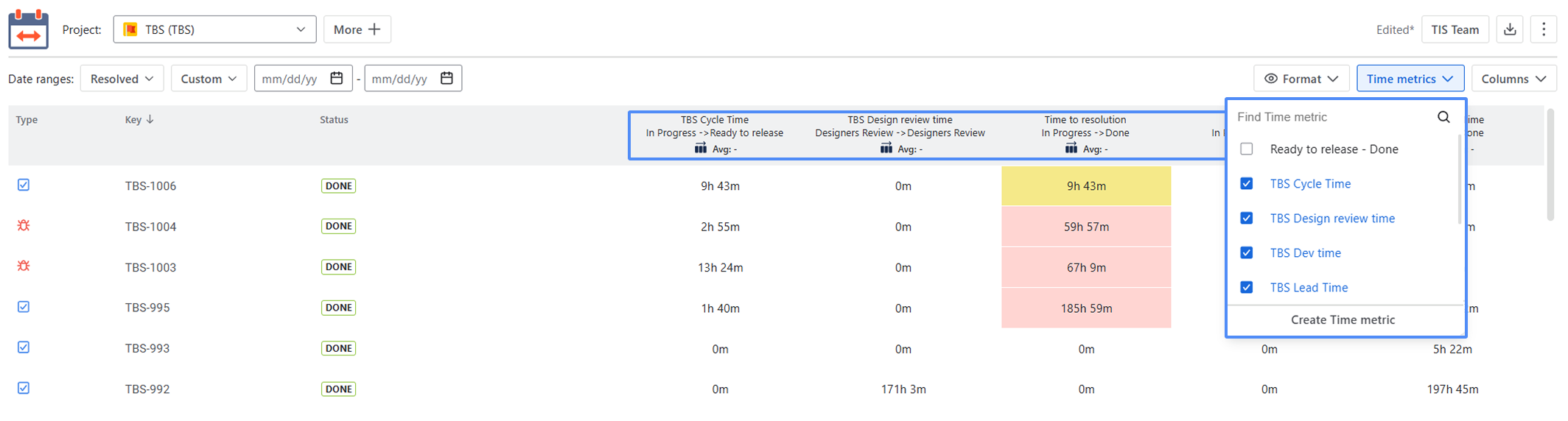
I'd be happy to help if you have any questions about setting up your specific bug-tracking metrics!
You must be a registered user to add a comment. If you've already registered, sign in. Otherwise, register and sign in.

As far as I know, this is not possible using Jira’s native tools. You will most likely need a plugin (app) from the Atlassian Marketplace.
If you’d like to try a plugin, you can easily achieve this using the dashboard gadgets provided by our Great Gadgets app:
Time in Status gadget can display the average time or total time the bugs (from a filter or JQL) spent in each workflow status.

On its Data tab, this gadget lists the bugs along with their time in each status and the Total, as in this example. The table can be easily exported in CSV.

For determining status between transitions, you can use gadgets like Control Chart gadget or Histogram Chart gadget configured to calculate time from Status A to Status B (like for example, from To Do to Done).
Here is an example of Control Chart, showing the time from creation to closure:

This gadget can also display a Data tab with detailed info about each bug.
If you need any help with our gadgets, feel free to contact support@stonikbyte.com at any time.
Danut.
You must be a registered user to add a comment. If you've already registered, sign in. Otherwise, register and sign in.

Hi @Ashwin Kurundkar ,
If you need to calculate how long a Bug issue spends in each workflow status — including transition timestamps and total time across multiple statuses — Time in Status Reporter for Jira released by our tem, isbuilt specifically to answer this.
The app reads the full issue history and calculates:
-
Time spent in each individual status
-
Total time across selected statuses
The easiest way to achieve this is to create a Status Group.
You simply:
-
Create a group and name it as needed (for example, Lead Time).
-
Add the workflow statuses that should be summed together for that metric.
-
Save the configuration.

That group will then appear in the search results and reports.

As shown in the attached picture, Story and Bug have different workflow steps associated with the group named Lead Time, and the search result table displays the calculated values accordingly. The grouped total is shown, while the time spent in each individual status remains visible as well.
This allows you to calculate both:
-
Total time across defined workflow stages
-
Time in each status
-
Exact transition timing
All directly from Jira issue history, without manual calculations.
You can export your search result in CSV format.
Regards,
Petru
You must be a registered user to add a comment. If you've already registered, sign in. Otherwise, register and sign in.
Comments for this post are closed
Community moderators have prevented the ability to post new answers.

You must be a registered user to add a comment. If you've already registered, sign in. Otherwise, register and sign in.