Forums

Articles
Create
cancel
Showing results for 
Search instead for 
Did you mean: 

Managing assignment in small team - Use assignee or team?

Aimee Roddick (Walter)
Contributor
February 15, 2026

Currently, I am working on a small team, with 5 developers and 2 design members. The developers have defined owning areas, but the 2 on the design team share responsibility. 

Creating and assigning engineering tickets is straightforward, as we always know the engineer that would be responsible for the case we're creating of the 5 engineers. However, when the team is creating a design case, it may be owned by either of the 2 designers, and we may not know that at the time of case creation. 

There is a field for "Team" that could be used to choose Design team vs. Assignee, but I was wondering - how are others doing this today? Have you come up with anything creative that you could share?

2 answers

2 votes
Jorge Cammarota
Banned
February 15, 2026

Hi Aimee, how are you?

I've seen this scenario in several small teams (dev + design) and, generally, what tends to work best is combining the two: Assignee + Team, but at different points in the workflow.
When creating a ticket: use “Team” (Design Team) as the “initial owner”

When the team doesn't yet know which designer will take the work, some practices I see quite often are:

Blank assignee or assigned to a “triage owner” (e.g., the design lead or a generic “Design Inbox”).

Team field = Design (or “Product Design”, “UX”, etc.).

Optional: a custom field like “Design Area” (e.g., Visual, UX Research, UX Writing) if this helps later in deciding who takes it.

The logic here is:

“Initially, the ticket belongs to the Design Team, not to a person.”

This allows:

Easily filtering by pending work from the design team.

Performing a bulk review (triage) of new design tickets.

In triage/planning: move from “team” to “person”
In almost all successful cases I've followed, there's a clear triage or planning moment where someone handles the assignment:

In a quick design meeting (daily/weekly) or during sprint planning:

They look at all tickets with Team = Design and an empty or generic Assignee.

They decide who will be the responsible designer based on:

capacity for the week

expertise (product area, problem type)

They update the Assignee to the correct designer.

(Optional) They keep the Team = Design field for cross-time reporting and visibility.

This creates a healthy separation:

Ticket creation: focused on logging the work.

Triage/planning: focused on assigning the right person.

When does it make sense to use only Assignee?

When the team is very small and stable (like 2 permanent designers) and you have good daily communication, some teams opt for an even simpler model:

In the creation phase, they leave Assignee blank.

The designers use their own filter, such as:

“All unassigned design tickets for this project”

And they coordinate among themselves (via daily/Slack) who takes what, assigning it to themselves.

This works well when:

The team is mature and communicates a lot.

There isn't a strong need for reports by "Team".

The volume of design tickets isn't huge.

It might make sense, or it might not; it will depend on each scenario.

Aimee Roddick (Walter)
Contributor
February 15, 2026

Thank you! This is what I was thinking, as well, but I wasn't sure if teams found it cumbersome to add another field to issue creation that requires determination of when to use assignee vs. team consistently. 

Thank you for the feedback! 

Like Jorge Cammarota likes this
Jorge Cammarota
Banned
February 15, 2026

It's always a pleasure to help, I'm glad your team will be able to work this way, and your thinking was absolutely correct.
If you can help by accepting my answer, it will help me with my personal goals.

1 vote
Mary from Planyway
Atlassian Partner
February 15, 2026

Hi @Aimee Roddick (Walter) 

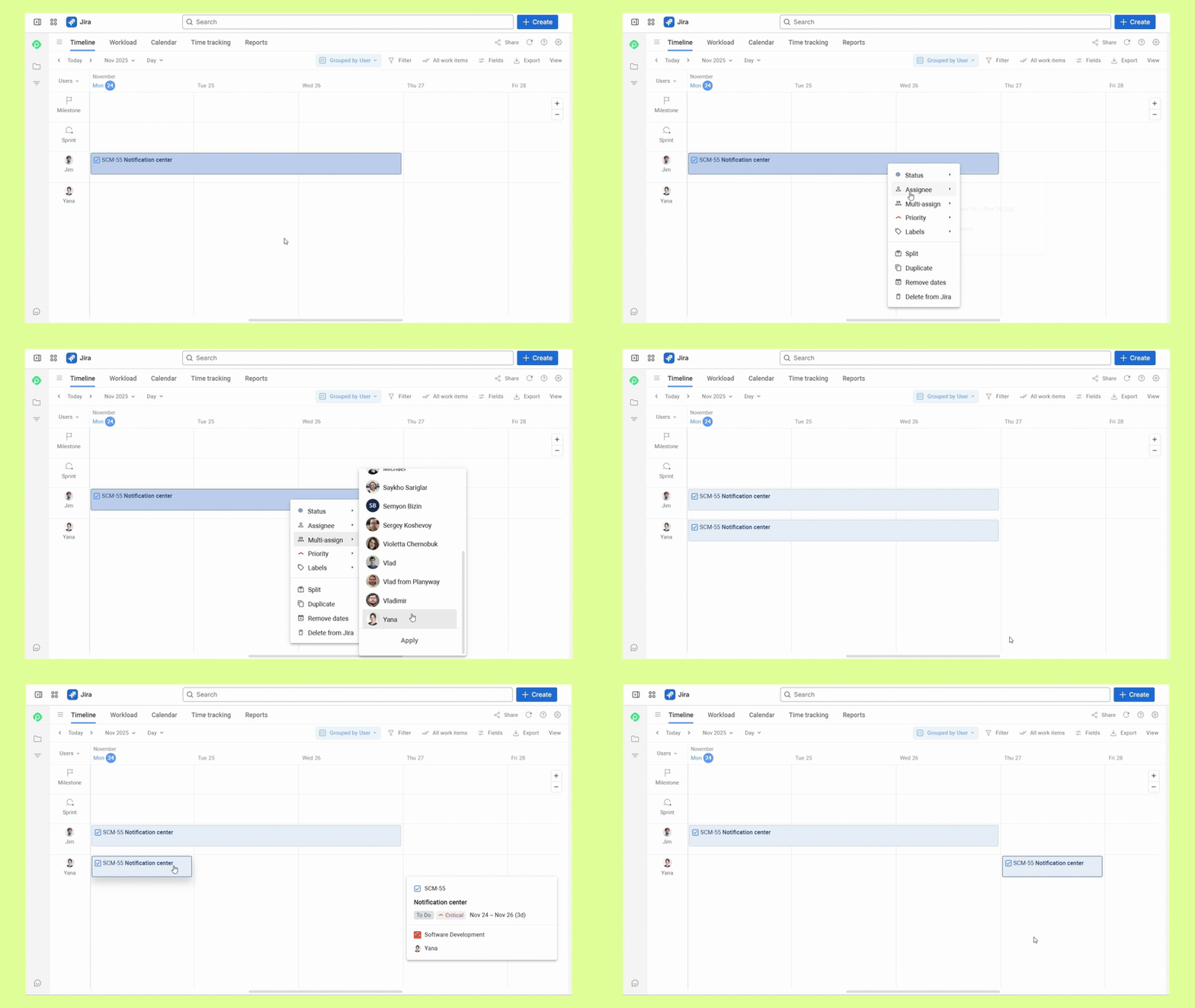
Do you mean you want to assign 2 team mates to a single issue?
If so, it's possible with the Planyway plugin thanks to the multi-assign feature:


jira-multiple-assignees.gif

Suggest an answer

Log in or Sign up to answer
DEPLOYMENT TYPE
CLOUD
PRODUCT PLAN
STANDARD
PERMISSIONS LEVEL
Product Admin
TAGS
AUG Leaders

Atlassian Community Events