The Atlassian Community Forums are currently in read-only mode. We will be relaunching on a new platform on September 22 (read more here). We apologize for the extended downtime. For concerns or questions, please email communitymanagers@atlassian.com. See you on the other side, on the new Atlassian Community Forums! :)
×Community resources
Community resources
Community resources
How to introduce a project-level master schedule on top of Product/Engineering Jira boards?


Hi everyone,
I’m looking for guidance on structuring Jira to better support project-level commitments and delivery tracking.
Current setup:
- We use Jira primarily for product backlog and sprint planning between Product and Engineering.
- All work is managed at the feature/story level within product boards.
- There is no dedicated project layer that aggregates work into customer-facing commitments.
Problem:
- Project deadlines are currently tracked informally (Slack, meetings, etc.).
- This leads to:
- Missed or unclear commitments
- Lack of visibility into cross-team dependencies
- Difficulty assessing delivery risk
- Essentially, we have strong execution at the sprint level, but no centralized view of delivery against project timelines.
This is also creating a “multiple sources of truth” issue, where critical timelines live outside Jira, which we’re trying to avoid.
What I’m trying to achieve:
- A master schedule / portfolio view in Jira that:
- Shows all project-level commitments (start/end dates, milestones)
- Links to underlying product/engineering work
- Highlights dependencies across teams
- Enables tracking of risk to delivery (on-time vs at-risk vs delayed)
Questions:
- What’s the best way to introduce a project layer on top of product boards in Jira?
- Advanced Roadmaps?
- Custom issue hierarchy (Initiatives / Projects)?
- Separate “Project Delivery” board?
- How do you structure:
- Project timelines vs sprint timelines?
- Ownership between Product vs Project Management?
- What’s the best way to quantify and visualize delivery risk in Jira?
- Are there standard practices or plugins for this?
- Any recommended approach to ensure Jira becomes the single source of truth for commitments, instead of relying on Slack?
Context:
We manage a portfolio of customer-facing deployments (projects, pilots, etc.), and we’re trying to align delivery tracking with a structured lifecycle (intake → plan → deploy → stabilize → close).
Bonus: Consultant Recommendations
If anyone has worked with consultants or partners who specialize in:
- Jira portfolio setup
- PMO / project delivery transformation
- Scaling delivery across product + engineering + customer projects
I’d appreciate recommendations.
3 answers
Comments for this post are closed
Community moderators have prevented the ability to post new answers.

Hi @Hassen Alwalie ,
Speaking specifically about delivery risks, you can address them using the app I developed - Multi-team Scrum Metrics & Retrospectives.
You can define any metrics you want to track using custom JQL feature inside the app. As a basic example, you can track unestimated or uncompleted tasks within a sprint, month, quarter, half-year or year.
3 boards/teams in the same view, 1 period selected for analysis:


3 boards/teams in the same view, all periods are clicked for average metrics and dynamics:


Best regards,
Alexey

Hi @Hassen Alwalie
Sounds like you're facing a pretty common challenge — a strong execution at the sprint level but lacking a clear, centralized view for project-level commitments and delivery tracking. Fortunately, there are solutions that can help..
I highly recommend using Planyway for Jira as a solution for your project tracking needs. Planyway integrates directly with Jira, allowing you to:
- Create a master schedule/portfolio view that aggregates all project-level commitments (start/end dates, milestones), linking them to your existing product and engineering work.
- Visualize project timelines alongside your sprint timelines, giving you a clear overview of both short-term execution and long-term project commitments.
- Track dependencies across teams with a visual roadmap, ensuring you can easily identify and manage risks and cross-team impacts.
- Highlight delivery risks by showing real-time updates on timelines, including on-time, at-risk, and delayed statuses, allowing you to proactively address potential delays.
- Eliminate multiple sources of truth by centralizing all critical project data within Jira, making it the single source of truth for your commitments.
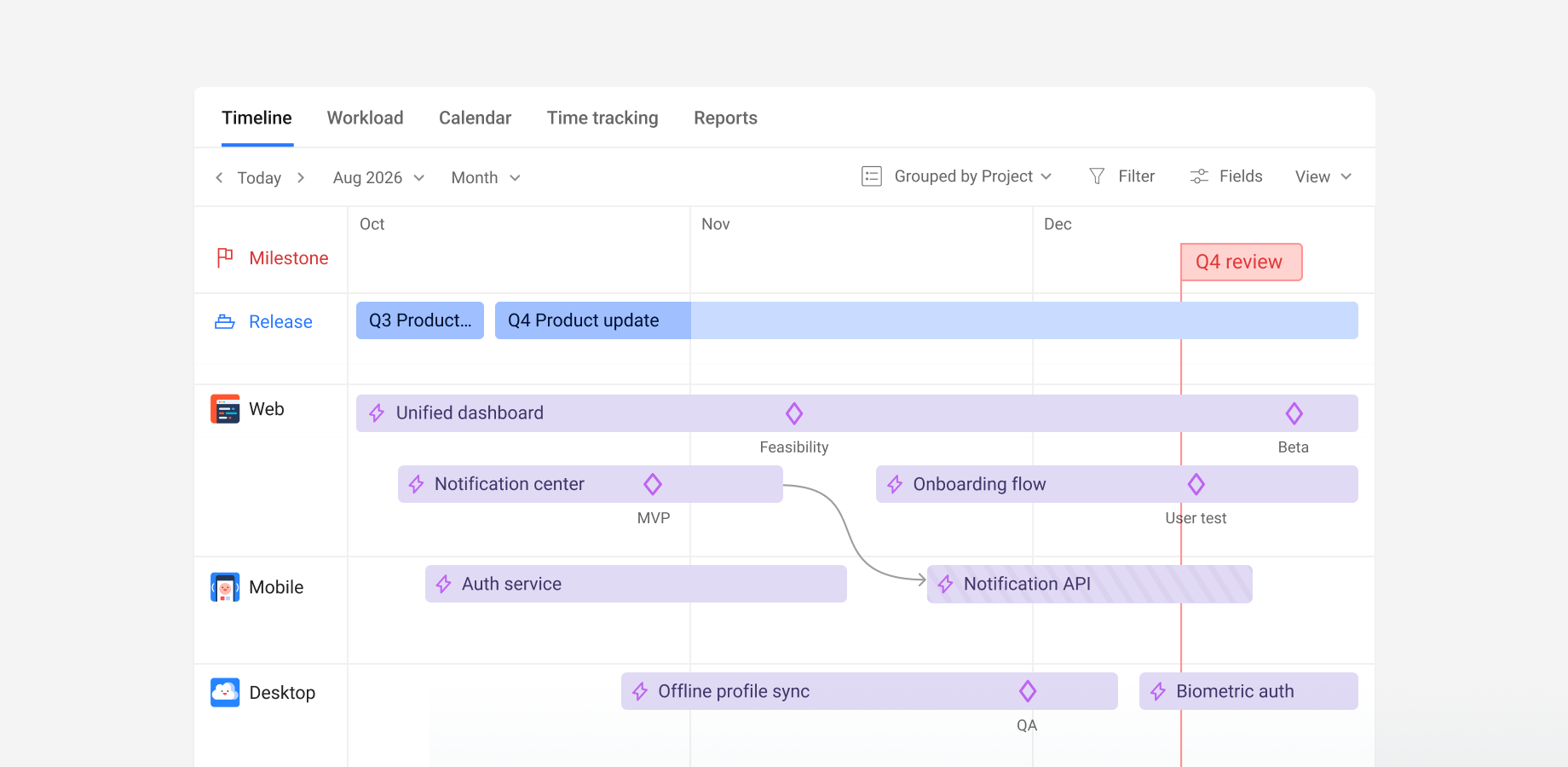
Answer to your questions:
- Project Layer: Planyway’s Portfolio View feature would allow you to add a project layer on top of your product boards.
- Project vs Sprint Timelines: You can keep your sprint timelines intact while also creating project-level timelines in Planyway.
- Ownership: You can assign ownership and track both product and project management responsibilities within the same tool, clarifying roles and reducing duplication.
- Visualizing Delivery Risk: With Planyway’s risk tracking, you’ll get insights into which tasks are at risk of missing deadlines, helping you mitigate any potential delays.
Let me know if you need more details or have any other questions!
You must be a registered user to add a comment. If you've already registered, sign in. Otherwise, register and sign in.

Hi @Hassen Alwalie from the options you've listed in your question, it sounds like you have a great grasp of some initial solutions to try. Here are some answers to your questions:
What’s the best way to introduce a project layer on top of product boards in Jira?
Since you already have Jira Premium, I suggest leveraging the included Jira Plans feature (formerly called "Advanced Roadmaps".) It allows cross-project visibility and additional views and features not available through the "Timeline" feature in individual Jira spaces. If you don't like Plans, there are certainly other options available in the Atlassian Marketplace (marketplace.atlassian.com.) But I always tell people to start with what you already have before exploring alternatives.
Next, if the work you are tracking spans multiple Jira spaces, I'd probably create a separate space to track strategic company priorities at the highest level. Let's call this new space "Master Schedule" for simplicity. You could add additional levels of hierarchy to accommodate this work. Then, items in that new "Master Schedule" space can be the parent of items in other spaces. Make sure each item in the new "Master Schedule" space has the Start date and Due date standard fields. You could make the workflow in this space very simple and more milestone-driven than in other Jira spaces. Your example of "intake → plan → deploy → stabilize → close" would work. Although I'd argue for slightly different tenses that describe the item's current state, not the action needed to get to or leave the state. Ex: "Planning" instead of "Plan", "Closed" (also a standard Jira status) instead of "Close" (a custom status). I know, it's semantics but I think naming matters.
You wouldn't necessarily need to create a new board to view the "Master Schedule" work, but you could if you wanted. I find boards to be most useful for status-based views. There are plenty of more compelling views available in the Jira Plans feature, in my opinion. Alternatively, if you did create a board, you could use it as the scope for the data in your Jira Plan. (Your data scope choices are: one or more spaces, filters, or boards. There are pros and cons to each option.)
How do you structure...?
Next, create a Jira Plan and choose the scope of the data to display. Then show the "Sprints" column to see when child items in other spaces are scheduled for work. You could choose to use the same sprint cadence for items in the "Master Schedule" space or simply just use those items as high-level container work that isn't part of a specific sprint.
What’s the best way to quantify and visualize delivery risk in Jira?
Jira Plans has a dependency management visualization. Simply use Jira's built-in linking feature to link dependent work together. By default, the Plan recognizes the "Blocks" link type, but that's configurable. You might consider adding a custom link type called "Depends on / Depended on by" and then add this link to the global Plan configuration. The Plans feature will visually show dependencies in multiple ways. In general, hovering over a dependency shows additional details.
Another great visual Plans feature that will help is "warnings". Plans will show an orange warning icon for different risky scenarios, like "Work item starts or ends after its due date", "Open work item has passed its assigned end date", and more. You can toggle the warnings on and off as a whole, or turn specific warnings on/off.
Any recommended approach to ensure Jira becomes the single source of truth for commitments, instead of relying on Slack?
Your instincts are absolutely correct! It's OK is people discuss things in Slack, in an Excel file, or in the break room, but you need to communicate that its not reality unless it's in Jira! If you connect Slack and Jira, users can view work and create items from conversations, which is a nice timesaver.
I hope this gets you started in the right direction! Again, it sounds like you have a good grasp on the solution already. :) There are lots of great fellow users in this community, so I encourage you to ask more questions and solicit additional opinions.
Until then, best of luck planning!
Rachel Wright
Author, Jira Strategy Admin Workbook
You must be a registered user to add a comment. If you've already registered, sign in. Otherwise, register and sign in.
Comments for this post are closed
Community moderators have prevented the ability to post new answers.

You must be a registered user to add a comment. If you've already registered, sign in. Otherwise, register and sign in.