Forums

Articles
Create
cancel
Showing results for 
Search instead for 
Did you mean: 

Export the full Jira hierarchy (Epic→Task→Subtask), incl correct parent-child relations?

Peter Lie
I'm New Here
I'm New Here
Those new to the Atlassian Community have posted less than three times. Give them a warm welcome!
July 7, 2026

Key question:
How can we export the full Jira hierarchy (Epic → Task → Subtask), including the correct parent-child relationships and layout, so that the timeline can continue to be shared and maintained outside Jira?

Problem Description

We use Jira to manage and track the budget planning timeline, as it allows us to visualize task dependencies and relationships. Since not all departments within the organization work in Jira, we regularly export the timeline to Excel and share it via SharePoint.  

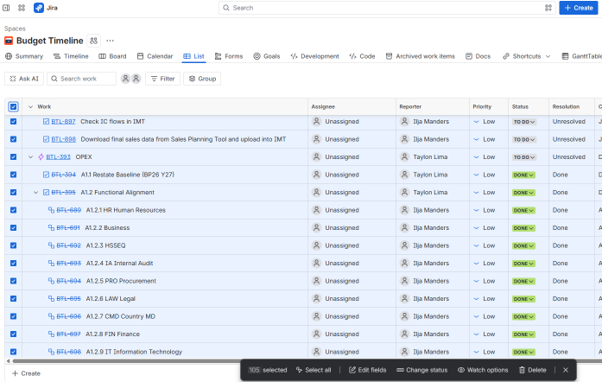
Historically, we were able to export the complete Jira structure (Epic → Task → Subtask) using the following method: List view → Expand all items → Select all items → Copy to clipboard. This ensured that all hierarchy levels were included and correctly displayed in Excel, preserving both the structure and layout required for sharing with stakeholders. Recently, this functionality was removed or changed. Since then, we have tested multiple export options, but none provide the required result. The exported data either:

  • Excludes subtasks completely,
  • Does not link subtasks to the correct parent tasks, or
  • Produces a layout that is not suitable for our reporting purposes.

As a result, we can no longer generate a complete and accurate Excel timeline for users outside Jira.


Screenshot of the relevant configuration screen:
 Screenshot.png

Previously the black box showed the option: copy to clipboard.

3 answers

1 vote
Gabriela
Rising Star
Rising Star
Rising Stars are recognized for providing high-quality answers to other users. Rising Stars receive a certificate of achievement and are on the path to becoming Community Champions.
July 7, 2026

Hi @Peter Lie, welcome to the community.

That copy-from-List-view trick got reworked recently, so the dependable route now is the issue search export, not the Timeline or a board (those two drop subtasks and won't carry a layout). Go to Filters / your Issues search and run a query that returns subtasks too — querying the whole project does, since subtasks are separate work items, or use parentEpic = "EPIC-KEY" for a single tree. Then Export → Export Excel CSV (all fields).

The all-fields export gives you a Parent column holding the parent key for both the story→epic and subtask→task links, so you can sort or group on Parent in Excel and rebuild Epic → Task → Subtask. It exports flat rather than indented, so you'd shape the tree in the sheet, or use a hierarchy app like Structure if you want it pre-built. Plans exports the tree directly, but that's Premium, not Standard.

https://support.atlassian.com/jira/kb/retrieve-all-child-and-linked-work-items-of-an-epic-in-jira-cloud/

Peter Lie
I'm New Here
I'm New Here
Those new to the Atlassian Community have posted less than three times. Give them a warm welcome!
July 7, 2026

Thank you! I will try out asap.

0 votes
Rahul_RVS
Atlassian Partner
July 7, 2026

Hi @Peter Lie 

Welcome to the community !!


If you are open to try out for this requirement, take a look at,

Agile Tools

The app allows you to view your issues in a list view along with the linked issues shown as child issue. Also you can filter your child issues with multiple criteria.

The export feature of the app maintains the parent child relationship as shown in the video below.

Do give it a try.

Disclaimer : I am one of the app team member


Epic Hierarchy - CSV export - animation.gif

0 votes
Aron Gombas _Midori_
Community Champion
July 7, 2026

 Try exporting with the Better Excel Exporter app!

It integrates with various type of Jira data and third party app data. It supports the epic, work item, sub-task hierarchy.

Here is a sample:

jira-excel-export-advanced-roadmaps (1).png

As you mentioned you re-create this export periodically. If so, the companion Better Excel Automation will be useful, because it can automatically re-create the export based on a  custom schedule and email the resulted file. I am quite sure that SharePoint can fetch files from email inboxes, thus you could fully automate the process!

(Discl. this paid and supported app is developed by our team. Free for 10 users.)

Suggest an answer

Log in or Sign up to answer
DEPLOYMENT TYPE
CLOUD
PRODUCT PLAN
STANDARD
PERMISSIONS LEVEL
Product Admin
TAGS
AUG Leaders

Atlassian Community Events