We're moving! The community forums are migrating to a new platform on September 22. Learn more
×Community resources
Community resources
Community resources
Errors when trying to import a very basic CSV file

Hello
I'm trying to import 43 new stories into an existing Space using a CSV file. I have set the CSV delimiter to ';' and mapped the three fields, but keep getting the same errors, as shown below:

This is a sample of the data I'm trying to import:

Any advice please 🙏
4 answers
1 accepted

Hi Maxine - Welcome to the Atlassian Community!
Is there a reason you are not using the standard Comma as your separator?
Hi @John Funk
The file was provided by someone else and they had used this format. I have now tried with a ',' delimeter too, and get the same error.
You must be a registered user to add a comment. If you've already registered, sign in. Otherwise, register and sign in.
So in your spreadsheet tool, but the values in different columns and drop the separator in the spreadsheet. Then save as a CSV file. When you import then you will map the columns of your spreadsheet to the Jira fields.
You must be a registered user to add a comment. If you've already registered, sign in. Otherwise, register and sign in.
Hey @John Funk , sorry, I'm not sure what you mean by this :( When creating the Excel file, each value is in a separate column:

You must be a registered user to add a comment. If you've already registered, sign in. Otherwise, register and sign in.
Thanks for that. So, you are then saving as a CSV file and doing the import - correct? And you choose the comma as the separator, correct? And you still get the error, correct?
I suspect the import is not liking the / and maybe the & either. Try replacing those with something else like and or maybe a dash. Then save and try the import again.
Or just save it separately and delete out everything but one or two rows without those special characters and see if those work.
You must be a registered user to add a comment. If you've already registered, sign in. Otherwise, register and sign in.

As I recall when saving a CSV file in Excel there is also a field to select the format, and there you should be selecting UTF-8.
I no longer have the Excel app so I can't get a screen image of that. I found this image, but I don't know if it will match your Excel version.
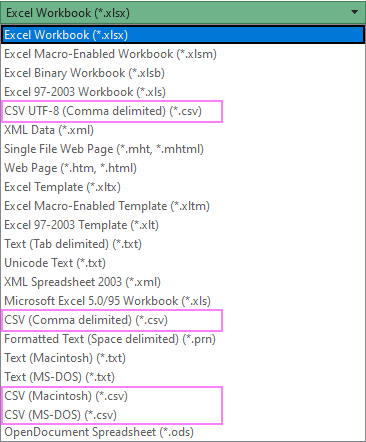
You must be a registered user to add a comment. If you've already registered, sign in. Otherwise, register and sign in.
Alas, following all of the above, I still get the same errors :(

You must be a registered user to add a comment. If you've already registered, sign in. Otherwise, register and sign in.
Can you confirm that you are able to manually create individual issues in that same project through the UI?
You must be a registered user to add a comment. If you've already registered, sign in. Otherwise, register and sign in.
I discovered I needed to specify the parent when adding a work type manually. I therefore updated my CSV file as follows:

I also tried it with the Parent ID in full, e.g. PRO-81.
The only mapping option for issue ID was External Issue ID and the only option for Parent ID was Parent. Neither worked, resulting in the error: You have to define which CSV column maps to Issue Id if you want to import parents.
You must be a registered user to add a comment. If you've already registered, sign in. Otherwise, register and sign in.
I tried to do an import myself linking the items as children of an existing Epic and ran into problems also.
I played with a few different methods and got different errors, but could not get it to work.
There is currently an unresolved Bug that concerning linking a child issue to an Epic when both are being created in the same CSV import file. I think that the problem may extend to linking imported issues to a pre-existing Epic also.
I'm going to open a support case with Atlassian. I'll report back here what I learn.
You must be a registered user to add a comment. If you've already registered, sign in. Otherwise, register and sign in.
I found the bug is already documented:
You must be a registered user to add a comment. If you've already registered, sign in. Otherwise, register and sign in.
You must be a registered user to add a comment. If you've already registered, sign in. Otherwise, register and sign in.
Do you have some type of validation on the workflow to force the Parent field to be mandatory? If yes, can you disable that long enough to run your import to get the issues created and then do a bulk change to add the parent?
You must be a registered user to add a comment. If you've already registered, sign in. Otherwise, register and sign in.


Agreed if you can get the items imported and do the "Parent" connection in Bulk Edit, that is a viable work around.
One more suggestion --- you aren't violating your Work Item Hierarchy by chance, are you? (Trying to hook up the wrong level Parent).
And as a reminder -- to eliminate the "do you have valid data" question,
- Try importing 1 and only 1 issue to see if it works
- double check your editmetadata with the REST Endpoint I showed below. I suggest you create 1 new work item through the UI and do nothing else. Run the endpoint below to see what was actually inserted. Make sure your CSV is covering those fields
https://splitdimedata.atlassian.net/rest/api/3/issue/SSSB-300?expand=editmeta
You must be a registered user to add a comment. If you've already registered, sign in. Otherwise, register and sign in.
@John Funk great minds think alike! This is my plan 😁 Thank you.
You must be a registered user to add a comment. If you've already registered, sign in. Otherwise, register and sign in.
Hello @Maxine Freedman-Thompson
Welcome to the Atlassian community.
The CSV file needs to use a comma as the delimiter, not a semi-colon. Have you done something to tell Jira that you are using a semi-colon instead? I did not find a way to do that (yet).
Into what type of space are you trying to import the data? Get that info by clicking on the ... next to the space name in the panel on the left. The type information is at the bottom of the pop-up.

What is the field mapping that you have set up for this import?
You must be a registered user to add a comment. If you've already registered, sign in. Otherwise, register and sign in.
Hi Trudy
Is this Advanced option not for specifying the delimeter:

You must be a registered user to add a comment. If you've already registered, sign in. Otherwise, register and sign in.
It's a Company Managed Space and I don't change the field mapping.
You must be a registered user to add a comment. If you've already registered, sign in. Otherwise, register and sign in.
@Trudy P Claspill I get the same error even if I upload the CSV file with ',' as the delimiter.
You must be a registered user to add a comment. If you've already registered, sign in. Otherwise, register and sign in.
You are correct @Maxine Freedman-Thompson .
I never look at the advanced options because I am either creating my CSV files with a text editor and using commas, or when using a tool like Excel I put each field in a separate column and then save the file with the CSV format option, as @John Funk suggested in his reply.
You must be a registered user to add a comment. If you've already registered, sign in. Otherwise, register and sign in.
You must be a registered user to add a comment. If you've already registered, sign in. Otherwise, register and sign in.
You may be doing everything perfectly and may not realize that no matter how hard you try, Excel does something to alter your data when the file is saved.
Open the file in a good text editor and see if you can spot an issue. I don't even recall what tripped me up before... but I finally corrected the CSV format using TEXT, not Excel.
Good luck!
You must be a registered user to add a comment. If you've already registered, sign in. Otherwise, register and sign in.
Thanks @David Nickell but I can't spot any issues :(
You must be a registered user to add a comment. If you've already registered, sign in. Otherwise, register and sign in.
- What is the non-ascii character warning you are getting? Maybe a Line Feed ? (I see the warning in your screen shot)
- Back slashes "/" are sometimes used as escape characters.
- Are there any required fields either in our field context or workflow steps?
Try importing a single issue. Debug one and then add a second.
You can also see the JSON representation of an existing issue using the REST API in a browser like this: https://splitdimedata.atlassian.net/rest/api/3/issue/SSSB-300?expand=editmeta
You'll get something like this which will help check your required fields
"expand": "renderedFields,names,schema,operations,editmeta,changelog,versionedRepresentations,customfield_10210.cmdb.label,customfield_10210.cmdb.objectKey,customfield_10210.cmdb.attributes,customfield_10010.requestTypePractice",
  "id": "10868",
  "self": "https://splitdimedata.atlassian.net/rest/api/3/issue/10868",
  "key": "SSSB-300",
  "editmeta": {
    "fields": {
      "summary": {
        "required": true,
        "schema": {
          "type": "string",
          "system": "summary"
        },
        "name": "Summary",
        "key": "summary",
        "operations": [
          "set"
        ]
      },
      "parent": {
        "required": true,
        "schema": {
          "type": "issuelink",
          "system": "parent"
        },
        "name": "Parent",
        "key": "parent",
        "hasDefaultValue": false,
        "operations": [
          "set"
        ]
      },
You must be a registered user to add a comment. If you've already registered, sign in. Otherwise, register and sign in.
Also --do you have create issue permission in the project? A CSV import mimics a create from the UI. All rules and permissions apply.
You must be a registered user to add a comment. If you've already registered, sign in. Otherwise, register and sign in.

You must be a registered user to add a comment. If you've already registered, sign in. Otherwise, register and sign in.