Community resources
Community resources
Community resources
Convert JIRA tickets to Confluence Page

Hi
I have a group of JIRA tickets bundled into a Release. For each release, I want to extract most of the information of the JIRA tickets, especially the comments, screenshots, all into a confluence page identifying the release.
I am able to use Rovo to extract the information but having a hard time extracting the screenshots.
Does anybody have a way around this?
Thanks.
5 answers

Hi @Chan_ Renee
Atlassian Rovo has OCR capabilities for individual image attachments, but it can't directly download, zip, or bulk export screenshot files from Jira tickets.
Rovo only reads image text for analysis.
Can you tell me more about OCR capabilities for individual image attachments?
Can the image filename or raw URL link of the image attachment be replaced with the actual image if we ask Rovo to do that?
You must be a registered user to add a comment. If you've already registered, sign in. Otherwise, register and sign in.
Hi @Chan_ Renee
There are no options in the OCR for this, it can only read the attachment.
It can't replace any information with the actual file.
You must be a registered user to add a comment. If you've already registered, sign in. Otherwise, register and sign in.

Hi @Chan_ Renee, I have a solution for you if you're open to Marketplace apps.
AutoPage lets you define automation rules that generate (and keep in sync) Confluence pages from Jira issues using Confluence templates you build with special placeholder macros. The one that's directly relevant to your problem is the Attachments macro: it publishes the files attached to a Jira issue (screenshots, PDFs, whatever) directly onto the generated Confluence page. Currently, AutoPage doesn't display comments but this is under development and will be available very soon - I work with the team behind the app (full disclosure), and I can keep you updated. And it does already display other system fields, including the description, as well as the linked issues. Here is an example of the outcome:

Let me know if you have questions. The app is free up to 10 users, so you can also give it a try on your own.
You must be a registered user to add a comment. If you've already registered, sign in. Otherwise, register and sign in.
@Monika Ambrozowicz_Seibert_ thanks for this information. I'll have to pass that to our admin team that support JIRA and Confluence to see if they have heard of that app.
You must be a registered user to add a comment. If you've already registered, sign in. Otherwise, register and sign in.

I would like to use this opportunity to suggest taking a look at the Release Management app for Jira that we created to simplify release management, introduce a release workflow, create cross-project versions, package them into meta-releases, and, of course, generate pixel-perfect release notes and export them to Confluence.
You can create many release note templates for various purposes, and they will be applied to the release hierarchy defined in the app, of course, and then exported to Confluence.
I am happy to share more details if needed.
Thanks,
Yuri
You must be a registered user to add a comment. If you've already registered, sign in. Otherwise, register and sign in.

Hi @Chan_ Renee
For this kind of use case (inserting a batch of Jira tickets data into a Confluence page, including attachments like screenshots), you might want to look into our app Elements Publish.
It's built specifically to generate Confluence pages from Jira tickets, and it does carry over attachments/screenshots along with fields, comments, and formatting, using Confluence templates or your own page.
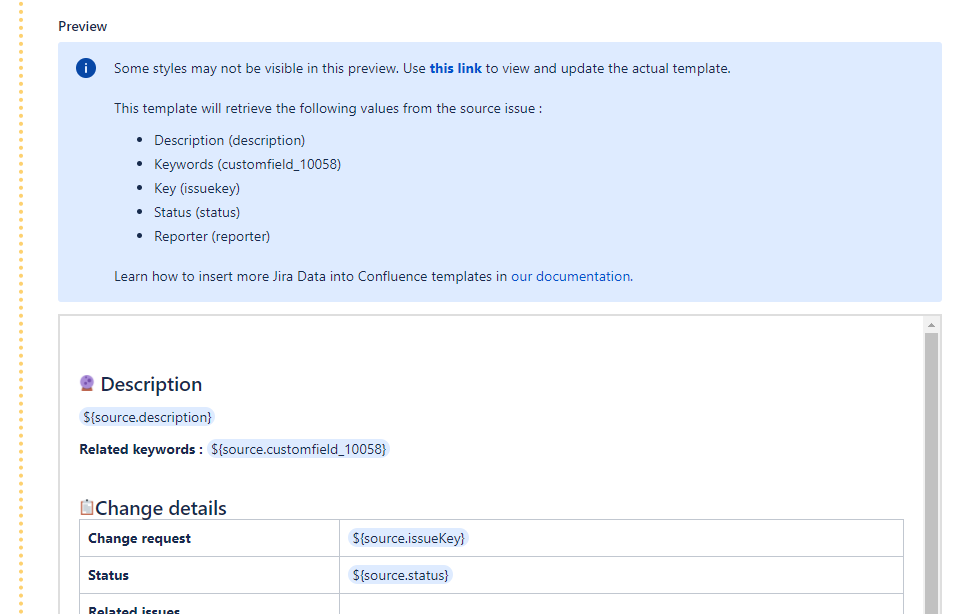
This should solve the screenshot extraction gap you're hitting with Rovo, since attachments are pulled in as part of the page content rather than just referenced.
You can even synchronize the fields in case you want the Confluence page to stay up to date.
You can check our documentation for more details on templates and configuration options.
You must be a registered user to add a comment. If you've already registered, sign in. Otherwise, register and sign in.


hi @Chan_ Renee
Rovo’s OCR capability and attachment handling are two different things.
OCR allows Rovo to analyse an image and extract or summarise the text it contains. It doesn’t mean Rovo can automatically collect, download, or embed all image attachments from multiple Jira issues into a Confluence page.
If your goal is to generate release documentation that includes issue details, comments, and screenshots, I’d recommend separating the solution into two parts:
Use Rovo for AI tasks
- Summarise the Jira issues
- Summarise comments.
- Extract insights from individual screenshots if needed.
Use automation for file handling
- Retrieve the issues in the release using JQL or the Jira REST API.
- Retrieve the attachments for each issue.
- Upload or embed those attachments into the Confluence page using the Confluence REST API or an automation solution such as Forge, ScriptRunner, or another integration platform.
This approach lets each tool do what it’s does best: Rovo generates the narrative, while automation handles the binary files.
If you’re hoping for a completely native Rovo solution that automatically copies all screenshots from a release into a Confluence page, I don’t believe that capability exists today.
As a workaround, you could also include links to the original Jira issues or attachments in the generated release notes, allowing readers to access the screenshots directly while Rovo provides the AI-generated summary.
Hope it helps.
You must be a registered user to add a comment. If you've already registered, sign in. Otherwise, register and sign in.
You must be a registered user to add a comment. If you've already registered, sign in. Otherwise, register and sign in.

You must be a registered user to add a comment. If you've already registered, sign in. Otherwise, register and sign in.