The Atlassian Community Forums are currently in read-only mode. We will be relaunching on a new platform on September 22 (read more here). We apologize for the extended downtime. For concerns or questions, please email communitymanagers@atlassian.com. See you on the other side, on the new Atlassian Community Forums! :)
×Community resources
Community resources
Community resources
Clone the assigned person to a different project

I have an automation running in my company that clones a specific service request ticket into a Kanban project.
Now I’m having trouble transferring the assigned person to the cloned ticket.
I have a custom field in the form with a few options. Depending on the selection, the ticket should be assigned to a person. It all works, but the assigned person is only set in the original ticket.
3 answers
Comments for this post are closed
Community moderators have prevented the ability to post new answers.

Hi @Dominik Boehm,
This is a common limitation with native Jira Automation, when you "create issue" or "clone" across projects, some fields (like Assignee) don't always carry over cleanly, especially when the value depends on a custom field selection rather than a direct mapping.
If you want a more reliable way to handle this, I can suggest trying our app Elements Copy & Sync. It lets you clone tickets from one project to another (Kanban included) while mapping field values between them, so the Assignee field is carried over correctly on the cloned ticket rather than only staying on the original.
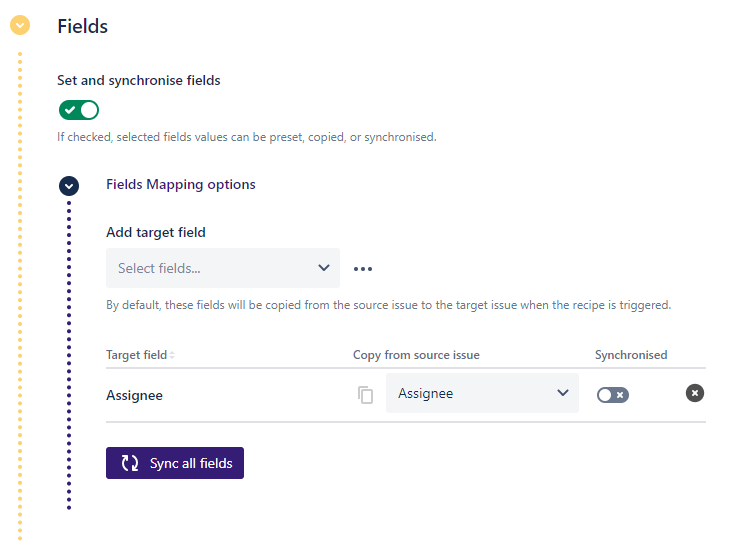
You can check the different steps to do field mapping here. Don't hesitate to try the app it's free for 30 days.

If you are struggling with cloning via Jira Automations and are willing to use a Marketplace app, you can use a purpose-built app like our Deep Clone for Jira.
For more advanced scenarios, you can also create a Deep Clone Preset to define via the Field Editor feature exactly which fields (like Assignee) should always be cloned to your Kanban project.
You must be a registered user to add a comment. If you've already registered, sign in. Otherwise, register and sign in.

To better understand what’s going wrong, could you share a few more details about your current setup?
- A screenshot (or description) of your automation rule
- Any errors or warnings shown in the automation audit log
- What you’ve already tried so far to set the assignee on the cloned issue
- The project types involved (e.g., JSM vs Jira Software, company-managed vs team-managed)
- Whether the Assignee field exists and is editable in both source and target projects
These details will help narrow down whether this is a field mapping issue, permissions constraint, or something specific to how the cloning action is configured.
You must be a registered user to add a comment. If you've already registered, sign in. Otherwise, register and sign in.
Thanks for your reply!
I attached two screenshots of the current automation rule. This rule works fine but doesn't clone the assignee to the cloned ticket. Because of that, the Audit Log looks fine and there aren't any errors.
I tried different solutions including a new automation rule which triggers if a new issue is created and sets the assignee for the KANBAN project. This rule never triggered. I also tried the trigger "work item updated" which also doesn't work.
Since the asignee in the original ticket is set correct i assume that the clone either doesn't receive the assignee before the ticket is cloned, or that the ticket is cloned already before it could fetch the assignee.
In the last screenshot you should see, that the "Assignee field" exists in the KANBAN space. It also exists in the main space.
We use JSM.
Kind regards


You must be a registered user to add a comment. If you've already registered, sign in. Otherwise, register and sign in.
@Dominik Boehm Could you please confirm whether the assignee has access to the Jira product, especially if the target project is associated with Jira?
Additionally, ensure that the user has the “Assignable User” permission in the target project. You can verify this by navigating to the ⚙️ → System → Permission Helper.
In the Permission Helper:
- Select a user (for example, the assignee who is not being copied via automation)
- Choose the relevant (cloned) work item
- Check for the “Assignable User” permission
This should help identify whether the issue is related to permissions.

You must be a registered user to add a comment. If you've already registered, sign in. Otherwise, register and sign in.
Dear @Akash Singh
Thanks for your reply!
I looked at the permission helper before and since i put myself in the test automation i had all the access.
Yesterday i worked on multiple workarounds. Right now if i manually change the field "Key-User aus Bereich" which is shown as "FI" in the screenshot to a different value i selected in the automation the assignee changes to myself as you can see in the second screenshot. But it still seems, that the cloning of the tickets causes the issue. I think the automation is cloning the ticket, but my second automation with the trigger "Issue created" doesn't trigger because it doesn't accept a clone as an created issue.


You must be a registered user to add a comment. If you've already registered, sign in. Otherwise, register and sign in.
@Dominik Boehm This does seem like unusual behavior, as I was able to set the Assignee using the same automation action successfully on my own site. I’d recommend checking the work item history as well to confirm there isn’t another automation rule, workflow post-function, or third-party app that may be clearing the Assignee field immediately after the work item is created.
Additionally, in your second automation rule that triggers on work item creation, make sure the following checkbox is enabled under the rule’s Flow details section. Since the work item is being created by another automation rule, this option is required for the second rule to execute correctly, as shown below.

You must be a registered user to add a comment. If you've already registered, sign in. Otherwise, register and sign in.
Comments for this post are closed
Community moderators have prevented the ability to post new answers.

You must be a registered user to add a comment. If you've already registered, sign in. Otherwise, register and sign in.