Community resources
Community resources
Community resources
Can Jira automatically create subtasks for generic repeatable stories?

I'm a Release Specialist and I coordinate releases for separate platforms within the company. When I'm assigned a release, I create a "release" story. As the release is usually a monthly release, I create 2 stories, 1 for each 2 week sprint. Basically, I create a Release Preparation story and a Release Deployment story. Both of these stories have the same repeatable subtasks assigned every time. At the moment I have to create the subtasks manually every time I add the stories to the sprint. Is there a way of adding a set of subtasks automatically to these stories?
4 answers
3 accepted

Hi @Si Scott
- Create an automation rule that triggers when a specific story is created. This will automatically populate your "Release Preparation" and "Release Deployment" stories with the required subtasks.
- Using Issue Templates (Marketplace Apps): Tools such as Deep Clone or Issue Templates for Jira let you define a template structure, including stories and subtasks, and clone the entire hierarchy with one click.
- Copying Issues: You can manually clone a previous month's story and its subtasks, although this method is less automated than using the automation engine.
I hope this helps.
Cheers, Martin

Hello @Si Scott
Welcome to the Atlassian community.
Adding to @Martin Runge 's answer just a little bit...
Regarding option 1 to use Automation Rules for this requires that you have permission to create Automation Rules. Jira app admins have this permission and it may also be granted to users who are Project/Space Administrators to create rule within their projects. The average end user of Jira does not have permission to create Automation Rules.
The rule would look something like this:

The trigger is Work Item Created. The rule will be triggered for every item that gets created in the project/space.
That is followed with Conditions to figure out if the trigger item is one to which you actually want to add the subtasks. You can set conditions similar to how you would construct an item search. You'll need to figure out elements of your Release Preparation and Release Deployment stories that makes them uniquely identifiable.
That is followed by the Create Sub-task action.
If you only fill in the Summary of the subtasks, you can create multiple subtasks as shown in the box on the right.
If you need to fill in additional fields for your subtasks, click the Add Fields button in that box and it will split out a separate action to give you the option to select more fields to fill.

If the two Release stories need different subtasks you would have a rule for each story.
You must be a registered user to add a comment. If you've already registered, sign in. Otherwise, register and sign in.

Hi @Si Scott
I can suggest trying our app Elements Copy & Sync to automatically create subtasks for your releases.
It only takes one single configuration and is very easy to set up.
Here are the steps:
- Create a recipe called "Create subtasks from a source issue"
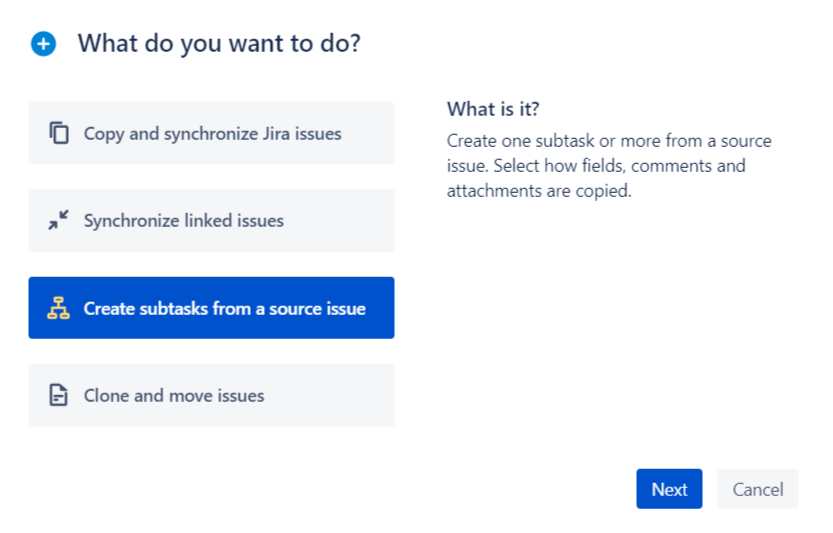
2. Define your source and target spaces
3. Define which subtask should be created and apply static or dynamic value on the fields of your choice
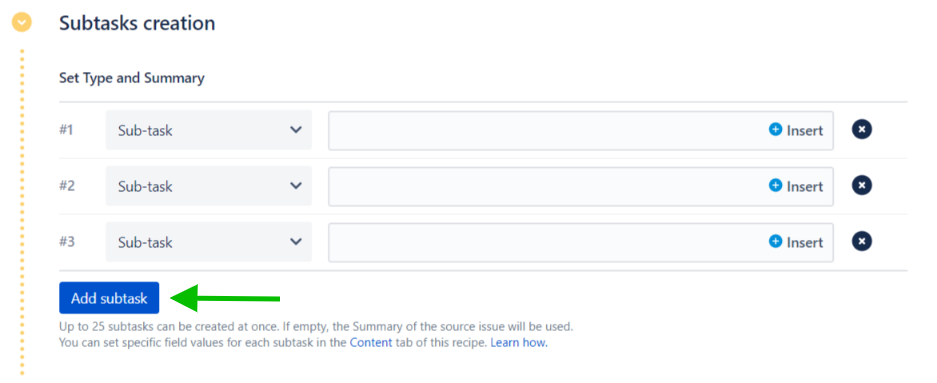
4. You can trigger this recipe directly on an issue, with a post-function or even Automation
Don't hesitate to try it to see if it fits your use case!
You must be a registered user to add a comment. If you've already registered, sign in. Otherwise, register and sign in.
You must be a registered user to add a comment. If you've already registered, sign in. Otherwise, register and sign in.

Hi @Si Scott
Welcome to Atlassian Community!
Yes, you can do this with automation. One option is to trigger on when the sprint is created to create both your stories and linked subtasks. Or you can trigger on when the sprint is set in the story, The first one is pretty straight forward, the second option would require a check to see if the subtasks already exists in order to cover if your stories are added to multiple sprints.
You must be a registered user to add a comment. If you've already registered, sign in. Otherwise, register and sign in.
You must be a registered user to add a comment. If you've already registered, sign in. Otherwise, register and sign in.

hi @Si Scott !
Indeed, that's not the most exciting task to do manually. This can be handled with Jira work item templates - save once, reuse multiple times. Jira doesn't offer such a feature natively, but there are third-party apps that can do the trick. I can recommend our solution Smart Templates for Jira.
Here's how you can do this:
1) Create a "model" ticket for your Release Preparation story and a Release Deployment story. Add all the subtasks you need, fill out the fields such as description, assignee, etc. Add variables, such as {{sprint_number}} or {{feature_name}}.
2) Save these tickets as templates with the help of Smart Templates. The app allows you to save any work item or set of work items as a reusable template - regardless of how complex the set is. In your case, you'll have two templates, each consisting of a Story + Subtasks.
3) Set up a schedule to auto-generate these stories every 2 weeks. This can easily be done with Smart Templates' native Scheduler. If you prefer manual generation, you can also generate your Story + Subtasks set with one push of a button. Here's what the Sheduler look like:

And here's an example of a Jira issue template created with Smart Templates. In this case, it's an Epic + Tasks + Checklists for bi-weekly regression testing.
By the way, if your subtasks inside those stories represent step-by-step actions rather than distinct chunks of work, you can also consider using checklists instead of subtasks. Here, checklists were added with Smart Checklist for Jira.
I hope this helps!

You must be a registered user to add a comment. If you've already registered, sign in. Otherwise, register and sign in.

You must be a registered user to add a comment. If you've already registered, sign in. Otherwise, register and sign in.