Atlassian has recently announced support for Security Info Provider apps in Forge. Here I will take you through how this feature works for customers, and how to implement a Security Info Provider app.
What is a Security Info Provider?
A Security Info Provider app surfaces vulnerability information to a Jira space. Vulnerabilities appear in the Development tab for a Jira Software space.
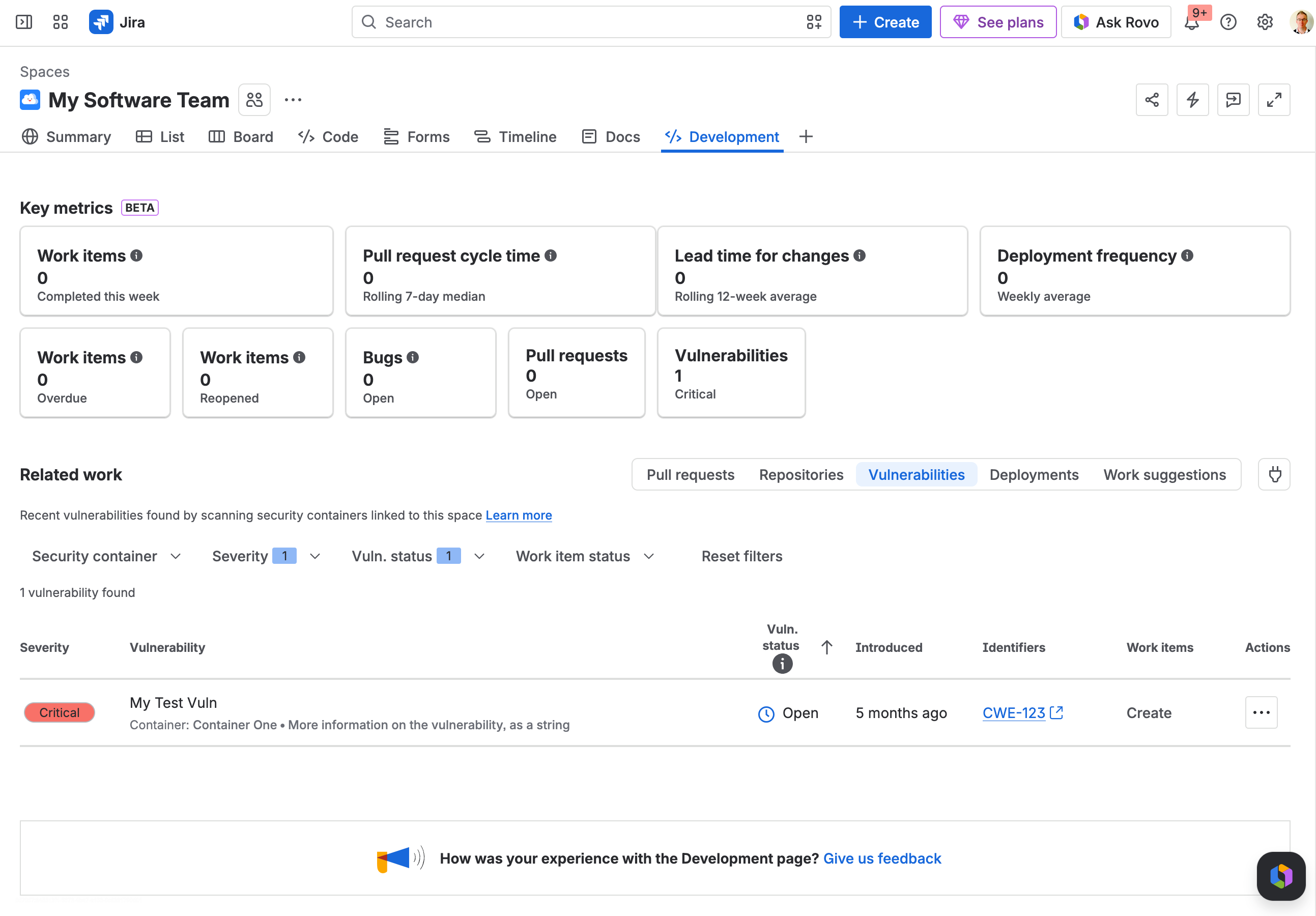
From here customers can create a new work item for that vulnerability, or link the vulnerability to an existing work item. This helps them see new vulnerabilities that your app detected, and helps them track the progress of the work to address that vulnerability in Jira.
A Security Info Provider app defines:
-
Workspaces. A workspace can contain one or more Containers.
-
Containers. A container can contain one or more Vulnerabilities. A Jira Software Space can be connected to containers.
-
Vulnerabilities. A vulnerability describes a potential risk that may be relevant to the customer. It is up to your app to decide which things should be surfaced to the customer. Customers can view vulnerabilities in the Jira Software space that is linked to the container.
If you are familiar with the jiraSecurityInfoProvider module in Atlassian Connect, you will notice that it works in a very similar way. That is, this feature is designed to support such Atlassian Connect apps moving to Forge. Remember that Atlassian Connect reaches end-of-support soon, so this provides a way for security info provider apps to take advantage of the new capabilities that Forge provides.
Requirements for building an app
These are the main pieces needed to build a Forge Security Info Provider app. I will walk through them in more detail below.
-
Forge manifest.yml. Every Forge app is defined by its manifest.yml file.
-
A legacy Connect app key. For backward compatibility reasons, security info provider apps need a Connect key. If you are migrating a Connect app to Forge you will use the same key in Forge. (If you are creating a completely new app, you’ll still need to define one, even if there are no other Connect modules in your app. See https://jira.atlassian.com/browse/ECO-1602)
-
A Jira admin page. Your app should define a jira:adminPage module that uses either Forge UI Kit, or a Forge native UI. This is needed so your app can tell Jira that it is configured (and so Jira should start to surface vulnerability information). You may wish to use this page to configure other settings for your app in Jira.
-
A back end server process. There are integration points (which I will describe in more detail later) where Jira will make REST calls back to your app. You will need a back end (defined as a Forge Remote in your manifest) that is reachable on the Internet, where Jira can call you.
-
REST endpoints. Your back end server process will need to be able to receive calls for:
-
Describing the workspaces your app provides.
-
Describing the containers your app provides.
-
Searching for containers by name in a workspace.
-
Receiving an update that a vulnerability is linked to a Jira work item.
-
Receiving an update that a vulnerability is un-linked from a Jira work item.
-
Being notified that your app was installed or uninstalled. If your app has migrated from Atlassian Connect, you may wish to use the installation notification to ask Jira about the Connect client ID that was associated with your app if it was previously installed for that customer.
-
A way to make REST calls to Jira for:
-
Telling Jira about the IDs of the workspaces your app provides. (Jira will use these IDs to call you, asking for more details about those workspaces.)
-
Telling Jira about the vulnerabilities your app has found, so Jira can show those vulnerabilities to customers in the appropriate Jira Software space.
You may wish to provide:
-
A REST endpoint that tells you when your app was installed (or uninstalled). If you are migrating from Connect, this will be a useful place to link the Connect version’s client ID with the Forge installation.
-
A REST endpoint to receive periodic updates to the authentication token you will need to authenticate calls back to Jira. While you can request the authentication token to be supplied with any of your endpoints, configuring one that gets called periodically ensures that you always have current authentication information for making calls back to Jira about any of your installations.
If a customer installs a security info provider app that correctly defines the appropriate REST endpoints for Jira to call, then the app will be configurable in the Jira UI. (Note that Jira won’t make calls to the app until the app reports that it is configured, generally through it’s admin page.)
Let’s build it!
Create a Forge app
If you are not familiar with the Forge platform, then Getting started with Forge is a great place to start. It covers setting up Node.js and installing the forge CLI, which we will use here.
We use the forge create command to get started. Because we know our app will need an admin page in Jira, we will use the template for jira-admin-page.
Start with a template. Each template contains the required files to be a valid app.

? Select an Atlassian app or platform tool: Jira
? Select a category: Custom UI
? Select a template: jira-admin-page

 ✔ Creating app...
This will create:
-
A manifest.yml file (your app’s manifest)
-
A handler resolver function in src/index.js
-
A simple admin page in static/hello-world. The name of the admin page will be the name you gave your app in forge create.
-
Other support files
Defining your Connect app key
If you have an existing Atlassian Connect security info provider app, then you should use the app key that is used by that app. This allows your customers to upgrade from your Connect app to the Forge app, and preserve any vulnerability data. It is the Connect app key that will link the vulnerability data from the old Connect app to the new Forge app.
If you are creating a brand new app (with no legacy Atlassian Connect installations to migrate from), it is still necessary to define a Connect app key. (See https://jira.atlassian.com/browse/ECO-1602) This could be something like com.mycompany.myapp.security.
Edit your manfiest.yml file to set the key (as app.connect.key)
app:
  runtime:
    name: nodejs24.x
    memoryMB: 256
    architecture: arm64
  id: ari:cloud:ecosystem::app/1234567-abcd-1234-dcba-987654321
  connect:
    key: com.mycompany.myapp.security
Jira admin page to configure
Your app needs an admin page that can set the is-configured application property for your app. This tells the UI whether it should display vulnerability information or not. The property uses your application’s Connect key, so if you are migrating from Connect, then this property is likely already set for customers, as Connect used a similar mechanism.
First we will define a function that can set the is-configured property. We can use the exported handler from the src/index.js that got created. We will define a setConfigured function that sets the is-configured application property. This function needs to know the Connect key. Make sure this is the same value as is configured in your manifest, or else the app won’t have permission to change this application property.
import Resolver from '@forge/resolver';
import api, { route } from '@forge/api';

const resolver = new Resolver();

resolver.define('setConfigured', async () => {
    // This needs to match the connect key in the manifest!
    const APP_KEY = 'com.mycompany.myapp.security';

    const response = await api.asApp().requestJira(
        route`/rest/atlassian-connect/1/addons/${APP_KEY}/properties/is-configured`,
        {
            method: 'PUT',
            headers: {
                'Content-Type': 'application/json',
            },
            body: JSON.stringify({ isConfigured: true }),
        }
    );

    if (!response.ok) {
        const errorBody = await response.text();
        console.error('Failed to set is-configured property. Status:', response.status, errorBody);
        throw new Error(`Failed to set is-configured: ${response.status}`);
    }

    return { success: true };
});

export const handler = resolver.getDefinitions();
Possibly you might want a way to check if your app is configured (by doing a GET to the same API) or to “un-configure” your app, in which case you could set the isConfigured value to false.
We can use the invoke function from <a href="https://community.atlassian.com/forums/user/viewprofilepage/user-id/4918321">@Forge</a>/bridge to call the setConfigured function we just defined.
I’m going to create an admin page called AdminPage.jsx and I’m going to put it in src/frontend.
import React from 'react';
import ForgeReconciler, { Button, Text } from '@forge/react';
import { invoke } from '@forge/bridge';

const ConfigurePage = () => {
    const handleConfigure = async () => {
        try {
            await invoke('setConfigured');
        } catch (error) {
            console.error('Error saving configuration:', error);
        }
    };

    return (
        <>
            <Text>Click the button below to mark this app as configured.</Text>
            <Button
                appearance="primary"
                onClick={handleConfigure}
            >
                Set Configured
            </Button>
        </>
    );
};


ForgeReconciler.render(
    <React.StrictMode>
        <ConfigurePage />
    </React.StrictMode>
);
Possibly you would want your admin page to check if the app was configured, have better error handling, and confirm whether the configuration request was successful.
To link this all together we need the following in manifest.yml. Note the useAsConfig: true property. This tells Jira to use this page to configure the app.
modules:
  jira:adminPage:
    - key: security-admin-page
      resource: configure-page
      render: native
      resolver:
        function: resolver
      title: Configure Security Provider
      useAsConfig: true

  function:
    - key: resolver
      handler: index.handler

resources:
  - key: configure-page
    path: src/frontend/AdminPage.jsx
The only thing remaining is a suitable package.json and tsconfig.json. I'm using:
Now you should be able to build. I’m using npm 10.9.2 and node v22.14.0. I built my app using npm install, then forge build (to check for any errors).
Then I deployed my app using forge deploy, and installed my app on my test site using forge install. When you run forge install it will ask you what product you are installing your app on (choose Jira), and then the URL for your site, like mysite.atlassian.net. (Maybe test your app on a sandbox instance.)
Now in Jira click the “…” next to Apps in the menu and choose Manage Apps. (At the moment in June 2026 you will get a page telling you that App management has moved to Administration, so click Take me there. Click the “…” to the right of your app, and click configure.)
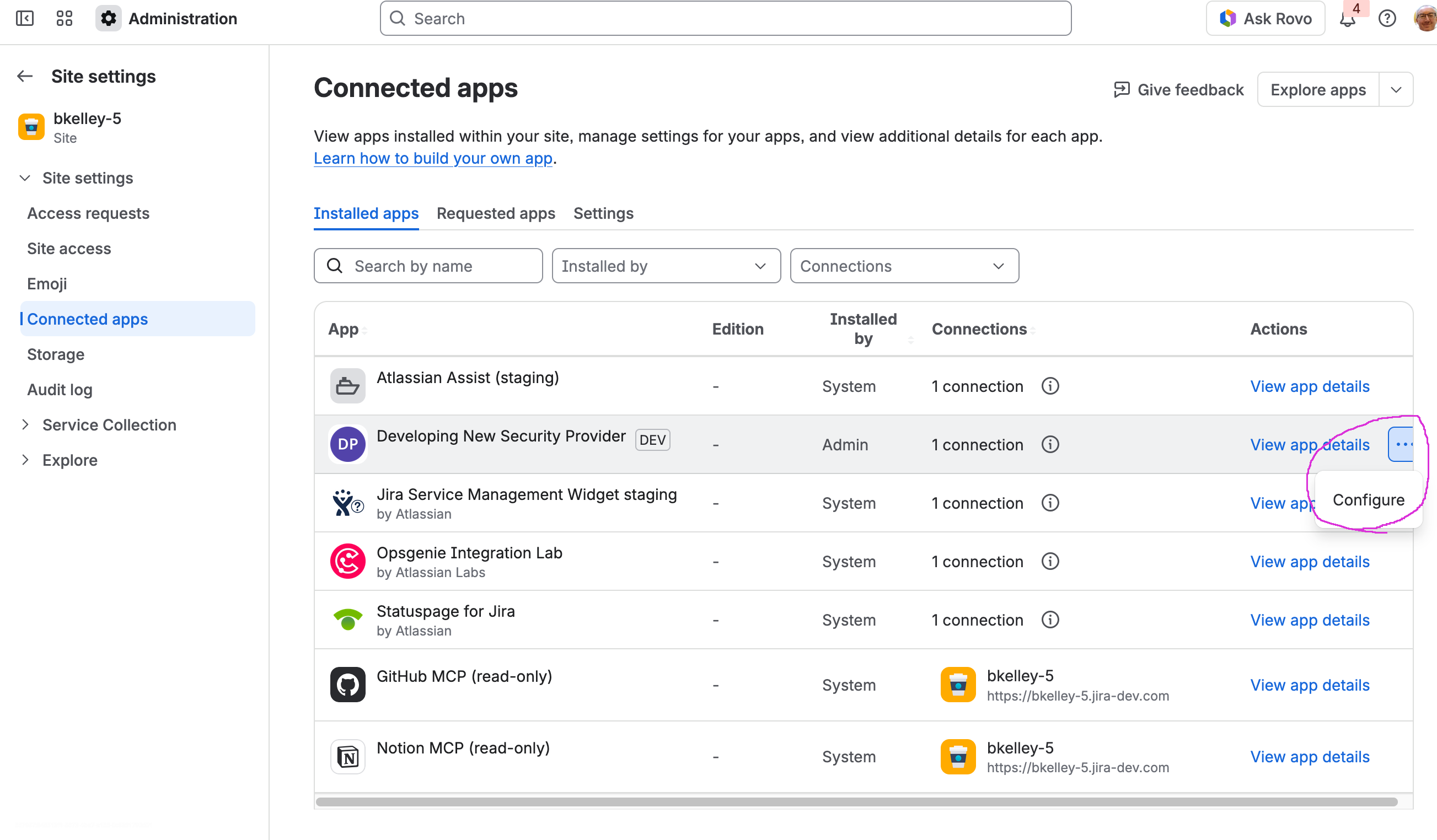
You should see the configuration screen we defined earlier.
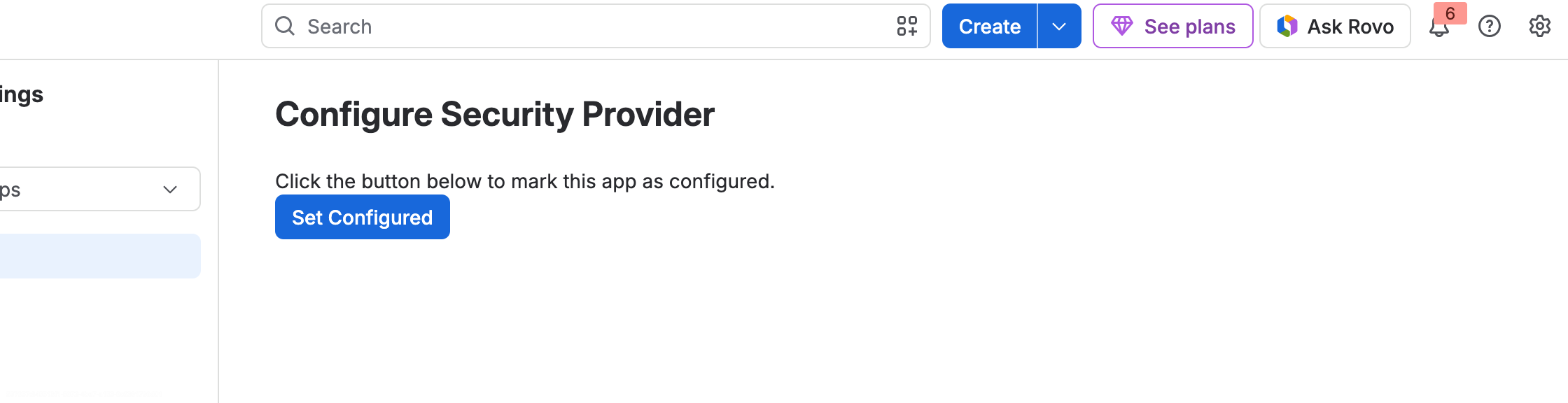
Clicking Set Configured should cause the application property to be set. Because I built a lightweight admin screen, I have no way of knowing if it worked, so I went into “Download logs” from the View app details screen.
ERROR 2026-06-25T04:37:42.789Z 2.0.0 e3d2febd-3729-4769-8009-c248931aa7c3 resolver Failed to set is-configured property. Status:, "403", "{\"code\":403,\"message\":\"The app is not installed on this instance\"}"
Oops. I forgot to set the Connect key for my app. I had to go back and fix my manifest, redeploy, and reinstall.
Back end server process - Forge Remote Basics
You will need some kind of server running that can receive REST calls from Jira. In this example I’m going to use Java, Spring Boot, and Spring MVC, but anything with good REST and JWT support will work.
Forge Remote essentials is good reading on this topic.
Let’s assume my back end server is running at mycompany.com. I need to define a Forge Remote for this in my manifest.yml.
remotes:
  - key: spring-boot-backend
    baseUrl: 'https://mycompany.com'
Because I’m going to want a current authentication token to call back to Jira, I’m going to define an endpoint just for receiving the authentication token I need. In my manifest I can request periodic calls from Forge to that endpoint.
In my manifest I need to define an endpoint that has the relative path on my site for the endpoint that will receive these tokens, which will be https://mycompany.com/token/receive-token. I set appSystemToken to indicate that I want this endpoint to be sent headers to enable me to authenticate as the app user.
  endpoint:
    - key: token-endpoint
      remote: spring-boot-backend
      route:
        path: /token/receive-token
      auth:
        appSystemToken:
          enabled: true
Any endpoint that enables appSystemToken will cause the header x-forge-oauth-system to be including in requests to my app. This will contain a bearer token I can use to make valid calls back to Jira.
Now I need to request my scheduled trigger so that I always have a current token. To start with I will request this every 5 minutes, but this will mean I get called once ever 5 minutes per installation. This is OK for testing, but this could cause a lot of traffic to your back end in production, so remember to make this longer later. Keep in mind that the token is valid for 4 hours.
modules:

  scheduledTrigger:
    - key: token-sync-trigger
      interval: fiveMinute
      endpoint: token-endpoint
Now to define the Spring MVC endpoint that will receive the tokens. I have omitted a few things here, such as my TokenValidator, the way I extract the claims I need, and my TokenStore that remembers the correct authentication token for each installation.
See here for example code to validate tokens, which checks that the authentication header is signed correctly, and that the audience if my app ID, or here for more information on Forge Invocation Tokens.
@RestController
@RequestMapping("/token")
public class ForgeTokenController {

      private ResponseEntity<Map<String, String>> processToken(
            String authHeader,
            String systemAuthToken
    ) {
        try {
            String token = null;
            if (authHeader != null && authHeader.startsWith("Bearer ")) {
               token = authHeader.substring(7);
            }

            if (token == null) {
                return ResponseEntity.status(HttpStatus.UNAUTHORIZED)
                        .body(Map.of("error", "Missing or invalid Authorization header"));
            }

            JwtClaims claims = tokenValidator.validateToken(token);

            String installationId = tokenValidator.getInstallationId(claims);
            String environmentId = tokenValidator.getEnvironmentId(claims);
            String apiBaseUrl = tokenValidator.getApiBaseUrl(claims);
            String cloudId = tokenValidator.getCloudId(claims);

            TokenInfo tokenInfo = new TokenInfo(
                    systemAuthToken,
                    installationId,
                    environmentId,
                    apiBaseUrl,
                    cloudId,
                    System.currentTimeMillis()
            );

            tokenStore.addToken(tokenInfo);
            logger.info("Token received and stored for installation: {}", installationId);

            return ResponseEntity.ok(Map.of(
                    "status", "success",
                    "message", "Token received and validated",
                    "installationId", installationId
            ));

        } catch (Exception e) {
            logger.error("Error processing token: {}", e.getMessage());
            return ResponseEntity.status(HttpStatus.UNAUTHORIZED)
                    .body(Map.of("error", "Token validation failed: " + e.getMessage()));
        }
    }

    @PostMapping("/receive-token")
    public ResponseEntity<Map<String, String>> receiveToken(
            @RequestHeader("Authorization") String authHeader,
            @RequestHeader("x-forge-oauth-system") String systemAuthToken,
            @RequestBody String body) {

        // For now, we don't care about the body
        return processToken(authHeader, systemAuthToken);
    }
}
If I start my back end server now, I should start to see calls to my /receive-token endpoint.
If I wanted to be called when the app was installed, I could also configure that in my manifest with and endpoint for /token/installed:
  endpoint:
    - key: installed-endpoint
      remote: spring-boot-backend
      route:
        path: /token/installed
      auth:
        appSystemToken:
          enabled: true
And the corresponding trigger:
modules:

  trigger:
    - key: forge-installed-callback
      endpoint: installed-endpoint
      events:
        - avi:forge:installed:app
I would then define an endpoint in my back end that receives POSTs to /token/installed.
Sending data to Jira - Linked workspace IDs
As above, the top level object for security info providers is the workspace. My app needs to make a REST call to Jira to tell it about the workspace IDs my app knows about. (If you have an Atlassian Connect app, you will notice that the process is very similar.)
See the Jira Software Cloud REST API for Submit Security Workspaces To Link.
In order to make this call I need to ensure:
-
My app has the correct scopes. According to the documentation I need read:security:jira, write:security:jira, and delete:security:jira.
-
I have the security token needed to authenticate the call. This is provided by the JWT sent in the scheduled trigger I set up previously.
-
I know the API base URL (through the Atlassian API gateway) to make the call. This is also provided by the JWT sent in the scheduled trigger. (Note that for Atlassian Connect the REST call could be made relative to the site’s URL, but for Forge the call must be relative to the API base URL.)
The scopes in my manifest look like this:
permissions:
  scopes:
    - "read:security:jira"
    - "write:security:jira"
    - "delete:security:jira"
Note that adding scopes to an app won’t be an automatic upgrade. You will need to use forge install --upgrade to get your test site to upgrade.
Suppose my app defines workspaces 111 and 222. I would need to POST the following body:
{
  "workspaceIds": [
    "111",
    "222"
  ]
}
If I wanted to post that data from my app’s front end, I could use an appropriate api.asApp().requestJira() call, which would automatically be relative to the correct API base URL. Instead, my app determines its workspace details from some other scanning tool that runs on my back end, so I am going to send the data from the back end using a Java REST client.
@Component
public class WorkspaceClient {
    @Inject
    private TokenService tokenService;

    public record WorkspaceRequest(Integer[] workspaceIds) {
    }

    public void submitWorkspaceIds(String installationId, WorkspaceRequest workspaceRequest) {
        TokenInfo token = tokenService.getTokenForInstallation(installationId);

        String apiBaseUrl = tokenInfo.getApiBaseUrl();
        String requestUrl = apiBaseUrl + "/rest/security/1.0/linkedWorkspaces/bulk";
        HttpHeaders headers = new HttpHeaders();
        headers.setContentType(MediaType.APPLICATION_JSON);
        headers.setAccept(Collections.singletonList(MediaType.APPLICATION_JSON));
        headers.setBearerAuth(tokenInfo.getAuthenticationToken());
        HttpEntity<WorkspaceRequest> requestEntity =
          new HttpEntity<>(workspaceRequest, headers);

        RestTemplate restTemplate = new RestTemplate();
        ResponseEntity<String> response =
          restTemplate.exchange(requestUrl, HttpMethod.POST, requestEntity, String.class);
        if (response.getStatusCode() != 200) {
          System.err.println("Failed");
        }
    }
}
If you have an existing Connect app that has linked workspaces you may be wondering how to associate existing data in your app’s back end with the new Forge installation, as there are no fields in to the FIT JWT that correspond to the Connect installation. Take a look at this page on how to get the Connect clientKey that corresponds to the Forge installation: Retrieving the Connect clientKey in Forge.
Hopefully now I can post my workspace IDs and get a 200 response back, but I can’t see them in the UI yet because I have yet to define the callbacks for workspace and container lookups.
Implementing workspace and container endpoints
In order for Jira to understand my app’s workspaces and containers I need to implement some endpoints in my app’s back end. These are:
-
fetchWorkspaces - This supplies the names of workspaces for IDs
-
searchContainers - This returns a list of containers for a workspace that match a search string. The front end will send an empty string if it wants to see all containers for a workspace.
-
fetchContainers - This describes a container when supplied an ID.
I will define my endpoints in my manifest like so:
    - key: fetch-workspaces
      remote: spring-boot-backend
      route:
        path: /security/fetch-workspaces
    - key: fetch-containers
      remote: spring-boot-backend
      route:
        path: /security/fetch-containers
    - key: search-containers
      remote: spring-boot-backend
      route:
        path: /security/search-containers
Then I need to reference these in my devops:securityInfoProvider module.
  devops:securityInfoProvider:
    - key: my-security-info-provider
      name:
        value: "Forge Security Provider"
      homeUrl: https://mycompany.com
      logoUrl: https://images.mycompany.com/security/icon.svg
      fetchWorkspaces:
        endpoint: 'fetch-workspaces'
      fetchContainers:
        endpoint: 'fetch-containers'
      searchContainers:
        endpoint: 'search-containers'
Now I need to define a REST endpoint in my back end that can receive data for these.
Omitted for brevity here are:
-
My ForgeTokenValidator. This is the same code I used to extract the FIT information before. I need to verify that request to my endpoint here are correctly authenticated.
-
My ContainerService and WorkspaceService. Imagine that these are back end services that can look up container and workspace information for you.
-
The record classes for input and output.
-
Logging. I would normally add info logs to let me know about successful requests, and error logs to tell me about failures.
@RestController
@RequestMapping("/security")
public class SecurityEndpoints {
    @Autowired
    private ForgeTokenValidator tokenValidator;
    @Autowired
    private ContainerService containerService;
    @Autowired
    private WorkspaceService workspaceService;

    @PostMapping("/fetch-workspaces")
    public ResponseEntity<FetchWorkspacesResponse> fetchWorkspaces(
            @RequestHeader("Authorization") String authHeader,
            @RequestBody FetchWorkspacesRequest request) {

        if (!tokenValidator.isAuthenticated(authHeader)) {
            return ResponseEntity.status(HttpStatus.UNAUTHORIZED).build();
        }

        List<Workspace> workspaces = workspaceService.getWorkspacesById(Arrays.asList(request.ids()));

        FetchWorkspacesResponse response = new FetchWorkspacesResponse(workspaces.toArray(new Workspace[0]));

        return ResponseEntity.ok(response);
    }

    @PostMapping("/fetch-containers")
    public ResponseEntity<FetchContainersResponse> fetchContainers(
            @RequestHeader("Authorization") String authHeader,
            @RequestBody FetchContainersRequest request) {

        if (!tokenValidator.isAuthenticated(authHeader)) {
            return ResponseEntity.status(HttpStatus.UNAUTHORIZED).build();
        }

        List<Container> containers = containerService.getContainersById(Arrays.asList(request.ids()));

        FetchContainersResponse response = new FetchContainersResponse(containers.toArray(new Container[0]));

        return ResponseEntity.ok(response);
    }

    @PostMapping("/search-containers")
    public ResponseEntity<SearchContainersResponse2> searchContainers2(
            @RequestHeader("Authorization") String authHeader,
            @RequestBody SearchContainersRequest2 request) {

        if (!tokenValidator.isAuthenticated(authHeader)) {
            return ResponseEntity.status(HttpStatus.UNAUTHORIZED).build();
        }

        List<Container2> containers = containerService.searchContainers(request.workspaceId(), request.searchQuery());

        SearchContainersResponse2 response = new SearchContainersResponse2(containers.toArray(new Container2[0]));

        return ResponseEntity.ok(response);
    }
}
For the app to be usable it will need to describe the workspaces and containers for the values of workspace IDs you sent. That is, it must describe the workspace when requested, and it must return 1 or more containers for any valid workspace.
This should be enough to deploy the app, and have it appear in the UI. Remember you might need to use forge install --upgrade to upgrade your app to the latest version if you added new permissions or scopes.
Testing workspaces and containers
After deploying and updating your app (and starting your app’s back end), go to a Jira Software space in the Jira UI. If your space doesn’t show the Development tab, click the + to add the Development tab. Then click Vulnerabilities. It will tell you that you need to finish setting up your security apps.
Clicking Finish Setup should show your security app name on the right column.
If you have not already set the isConfigured application property (using the UI we made earlier), there will be a button that will take you to that admin page to set it.
After that, assuming your app created some linked workspace IDs, Jira will call your app’s fetchWorkspaces endpoint to get the names of those workspaces, and they should appear in the UI.
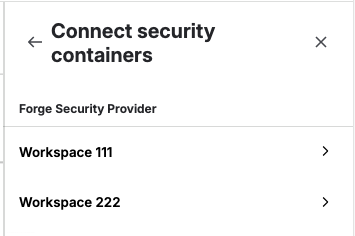
If you click on the workspace, Jira will call your app’s searchContainers endpoint (and fetchContainers endpoint) to find out about containers in that workspace.
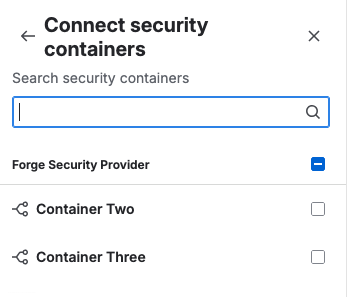
You should be able to check the box and click Connect.
Linking and un-linking
The only endpoints we are missing now is for onEntityAssociated and onEntityDisassociated. This tells you when a customer links a vulnerability to a Jira work item (or unlinks a work item).
In your manifest the endpoints might look like:
    - key: entity-associated
      remote: spring-boot-backend
      route:
        path: /security/on-entity-associated
    - key: entity-disassociated
      remote: spring-boot-backend
      route:
        path: /security/on-entity-disassociated
And your app includes them like:
  devops:securityInfoProvider:
    - key: my-security-info-provider
      name:
        value: "Forge Security Provider"
      homeUrl: https://mycompany.com
      logoUrl: https://images.mycompany.com/security/icon.svg
      fetchWorkspaces:
        endpoint: 'fetch-workspaces'
      fetchContainers:
        endpoint: 'fetch-containers'
      searchContainers:
        endpoint: 'search-containers'
      onEntityAssociated:
        endpoint: 'entity-associated'
      onEntityDisassociated:
        endpoint: 'entity-disassociated'
Your app’s back end might look like:
@RestController
@RequestMapping("/security")
public class SecurityEndpoints {
    @Autowired
    private ForgeTokenValidator tokenValidator;

    @PostMapping("/on-entity-associated")
    public ResponseEntity<Void> onEntityAssociated(
            @RequestHeader("Authorization") String authHeader,
            @RequestBody OnEntityAssociatedRequest request) {

        if (!tokenValidator.isAuthenticated(authHeader)) {
            logger.error("Authentication failed");
            return ResponseEntity.status(HttpStatus.UNAUTHORIZED).build();
        }

        // Great. Got it. Thanks.

        return ResponseEntity.ok().build();
    }

    @PostMapping("/on-entity-disassociated")
    public ResponseEntity<Void> onEntityDisassociated(
            @RequestHeader("Authorization") String authHeader,
            @RequestBody OnEntityDisassociatedRequest request) {

        if (!tokenValidator.isAuthenticated(authHeader)) {
            logger.error("Authentication failed");
            return ResponseEntity.status(HttpStatus.UNAUTHORIZED).build();
        }

        // OK bye.

        return ResponseEntity.ok().build();
    }
}
We are almost ready for an end-to-end test.
For reference, here is my complete manifest.yml now:
app:
  id: ari:cloud:ecosystem::app/1234567-abcd-1234-dcba-987654321
  connect:
    key: com.mycompany.myapp.security
  runtime:
    name: nodejs24.x

modules:
  jira:adminPage:
    - key: security-admin-page
      resource: configure-page
      render: native
      resolver:
        function: resolver
      title: Configure Security Provider
      useAsConfig: true

  trigger:
    - key: forge-installed-callback
      endpoint: installed-endpoint
      events:
        - avi:forge:installed:app

  scheduledTrigger:
    - key: token-sync-trigger
      interval: fiveMinute
      endpoint: token-endpoint

  devops:securityInfoProvider:
    - key: my-security-info-provider
      name:
        value: "Forge Security Provider"
      homeUrl: https://mycompany.com
      logoUrl: https://images.mycompany.com/security/icon.svg
      fetchWorkspaces:
        endpoint: 'fetch-workspaces'
      fetchContainers:
        endpoint: 'fetch-containers'
      searchContainers:
        endpoint: 'search-containers'
      onEntityAssociated:
        endpoint: 'entity-associated'
      onEntityDisassociated:
        endpoint: 'entity-disassociated'

  function:
    - key: resolver
      handler: index.handler

  endpoint:
    - key: token-endpoint
      remote: spring-boot-backend
      route:
        path: /token/receive-token
      auth:
        appSystemToken:
          enabled: true
    - key: installed-endpoint
      remote: spring-boot-backend
      route:
        path: /token/installed
      auth:
        appSystemToken:
          enabled: true
    - key: fetch-workspaces
      remote: spring-boot-backend
      route:
        path: /security/fetch-workspaces
    - key: fetch-containers
      remote: spring-boot-backend
      route:
        path: /security/fetch-containers
    - key: search-containers
      remote: spring-boot-backend
      route:
        path: /security/search-containers
    - key: entity-associated
      remote: spring-boot-backend
      route:
        path: /security/on-entity-associated
    - key: entity-disassociated
      remote: spring-boot-backend
      route:
        path: /security/on-entity-disassociated

remotes:
  - key: spring-boot-backend
    baseUrl: 'https://mycompany.com'

permissions:
  scopes:
    - "read:security:jira"
    - "write:security:jira"
    - "delete:security:jira"

resources:
  - key: configure-page
    path: src/frontend/AdminPage.jsx
Sending vulnerabilities
Now your app can send vulnerability data to Jira, and have it appear in the UI. If the container ID in the vulnerability matches a container that the customer linked to their software space, then the vulnerability will be visible.
See the API documentation on submitting a vulnerability.
As with submitting workspace IDs your client will need to look up the authentication token and API base URL if submitting the request from your app’s back end. (The Forge Bridge API looks this up automatically if you submit from the app’s front end.)
I won’t detail the client code here, but it is very similar to the client for submitting workspace IDs. The scope requirements are the same.
Testing
Go into your Jira Software space and link a workspace and container.
Now submit a vulnerability where the container ID matches the container you linked in the UI. You should see it in the Vulnerabilities section in the Development tab.
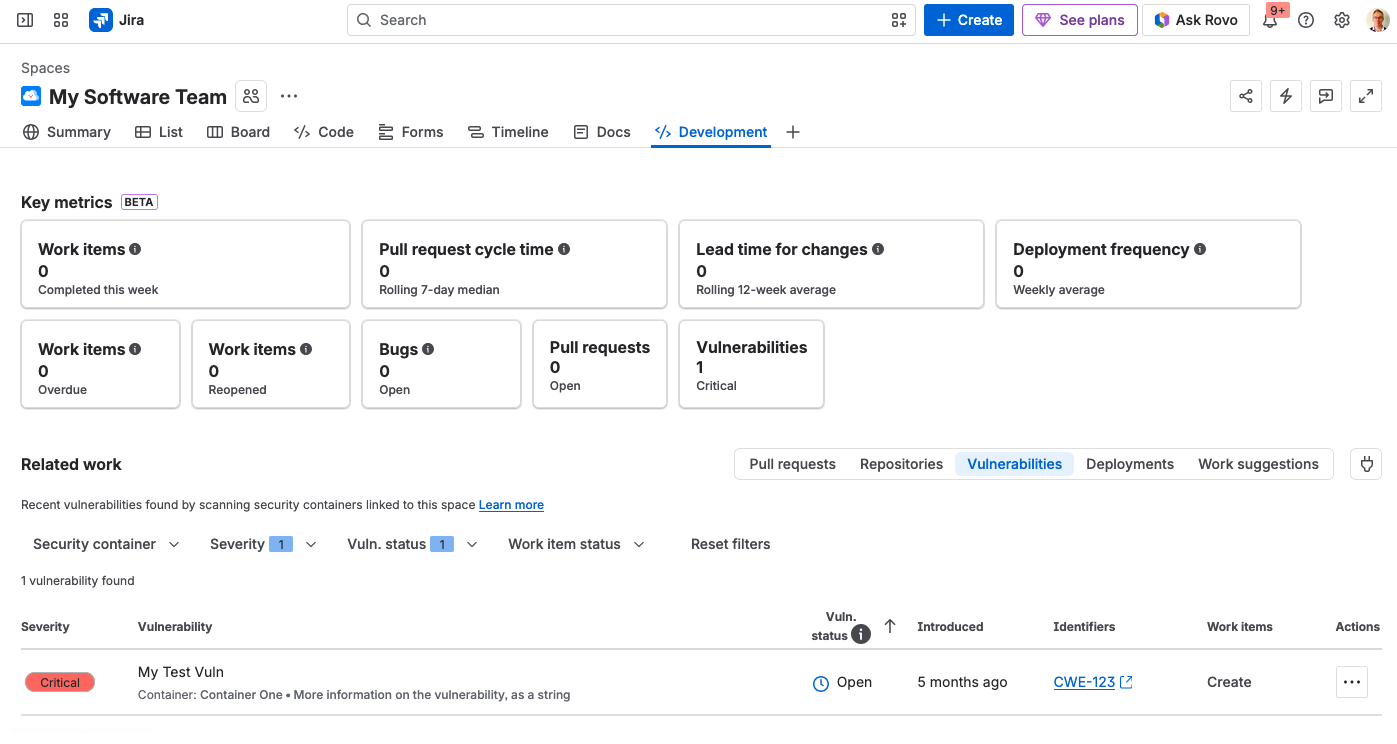
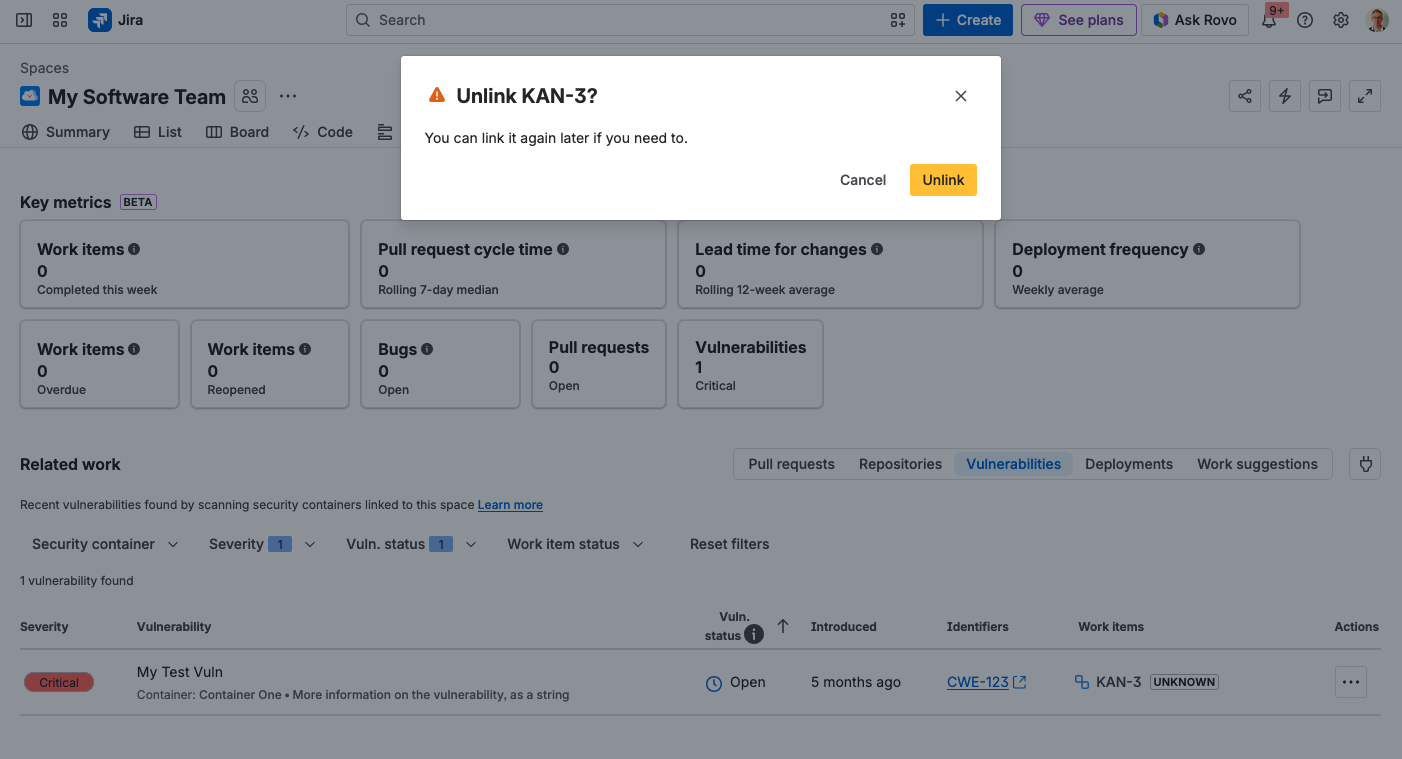
If you click the “…” in the Actions column you can link a work item to this vulnerability (or click Create to create a new one). You should see a call to your onEntityAssociated endpoint. If you then unlink it you will get a call to your onEntityDisassociated endpoint.
Summary
OK we did it.
-
We learned what a security info provider does in Jira.
-
We learned about the need to provide a Connect app key.
-
We learned about the is-configured application property, and we made an admin page to set it.
-
We learned how to tell Jira about the IDs of our workspaces, and how to describe workspaces and containers.
-
We learned how to submit vulnerability information, and see that linked/unlinked to Jira work items.
What’s left to do? Only to come up with great ideas for apps that find vulnerability information that Jira customers need, and then go build those apps!
Questions? Corrections? Let me know.

