Agentic automations in Jira Service Management are growing 3.4x faster than traditional automations — but most Jira Service Management admins still aren't sure where to start with Rovo Ops. Today, only ~1% of agentic automations created in JSM use Rovo Ops, even though it's the fastest path to "agent-in-the-loop" workflows for ITOps teams.
So we're shipping a set of ready-to-use automation templates right inside the Rovo Ops settings page. Click → review → turn on. No prompt engineering, no rule scaffolding, no guesswork.
Where to find them
- Open the settings page in your Jira Service Management project
- Scroll to the "Rovo Ops" section
- Pick a template → it opens pre-filled in JSM Automation
- Tweak the prompt or any other automation component → Turn on
Tap View more to jump to the full automation template library, pre-filtered to Rovo templates.
6 new templates for incident and change management
1. Intelligent Incident Triage
What it does: When an incident is created, Rovo Ops suggests an assignee based on the description and historical patterns, and updates the assignee field automatically.
| Trigger |
Rovo Ops action |
| Incident created |
Analyze incident → suggest assignee → update assignee field |
Best for: Teams with consistent incident patterns and clear historical ownership data.
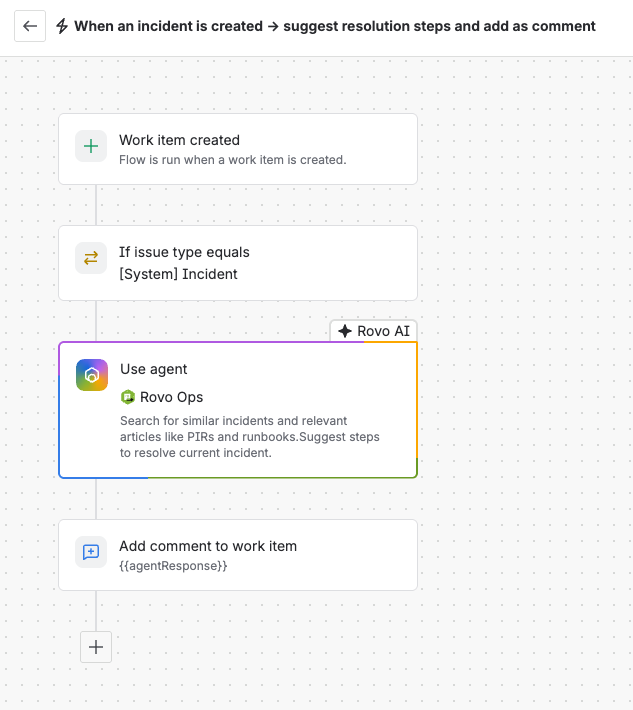
2. Similar Incident Search & Resolution Suggestions
What it does: Rovo Ops searches historical incidents, PIRs, and runbooks the moment a new incident is created, and posts suggested resolution steps as a comment.
| Trigger |
Rovo Ops action |
| Incident created |
Search similar incidents + knowledge base articles → suggest resolution steps → add as comment |
Best for: Teams with rich PIR/runbook history who want to shortcut "have we seen this before?"
3. Automated Incident Communication
What it does: When an incident's status changes, Rovo Ops generates a stakeholder-ready summary (status, root cause, impact, ETA) and posts it to the incident's Slack or Teams channel.
| Trigger |
Rovo Ops action |
| Incident status changes |
Summarize current state → post as comment → send to Slack/Teams channel |
Best for: Major incidents with stakeholders who need updates without paging the on-call.
4. PIR Creation
What it does: When a major incident closes, Rovo Ops generates a Post-Incident Review in Confluence — timeline, root cause, contributing factors, action items, and lessons learned — using the incident details, comments, linked resources, and Slack/Teams conversations. If there's not enough information, the rule adds a comment instead.
| Trigger |
Rovo Ops action |
| Major incident transitioned to Closed |
Generate full PIR → create Confluence page → link to incident (or add "insufficient info" comment if needed) |
Best for: Teams that want every major incident to harden the system, not just close a ticket.
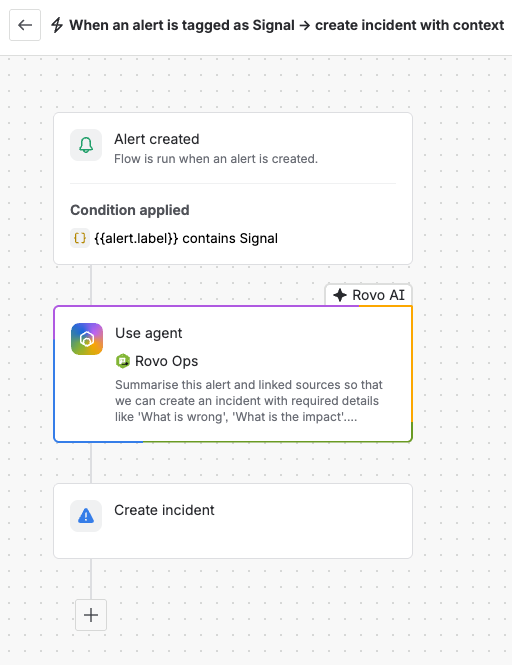
5. Alert Signal Detection & Incident Creation
What it does: When an alert is tagged as a Signal, Rovo Ops summarizes the alert and linked sources ("what's wrong," "what's the impact"), then creates an incident with a structured title and description and links the alert to it.
| Trigger |
Rovo Ops action |
| Alert tagged as Signal |
Summarize alert + linked sources → create incident with title & description → link alert |
Best for: Teams using Signal labels to elevate the alerts that actually deserve to become incidents.
6. Summarize Change & Share Risk Insights
What it does: When a change request is created, Rovo Ops summarizes the change scope, evaluates risk level, surfaces risk insights, and recommends next actions for reviewers — all as a comment on the ticket.
| Trigger |
Rovo Ops action |
| Alert tagged as Signal |
Summarize alert + linked sources → create incident with title & description → link alert |
Best for: CAB reviewers who want a one-glance read on risk before opening the full change record.
How to get the most out of the templates
Tweak the prompt for your environment. The defaults are intentionally generic. If your team uses specific severity names, runbook conventions, or stakeholder channels — bake them into the prompt.- Start with one. The PIR Creation and Similar Incident Search templates tend to deliver the most visible value in week one.
- Combine them. Triage + Similar Incident Search + Automated Communication on the same project gives you an end-to-end "agent-augmented incident" experience.
Have a Rovo automation workflow that's working well for your team? Drop it in the comments — we love seeing how teams are extending these templates.
