Hey Community! 👋
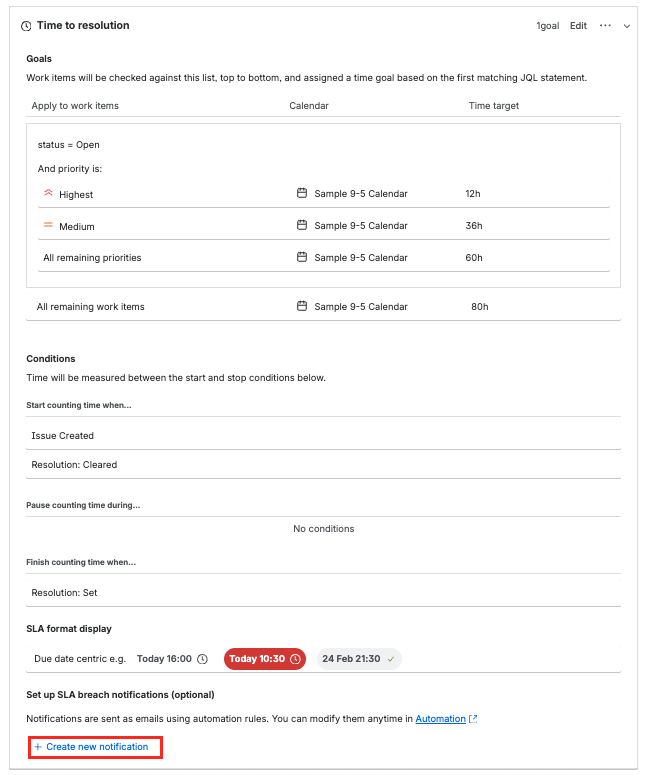
We're excited to share a new improvement for JSM admins — you can now create SLA notification rules directly from the SLA page itself.
No more context-switching. No more hunting through automation settings. Just set it up right where you're already managing your SLAs.
How it works
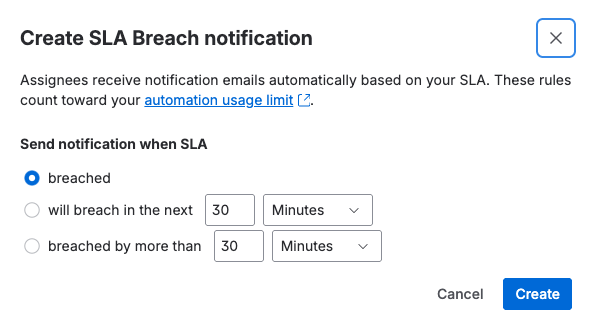
From your SLA configuration page, you'll now see the option to create an automation rule for notifications. Select the parameters that matter to you:
-
SLA breached - get notified as soon as SLA is breached
-
⏳ Time to breach — get alerted before an SLA is about to be missed
-
🚨 Time after breach — stay informed when SLAs have already been exceeded
Behind the scenes, a fully functional automation rule is created for you — no manual rule-building required. It just works.
Why this matters
Previously, setting up SLA breach notifications meant jumping into automation, crafting rules from scratch, and wiring up the right conditions. This update puts notification setup exactly where you’d expect to find it — right next to the SLAs you're tracking, making it intuitive for admins who just need a simple "tell me when we're about to miss our target."
TL;DR
✅ Create SLA notification rules directly from the SLA page
✅ Choose your thresholds (time to breach, time after breach, etc.)
✅ Automation rule is created in the background — no extra configuration
✅ Fewer clicks, less context-switching, faster setup
We'd love to hear your thoughts — give it a try and let us know how it works for your team! 💬


