This is the 2nd installment in a 5-part series highlighting the biggest Atlassian Platform announcements from Team ’26 US:
The Atlassian Platform - start your AI and cloud journey with the Atlassian Platform
📍 Teamwork Graph & Rovo - power AI with your organization's connected work context
Platform apps - connect the dots for your organization
Administration - master the four shifts of modern administration
Enterprise-grade infrastructure - scale confidently with new AI trust and governance controls
|
TL;DR ⚡
At Team '26 US, we made seven major announcements across Rovo, Jira, and Teamwork Graph:
⌨️ Teamwork Graph CLI: connected work context for AI coding agents in the terminal → get started
🔌 Teamwork Graph MCP Tools: the same above connected context, but for AI assistant agents → get started
🕸️ Teamwork Graph visualizer: see how your work is all connected → explore your graph
🤖 Agents in Jira: AI agents as first-class team members in Jira, powered by Teamwork Graph → get started
🧠 Code Intelligence: semantic context for your entire codebase → join the waitlist
🎨 Rovo Studio: a unified experience for building and deploy custom AI agents, automations, and apps → learn more
Read on for the full breakdown and how to get started. ⬇️
|
Hey community 👋
We just wrapped three big days in Anaheim at Team ‘26. Lots of announcements, lots of demos, lots of hallway conversations. If you were there, you saw it firsthand. If you weren’t there, don’t worry - we’ve got you covered.
At Team 26 Anaheim, we made the case that AI without context is noise. The models aren’t the problem. They just don’t know your work. Since Team 25 Barcelona, we’ve been heads-down on building the foundation that makes AI actually useful - the connected context of how your team works, who's involved, and what's happened before - so you can get the most out of our latest AI innovations.
Here's what shipped. 👇
Teamwork Graph: The context layer behind your AI, everywhere
Acceleration = context x intelligence. Anyone can buy intelligence by the token, but the teams that figure out context will move faster and the most out of their AI investment.
Teamwork Graph is Atlassian’s context graph built on 20+ years of understanding how teams actually work. It automatically maps the relationships between your work items, people, knowledge, and third-party tools, so Rovo and other AI agents have the connected context they need to give useful answers. Teams that use it see up to a 44% improvement in AI accuracy.
Until now, that context lived only inside Atlassian’s apps and experiences. But, AI workflows don’t stop working once they leave the Atlassian ecosystem; the context they require shouldn’t either. Your teams are building and working across terminals, IDEs, browsers, and AI assistants that have nothing to do with Atlassian. So we made a deliberate choice: open the Teamwork Graph to wherever AI is working. At Team '26, we launched two complementary capabilities that together cover the full spectrum of how teams work with AI today - Teamwork Graph CLI for AI coding agents in the terminal, and Teamwork Graph MCP tools for AI assistant agents in apps and browsers.
| 🎟 Don’t miss your chance to earn the first ever Teamwork Graph badge. Coming May 25, we are releasing a Bite-sized Learning on Teamwork Graph CLI and Teamwork Graph tools in MCP. Watch, quiz, and earn a badge → |
1. Teamwork Graph CLI (open beta) ⌨️
For developers: get Teamwork graph in your Claude Code, Cursor, OpenAI Codex, Amp, and more
AI coding agents are only as useful as the context they can access. Without context, they can read a ticket, but they can't see what's blocking it, what decisions were made in the last RFC, who the key people are, or what the related Figma designs show. Teamwork Graph CLI closes those gaps. Your Jira issues, Confluence pages, GitHub PRs, Figma designs, Google Docs, and the relationships connecting them are all delivered in a structured format agents can actually reason with.
Teamwork Graph CLI is an agent-first command-line interface that gives AI coding agents direct access to your Teamwork Graph from the terminal. It comes out-of-the-box with 300+ commands that work natively with the coding agents you already use. The improvements are major; we ran the tests. Agents that leverage Teamwork Graph context achieved a 44% improvement in answer quality, used 48% fewer tokens, and maintained comparable latency.
Get started:
-
Install Teamwork Graph CLI following the instructions here
-
Open Claude Code, Cursor, or Codex and prompt: "Research work item [ID] and summarize the historical context"
🚀 Install now → | 🎥 Watch the demo → | 📚 Read the full post → | 🎬 Watch Team '26 keynote →
2. Teamwork Graph tools in Rovo MCP server (open beta) 🔌
For knowledge workers: get Teamwork Graph in your Claude, ChatGPT, Cursor, VS Code, and more
Teamwork Graph tools in Rovo MCP bring the same connected work context to the AI assistant agents you use in apps, browsers, and everyday workflows. Two new tools in the Atlassian Rovo MCP server make this possible: getTeamworkGraphContext and getTeamworkGraphObject.
getTeamworkGraphContext discovers everything connected to a work item, such as linked specs, blocking dependencies, related PRs, the people behind the decisions. Then getTeamworkGraphObject fetches the full details of those connected objects. There's a built-in hint in getTeamworkGraphContext that directs the LLM to call getTeamworkGraphObject automatically, so the chaining happens without any extra prompting.
That’s the difference between AI you reference and one you rely on. Without Teamwork Graph, an AI agent can read a Jira ticket and give you a generic summary. With them, it traverses the graph, pulls in the full web of connected work, and gives you an answer grounded in how your work actually flows, not just what the ticket says.
Get started:
-
Enable the Rovo MCP server in your Atlassian admin settings
-
Connect your preferred AI client
-
Ask your agent about any Jira issue and watch it traverse the graph
🚀 Setup now → | 🎥 Watch the demo → | 📚 Read the full post → | 🎬 Watch Team '26 keynote →
3. Teamwork Graph Visualizer (GA) 🗺️
See your context graph visually
The Teamwork Graph Visualizer gives you a live view of your context graph - see which connectors are pulling in data, explore the relationships between your people, work items, pages, goals, and third-party tools, and understand what's actually in your graph at a glance. No queries required. Just open it, and see your org's context come to life.
And if you're ready to go deeper, Teamwork Graph APIs let you build directly on top of the graph. Query and extend Teamwork Graph to build custom Atlassian experiences powered by your connected context.
Try it:
-
Head to teamworkgraph.com
-
Log in with your Atlassian account
-
Search for any work item, person, or project.
👉 Explore teamworkgraph.com → | 📚 Read the blog → | 🎬 How Mercedes uses TWG APIs →
Rovo: AI that actually does the work
If Teamwork Graph gives your agents the knowledge they need to be effective, Rovo is how they act on it. With Agents in Jira, Code Intelligence, and Studio, Rovo takes on complex, multi-stepped tasks.
4. Agents in Jira (GA) 🤖
Your AI workforce, embedded in the work
Not only are we making agents smarter, we’re bringing them directly into your workflow with Agents in Jira. Now, any agent can be assigned work, @mentioned inline, or triggered from a workflow - with full audit trail and permissions intact, right where the work lives.
Three ways you can start using Agents in Jira:
-
Assign to work item: Pick an agent from the assignee dropdown like you would a human.
-
@mention in a comment: Tag @rovo or any third-party agent - @Github Copilot, @Figma, @Amplitude - and it reads the full issue thread and responds accordingly.
-
Trigger from a workflow: Fire an agent automatically when an issue changes status, no prompt needed.
🚀 Get started → | 🎬 Watch Team '26 keynote →
5. Code Intelligence (coming soon) 🧠
Semantic context for your entire codebase
AI coding agents are great at generating code, but they don't actually understand your codebase. They pattern-match on what they can see (a file, a function, a snippet) but they can't reason about how your code is structured, what a module is for, or how a change in one place ripples across the system. That means code that looks great, but breaks things downstream.
Code Intelligence indexes your entire codebase semantically, not just the text of the code, but its meaning, intent, and relationships. When a coding agent asks a question, it doesn't just search for matching keywords. It understands what you're asking for and retrieves the right context, even across massive, complex repos.
Available soon in both Rovo Chat and Teamwork Graph CLI, Code Intelligence works with the agents your developers already use, such as Claude Code, GitHub Copilot, and Cursor, giving them the deep codebase context they need to deliver faster results and better quality code.
👉 Join the Code Intelligence waitlist → | 🎬 Watch the AI keynote →
6. Rovo Studio (GA) 🎨
Put AI to work with a unified builder experience
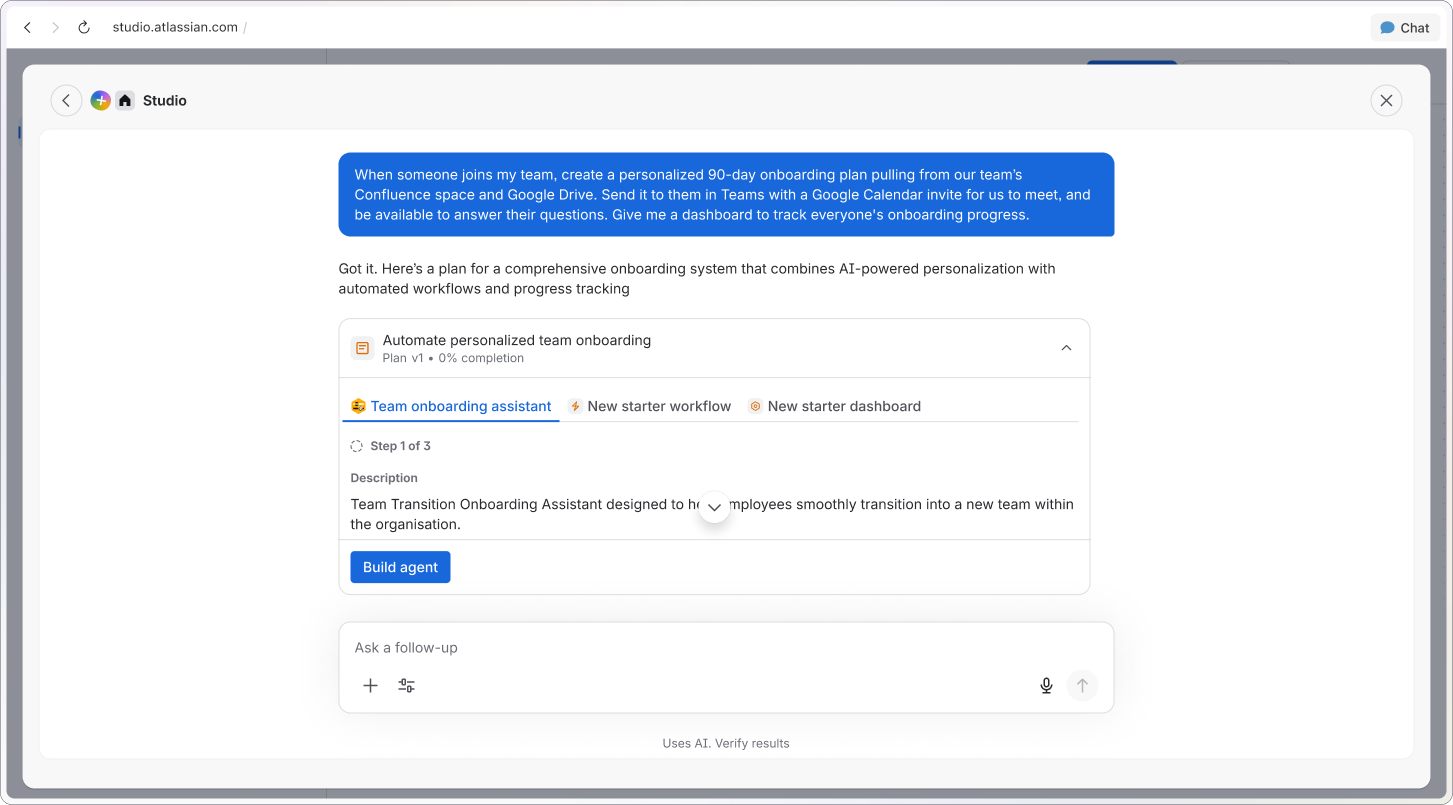
Any team can now put AI to work – building agents, automations, and apps from a simple, natural language prompt, no code required. Unlike ad-hoc AI tools and vibe-coded scripts that bypass IT, Studio is built enterprise-grade from the ground up: governed, auditable, and grounded in how your teams actually work. Studio surfaces the right skills, Teamwork Graph context, and data automatically - so ideas move from concept to production safely, without shadow AI risk.
Get started:
-
Go to Rovo → Studio in your Atlassian product
-
Start prompting Studio
👉 Learn more about Rovo Studio → | 🎬 Watch the AI keynote →
Whether you’re just starting to explore agents, building a business case, or aligning your leadership team around an agentic strategy, Inside the Agentic Enterprise is a practical guide to putting agents to work in your existing workflows - built from the patterns Atlassian customers are already using.
📚 Read more →
💬 We want to hear from you!
Which announcement are you most excited to try first? We'd love to hear from you:
-
Are you using Agents in Jira yet? Which workflow triggered your first agent — assign, @mention, or a workflow rule?
-
Are you using Teamwork Graph CLI or MCP tools with your agents? What's your setup?
-
What agent are you building (or dreaming of building) in Studio?
🏆 Bonus: 2 lucky winners will be randomly chosen to win a free Atlassian certification voucher. In two weeks, we’ll at-mentioned the winners in the comments!
👉 Up next: Don't miss the Platform Apps recap dropping next week and covering everything we launched around security, admin controls, and data governance at Team '26.


