This month, Rovo got faster, smarter, and more capable everywhere you work — Automations that fix themselves, Search that summarizes on the spot, and Agents that can now debug and analyze. Here’s everything new 👇
1. Enhanced Smart Values Panel ⚙️
It’s now much easier to work with dynamic data in Automation. You can now insert smart values directly, see exactly where they come from (including integration service actions), and spot when values are overridden.
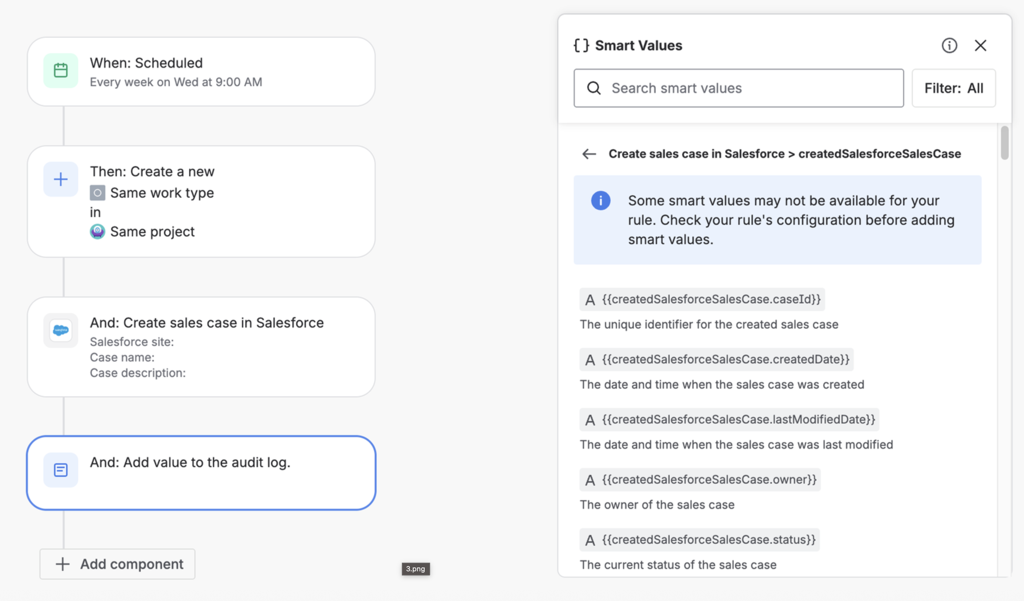
These improvements make building and orchestrating workflows faster and clearer, so you can confidently leverage more components and data throughout your automations
Learn more: 📢 Enhanced Smart Values Panel: Better Organisation and More Precise Data Types
2. Add custom code to your automation or agentic workflows with Forge Automation Actions in Open Beta 🛠️
Forge automation actions are now available in open beta, allowing developers to create custom automation actions in Forge. Once the Forge app is installed, these custom actions will appear in Automation for Jira. Keep an eye out for the beta tags when looking for these actions in the automation rule-builder
If you need to take an input from an internal system, pass it to an agent (or visa versa) this is a great use of Forge-based automation actions mixed with your Agents. For example, you can automatically pull customer entitlement data from an internal billing system and pass it to an agent that drafts the right upgrade offer in Jira, passes it to a human to review and send off in Salesforce. What to see another example? Hear from Paul on what he’s built. Want more? Join a webinar.
Learn more: Automation Action
3. Agentic workflows with Loop Orchestration 🔁
Retry automation tasks until conditions are met - perfect for supporting business with agents for critical processes like incident management. Predictable, resilient automation.
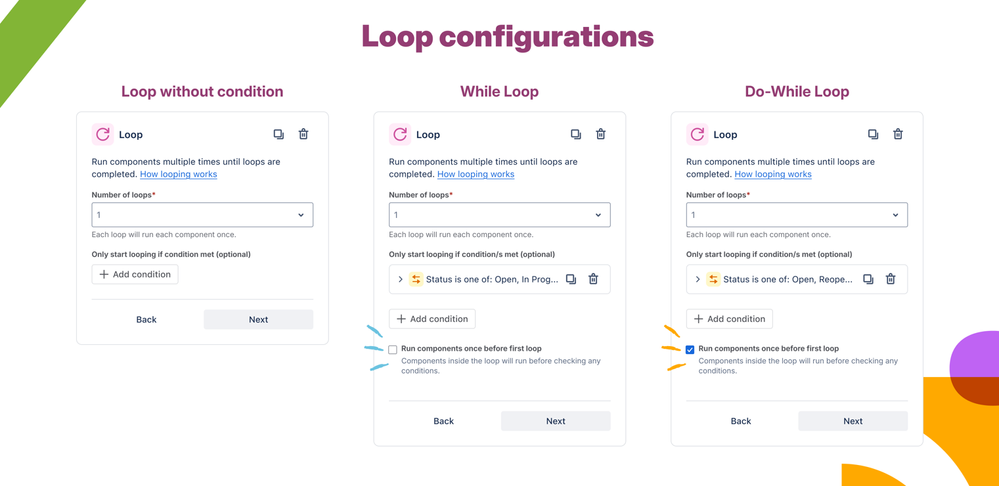
Learn more: What’s new for Automation and Playbooks - November 2025
4. Smarter Ways to Explore Search Results 🔍
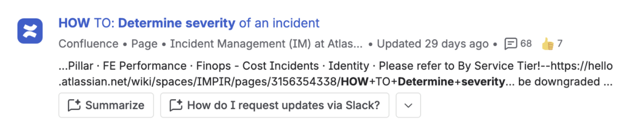
A new Summarize option on all result hovers opens Rovo Chat with a pre-filled prompt - great for catching up fast and asking follow-ups.

Also, conversation starters now appear for the first Confluence result - bringing relevant chat directly to content discovery.
5. Time-Based Ingestion Control for Google Drive & SharePoint 🔐
Pulling in knowledge from other SaaS tools for Search, Agents or AI Chat? Index only the files modified after a chosen date to reduce risk and accelerate onboarding. This reduces risk by limiting exposure of legacy data and permissions and accelerates onboarding by focusing on the most relevant, recent content.
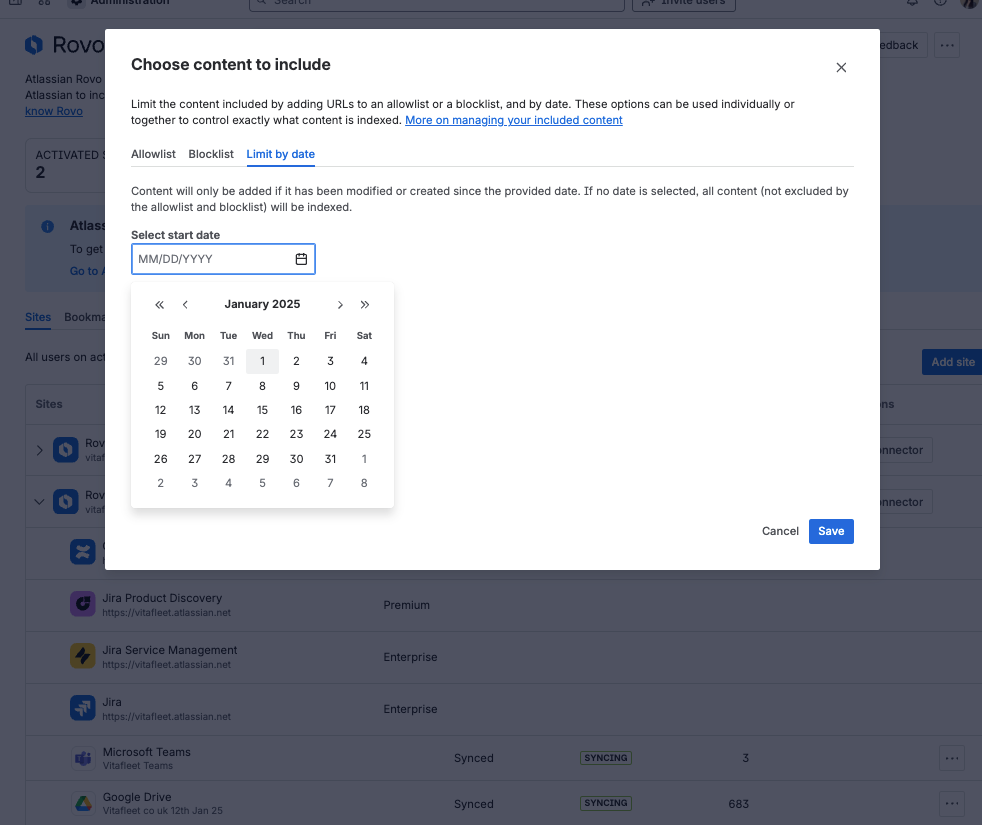
Learn more: Time-Based Ingestion Controls for GDrive & SharePoint is Here! 🎉
6. Usage Analytics for User-Created Agents 📈
You can now access conversation and user data, along with deflection rates for agents that use the JSM Raise Request skill – all designed to give you a clearer picture of how your agents are performing.
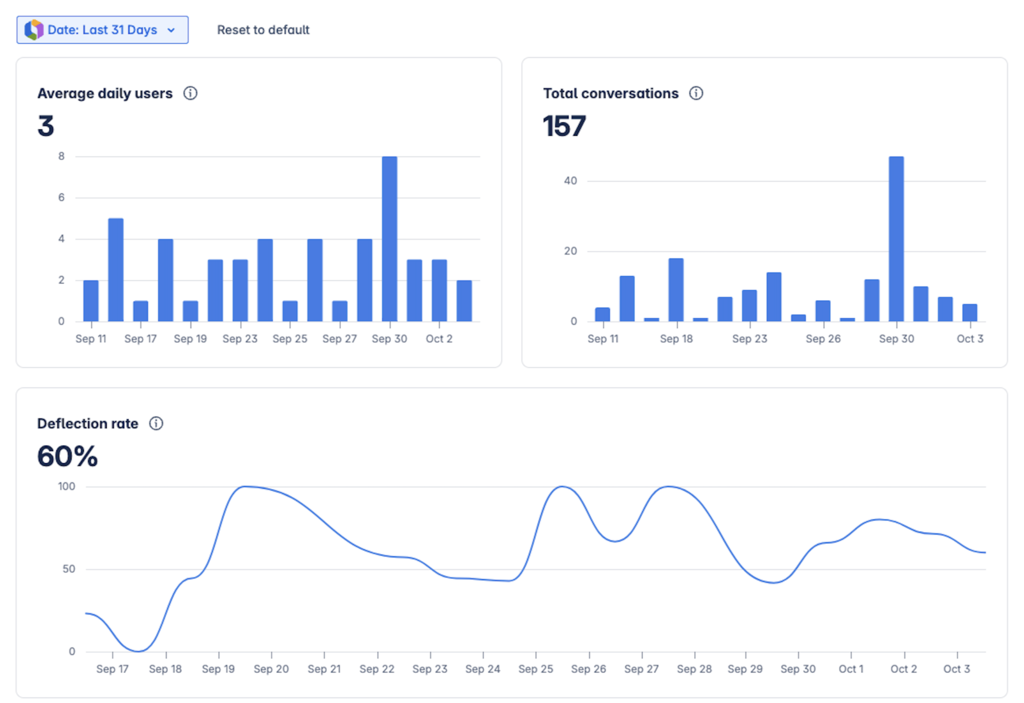
While analytics is now available to all customers, we’re keeping the feature in beta as we continue to refine insights for General Availability. Stay tuned for even more powerful reporting capabilities soon!
Follow along for updates here.
7. New Skills Directory Modal 🧠
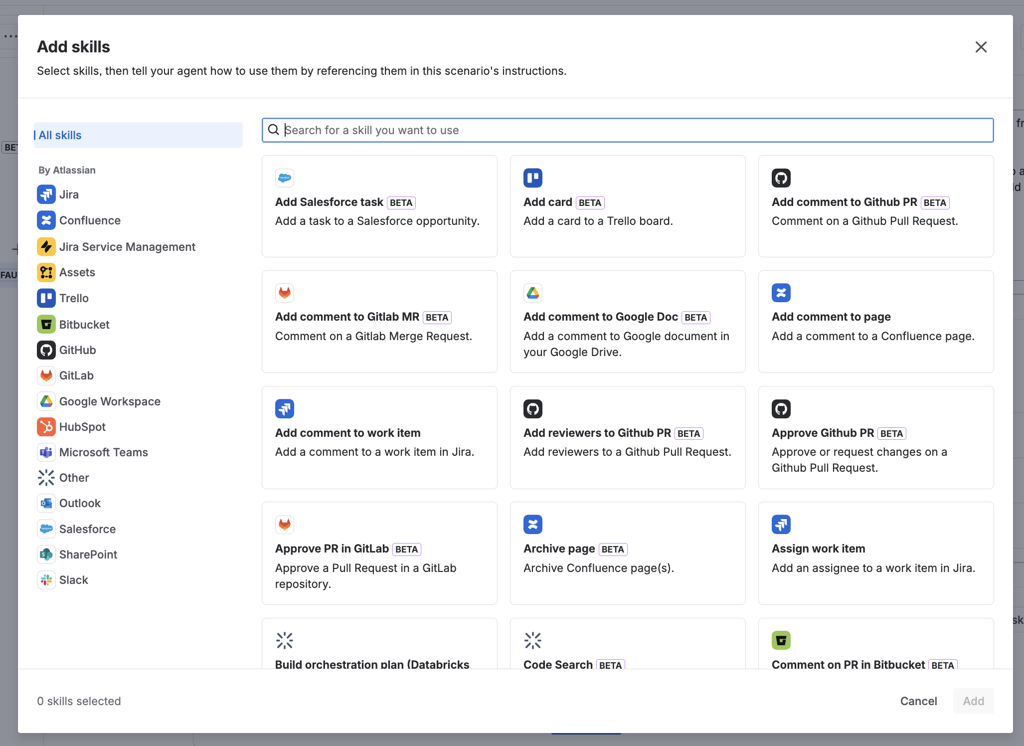
We've completely redesigned the Skills (formerly Actions) directory with a fresh, intuitive interface!
What's New:
-
Visual Recognition: Product logos for instant identification
-
Better Organization: Skills are now grouped by their source apps (not just Jira and Confluence)
-
Improved Discoverability: Enhanced search and filtering across all integrated products
-
Cleaner Layout: Each skill displays with clear names, descriptions, and visual icons
The content you know and love is still there—we've just made it much easier to find and add the right skills to your agents.
8. MCP for Agents (Early Access) 🔌
We're bringing the Model Context Protocol (MCP) to Rovo Agents! Organizations in our Early Access Program can now connect MCP servers through Admin Hub, unlocking powerful integrations.
How It Works:
-
Org admins configure MCP servers (like Atlassian MCP, GitHub MCP) in Admin Hub
-
Agent builders see available MCP servers and their tools in the Skills directory
-
Add MCP servers to your agent scenarios with one click
This opens up exciting possibilities for extending your agents with custom integrations and third-party services.
If you would like to follow along, or join the EAP, ping us here.
9. Agent Debug View in Chat 🔍
We’ve launched a new Debug View for Rovo agents in Chat, giving creators and admins a transparent look into how agents process requests and make decisions. This feature helps you troubleshoot, optimize, and understand agent behavior in real time—making it easier to build reliable, high-performing automations.
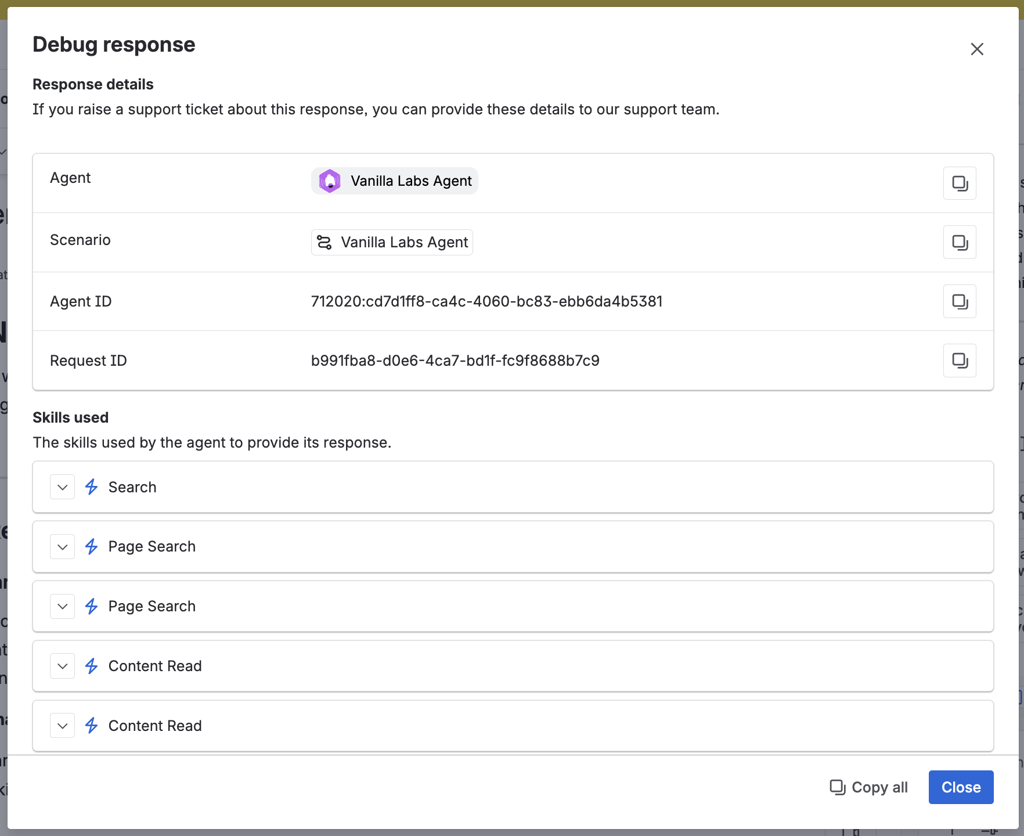
Learn more: Peek Behind the Curtain: New Debug View for Rovo Agents in Chat!🕵️♂️
10. Rovo Agents Now Available in Slack 💬⚡
Rovo Agents are now available directly in Slack, making it easier than ever to get instant AI-powered help right inside your team’s favorite chat tool - whether you need quick answers, want to automate tasks, or connect with specialized agents for HR, IT, or project support.
Learn more: Meet Atlassian Rovo for Slack: AI-Powered Search and Assistance, Right Where You Work.
11. Authoring Teams for Agents 👥
Agents now support Authoring Teams! While you remain the owner with full permissions, you can display a team name instead of your personal name on the agent.
Simply change the display name from yourself to your team, and it will appear everywhere your agent is shown - in chat, on profile cards, and in Confluence embeds.
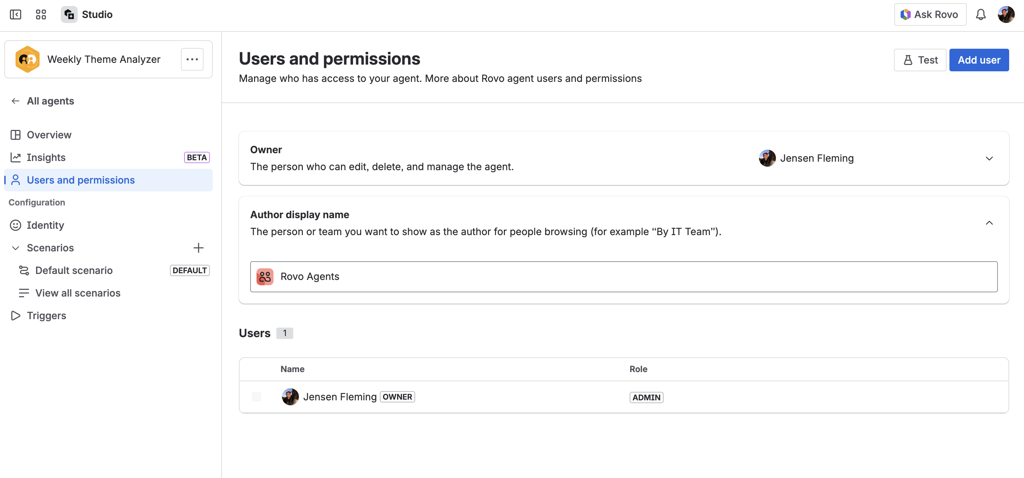
Learn more: Rovo agent permissions and governance | Rovo | Atlassian Support
12. Scenario Builder for Agents 🧪
A new way to define, test, and manage agent behaviors for specific use cases. Scenarios make it easier to create smarter, more reliable agents with less hassle, so you can confidently deploy automations that fit your team’s unique needs.
Learn more: Smarter agents, less hassle: Meet scenarios for Rovo agents
13. Rovo in JSM Portal 🎫🤖
Users can now chat with Rovo Agents directly from the Jira Service Management portal!
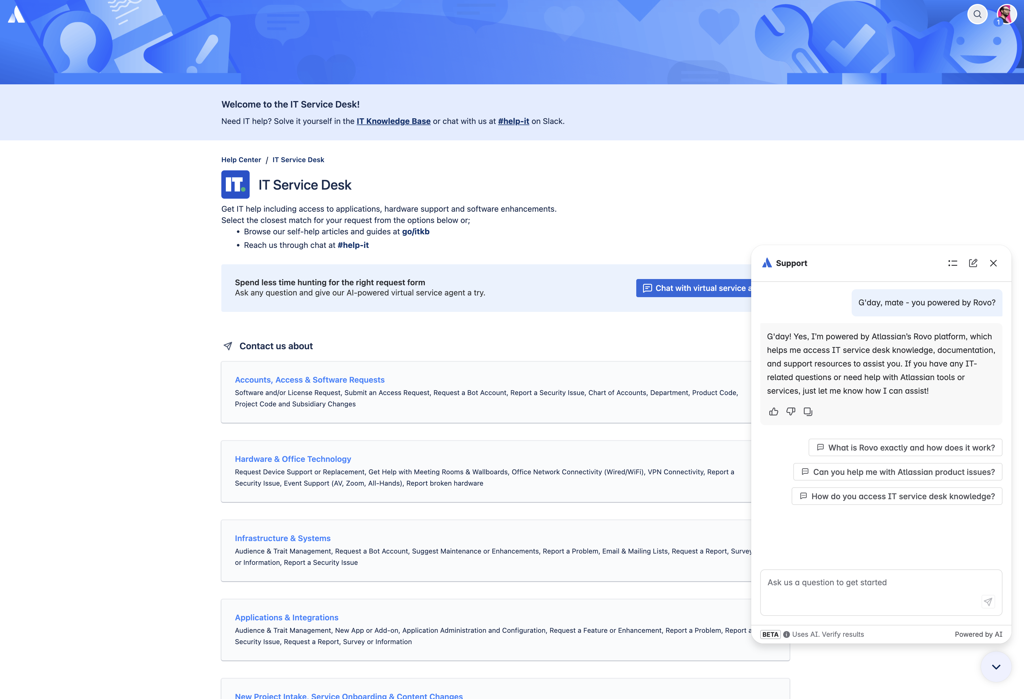
The chat widget brings instant, conversational support right where your users need it. This seamless integration makes it easier than ever for your team to deflect tickets and provide self-service support at scale.
Learn more: Set up your virtual service agent | Jira Service Management Cloud | Atlassian Support
14. Create JSM Requests from Chat ➕
Rovo Agents can now create JSM requests directly from a conversation, routing to the right project and request type, plus pre-filling required fields
This means your agents work seamlessly with your existing JSM configuration - no custom setup required. Support workflows just got a whole lot smoother!
Just add the skill to your Agent’s scenario(s) and get creating!
15. Agents can now take 11 new actions in Confluence 📄⚡
We’ve added actions like page creation, content updates, metadata handling — so now you can build even more powerful automations that interact with your Confluence content.
Learn more: Build more powerful agents with 11 new Confluence skills in Studio - now generally available!
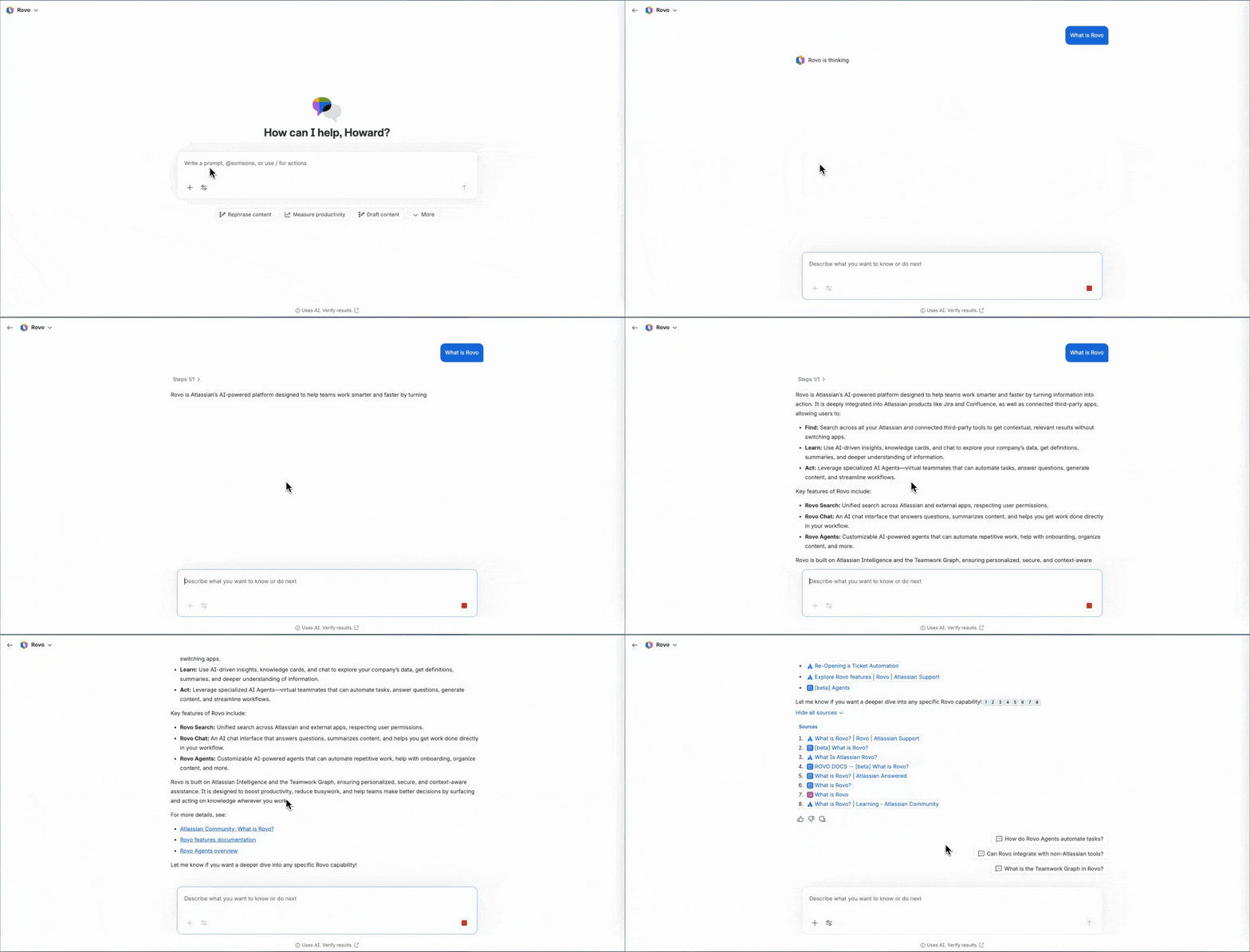
16. New Chat Message Styles + Clean Loading State ✨
Say hello to a smoother, more consistent chat experience — so you can stay focused on getting work done.
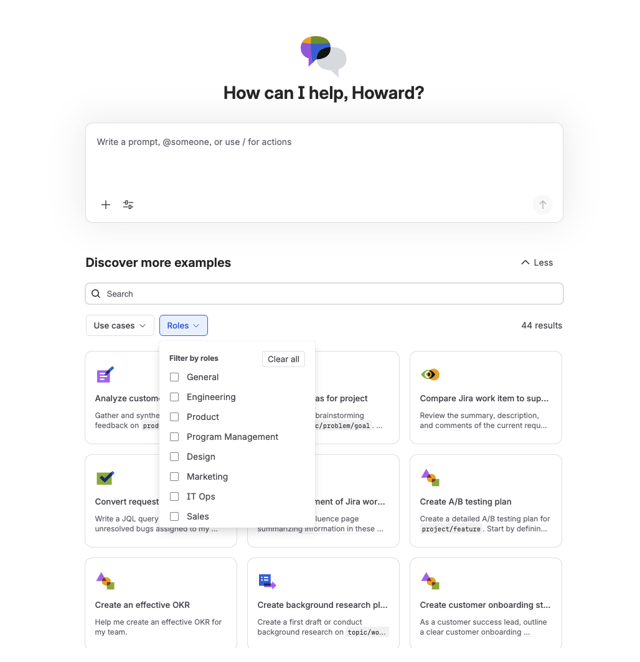
17. Prompt Library in Chat 📚
You can now kickstart work faster with curated prompts tailored to your role and use cases.
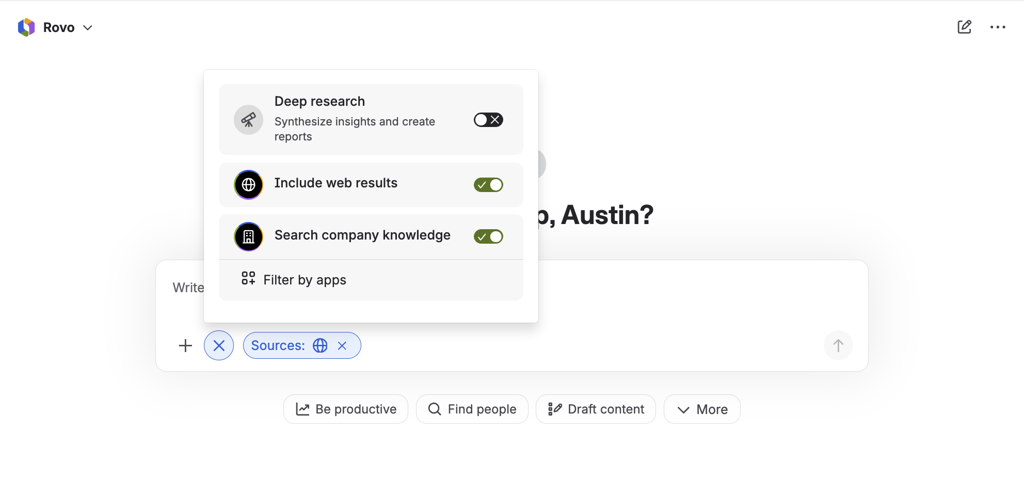
18. Web Search in Chat 🌐
Web Search in now live in Rovo Chat, enabling real-time access to fresh web data for more comprehensive and accurate answers. Organization admins can control this feature through the admin portal, turning it on or off based on their security and compliance needs.
19. More Control & Auditability with Rovo MCP Server 🔒
You can now control which domains connect to your Atlassian apps via the Atlassian Rovo MCP server. Decide which AI tools and integrations access your Jira, Confluence, and Compass instances. See our documentation.
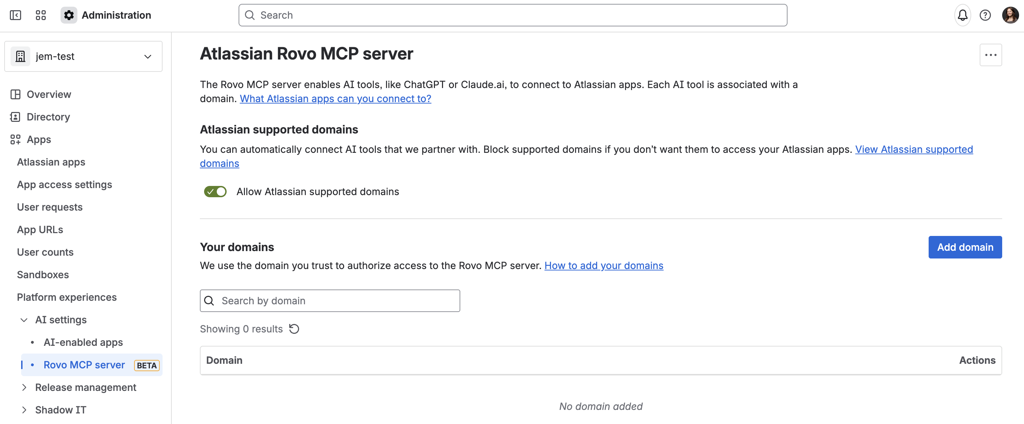
Learn more: 🚀 New: Manage your own allowlist
For transparency and compliance, we have added MCP tool invocations in your organization’s audit logs. Track when and how MCP tools are used to monitor activity and meet security and compliance requirements. See our documentation.
Learn more: MCP tool invocations now in audit logs
20. Cloudflare Verification for Custom Website Crawling 🌐🛡
The Rovo Custom Websites webcrawler has just been officially verified by Cloudflare—a major milestone that unlocks seamless access to millions of Cloudflare-protected sites!
This breakthrough means customers can expect dramatically higher connection success rates, making it easier than ever to bring their unique web content into Rovo.
Moreover, Rovo’s webcrawler connector just got a major upgrade! Now supporting broader robots.txt rules—including sites that welcome all bots—Rovo makes it easier than ever to connect your custom websites. This breakthrough eliminates a key onboarding hurdle, unlocking seamless integration for more sites while upholding the highest standards of privacy and compliance.
Please check out our support documentation how to enable your custom websites in Rovo!
21. Create work items, pages, whiteboards, agents from the Rovo browser extension 🧩
You can now create Jira tickets, Confluence pages, whiteboards, and even Rovo agents easily straight from your Rovo home page via the Rovo browser extension. Jump into work with less tabs & less hassle.
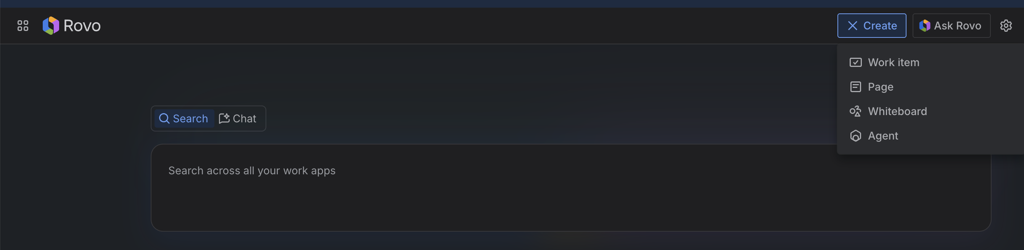
Haven’t tried the Rovo extension yet? Join 35K+ employees that are bringing Rovo to where they work on the browser via the Rovo extension.
Install here: Rovo: Search, Chat, and more - Chrome Web Store.
And that’s a wrap! Stay tuned for next month’s edition - we’ve got more exciting releases coming your way.


