This month, Rovo is all about reliability and reach: smarter automations that can handle higher volumes, search that feels more personal, agents that dig deeper into your work, and new ways to bring Rovo into the apps you use every day. Here’s what’s new 👇
1. Run more agents in parallel with higher capacity automation runs
We’ve been blown away with your adoption of Agents in your teams workflows. Last month alone you nearly hit 3.5 million workflows powered with agents. To help, we’ve significantly increased the concurrency limit for agentic automation rules, so you can run many more AI‑powered actions in parallel without hitting throttling limits. This is especially helpful for large teams orchestrating high‑volume workflows, such as incident response or customer operations, where delays quickly add up.
Learn more: How is my usage calculated? | Cloud automation Cloud | Atlassian Support
2. Design a multi‑path workflow for agent outputs with new branching conditions
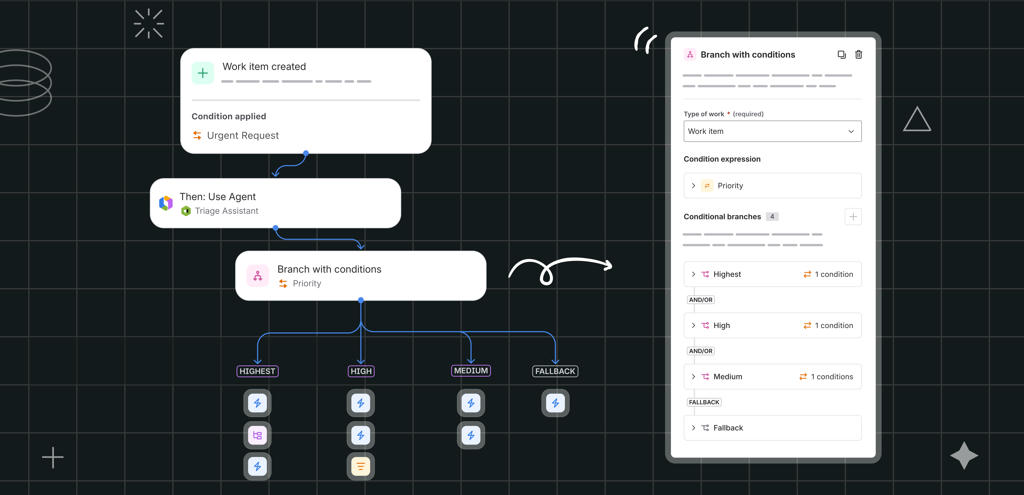
Branch with Conditions makes it easier to build a single automation that covers multiple scenarios - like handling different priority levels, routing work by team, or coordinating multi‑agent workflows.
Previously if you had an agent response and wanted to take different paths depending on the output, instead of duplicating rules, you can branch on conditions, add steps for each path, and keep complex processes maintainable over time.
Learn more: 📣 Introducing Branch with Conditions for Atlassian Automation
3. Four small improvements to make designing your agentic workflows more delightful
We know you’re spending more and more time designing how you want your agentic workflow
-
Edit, test, improve → Edit again!: You know the loop - you kick off a change to run the rule, go back and edit rule while it’s running. Previously in‑progress runs would get cancelled when you edited - so you had to wait until it finished. Now, you can work on your next version while the previous run finishes - no more cancellation!
-
We get it, you have 100’s of custom fields with all sorts of naming conventions. It’s now 100x (yes, a total Sherif estimate) easier to select a field with a “short‑name”
-
We now have fairer, clearer automation billing attribution for customers with multiple apps.
Lean more: 📣 Introducing Branch with Conditions for Atlassian Automation
4. In‑product help for adding a “Use Rovo Agent” step to your automation flow
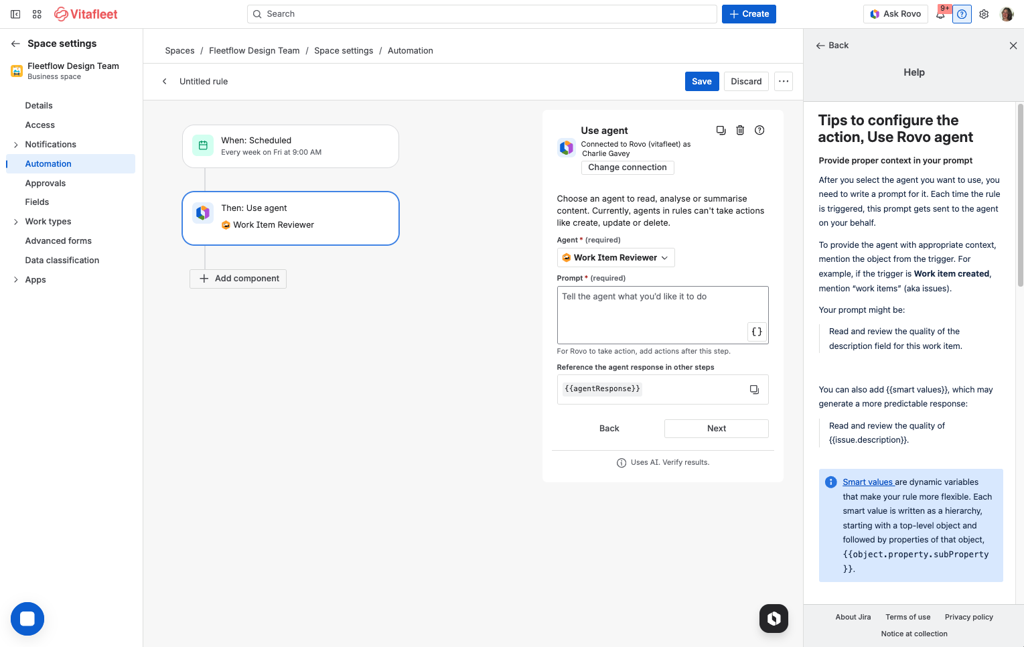
New in‑product guidance in the Use Rovo Agent action helps teams understand how to invoke agents from Automation - simply by clicking the question mark icon near ‘Use Agent’. This makes it easier for first‑time users to design flows in which agents automatically analyze content, draft updates, or coordinate next steps.
5. Did you know? Rovo use context from other apps across all your AI use cases
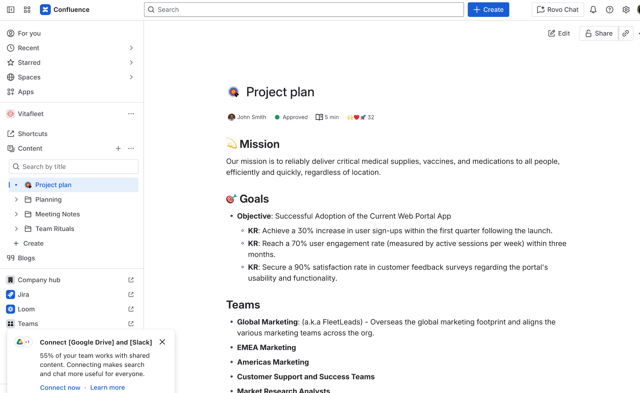
You’re pasting in millions of links from many of the apps you use across Atlassian’s world to help with context - that Google Slides presentation for the sales brief, the Figma design for that work item. Rovo can help you retrieve that context again with search, or power your AI responses and agents with that knowledge. If you’ve engaged a lot with a smart link from another app and don’t have the Rovo connector for that link set up, we now highlight the value you get from connecting it to Rovo.
6. Rovo search: Jira search results are now personalised
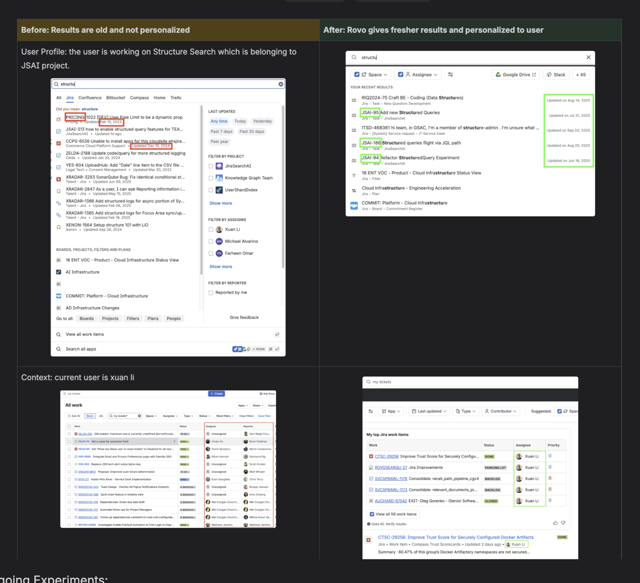
We now use a lot more signals of your Teamwork graph in Jira to improve Jira search relevance. This personalisation helps you get back to the right issues faster and reduces time spent re‑typing filters or hunting through long result lists.
7. Clearer sources and citations in smart answers
Smart answers in Search now include clearer citations and source details so you can see exactly where information is coming from. That transparency helps you quickly verify responses, trust AI‑generated summaries, and jump straight into the underlying Jira or Confluence content.
|
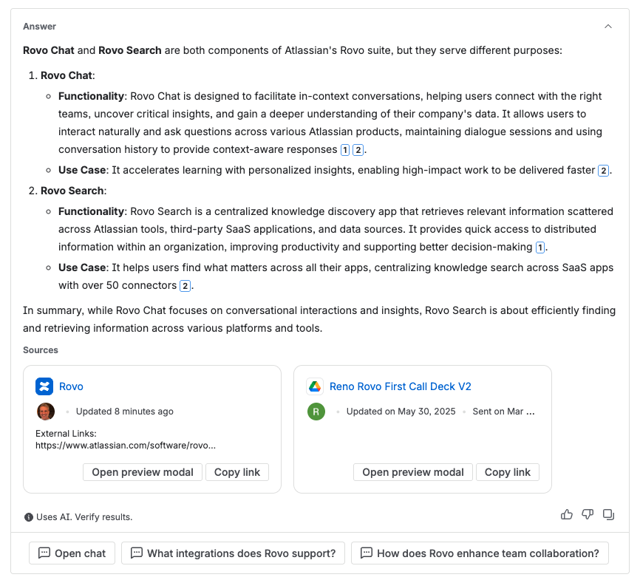
Before
|
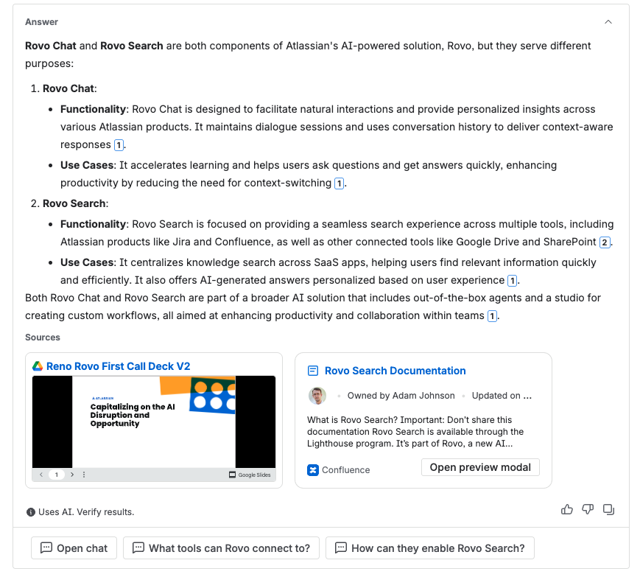
After
|
8. Contextual search suggestions across your tools
Search inputs now provide contextual prompts that remind users they can search across more than just Jira or Confluence. For example, in Confluence search, you may see rotating, personalized suggestions based on connected apps, nudging teams to tap into the full power of Rovo‑powered search.

9. Richer filters in Jira quick find and Rovo search
We’ve expanded the filters available in the Jira quick find UI, including more status and content‑type options. In Rovo search, you can now filter Jira work items by those you’ve commented on or are watching, making it easier to prioritize the issues you’re actively involved in.
10. Rovo Agents in the Atlassian Teams app
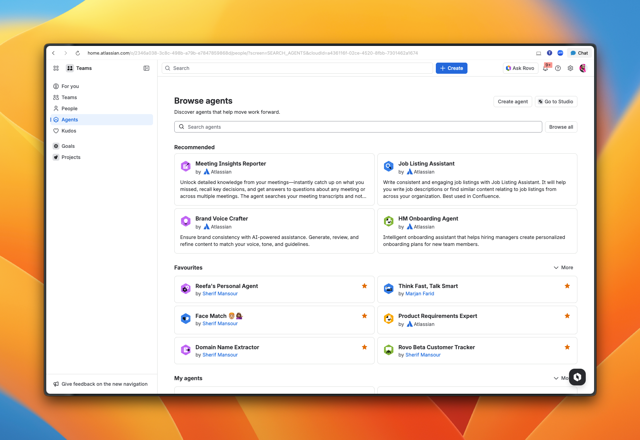
Rovo Agents now appear directly in the Atlassian Teams app, alongside your people, projects, and goals. That means you can bring specialized agents into the conversations and channels where work happens, without switching tools.
11. Deep Research for complex, multi‑source questions
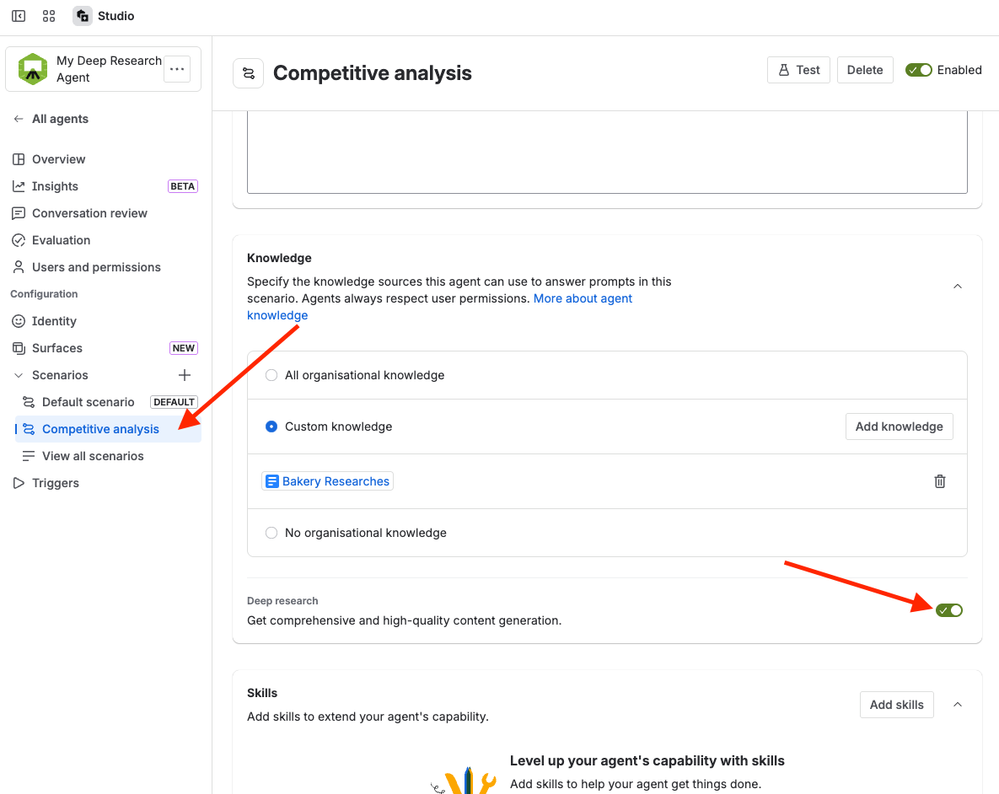
A new Deep Research capability in Rovo Agents lets you ask complex, multi‑part questions across long‑form docs, Jira epics, and Confluence pages. Instead of manually reading and synthesizing everything, agents can now produce tailored briefs—such as risk‑and‑mitigation summaries or strategy comparisons—in a single step.
Learn more: Deep Research in Rovo Agents: Tailored Insights, Your Way
12. Agents are now more reliable when creating Jira and updating Jira work items
We’ve improved how agents create and edit Jira work items, including better handling of required and custom fields. Agents are now more likely to set the right components, labels, and assignees on the first try, reducing cleanup work and making AI‑assisted ticket management more reliable.
13. “Think Deeper” for nuanced answers worldwide
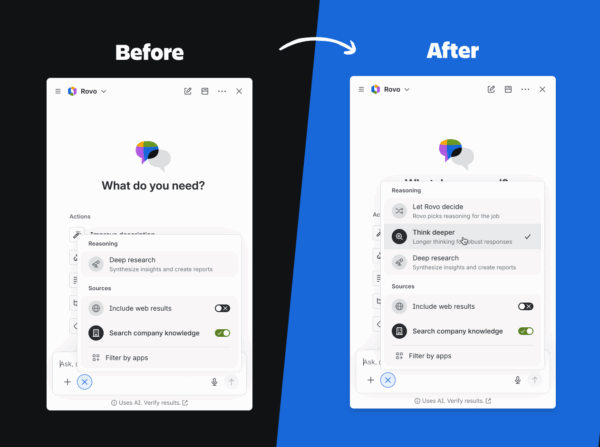
The Think Deeper option in Rovo Chat is now available globally, giving you the choice to let Rovo take a bit more time to reason through complex questions. When you enable it, Rovo can provide more thorough, nuanced responses—ideal for detailed analysis, planning, or technical problem‑solving.
Learn more: Introducing Rovo Think Deeper: Stronger reasoning, right when you need it - Work Life by Atlassian
14. App‑filtered search, front and center
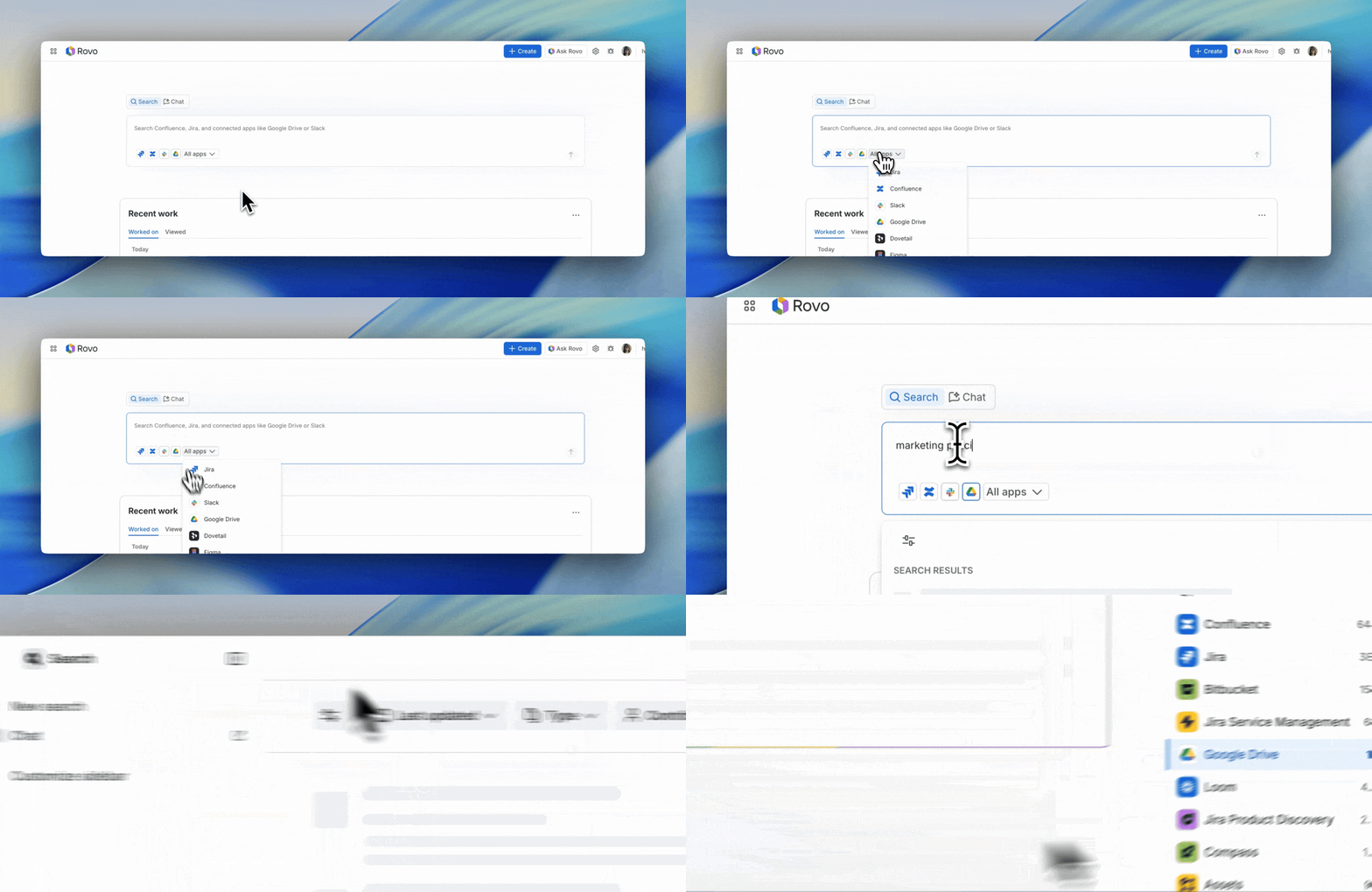
When you open a new tab with the Rovo browser extension, you’ll now see app filters directly in the search box for Atlassian products and any other apps your admin has connected. You can choose a specific tool to search—or search across everything as before—making it more obvious that Rovo spans Slack, Google Drive, SharePoint, and beyond.
Learn more: Rovo Extension: App filtered search, company announcements widget, and even more customization!
15. Atlassian Rovo MCP server now generally available
The Atlassian Rovo MCP server is now generally available as a secure, hosted way to connect AI tools like ChatGPT, Claude, Cursor, Figma, and more to Jira, Confluence, and Compass. Instead of copying and pasting between tools, you can let AI assistants create specs, update tickets, and coordinate workflows directly against your live Atlassian data - while Atlassian remains your system of record.
Learn more:
16. Atlassian skills in Claude’s directory
Atlassian skills are now available in Claude’s skill directory as ready‑made capabilities that let Claude understand and act on Jira and Confluence content. This reduces context‑switching by letting you perform common Atlassian workflows - like summarising a project or updating issues—without ever leaving your Claude chat.
Learn more: Atlassian Skills have landed in Claude's directory!
17. ChatGPT connector powered by Atlassian Rovo MCP
We’ve released support for ChatGPT via the Atlassian Rovo MCP server, enabling ChatGPT to securely access live Jira, Confluence, and Compass data (subject to your organisations controls). This allows ChatGPT to summarise content, create and update issues, and coordinate multi‑step workflows grounded in your real projects.
Learn more: Our new ChatGPT connector is live ✨
18. Centralised permissions for global third‑party actions
Org admins now have a single place to allow or block global third‑party actions, so they can control which external tools Rovo can act on. This helps organisations safely roll out AI‑powered automations while staying firmly in control of their external surface area.
19. MCP governance & audit logging
We’ve added detailed governance and audit logging for MCP configuration and actions, so every change is traceable - who changed what, and when. This supports compliance, security reviews, and operational debugging when you’re connecting powerful AI tools to your Atlassian environment.
20. Rovo Mobile for Android is now generally available
Rovo Mobile is now generally available on Android, so you can search, chat, and work with agents while you’re away from your desk. Whether you’re catching up on project context or triaging issues on the go, Rovo comes with you. Reminder: Rovo is already available in Apple iOS.
Download: Atlassian Rovo - Apps on Google Play
21. Customer‑managed keys (CMK) support for Rovo
Rovo now supports customer‑managed keys (CMK) for new sites, giving security‑conscious organisations more control over how their data is encrypted. This helps align Rovo usage with stricter compliance and data‑residency requirements.
And that’s a wrap! Stay tuned for next month’s edition - we’ve got more exciting releases coming your way.


![Photo of Aaron Pavez [ServiceRocket]](https://us.v-cdn.net/6038660/uploads/avatars/7e/e6/n7ee649f7a133f6ddee9b664969d38104.png)


