As an extra option of workaround to the feature request "Include Forms when cloning an issue", this guide is designed to assist users in using the Forms API to automatically duplicate a form between issues.
Steps to Follow:
- Set Up an Automation Rule:
- Create an API token for the web request process. This requires encoding your credentials and API token with base64. For detailed steps, refer to the documentation:
- Use the REST API feature "Copy forms" in a POST request. Example:
-
Copy a form during an issue status transition to a linked issue:
The request method will be POST:
POST https://api.atlassian.com/jira/forms/cloud/{cloudId}/issue/{sourceIssueIdOrKey}/form/copy/{targetIssueIdOrKey}
- Use your Cloud ID (not Org ID). Find it in the URL when accessing your Atlassian admin page, e.g., https://<instance>.atlassian.net/admin/jira-service-desk/portal-only-customers.
- Use the issue ID or Key dynamically with smart values like {{issue.id}} or {{issue.key}}.
- To retrieve the formId, you can use smart values. Begin by accessing the formTemplateID with {{issue.forms}}. Once you have the formTemplateID, such as "cf638d8b-0498-4b80-8fb1-f547dc769421", use {{issue.forms.cf638d8b-0498-4b80-8fb1-f547dc769421}} to obtain the formId.
- Add the formId dynamically with:
{{issue.forms.formTemplateID}}
- Specify the targetIssueIdOrKey for the issue you want to copy to. Use the following smart value to get the linked issue's ID:
{{issue.issuelinks.inwardIssue.key}}
- Your automation rule setup should resemble the image below:
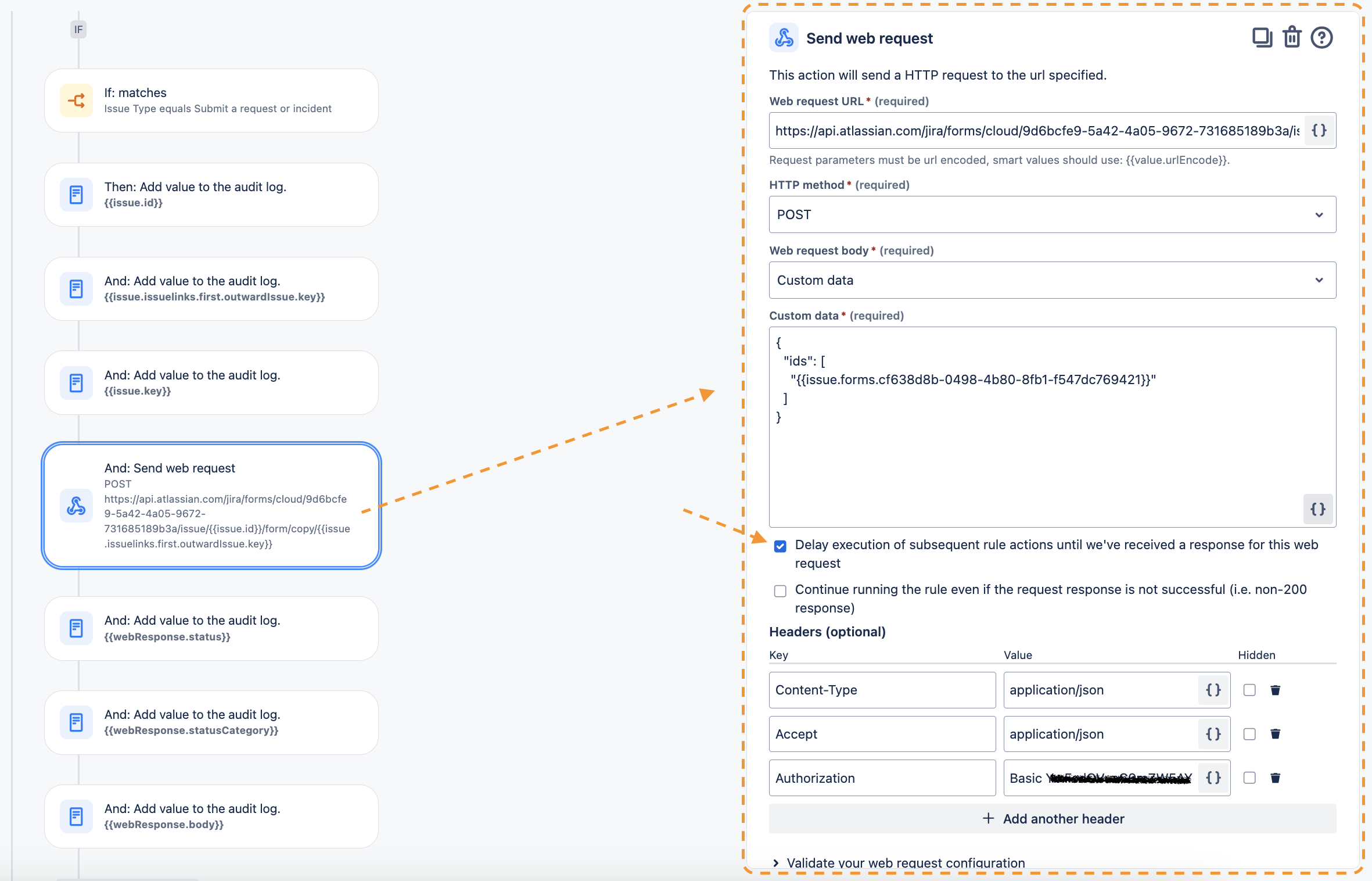
 Note: By enabling "Delay execution of...", you ensure the rule waits for the web request to complete before proceeding with further actions, which is vital when the request outcome affects subsequent automation steps.
Watch the process in action in the video below:
 https://www.youtube.com/watch?v=wCABUsCmEZc
For Different Projects: The process is similar, with a few additional details:
- Ensure your automation rule has a global scope that includes all projects involved (where forms will be copied and sent).
- Optional: Implement a filter to identify the linked issue containing the form to be copied, which may vary based on your use case. For example, an IF condition to check if "issues blocked by" was used.
Watch the cross-project process in the video below:
 https://www.youtube.com/watch?v=CjdyPQcpYZ4