Curious about what the Rovo Agents team has been up to? You’re in the right place! Every two months, we’ll highlight the latest features, key updates, and give you a preview of what’s coming next.
🚀 Major Releases
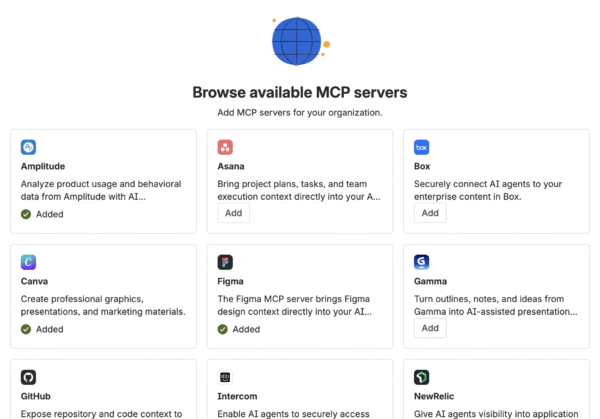
Connect Rovo to your favorite apps with MCP
AI works best when it has the right context and can act across the systems you use every day. Rovo already understands how work connects across Atlassian products, and now it’s easier to bring in data from your other tools.
Rovo now supports the Model Context Protocol (MCP). This new standard lets Rovo agents connect to third-party apps without custom code or complicated integrations.
Tap into live data and take action
By connecting an MCP server, your agents can:
-
Pull live data: Get the latest charts from Amplitude, designs from Figma, or files from Box, instead of relying on static exports.
-
Take action for you: Create tasks, update records, or generate reports across different platforms.
-
Connect the dots: Combine information from external apps with your Atlassian knowledge for a complete answer.
Ready-made agents to get you started
To help you see results right away, we’ve added several pre-built agents:
-
Figma Agent: Bring your latest mockups into Jira or summarize design comments for a Confluence page.
-
Intercom Agent: Pull recent customer support tickets into a Jira issue or show feature requests on a project page.
-
Box Agent: Find and attach the right assets from Box to your marketing campaigns or financial reports.
-
Canva Agent: Turn a project brief in Confluence into a draft presentation or social graphic in Canva.
Find what you need with Verified Agents
As more teams create agents, it can be hard to know which ones are official and maintained by your organization. To help, we’ve added Verified Agents.
Admins can now add a "Verified" badge to specific agents. This badge shows that an agent is endorsed, supported, and safe to use. You’ll see it when browsing the agent catalog, searching, or picking an agent in Rovo Chat.
Control access with New Agent Permissions
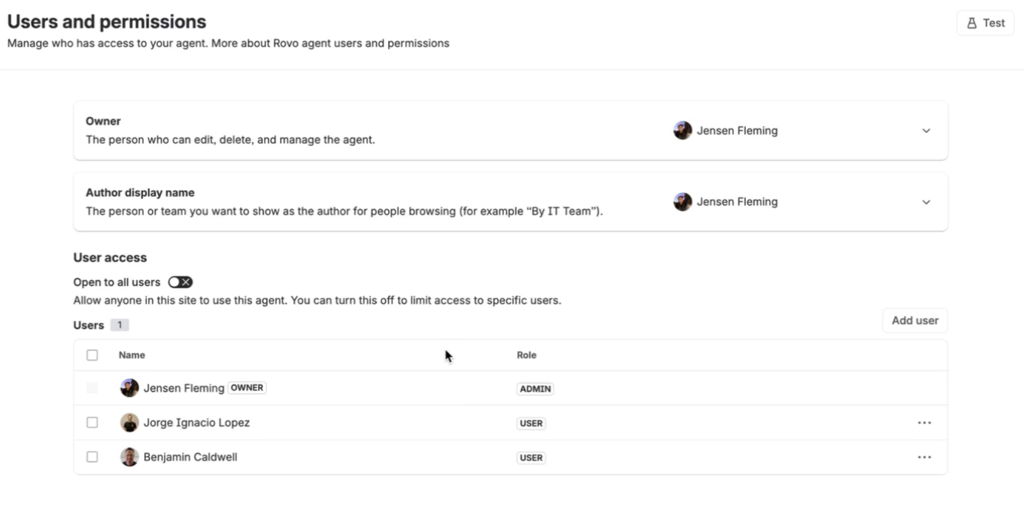
You can now decide exactly who can use the agents you build. Agents are open to your whole organization by default, but you can now restrict them.
In the agent settings, you can:
-
Restrict usage: Limit an agent so only you can use it, or give access to specific people.
-
Manage roles: See who is a Manager (can manage the agent), an Editor (can make changes), or a User (can interact with the agent).
-
Update anytime: Change these permissions whenever you need to.
Tools in Studio: See and Control What Your Agents Can Do
Rovo Agents now use tools directly, instead of abstract “actions.” This gives you a clear view of which tools your agents are using, making it easier to understand, audit, and adjust how your agents work. You get more control and transparency, so you’re not left guessing what’s happening behind the scenes.
Two-Way Comment Syncing: Slack ↔ JSM
You can now keep conversations in sync between Slack threads and Jira Service Management (JSM) tickets. When you raise a JSM ticket from a Slack thread using Rovo, all messages from the thread are added as comments to the ticket. Any new public comments on the JSM ticket will appear in the linked Slack thread, and replies in Slack sync back to JSM. This works both ways, including support for edits, deletes, and image attachments. Internal comments in JSM stay private and aren’t synced to Slack.
Create JSM Requests with Proforma Forms
Rovo Agents now support raising JSM requests that include Proforma forms, not just basic request fields. This lets you collect richer, more structured information from users right in the conversation, making it easier to capture exactly what’s needed for each request.
Helpfulness Score: Unified Insights for Rovo and CSM
We’ve added a new Feedback Score chart that combines thumbs-up and thumbs-down feedback across both Rovo and CSM workspaces. This gives you a single view of how well your agents are helping users, making it easier to spot trends and find areas to improve. The CSM dashboard also got a design update to match Rovo Insights.
Rovo Agents Now Accessible to All Atlassian Account Holders
Rovo agents in JSM portals and help centers are now available to everyone with an Atlassian account, even if they don’t have a paid product license. This closes a major adoption gap—now, anyone in your organization can get instant answers from your knowledge base or escalate to a human when needed. No extra setup required.
Add Rovo Agents Directly to JSM Help Centers
You can now add a Rovo agent to your JSM Help Center with one click. The agent uses your existing knowledge base to answer questions in a chat widget and can escalate to a JSM ticket when needed. This brings AI-powered support to one of the most visible parts of your service experience.
Assign Issues to Agents: Dispatch Work Faster
You can now assign issues directly to Rovo agents, helping you route and resolve work more efficiently.
✨ Notable Updates
Expand your knowledge with Web Search
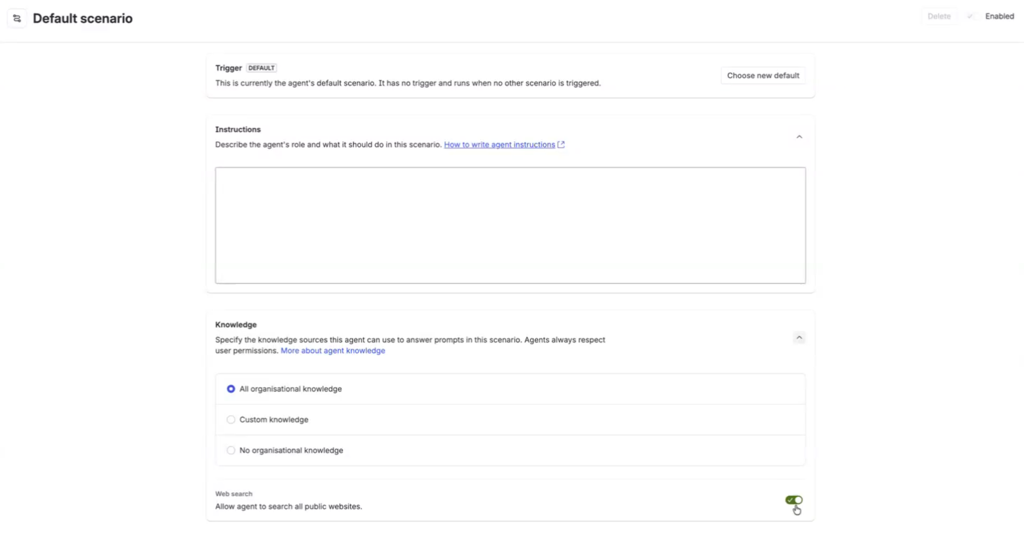
Rovo Agents can now look beyond your internal documentation to find answers. We’ve added Web Search as a knowledge source for agents.
When you enable this for an agent, it can search the internet to provide up-to-date information on public data, such as local regulations, industry trends, or external documentation. The agent will also cite the sources it finds. This is especially useful for roles that need external research, such as legal, marketing, or research teams.
🔮 Coming Soon: Sneak Peeks
Improved Agent Quality with Batch Evals
We’re testing new ways for agent builders to make sure their agents are accurate before sharing them more widely.
With Batch Evals, builders will be able to upload a list of questions and see how an agent responds at scale. This includes comparing agent answers against "golden" reference answers to get an objective pass/fail grade on accuracy. While this is in internal testing now, these tools will soon help everyone build more reliable and helpful agents.
Agent Sprawl Management
Rovo Agent Studio is adding new governance tools so admins can see, curate, and clean up their agent catalog. This includes agent verification, analytics for top/trending agents, and features to find and manage unused or orphaned agents, making it easier to find trusted agents and reduce clutter as adoption grows.
Agent Versioning/Drafts
Rovo is building a unified agent versioning platform that lets you safely make configuration changes to agents using draft and publish workflows, with full version history and rollback. You can test and update agents without affecting live ones, see exactly what changed and when, and recover quickly if something goes wrong.
Scenario Refresh
The Scenario Refresh project is updating how agent scenarios are modeled and managed, introducing a new Agent V2 model with improved backend and UI. This refresh simplifies agent configuration, supports sub-agent execution as tools, and lays the groundwork for more flexible and maintainable agent workflows.
Agents Can Run Agentic "/skills"
Rovo agents are being upgraded to reliably use agentic skills as first-class capabilities. This means agents can now discover, select, and chain together multiple skills from a central registry to handle complex, multi-step tasks—giving builders more flexibility and control over agent behavior, with clear configuration and documentation for each skill.
Rovo Agent Tool Configuration
Users can now set up high-value tools for their agents, such as choosing which Jira project to create work items in or letting agents create Confluence pages without extra confirmation. This gives teams more control and trust in how their agents work, making it easier to tailor agent behavior to fit specific workflows.
Rovo Agents Act in Automations
Rovo agents can now perform actions directly within automation workflows, not just return information. This removes the need for complicated, multi-step setups—agents can update work items, create pages, and more as part of an automated process, making automations more powerful and reducing manual follow-up.
Rovo Agents 3p Filtering
Rovo Agents are adding support for high-priority third-party connectors, along with new filtering options. This update lets agents access and search external knowledge sources more effectively, with the flexibility to add new connectors and filters as needed.
💬 We Want to Hear From You
These features are built based on your feedback. Have ideas for what's next? Questions about how to implement these new capabilities? Reach out to your Atlassian team or visit our documentation to learn more.
Stay tuned for our next bi-monthly update - we've got even more exciting features in the pipeline!


