Ship better agents with confidence: Rovo Agent Evals are here 🎯
Building a great agent is one thing. Proving it’s great—reliably, repeatedly, and at scale—is another. That’s where Rovo Agent Evals come in. This release introduces a dedicated evaluation workspace so you can systematically test, measure, and improve quality of your agent.
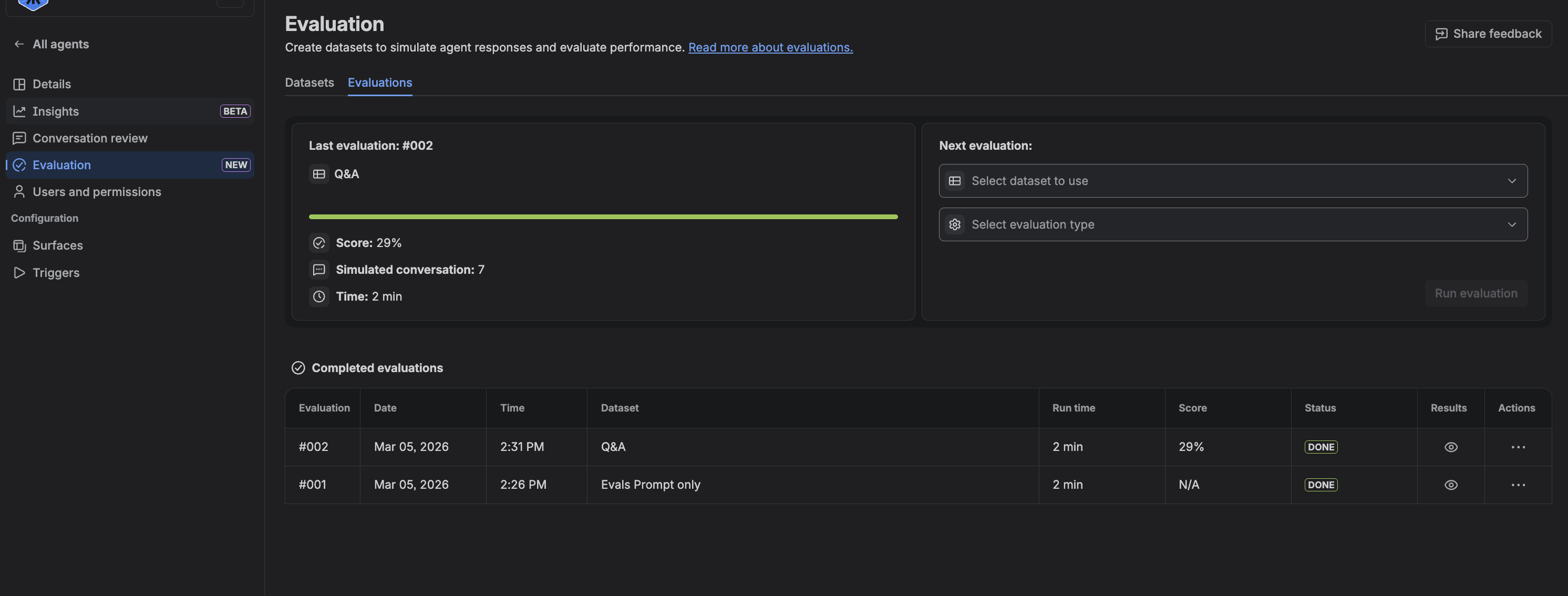
What you can do
Rovo Agent Evals provide three complementary ways to validate how your agent behaves:
1) Response Accuracy: test against the answers you expect
When you know what “good” looks like, this reference based judge lets you lock it in.
-
Upload a set of questions and their ideal responses as a CSV.
-
Run your agent against that test set in one go; an LLM compares agent responses to your reference responses (with the input of your instructions).
-
See pass/fail judgments, plus qualitative feedback explaining where responses diverged.
Great for objective, repeatable checks on critical flows like HR policies, IT support FAQs, product knowledge, onboarding, and internal process guidance. Move from “I think it’s working” to “It passes a high percentage of our reference tests.”
2) Resolution Rate: score whether a request was resolved
For many service and Q&A agents, the key question is simple: did the agent actually resolve the user’s request?
-
Upload a CSV of questions only; your agent responds as usual.
-
An LLM scores each interaction as “Resolved” or “Unresolved,” based on how well the answer addresses the question.
-
Ideal when you don’t have curated “golden answers” but need fast resolution-quality signals.
3) Manual Testing: review behavior across lots of scenarios
-
Upload a CSV of questions (no expected answers needed).
-
Run them all at once and skim generated responses in a single view.
-
Use it to sanity-check after instruction changes, explore edge cases, and spot strengths/weaknesses quickly.
Tips for great test sets
-
Mix critical, common, and edge-case prompts so scores reflect real usage.
-
Keep prompts short and unambiguous; put needed context in the prompt.
-
Iterate: fold real-world failures back into your test sets to prevent regressions.
Where to go next
Please let us know what you think! Excited to hear your feedback.


