Community resources
Community resources
Community resources
- Community
- Q&A
- Jira Service Management
- Questions
- 3 Hour copy to sandbox is taking over a day
3 Hour copy to sandbox is taking over a day

Hello!
I recently created a new sandbox and selected only 2 JSM projects to copy. I selected to copy the attachments and it told me it should take 3 hours. It has been over a day, and the screen in Atlassian Admin shows it is still copying. One project shows at 100% and the other project shows still in progress. I did have an active launch sandbox button, but when I selected it, I can only see the completed project. The in progress project is not listed.
What could cause the copy process to take so much time? Is there a way to "break" the copy? I don't see any options to pause or stop.
Appreciate any guidance you can offer.
Thanks!
3 answers
1 accepted
No, not yet. Is that my only avenue? There are no troubleshooting steps on my end that I should try?
You must be a registered user to add a comment. If you've already registered, sign in. Otherwise, register and sign in.

Did you do any searching of the internet for troubleshooting steps? With one query in Chrome Gemini I got the following information (which I have not cross-checked against Atlassian documentation):


You must be a registered user to add a comment. If you've already registered, sign in. Otherwise, register and sign in.
Just to share an update - the copy eventually failed. I attempted again, this time not selecting the attachments. The second attempt worked - and worked rather quickly - so there was something in the attachments that caused the delay and eventual fail. If it happens again, I will open a ticket with Atlassian.
I appreciate the checklist! I can verify the permissions - I am an org admin; there was no partial completion - the project did not appear in the sandbox for the first copy attempt; we have a limitation on the size of the attachment files, but I will make note of this for the future; and there were no parallel actions - I can confirm no other org admins were attempting to copy to the sandbox at the same time.
I appreciate you taking the time to help me troubleshoot this. I will make note of the imaged steps if this happens again and I need to reach out to Atlassian.
Thanks!
You must be a registered user to add a comment. If you've already registered, sign in. Otherwise, register and sign in.
Good to know! Thanks for sharing what you learned!
You must be a registered user to add a comment. If you've already registered, sign in. Otherwise, register and sign in.

In case you need an quicker solution to clone a set of issues from one projet to another, I can suggest trying our app Elements Copy & Sync. It lets you clone Jira issues from one project to another super quickly and efficiently through preconfigured recipes.
It only takes a few minutes to set up and that's it.
Here are the main steps:
- Create a "Copy & Synchronize work items"
- In the "Source" tab select "Copy full hierarchy" (this option allows the cloning of child issues)

- Enable "subtasks creation"
- Go to the search issues bar and filter on the project you want to clone
- Select your Elements Copy & Sync recipe
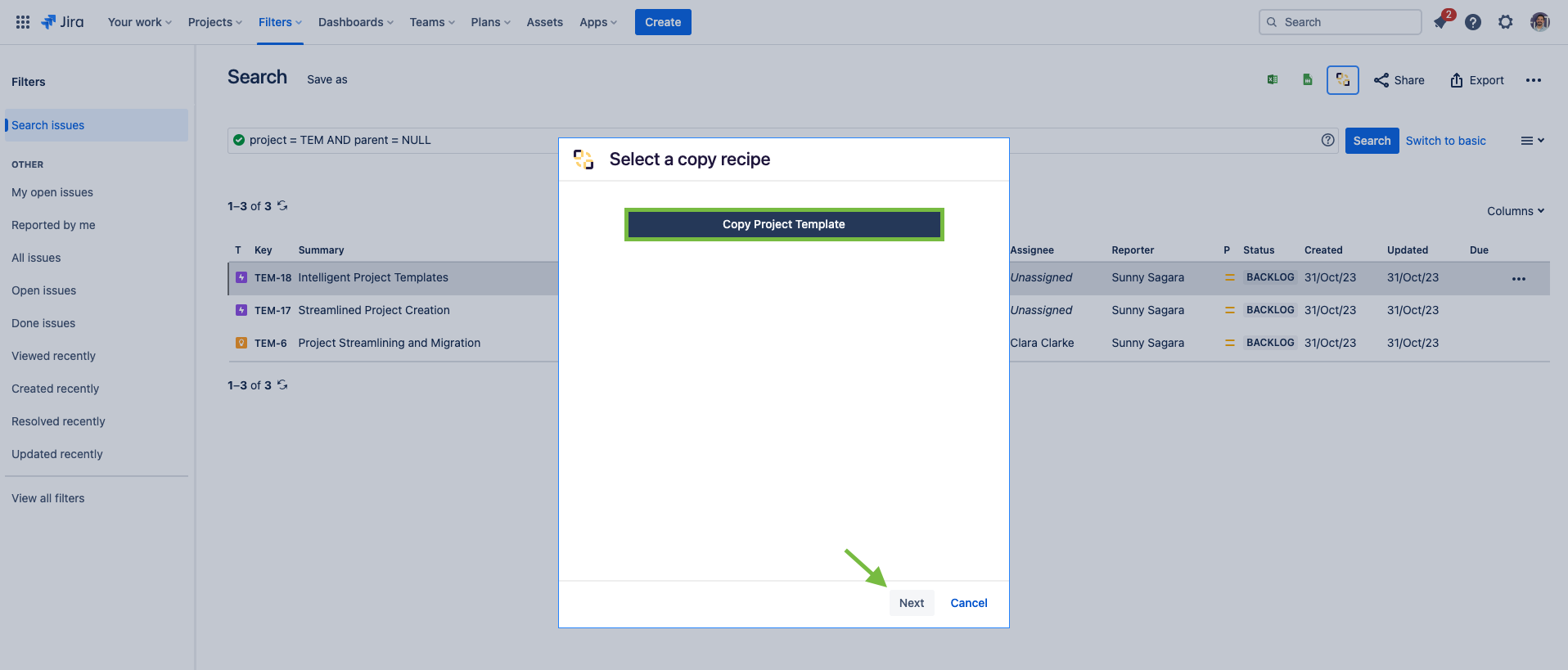
This action should only take a few seconds.
You can check the detailed documentation here.
You must be a registered user to add a comment. If you've already registered, sign in. Otherwise, register and sign in.

Hello @Bridget Caci,
I am Marlene, working on the team which develops Deep Clone for Jira.
I am happy to hear if it worked for you now.
If you are migrating from production to sandbox regularly and if you happen to have Deep Clone installed on your instances, you could use our app for the migration. It is possible to create space copies, including copies of the work items.
Our app also enables you to monitor process and logs during the cloning process, pause and cancel.
But note that there are some limitations when cloning spaces between instances.
You must be a registered user to add a comment. If you've already registered, sign in. Otherwise, register and sign in.

You must be a registered user to add a comment. If you've already registered, sign in. Otherwise, register and sign in.