Forums

Articles
Create
cancel
Showing results for 
Search instead for 
Did you mean: 

Workforce Management in JSM is Now Generally Available!

We're thrilled to announce that Workforce Management (WFM) in Jira Service Management is officially live.

This has been a long time coming. Workforce Management brings native schedule management, real-time availability tracking, and intelligent ticket routing together - right inside Jira Service Management, no third-party tools required.

If you've ever managed a support team using spreadsheets, manual admin groups, or a patchwork of automation rules just to get the right ticket to the right agent. This is built for you.


What is Workforce Management?

Workforce Management gives service team managers the tools to plan, staff, and route; all natively in Jira Service Management. Here's what's live today:

Schedules

Build and manage your team's work schedules directly in Jira Service Management. Set shifts, handle timezones, and bulk import via CSV so you're not starting from scratch.
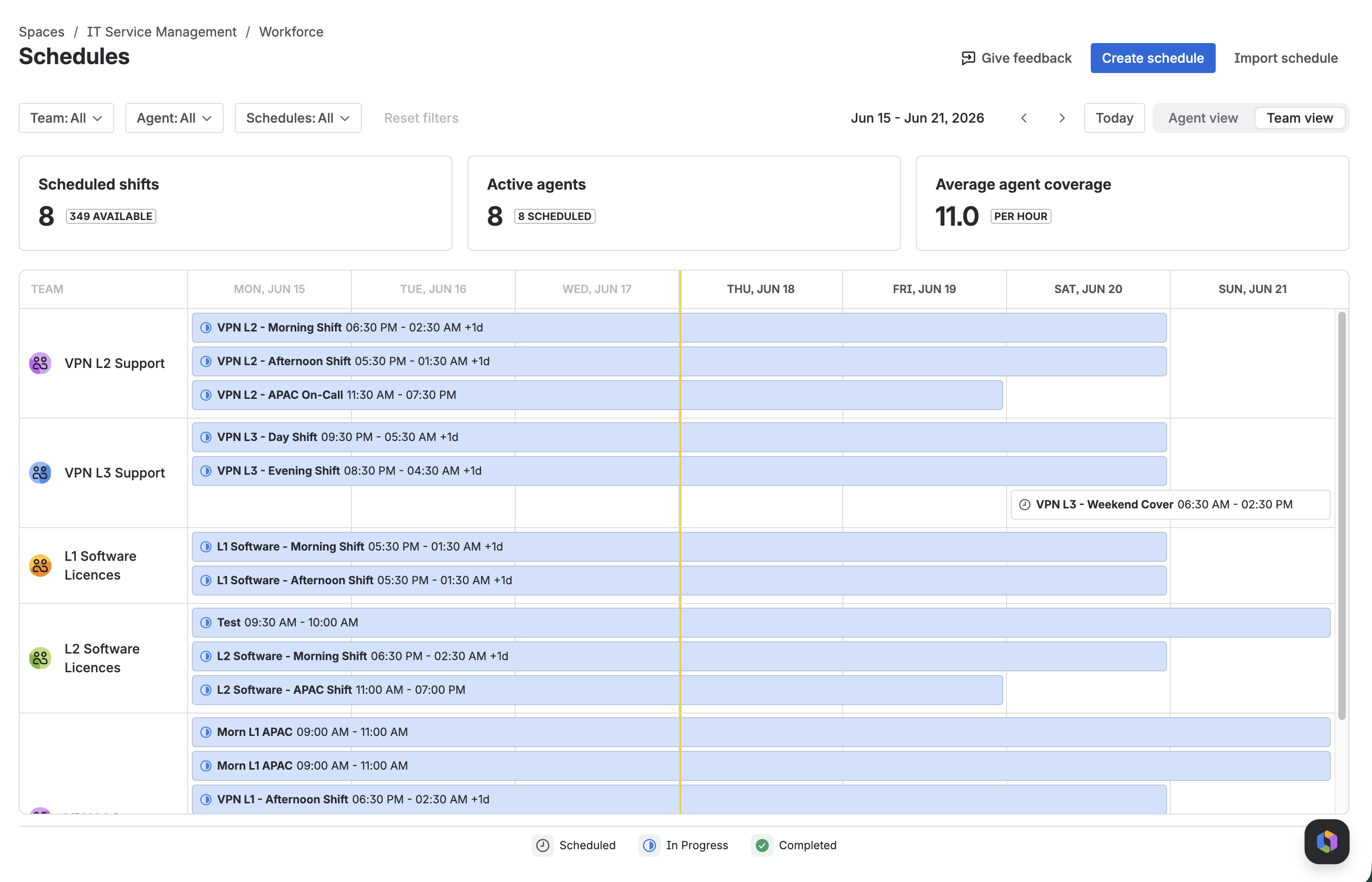
Screenshot 2026-06-18 at 1.34.08 PM.png

Availability

Agents can set their real-time availability status; managers get a live view of who's available. No more guessing who's actually available to pick up a request.
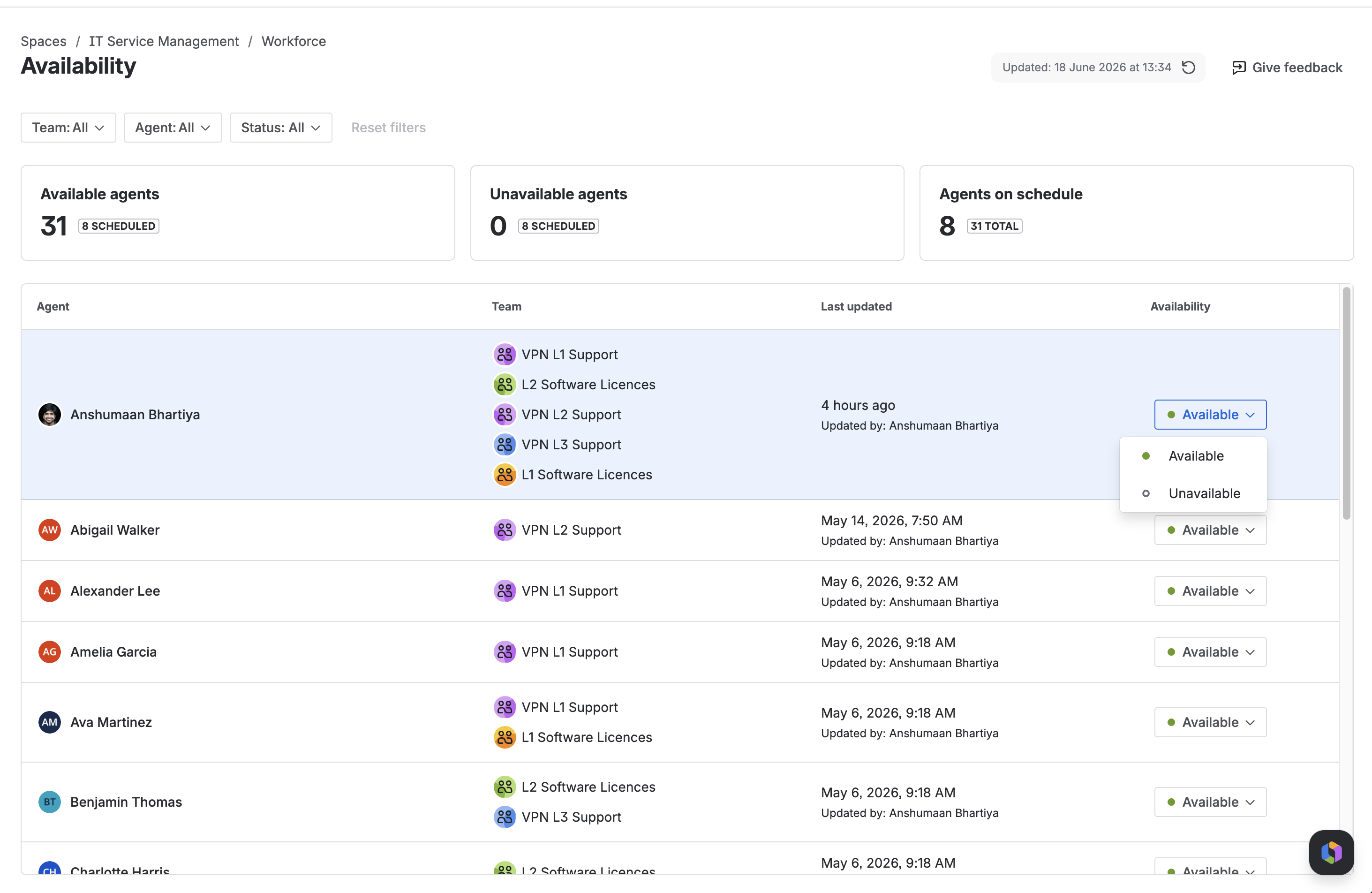
Screenshot 2026-06-18 at 1.34.22 PM.png

Capacity Utilization

See your team's ticket load in real time. Spot overloaded agents, identify agents who can take more work, and directly navigate to assigned work.
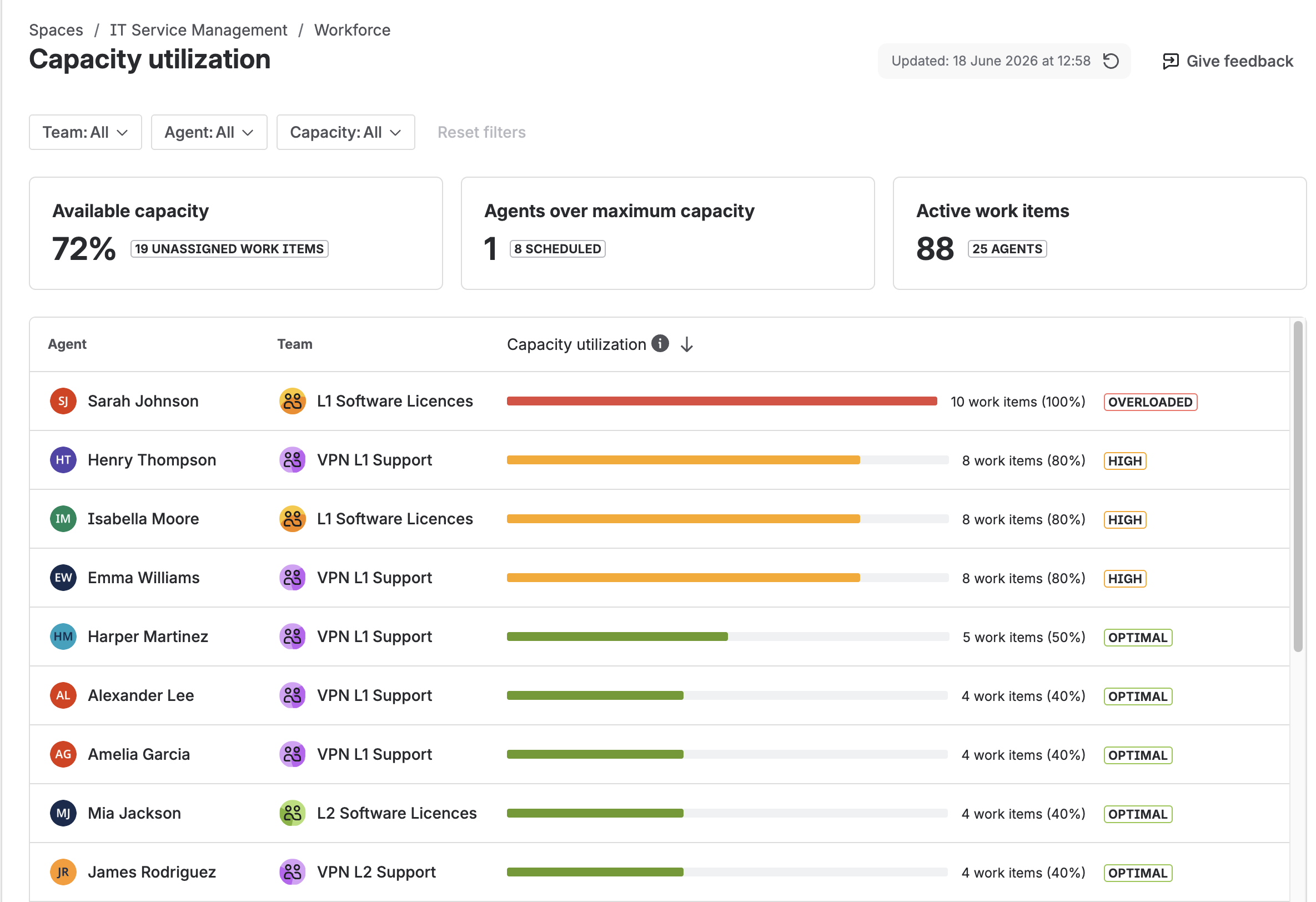
Screenshot 2026-06-18 at 12.59.55 PM.png

Automatic Routing

Workforce Management powered routing automatically factors in agent availability, capacity, and schedulse when assigning tickets. The right ticket always finds the right agent at the right time.
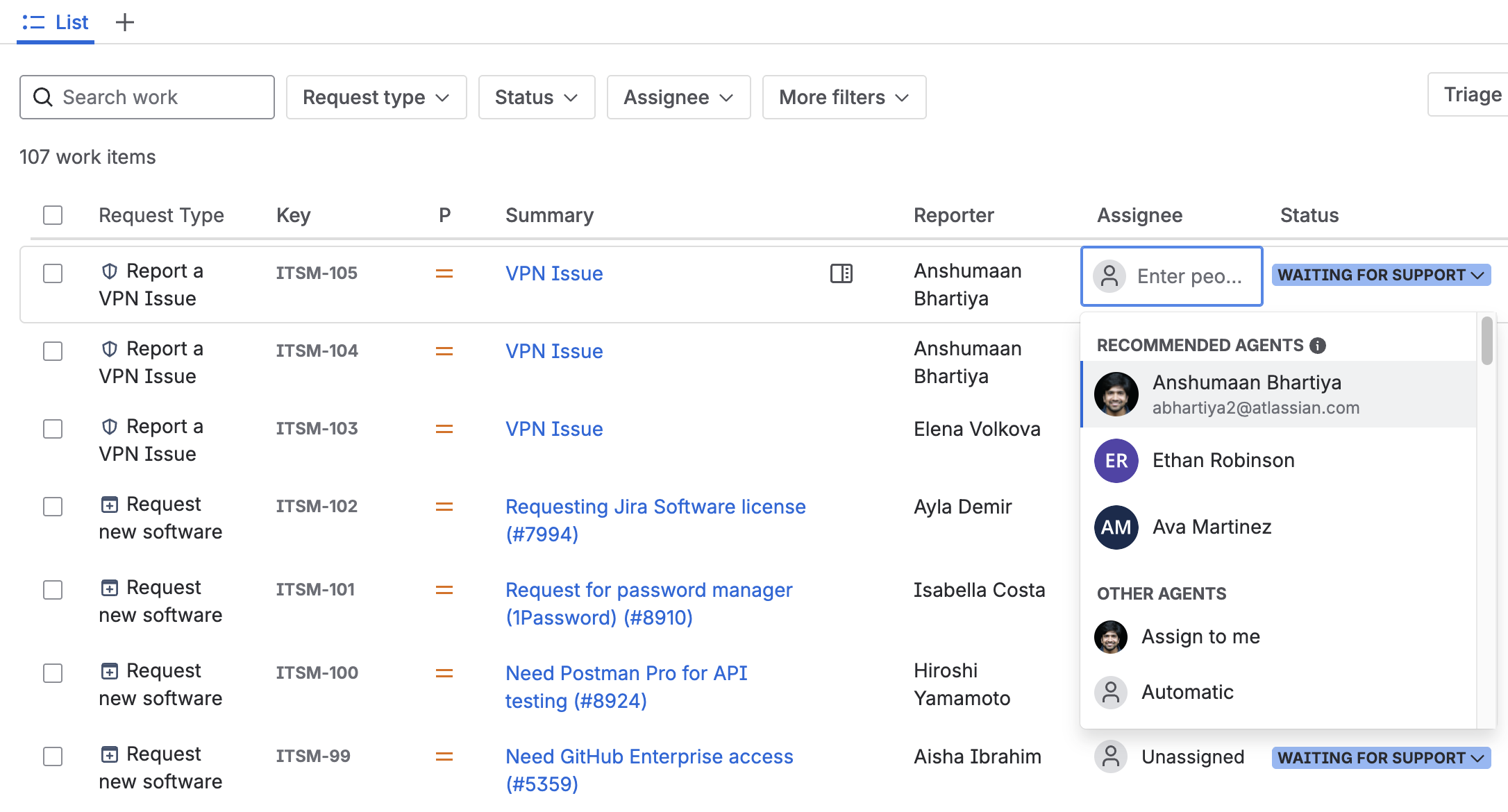
Screenshot 2026-06-18 at 2.17.12 PM.png


What EAP customers are saying

We ran a closed Early Access Program with customers across a range of industries before GA, and the signal was strong:

  • "We were managing schedules in spreadsheets and running automations just to handle routing. WFM replaced all of that."

  • "Availability tracking alone changed how our managers start their day."

  • "Getting set up was fast. We had our first schedule running within the hour."


How to get started

WFM is available today on JSM Premium and Enterprise plans.

  1. Go to your JSM project settings

  2. Navigate to Workforce Management

  3. Enable WFM and connect your team

  4. Build your first schedule. It takes less than 10 minutes.
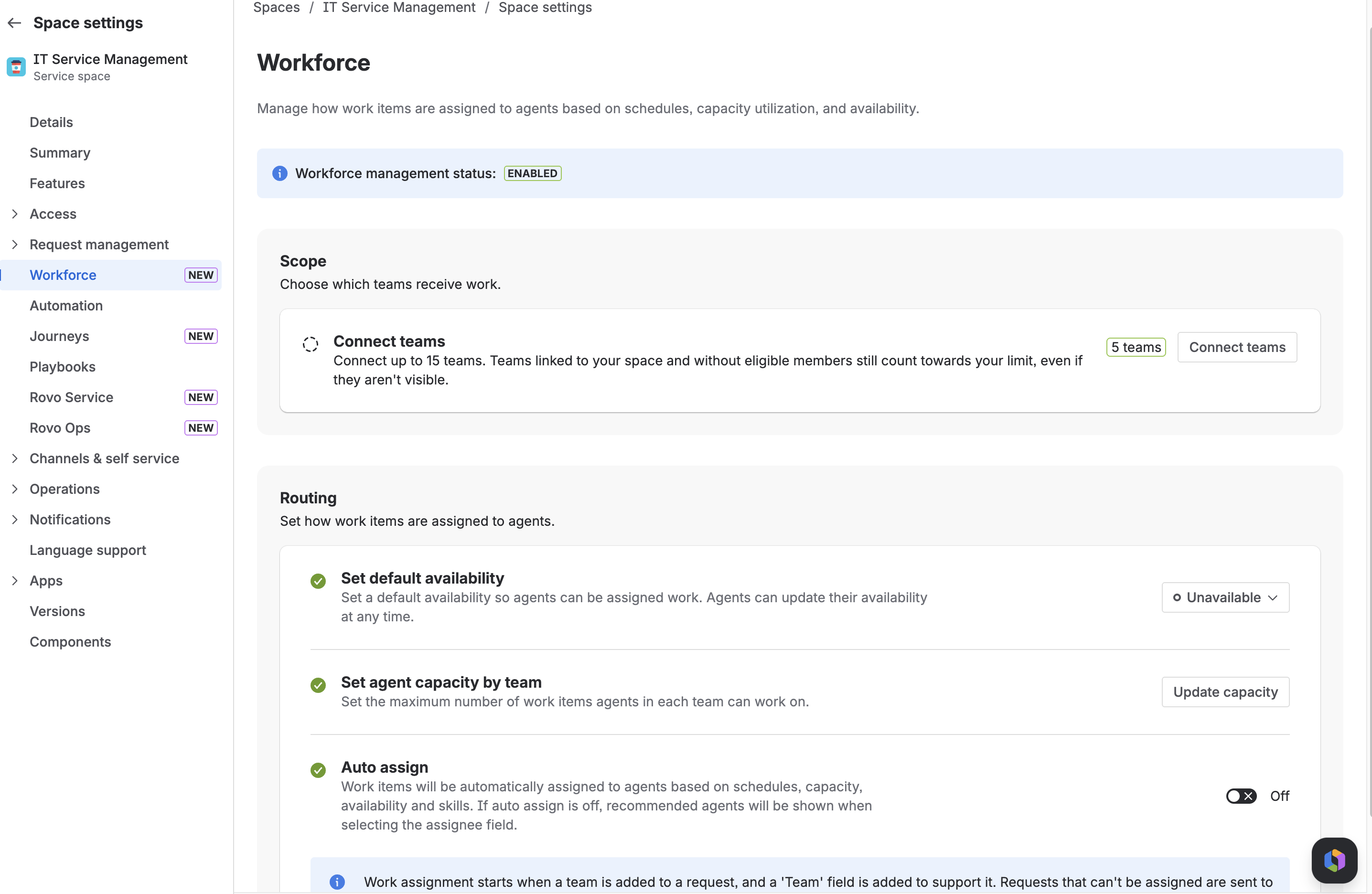
Screenshot 2026-06-18 at 1.35.37 PM.png


You can read more about WFM and Routing here.


What's coming next

Here's what we're building next:

  • Coverage Gap Detection & Reassignment. Automatically flag uncovered shifts and suggest replacements.

  • Skills-based Routing. Route tickets to agents based on skills, not just availability and schedules.

  • Reporting & Analytics. Utilisation, coverage, and capacity dashboards built natively into Jira Service Management.

  • Skills Catalog. Define and manage agent skills, map them to services and segments.

  • Configurable Routing. Choose your routing algorithm, triggers, and combination rules.

  • Leave Management. Agent leave requests, manager approvals, and automatic capacity impact.

…. and much more!!


Want early access to what's next?

We're opening a new EAP cohort for our next wave of features, including Skills-based Routing, Reporting, Skills Catalog, and Configurable Routing.

If you want to shape the product before it ships, we want to hear from you.

➡️ Sign up here !!!

We'll prioritise customers who:

  • Are already using WFM (or keen to start)

  • Have a real scheduling or routing challenge to solve

  • Can commit to 1–2 feedback sessions per month


We can't wait to see how you use it. Drop your questions, use cases, or feedback in the comments.

— Anshumaan & the JSM WFM team

13 comments

Rune Rasmussen
Rising Star
Rising Star
Rising Stars are recognized for providing high-quality answers to other users. Rising Stars receive a certificate of achievement and are on the path to becoming Community Champions.
June 18, 2026

A very interesting new feature.

It does also further increase the importance of proper controls over who can and cannot create Teams, who can administrate individual Teams, and the need for custom Teams-picker fields that can be scoped.

I'm trying this out in our Sandbox with a team that has 2 users.
When creating a schedule I can only select 1 of those users. What could cause this?

Where can I see/manage the Teams that have already been added to the Workforce Scope?

Schedules must have an end date.
Is it intended/possible to have Schedules without and end date? Could be useful for for Services supported 24/7 by different people in a day shift/night shift kind of situation.

Is this intended to work in tandem/cohort with the existing Operations features in JSM? It seems like it would fit in very well with those existing scheduling/escalation features.


Like # people like this
Adam Kassoff
Contributor
June 18, 2026

This feature has so much potential but it is currently being gatekept by needing Space Admin permissions.

Like Susan Waldrip likes this
Wojciech Polkowski
I'm New Here
I'm New Here
Those new to the Atlassian Community have posted less than three times. Give them a warm welcome!
June 18, 2026

We are definitely going to try this. Thanks!

Like # people like this
Subrata Dass
Atlassian Team
Atlassian Team members are employees working across the company in a wide variety of roles.
June 18, 2026

@Rune Rasmussen , yes Schedules must have an end date . You can extend it to long enough though . A never ending schedule unfortunately is not feasible . To see teams or add them to workscope you can use the onboarding feature - or link any teams to the project 

For teams control you can use the new type admins feature that come with teams - https://community.atlassian.com/forums/Atlassian-Teams-User-Group/New-Features-Team-type-permissions-custom-fields-and-more/ba-p/3240364 

Like Susan Waldrip likes this
Anshumaan Bhartiya
Atlassian Team
Atlassian Team members are employees working across the company in a wide variety of roles.
June 19, 2026

@Adam Kassoff Thanks for your feedback. We are exploring different permissions models to separate the roles, and I'll get back when we have more to share.

Like # people like this
Martin Runge
Community Champion
June 24, 2026

For me, this is one of the best features to give teams what they need. Good work!

Like # people like this
Rune Rasmussen
Rising Star
Rising Star
Rising Stars are recognized for providing high-quality answers to other users. Rising Stars receive a certificate of achievement and are on the path to becoming Community Champions.
June 30, 2026

@Subrata Dass It would be great if the schedules could be never ending.
And if already added teams was visible in a list beyond when adding new teams.

Anshumaan Bhartiya
Atlassian Team
Atlassian Team members are employees working across the company in a wide variety of roles.
June 30, 2026

Thanks all for the continued insights, we have incorporated some of these into the next set of features now rolling out!

Plus the Early Access has started for Skills based Routing and Team-based Routing, sign up here!

Josh
Rising Star
Rising Star
Rising Stars are recognized for providing high-quality answers to other users. Rising Stars receive a certificate of achievement and are on the path to becoming Community Champions.
July 6, 2026

Hi @Anshumaan Bhartiya . Does the current functionality work in situations where:

  1. Agents work in multiple spaces
  2. Multiple teams share single spaces
  3. Agents utilize different Jira family products (e.g. JSM + Jira)

This update seems JSM-focused, so my initial assumption would be that you're targeting that area first as an MVP. Would love to hear that I'm off-base there though.

Anshumaan Bhartiya
Atlassian Team
Atlassian Team members are employees working across the company in a wide variety of roles.
July 7, 2026

@Josh thanks for your questions!

1. Availability is agent-scoped, i.e. you status is the same across all spaces where you are an agent in WFM. Updating your status in any space reflects across all spaces. Schedules and Capacity are space-scoped, and do not reflect across spaces.
Coming Soon: Skills will be agent-scoped. Your skills are assigned to you across all your spaces (this is currently in EAP, and you can sign up here).

2. If you are referring to Atlassian Teams, that's exactly what makes WFM powerful. You can schedule for specific Teams, route to agents in Teams, filter by Teams etc.
Coming Soon: Automatic Routing to the right Team (this is also currently part of the same EAP).

3. We are currently JSM-focused for these features.

Best
Anshumaan

Like Josh likes this
Josh
Rising Star
Rising Star
Rising Stars are recognized for providing high-quality answers to other users. Rising Stars receive a certificate of achievement and are on the path to becoming Community Champions.
July 7, 2026

Thank you for the clarifications, @Anshumaan Bhartiya !

I'm sure there are good reasons (likely some combination of technical and early user feedback) for scoping Schedules and Capacity to single spaces. However, that can potentially pose some blockers for more heterogeneous environments / teams.

Not factoring in other Jira product spaces introduces additional blockers. Capacity is most helpful when it's a comprehensive view; if it's a space-fragmented picture then many use cases likely won't see the full value of WFM.


I'm glad to see that you're working towards Automatic Routing for Atlassian Teams. That's indeed very helpful; we have many situations where a 1:1 mapping between a given work team and a JSM space are not effective / feasible.

liam_incutto
I'm New Here
I'm New Here
Those new to the Atlassian Community have posted less than three times. Give them a warm welcome!
July 8, 2026

After a couple days of testing on a sandbox, I've noticed that the availability "feature" doesn't seem to work as I thought it might've done. I assumed it would be similar to an OOO app where an agent/engineer would manually set their status as available or unavailable (if they planned on working on a project which required them to step out of the "queue" for a short period of time) and based on that (our current round robin, auto work item assignment) would just skip those users who had marked themselves as "unavailable".. 

However, after testing this, as soon as an agent/engineer's status is marked as unavailable and they interact with a ticket (by literally just clicking in a random space, or beginning to type a comment), it immediately and automatically sets (the agent who initially set their status to unavailable) BACK to available. I know that this feature is relatively new and more and more features are being added.. but it just feels like this availability feature seems pretty useless and feels like something that should be avoided, as it feels like it doesn't do what it looked like it SHOULD do.

I've also noticed that (even if an agent has been assigned to a schedule/shift), as soon as their status is set to unavailable (even just the one time), it ends that shift completely, resulting in no other changes being able to be made for that specific user.

Any help would be greatly appreciated.

Thanks :)

Subrata Dass
Atlassian Team
Atlassian Team members are employees working across the company in a wide variety of roles.
July 8, 2026

@liam_incutto Thanks for your comments . We hear you . We are bringing in a feature to enable / Disable Auto Status Changes . 

However I have a question about the second part - Shifts and Status are not linked to each other . Changing of Status should not end shift . Can you validate that bit . 

Comment

Log in or Sign up to comment
TAGS
AUG Leaders

Atlassian Community Events