What's going on, Community? Scott from Automation here with another update!
Organization admins can now get better visibility and traceability for automation flows. We’ve added new events to the audit log at admin.atlassian.com, so you can see exactly when and how automation flows are changing across your organization.
What’s new?
Previously, it was difficult to track administrative changes to automation flows at an organization level. Now, you can see these events for Jira, Confluence, Jira Service Management, and Jira Product Discovery. The following actions will trigger an event in the audit log at admin.atlassian.com:
-
flow lifecycle: when a flow is created, enabled, disabled, or deleted
-
configuration changes: when a flow is updated or saved
-
access and ownership: when a flow’s owner changes, or when editor access is granted or revoked
Note: These events track changes to the flows themselves. To see when a flow runs or executes on an issue, continue using the automation audit log within the product.
Who can use this?
This feature is available for customers with any of the following:
-
Jira, Confluence, Team Work Collection, or Service Collection Enterprise plans
-
Jira or Confluence,Team Work Collection, or Service Collection Premium plans with Atlassian Guard
-
Atlassian Guard Premium
How to get started
You don’t need to do anything to turn this on. To see the new automation events:
-
Go to admin.atlassian.com and select your organization
-
Select Insights then Audit log.
-
Use the Activity” filter and search for "Automation" to see the new events.
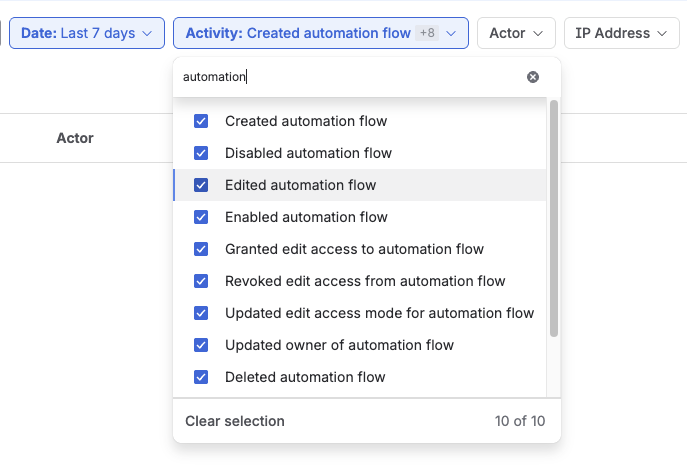
It’ll take a few minutes for events to show up in the log after an action. We’re also working on bringing these events to Atlassian Studio in the future.


