We're moving! The community forums are migrating to a new platform on September 22. Learn more
×Community resources
Community resources
Community resources
Story point rollup in Jira: what's native, what automation can do, and where both stop
Open an epic in Jira and the progress bar answers one question: how many child work items are done. For a lot of teams that's not the question they're asking. If you estimate in story points, a 13-point story and a 1-point cleanup task count the same — and the moment your sub-tasks carry estimates, even the count is misleading, because sub-task estimates don't roll up into the epic at all.
This comes up constantly in the community, usually phrased as "how do I sum story points from sub-tasks to the story, and from stories to the epic?" Here's what Jira gives you out of the box, how far automation gets you, and where it makes sense to reach for something else.
What rolls up natively
More than people expect, but in scattered places:
- The epic's issue view shows a progress indicator over its child work items — based on how many are done, not on estimates.
- The backlog (company-managed projects) shows per-epic story point totals split by status when you open the epic panel — useful, but it lives in the backlog, not on the epic.
- Plans (Premium) does real estimate rollup up the hierarchy — but it's a planning view you have to navigate to, and sub-task estimates are excluded from rollups entirely. If your team estimates at the sub-task level, Plans won't see those numbers.
- Team-managed projects add a naming wrinkle: the field is "Story point estimate", not "Story points". Any rollup you build has to target the right field, and JQL or automation written for one project type quietly does nothing in the other.

The common thread: Jira will show you pieces of the answer in different screens, but there's no single place on the epic itself that says "21 of 43 points done, and here's the breakdown." The gap is visible right in the screenshot above: the epic's progress bar reads 25% — two of eight items closed — while by story points the same epic is 49% done, because the two closed items happen to be the biggest ones.
The automation approach
The standard workaround is an automation rule that maintains the rollup in a custom field:
- Create a number field, e.g. "SP rollup", on stories and epics.
- Rule 1: when Story points changes on a sub-task → branch to its parent → sum the estimates of all the parent's sub-tasks (a lookup with
{{lookupIssues.Story Points.sum|0}}) → write the result to the story's rollup field. - Rule 2: same shape one level up — when a story's rollup changes, re-sum into the epic.
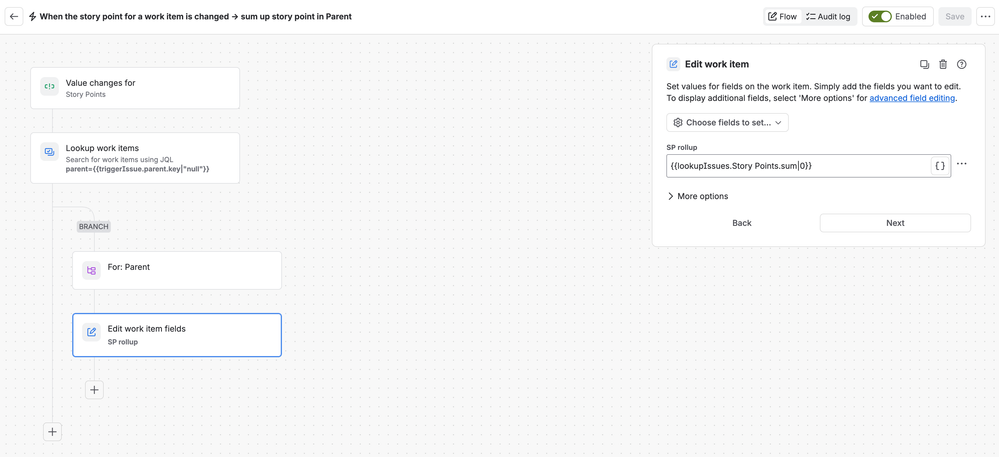
This genuinely works, and if you just need the number to exist — for JQL, for a dashboard gadget, for a report — it's a fine answer. The trade-offs only show up as you live with it:
- It's one rule per level. Sub-task → story → epic is two rules, plus the custom field on every level. Add an initiative layer and you're maintaining a pipeline.
- The value is only as fresh as the last trigger. Bulk edits, imports, moved issues, or a rule that was briefly disabled all leave stale numbers behind, and nothing flags the drift — the field looks exactly as authoritative when it's wrong.
- Both story point field names need handling if you have a mix of team-managed and company-managed projects.
- You get a number, not a picture. The rollup lands in a field. Progress toward done, or how the remaining work is distributed across assignees or departments, still isn't visible anywhere on the epic.
Which route fits
- Stay native if done-count progress is honest for your team — stories sized similarly, no sub-task estimates — or if you're on Premium and your PMs already live in Plans.
- Use automation if you need the total as data (JQL filters, dashboards) and you're comfortable owning the rules. One hierarchy level and a number field is automation's sweet spot.
- Look at a marketplace app if you want the rollup computed live at view time (no rules to maintain, nothing to drift), shown on the issue itself, and broken down — not just "21 of 43" but who has how much of the remainder, in what state.
Disclaimer: I work for Plugio, and the third branch is the one our app covers — Plugio Panels adds configurable panels to the issue view that compute progress over children and their sub-tasks at view time, weighted by issue count, story points (both field names), time estimates or any numeric field, with per-field breakdowns of the remaining work. It also handles the mixed case this article keeps running into: when a story and its sub-tasks both carry estimates, a per-field project setting decides which level counts, so nothing is silently doubled. I'm mentioning it as a direct example of that branch, not as the only option — there are several rollup apps on the Marketplace with different angles.

Curious how other teams handle this, especially sub-task estimates: do you roll them up, forbid them, or just accept the epic bar being approximate? What made your setup stick?
Was this helpful?
Thanks!

Habib__Plugio__
0 comments