If you've managed a Jira instance for more than a year, you know how it starts. A team needs to track something specific, a field gets created. Then another. Then ten more. Before long, you're staring at 300+ custom fields, half of which no one remembers creating.
At one of our enterprise clients, the field list had grown so large that every new feature request triggered the same conversation: the business team would describe what they needed, the admin would scan the list for something reusable, and the negotiation would begin.
The outcome was always one of two things: a new field gets created and the list grows, or a compromise is made on a label that confuses users for years. Neither is a win.
The root cause
The problem is structural. A Jira custom field has one name — globally. But business language is contextual. The same concept means different things to different teams, and forcing everyone into a single label is where the friction starts. Field count climbs not because teams need more data points, but because they need different words for the same data point.
Reuse the same field — with the right label every time
Jira does offer a native concept of field contexts — the ability to scope a field's options to specific projects or issue types. But native contexts have a hard limitation: the field label stays the same everywhere. You can restrict which options appear, but you cannot change what the field is called.
This is exactly where Behaviours Builder goes further.
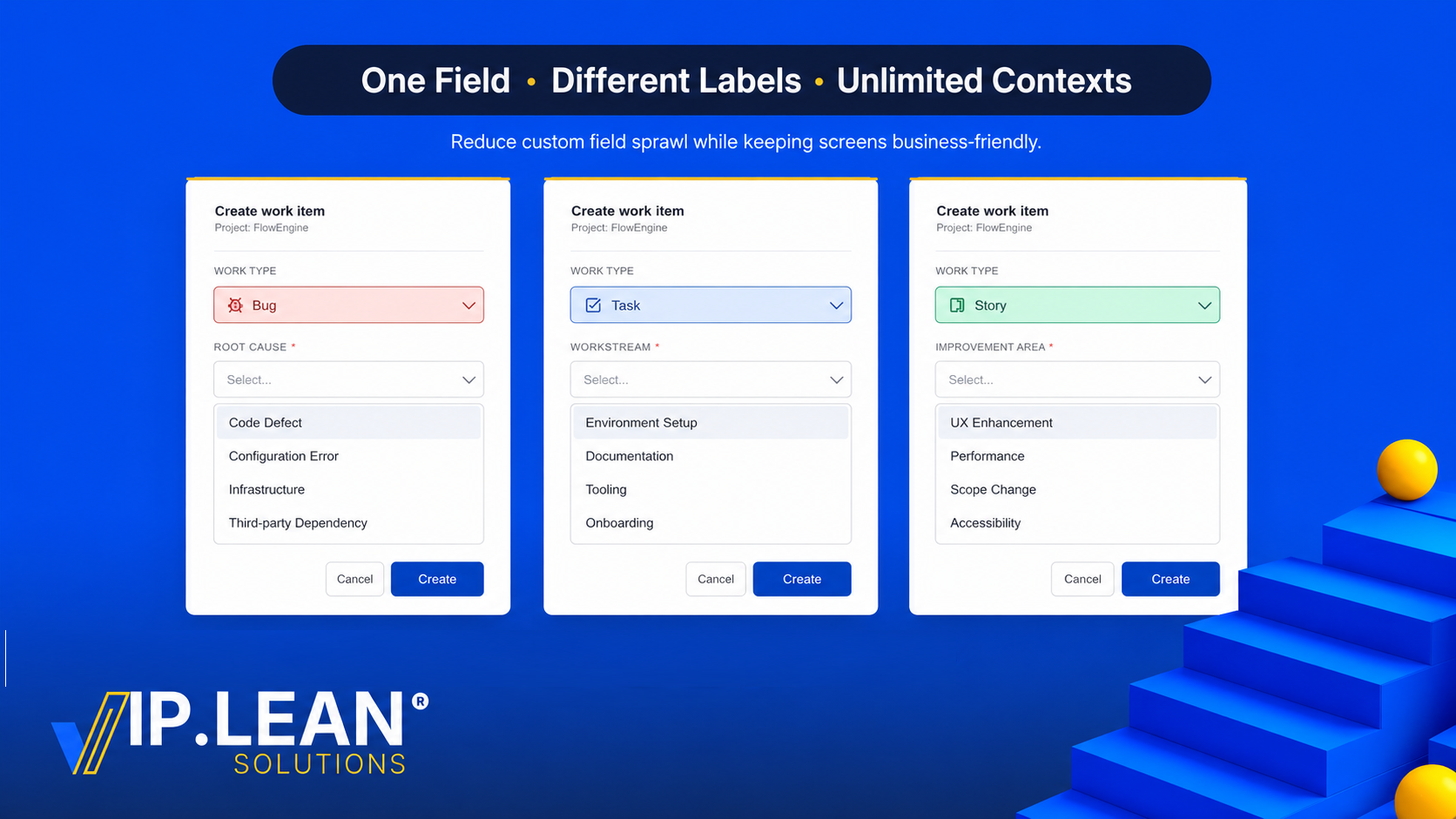
With the Field Label Override behaviour, both the label and the option list can be tailored per context — per project, per work type, or any combination of both. And unlike native Jira contexts, the number of contexts is unlimited: the same field can behave differently across as many projects and work types as your instance requires, including multiple distinct contexts within the same space.
Take a concrete example. A single-select field called Request Category — one field, one JQL name, one place to report. With Behaviours Builder, it surfaces as three completely different experiences depending on the work type:
|
|
Bug
|
Task
|
Story
|
|---|
|
Field label
|
Bug Category
|
Workstream
|
Improvement Area
|
|
Option 1
|
Code Defect
|
Environment Setup
|
UX Enhancement
|
|
Option 2
|
Configuration Error
|
Documentation
|
Performance
|
|
Option 3
|
Infrastructure
|
Tooling
|
Scope Change
|
Without label override, you'd either create three separate fields or force every team to accept a name that doesn't fit their context. With Behaviours Builder, each work type gets the label that belongs to its world — and the underlying field stays unified.
How it works with VIP.LEAN Behaviours Builder
The configuration is fully no-code. Here is how the Bug context is set up as an example.
-
In the Behaviours Builder app, create a new behaviour and define its scope: select the target space and set the work type to Bug. This determines exactly when and where the behaviour applies.
-
Within the behaviour, add an action targeting the Request Category field. Two modifications are set in one place:
-
Rename the label to Root Cause
-
Restrict the visible options to only those relevant for a Bug: Code Defect, Configuration Error, Infrastructure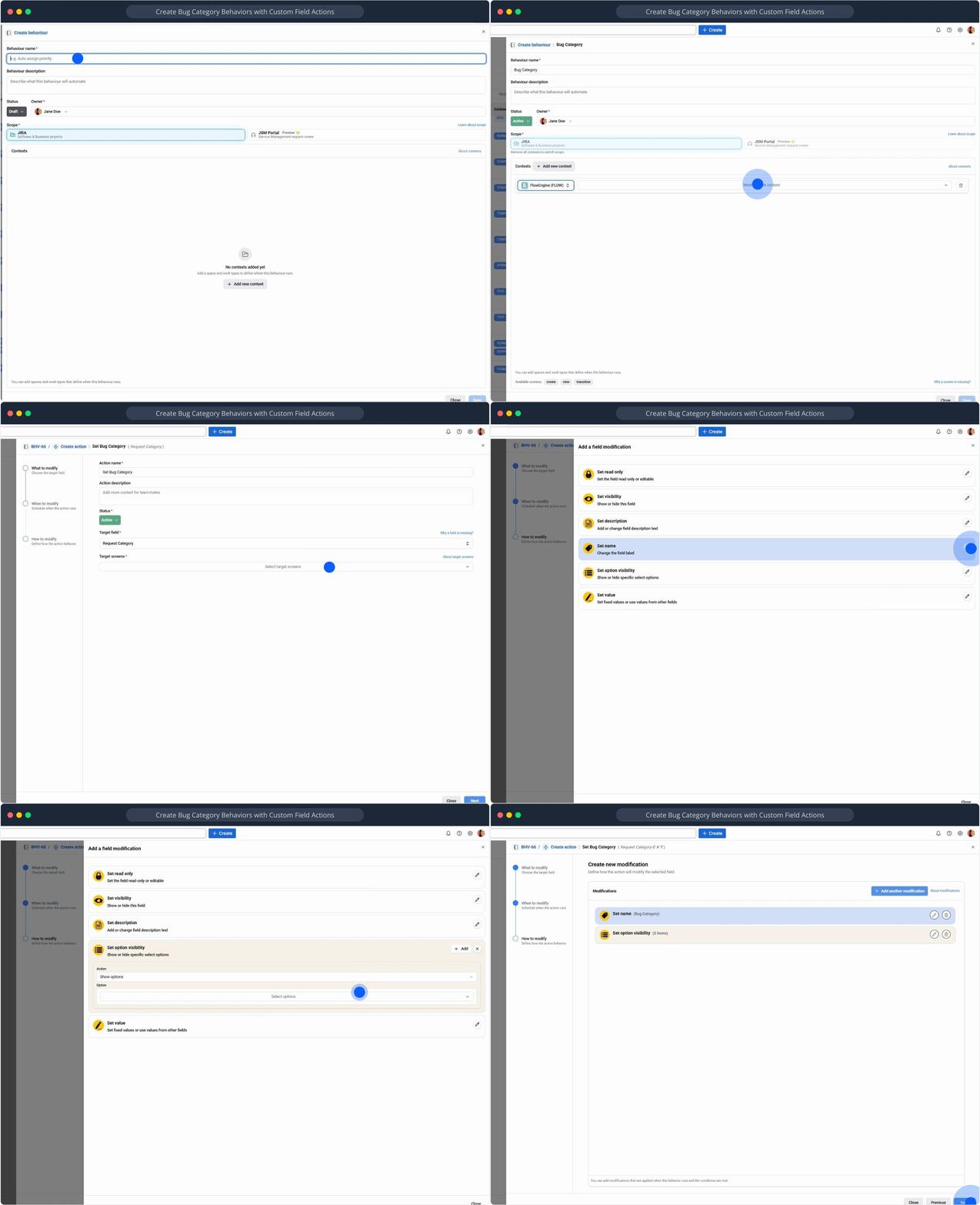
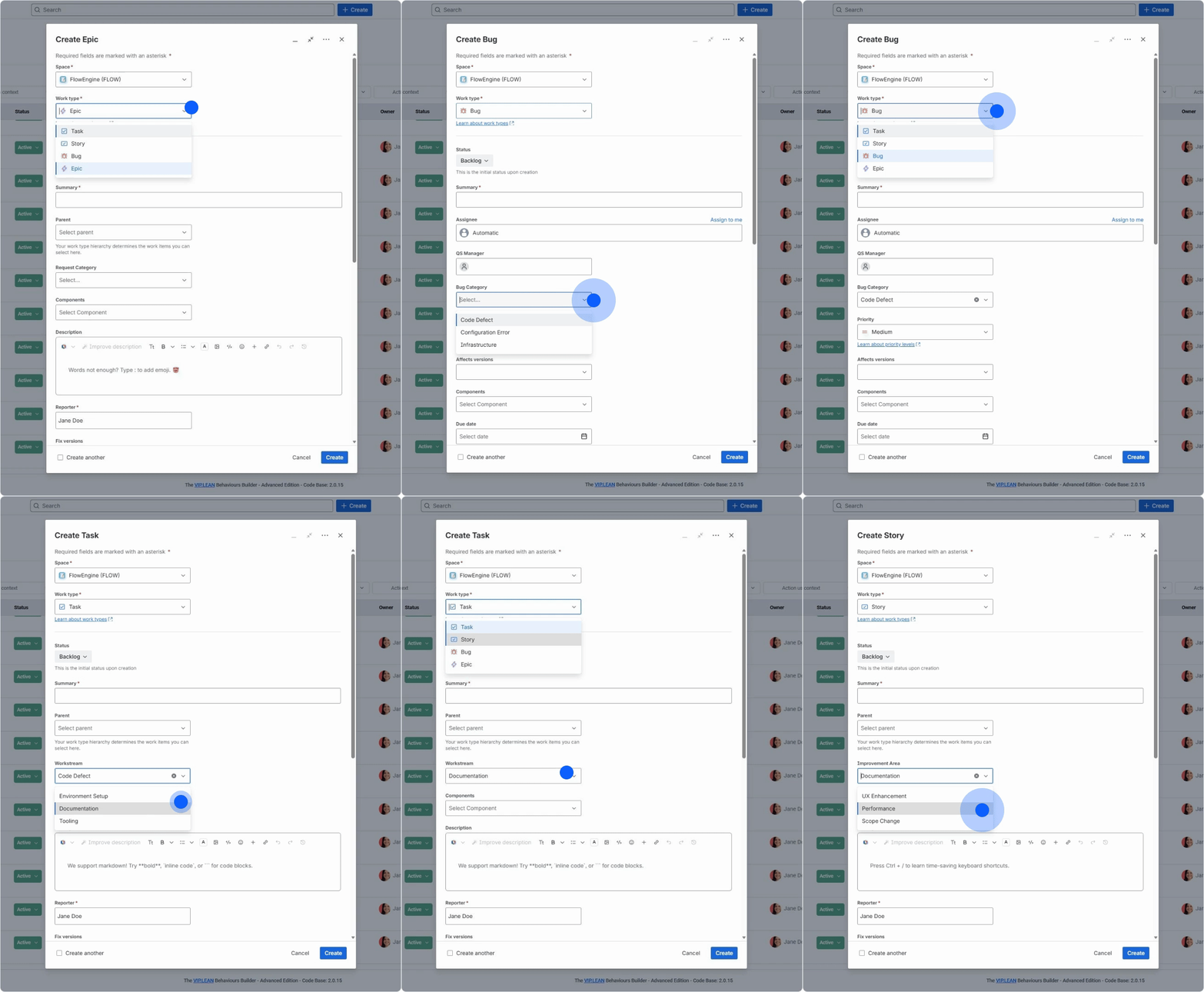
- We then repeat the same steps for Task (label: Workstream) and Story (label: Improvement Area), each with their own scoped behaviour and option list.
The result
Same field. Same screen. Completely different experience per work type.
One thing to keep in mind
Label overrides are a display-layer feature. JQL always uses the real field name or field ID — not the contextual label. If your field is named Request Category, that's what goes in your filters, dashboards, and automation rules, regardless of what label a given project sees. Worth communicating clearly to your power users and report builders before they go looking for a field that doesn't exist by that name.
What you actually gain
|
Without label override
|
With Behaviours Builder
|
|---|
|
New field created per naming need
|
One field, multiple display labels
|
|
Field list grows uncontrollably
|
Lean, auditable field catalogue
|
|
Users confused by mismatched names
|
Every team sees context-relevant labels
|
|
Admin negotiates field reuse each time
|
No compromise — the right name per context
|
|
Reporting fields scattered across duplicates
|
Single field ID, consistent data model
|
Beyond the table:
Fewer fields, less admin overhead. One well-scoped shared field replaces three "close enough" duplicates. Field schemes become leaner. Screen configurations simplify.
No more naming negotiations. Business teams see the label that makes sense to them. The conversation shifts from "can we reuse this?" to "what should it say for your team?"
Cleaner screens for end users. Combined with other Behaviours Builder behaviours — field visibility, conditional requirements — a single field can behave entirely differently across teams without any duplication in the data model.
Governance-friendly. Fewer fields means easier audits, cleaner unused-field reports, and a more maintainable instance. When a new admin joins, they're not inheriting a mystery list of 300 fields with no documentation.
Custom field sprawl rarely gets fixed because the fix feels like a big migration. This one isn't. A label override behaviour takes minutes to configure and the impact is immediately visible to every user on that screen.
Have you dealt with field naming chaos in your Jira instance? Drop a comment — curious how others have handled it.
Links:
