Community resources
Community resources
Community resources
How do I assign a team to an issue?


I created an Atlassian Team for a project and want to be able to assign an issue to this team in Jira.
The support guide says that this should be possible but it does not seem to work. The team is not available to select in the Assignee field.
Could I be missing a step?
I can tag the team in a Comment.
3 comments

As @Valerie Knapp stated, Jira allows only user-based assignment, not a team-based assignment. If you want visibility over which team owns the issue, one workaround may be to use a custom field to store the team within the issue.

Hi Devika,
As noted by the other posters, you can't pick the Team via the Assignee field. To assign a ticket to a team you'd have to use the Team field instead. If this isn't present on your work item view, you'll have to add it via the layout configuration. This is usually only accessible to an administrator of that project.
https://support.atlassian.com/jira-cloud-administration/docs/configure-issue-layout/
This does mean that wherever you would have been looking at the assignee field around Jira you'd have to convert over to looking at the Team field instead (e.g in JQL functions or filters).

hello can you brief me how to configure layout in such a way that assignee picker becomes team picker? I have multiple teams and I do have admin rights. Also on the default configuration page, the team field toggle is disabled.

Hi Saranya,
The screenshot you've shared is of the Field Configuration part of Jira settings - what you'd need to do is either:
1. If you have a fairly simple Jira instance setup (no screen schemes used meaning you have different sets of fields for Create/View/Edit work items), it's easiest to go to the specific Project where you'd like to replace the Assignee field with Team, go to any work item view, and press the Configure button on the bottom right underneath all the fields (number 4 in the screenshot below) 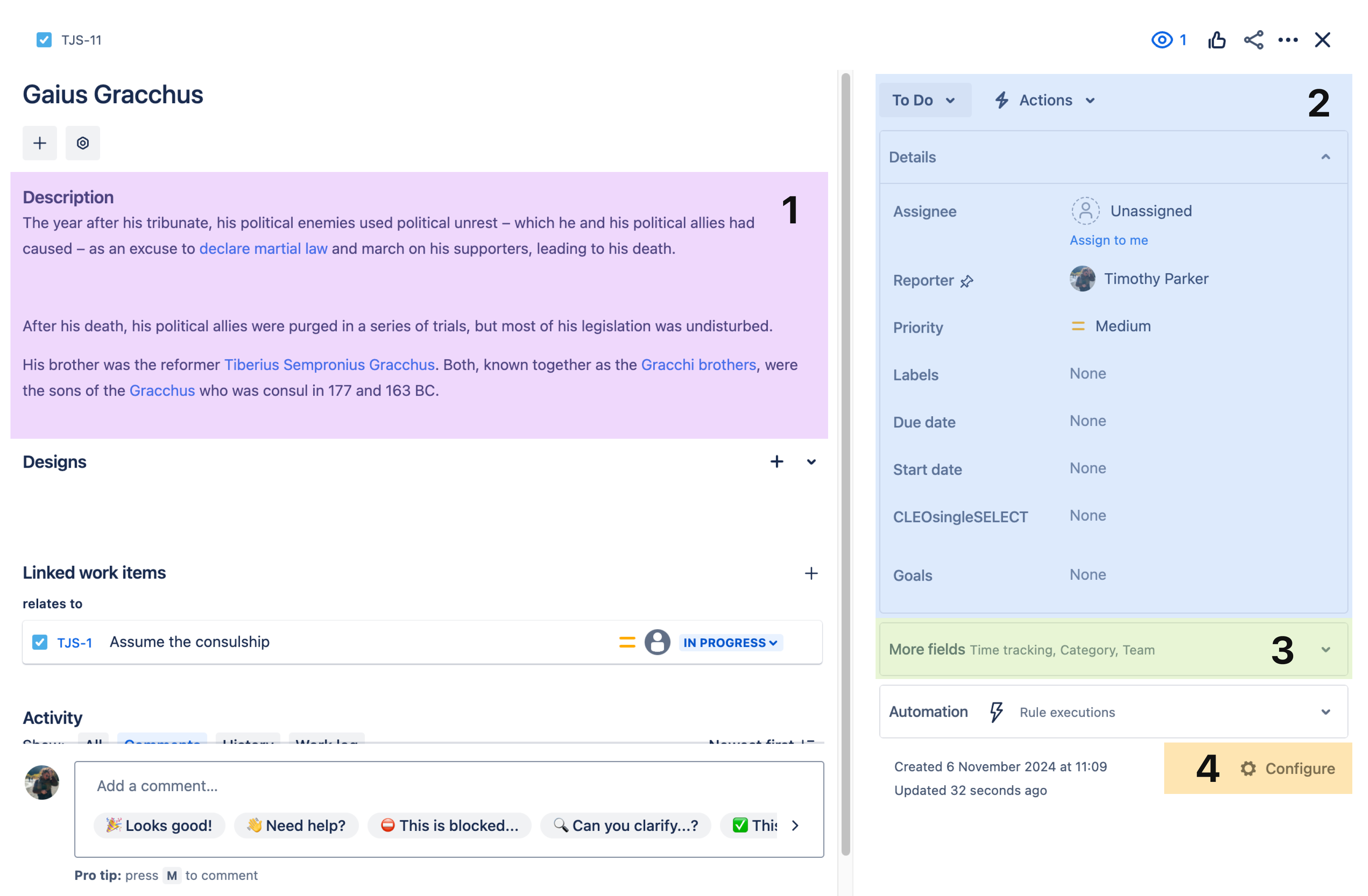
From here you can add or remove fields from that project's layout in a more modernised UI

2. Otherwise if you do have a lot of screens used in different ways (especially across screen schemes) already you'd have to go to Jira Settings -> Work Items -> Screens and modify the appropriate screens to no longer include the Assignee field but rather the Team field.
https://support.atlassian.com/jira-cloud-administration/docs/configure-issue-screens/
A word of warning if you want to do this - using a Team field to represent the assignee is not how Jira generally expects to be used, so there are many places across Jira where you can have Assignee level visualisations (e.g Group By Assignee in a Board, Filter by Assignee in board/backlog, and more) that will no longer work properly over time, since users will not be able to set the Assignee field if you remove it from the layout/screen. Team is generally not supported in the same way across these views.
My team prefers to use both fields, so instead of replacing the Assignee field with Team we use both - filling in both the Team field and the specific person as the assignee for the work item.