I'm attempting to automate the creation of a set of linked issues based on values selected in a checkbox (which is only editable in a workflow transition). Automation rule is setup per following:
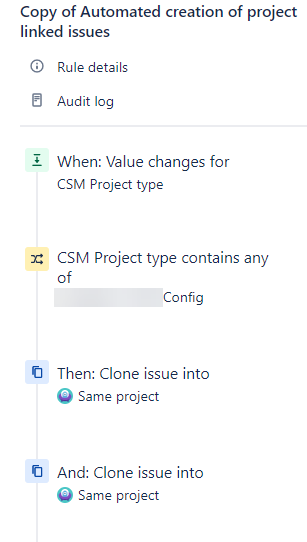
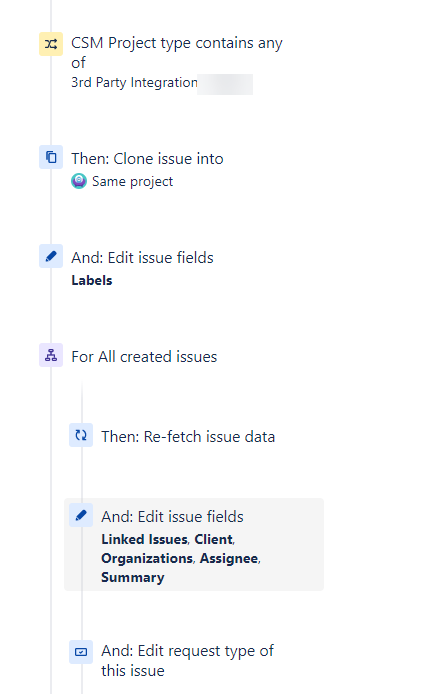
When value changes for Checkbox Field "CSM Project type"
Issue fields condition CSM Project Type contains any of "Value 1"
Then: Clone issue with Summary = ABC
Then: Clone issue with Summary = DEF
Issue fields condition CSM Project Type contains any of "Value 2"
Then: Clone issue with Summary = GHI
Issue fields condition CSM Project Type contains any of "Value 3"
Then: Clone issue with Summary = JKL
etc...
Branch rule - All Created Issues
> Edit Issues
Copy other custom fields from 'master' ticket and set the request types
The rule runs fine and as expected when all values are set in the checkboxes.
However, when one is left out, it stops running the remaining issue fields conditions checks and doesn't run my branch rule. In the above example, if Value 2 isn't set, the Value 3 actions aren't ran.
I tried If/Else conditions at one point but it doesn't suit my needs - I would need to write an excessive amount of "New Action" components to cover every possible combination of the checkboxes.
Is there something obvious I'm missing that will allow all condition checks & asssociated actions to run, without creating conditions for every possible combination of the checkbox values?
Thanks in advance,
Zac


