Community resources
Community resources
Community resources
Trello is suddenly underscoring all spaces between word in only PDF's

Why is Trello suddenly underscoring all spaces between word in only PDF's?
I have done some troubleshooting and it is happening only with pdfs and started suddenly yesterday, images it does not underscore.
This is extremely annoying as I have to go into every download and delete the spaces or copy and paste the original file name, time consuming and unnecessary. Yes there are third party apps that would mitigate this issue, but why did it happen all of a sudden? If it was a Trello change, then I would assume ALL downloaded files would do this.
I just read a thread from this site in 2018 that stated Atlassian was working on removing those underscores. Since I started using Trello last June, this has never occurred until yesterday.
2 answers
2 accepted

Hi @Jeff Arwine
Apologies for the delayed response!
The best way to download an attachment without the underscores in the file name is by clicking on the 3 dots on the right of the attachment, then select Download.
I hope that helps!
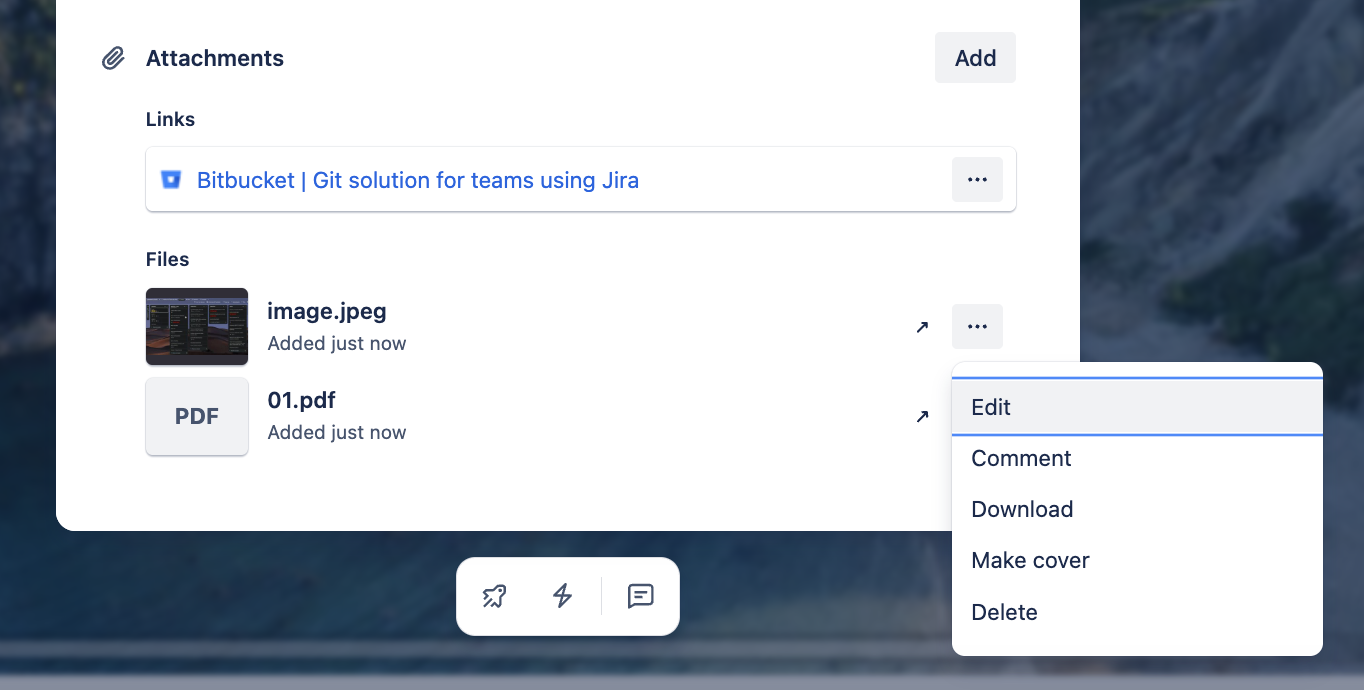
Ok, so I figured out MY problem, I must have started using the download option after the pdf is open and that will always do the underscores, like you stated, if I go to the three lines and select download there, no underscores! Honestly, both ways should work the same but at least I know why it seemed like something had changed in Trello, I just selected a different way of downloading and didn't pick up on it until your thread. Thank you!
You must be a registered user to add a comment. If you've already registered, sign in. Otherwise, register and sign in.

Hi @Jeff Arwine
I remember some individual cases but I cannot find any official bug or something that would confirm that..
And you probably refer to this thread from 2018, correct?..
Most web services (Trello included) internally convert spaces because URLs historically can’t safely carry raw space characters - browsers and servers encode them as %20 or remove them. Using underscores avoids unexpected encoding/decoding issues.
I think even if you think that nothing changed, something might actually like browser version that you use (it could update at the backend). And I would say that this the thing that work between us and the system..
Maybe you can check how it behave on a different browser or system?
Not sure what else we can try..
You must be a registered user to add a comment. If you've already registered, sign in. Otherwise, register and sign in.
I am calling our IT this morning, I am not convinced it is a Trello issue since it doesn't behave this way on my associates computer. And yes, that is the thread I located. I'll post any resolution I find.
You must be a registered user to add a comment. If you've already registered, sign in. Otherwise, register and sign in.
Ok, if this is working on a different computer then yes.. it it good to focus on what is going on on your environment (especially what changed). Yes, would be nice if you can share what you would be able to find out with IT.
Thank you!
You must be a registered user to add a comment. If you've already registered, sign in. Otherwise, register and sign in.
No, it appears that any computer using Trello has this issue, our IT had no solution either.
You must be a registered user to add a comment. If you've already registered, sign in. Otherwise, register and sign in.

You must be a registered user to add a comment. If you've already registered, sign in. Otherwise, register and sign in.