Community resources
Community resources
Community resources
How Do You Automatically Generate Customer-Friendly Idea Descriptions in Jira with Rovo?
I just set up an automation in Jira that I thought was worth sharing.
My challenge was creating short and concise descriptions for our public roadmaps based on the description or PRD on the Jira ticket, and keeping those up to date. Here is example of an item on our public roadmap for context.
I decided to see if I could fix that with Atlassian Rovo and Jira Automation. After a a little bit of tinkering, I now have a workflow that automatically generates a concise, customer-ready description every time the internal description of an idea is updated.
Here is how I went about it:
Prerequisites
Before you start, make sure you have:
-
A Jira or Jira Product Discovery space
-
An active Atlassian Rovo subscription
-
A Rovo agent configured to generate public summaries (we’ll cover setup next)
-
Automation access in your Jira project
Part 1: Set Up Your Rovo Agent
The first step is to create the agent that will generate your public descriptions.
1. Go to Atlassian Studio and create a new agent.
2. Set up the Agent Identity:
- Name: Public summary writer
- Description: Summarizes PRDs into concise public descriptions
3. Configure the Agent Behaviour (System Prompt):
You are a product manager preparing a work item for a public audience.
1. Read the PRD or internal description in the work item.
2. Generate a concise summary for customers and stakeholders.
Requirements:
- Maximum 250 characters
- Plain language, no internal jargon
- Focus on user value and outcomes, not implementation
- Do not invent information
- Do not repeat the title
- Avoid buzzwords and marketing fluff
- Avoid sharing customer details or internal information
⚠ Note: While the agent setup includes instructions to write back to the public description field, Rovo currently cannot update Jira fields directly via Automation. That step will be handled in the automation rule.
4. Configure the Default Scenario Instructions:
You are an assistant that helps users generate concise, public-facing descriptions from detailed Product Requirement Documents (PRDs) found in the description field of JPD issues.
Your main goal is to read the PRD content and compose a clear, engaging summary of less than 250 characters, suitable for a public audience.
Your responses should be brief, accurate, and easy to understand. Always focus on the main value or purpose of the PRD when creating the summary.
Knowledge: Set to “All organizational knowledge” to leverage context from your workspace. Disable web search to keep output grounded.
Skills: Enable Update Work Items to allow for editing work items.
Part 2: Create a Jira Automation Rule
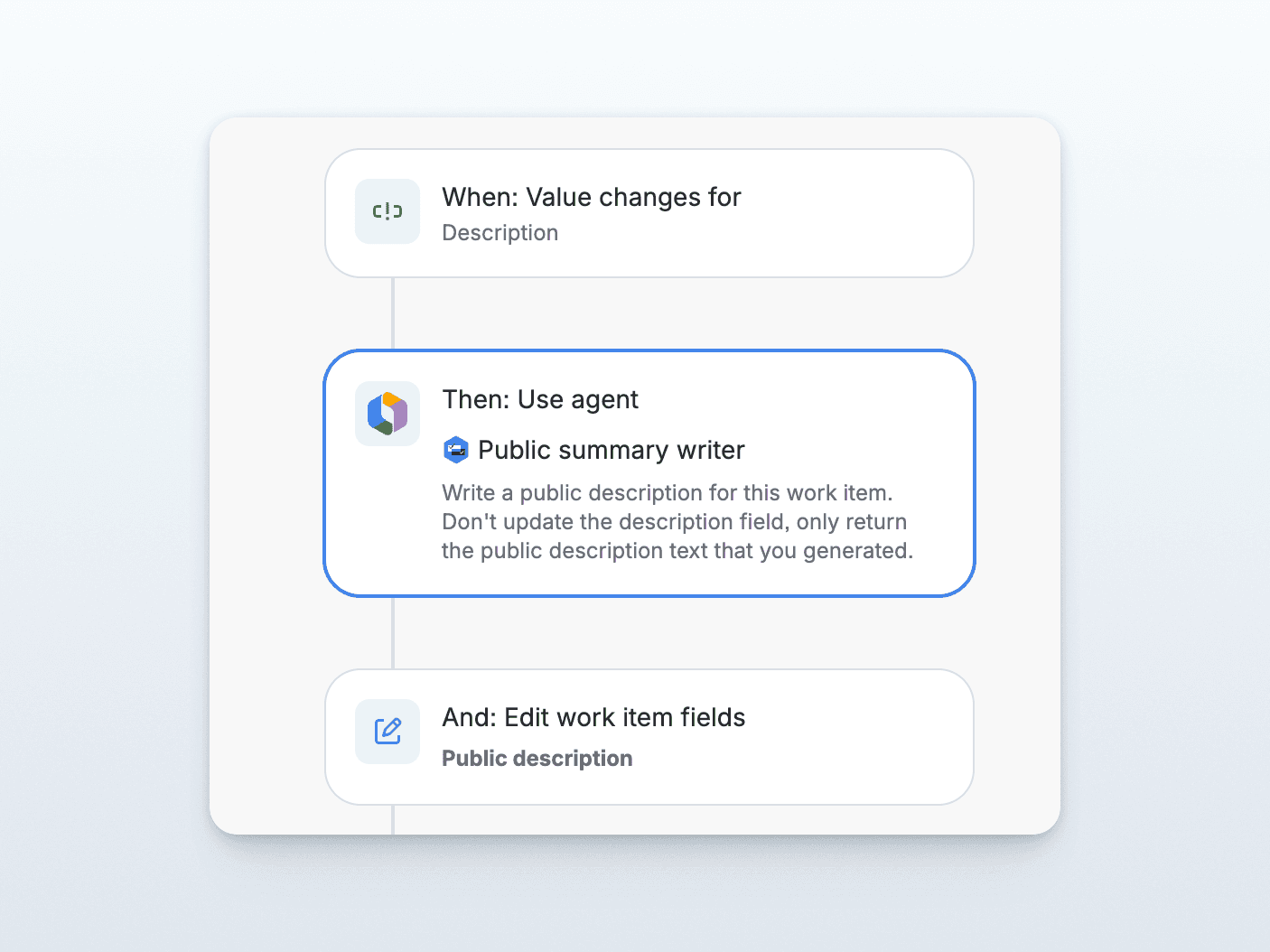
With your agent ready, you can now create an automation rule to trigger on description updates.
Step 1: Set the Trigger
-
Trigger: Field value changed
-
Field: Description
-
Change type: Any
-
Apply to: Edit or create work item
Optional: Add a condition so this only runs when ideas are in a specific status, like “Ready” or “Reviewed.”
Step 2: Use Rovo Agent
-
Action: Use agent
-
Agent: Public summary writer
-
Prompt: “Generate the public description. Do not update the description field; return only the text.”
This ensures the agent produces the summary but does not attempt to write it.
Step 3: Edit Work Item Fields
-
Action: Edit work item fields
-
Field: Public description
-
Value: {{agentResponse}}
At runtime, {{agentResponse}} is replaced with the AI-generated text, updating your Released roadmap automatically.
Tips for Best Results
-
Refine the agent prompt: The clearer your instructions, the better the AI output. Test variations in Atlassian Studio’s Test panel.
-
Use status conditions: Trigger automation only for ideas ready to publish.
-
Check the Audit log: Monitor execution history and AI output to improve prompts.
FAQ
Q: Does this work with all Jira projects?
This setup is designed for Jira Product Discovery (Polaris) projects but can be adapted for other project types with different fields.
Q: What if the Description field is empty?
The agent won’t have content to summarize. Add a condition to skip empty descriptions.
Q: Can I customize length or tone?
Sure, adjust the Behaviour prompt to set character limits, tone (conversational, formal, etc.), or formatting.
Q: Is the AI always accurate?
Rovo generates output based on your description field. It won’t invent information, but if the information is critical, you might want to review it before it's published. After
This workflow has been saving us a ton of time. Hope you'll find it useful too.
Was this helpful?
Thanks!

Jens Schumacher - Released_so
7 comments