Hi everyone 👋
It's been a busy quarter for Status Pages in Jira Service Management. We've shipped three new capabilities that customers have been asking for - each one aimed at a specific moment of pain in the status-page lifecycle. Here's what's new and how to use it.
1. "Send update to Statuspage" is now a Jira Automation action
This is the one I'm most excited about. Until now, posting a status page update during an incident meant a human had to remember to do it, usually mid-firefight, when remembering anything is hard.
We are gradually rolling this out and it should be available for all jira service management enterprise plans in next 2 weeks.
What's new: ‘Send update to Statuspage’ is now a first-class action in the Jira Automation action library, sitting alongside Send web request, Send email, and Send Slack message. That means you can wire up rules like:
🛎 When an incident is created and severity is Sev1 or Sev2 → automatically post an "Investigating" update to the affected component on your status page
✅ When an incident transitions to "Resolved" → automatically post a "Resolved" update and mark the affected component back to "Operational"
🔁 Every 30 minutes during an active Sev1 → post a status-page update with the current incident summary
You can configure the affected components, status (Investigating / Identified / Monitoring / Resolved), update message, and notification preferences - all from inside the same Jira Automation rule builder you already know.
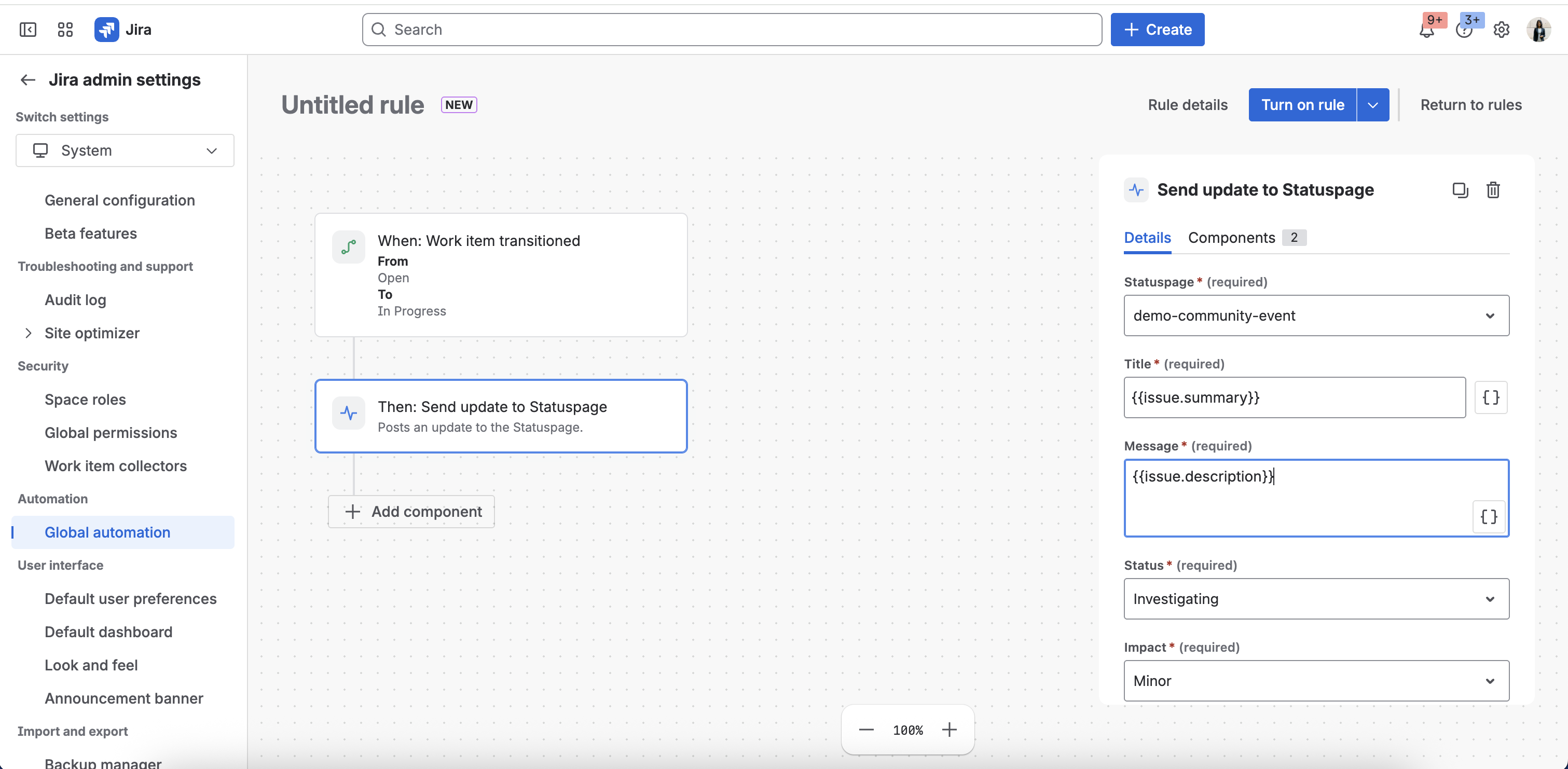
Why it matters: No more "we forgot to update the status page" post incident reviews. Customer communication moves from a manual checklist item to part of the incident response muscle itself.
📍 Where to find it: Space Settings / Site setting → Automation → Create rule → Add action → "Send update to Statuspage". The full reference is in our Jira Automation Actions docs.
2. Manually add email subscribers to your status page
Sometimes the people who most need status-page updates won't sign themselves up - your top accounts' procurement leads, your regulators, your CTO's exec assistant. Until now, you had to ask them to subscribe themselves through the status page.
This capability is generally available and ready for you to use!
What's new: You can now manually add email subscribers directly from the status page subscriber management page.
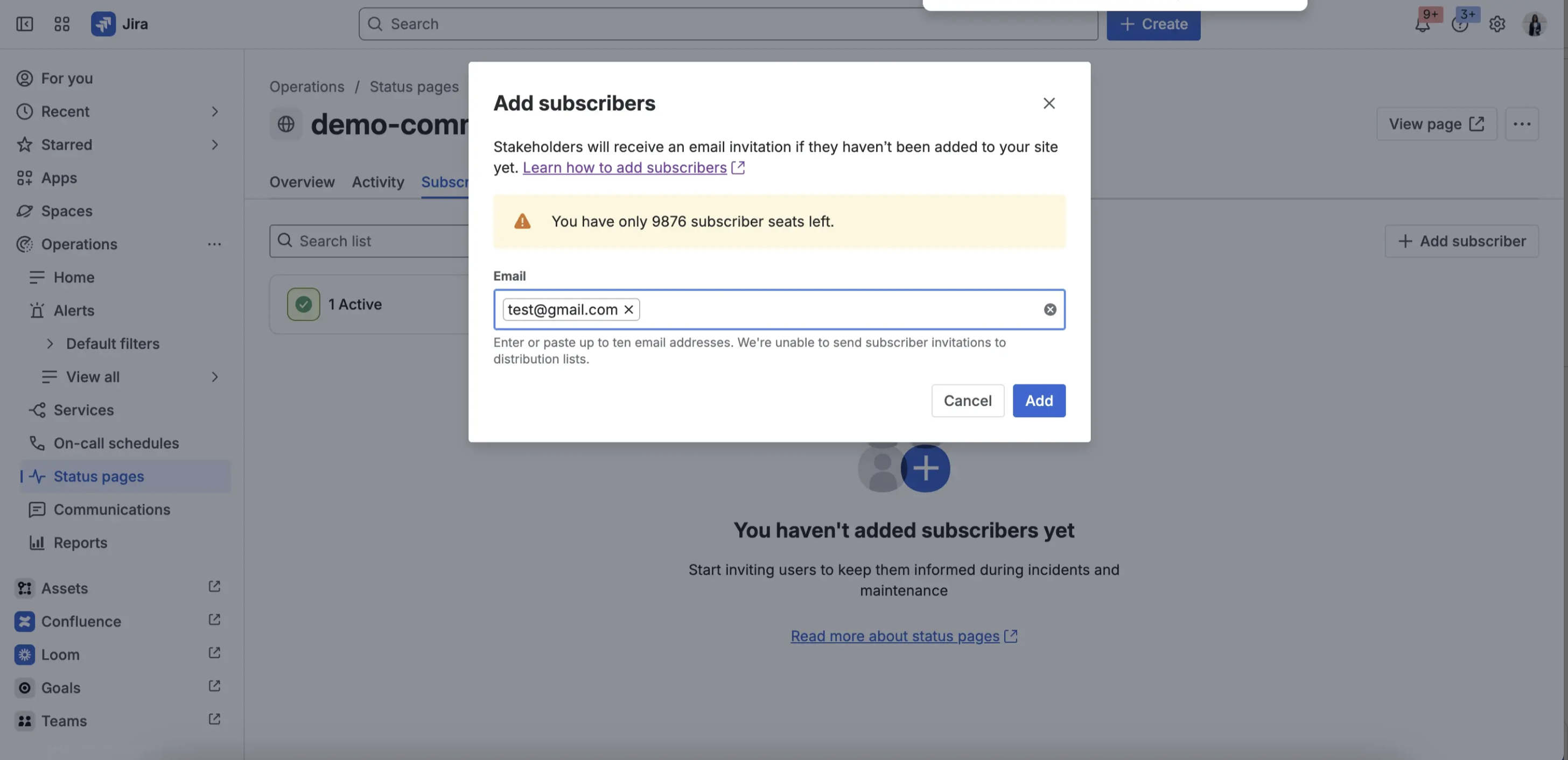
Why it matters: You can finally guarantee that your most important stakeholders are receiving status updates without relying on them to remember to subscribe. Especially powerful for B2B teams managing enterprise customer expectations.
📍 Where to find it: Status Pages → Subscribers → Add Subscribers. Get started and add subscribers to your page.
3. A simpler way to add a custom domain
Custom domains turn your-tenant.statuspage.io into status.yourcompany.com - the version your customers actually trust. Setting one up used to involve hopping between DNS records, CNAME guides, and trial-and-error.
This capability is generally available and ready for you to use!
What's new: The custom-domain setup flow is now guided end-to-end inside Jira service management. You'll see:
-
A single screen with the exact CNAME / DNS records you need to add
-
Live validation that confirms your DNS is propagating correctly
-
One-click verification when your records are live
-
Clear error states if anything is misconfigured, with the fix spelled out
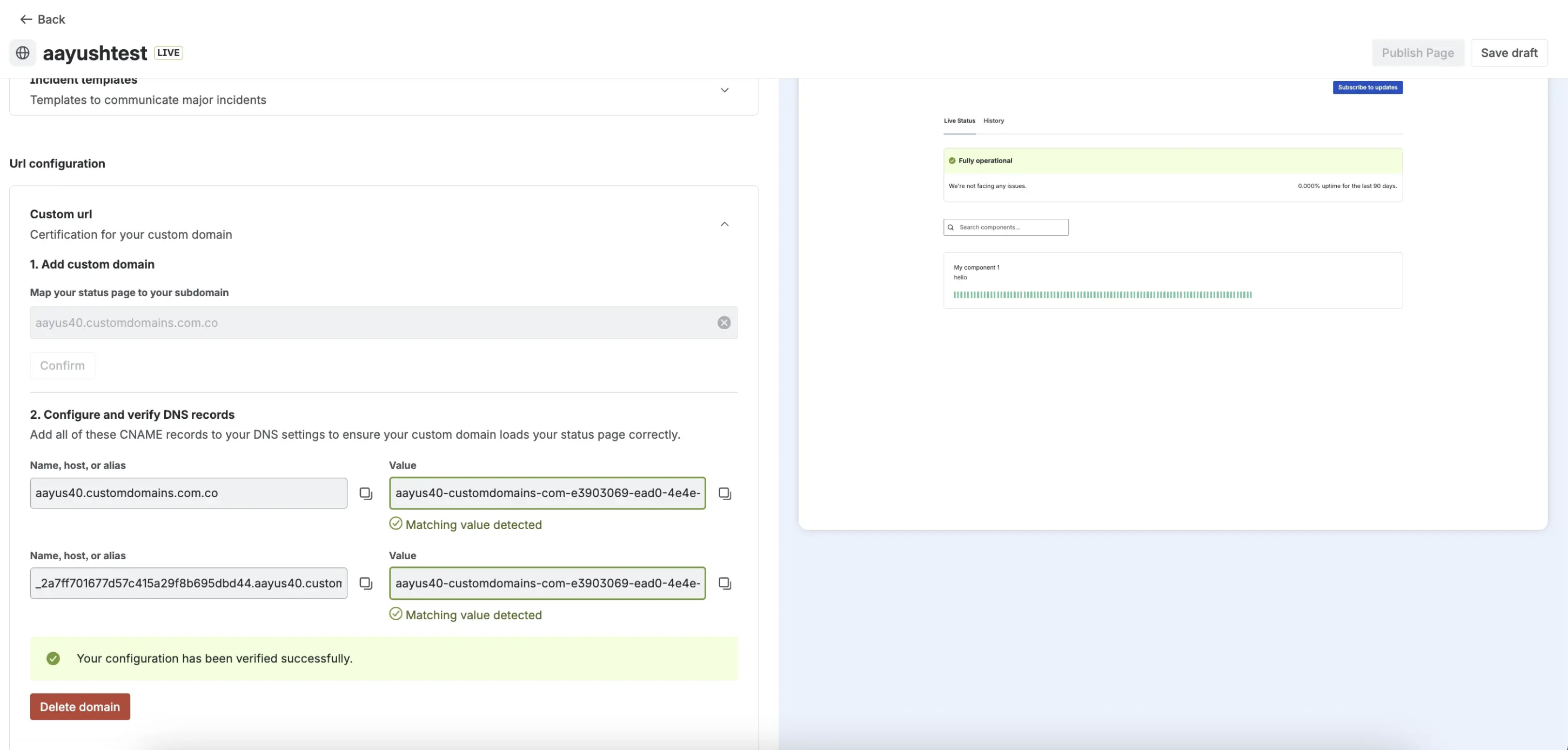
Why it matters: What used to take a back-and-forth between you and your IT team (and sometimes a support ticket) now takes minutes. Once your domain is verified, your status page is publicly reachable on your own branded URL.
📍 Where to find it: Status Pages → ... → edit → Advanced Setting → Custom Domain. You can find a step-by-step guide to configuring custom domains for your live status pages here.
🧭 Why these three together?
Each of these capabilities solves a different bottleneck in the status-page lifecycle:
-
Automation action removes the friction at incident time - when you're updating an active status page
-
Manual subscriber addition removes the friction at audience management - when you need to control who hears about updates
-
Custom domain setup removes the friction at day 0 - when you're first standing up your status page
Together they make Status Pages in Jira Service Management noticeably easier to adopt, easier to operate, and easier to trust
💬 What's next?
We're working on several more improvements based on your feedback, including:
If you have feedback or feature requests, please drop them below 👇. We read every comment.
Thanks for being on this journey with us! 🚀


