Effective prioritization is a superpower of successful product teams. It enables you to move fast and focus on high-impact activities. However, prioritization isn't a solo task—it is a collaborative effort involving the whole product team and key stakeholders.
This guide helps you set up and use the RICE Framework within Jira Product Discovery. Use this template to remove bias, identify "low-hanging fruit" (High Impact/Low Effort), and spot risky bets before development begins.
What is the RICE Framework?
The RICE framework standardizes decision-making by scoring ideas based on four factors.
-
Reach: How many users will this feature affect over a specific period?
-
Impact: How much will this move the needle on our key metric?
-
Confidence: How sure are we about our estimates for Reach and Impact?
-
Effort: How much time and resource investment is required?
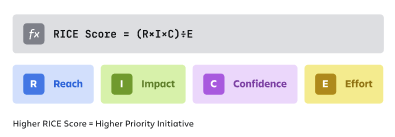
Reach, Impact, and Confidence increase your score (Numerator), while Effort decreases it (Denominator).
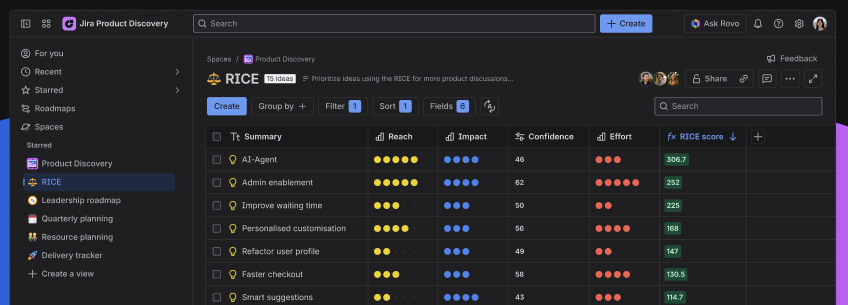
How to setup and use a RICE view in Jira Product Discovery
Step 1: create your input fields
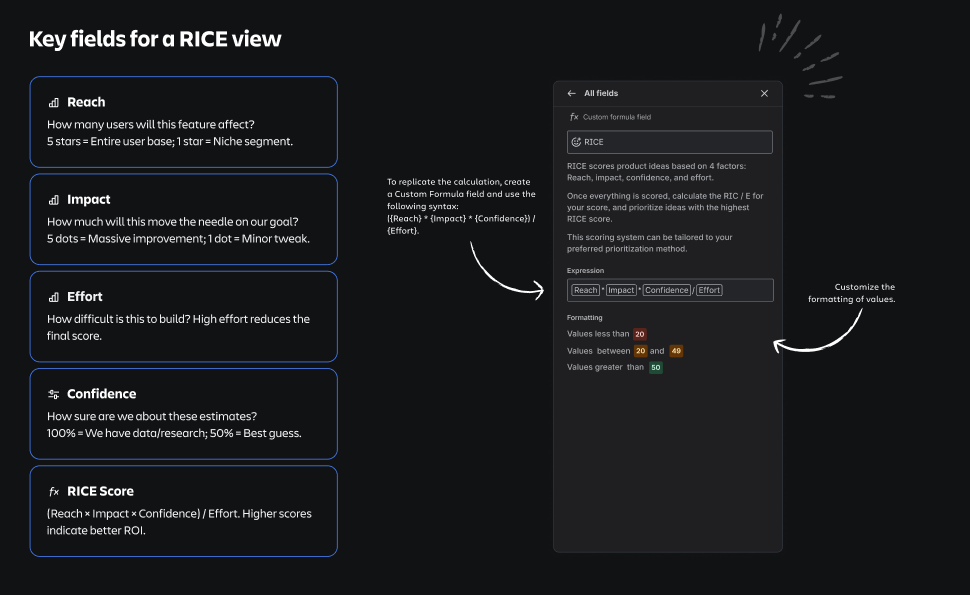
You need fields to capture the inputs. In your Jira Product Discovery view, create the following:
- 'Rating' fields (1-5) for Reach, Impact, Effort
- Alternative: use number field if using actual user counts
- Define what 5 dots mean for each input field)
- 'Slider' field (percentage) for Confidence
- Alternative: use rating field for higher level scoring.
Step 2: create the formula field
This field does the heavy lifting. Create a new field of type Custom Formula and name it RICE Score.
Use the following logic for your configuration:
Step 3: apply visual formatting & sorting
- Color coding: Add formatting rules to the RICE Score field.
- Green: Top 20% scores (High Priority)
- Yellow: Middle tier
- Red: Bottom tier (Low Priority)
- Sort: Apply a default sort to the view by RICE Score (Descending). This ensures the highest value items always appear at the top.
Quick tips
A score is just a number until you add context. Here's how to use this view effectively:
- Invite your team & stakeholders into the discussion to identify which ideas will deliver the most value relative to the resources required.
- Calibrate scores: Ambiguity kills prioritization. Ensure the team interprets "Effort" consistently (Example: 1 dot = 1 Week; 5 dots = 2 Months.
- Discuss the "Why": the score isn't the final decision; it's the conversation starter. Use it to debate why one idea has higher confidence than another
- Review regularly: RICE scores are not static. As you learn more about a customer problem, update your Confidence or Impact estimates to see if the priority changes.
See RICE in action
Not sure where to start? Create a dedicated space with pre-built views to explore a real-life example of the RICE scoring framework.
Note:
-
Only Site/Org Admins and users with permission to create spaces can access this feature.
-
If you do not have these permissions, please ask your admin to create the space and invite you.

