Thank you to everyone who has provided feedback on the upcoming transition from Field Configurations to the new Field Schemes, announced on this post late last year. We understand that this is a significant architectural change, especially for our veteran Jira Admins managing large-scale instances.
To help clarify the impact of this rollout, we’ve consolidated the community's most pressing questions and concerns into this living FAQ document.
Timeline & Open Beta Updates
Q: Has the rollout timeline changed?
A: Yes. Based on our latest progress and the incredibly valuable feedback we've received from our early access and Open Beta participants, we are adjusting our progressive rollout target. The rollout will now begin in June 2026 (previously targeted for April). This gives us the necessary time to incorporate your feedback, polish the user experience, and ensure a smooth transition for everyone. We will keep you updated with any further timeline changes.
Q: When Field Schemes are going GA, will I have to take any steps to migrate to the new schemes or will this be automated?
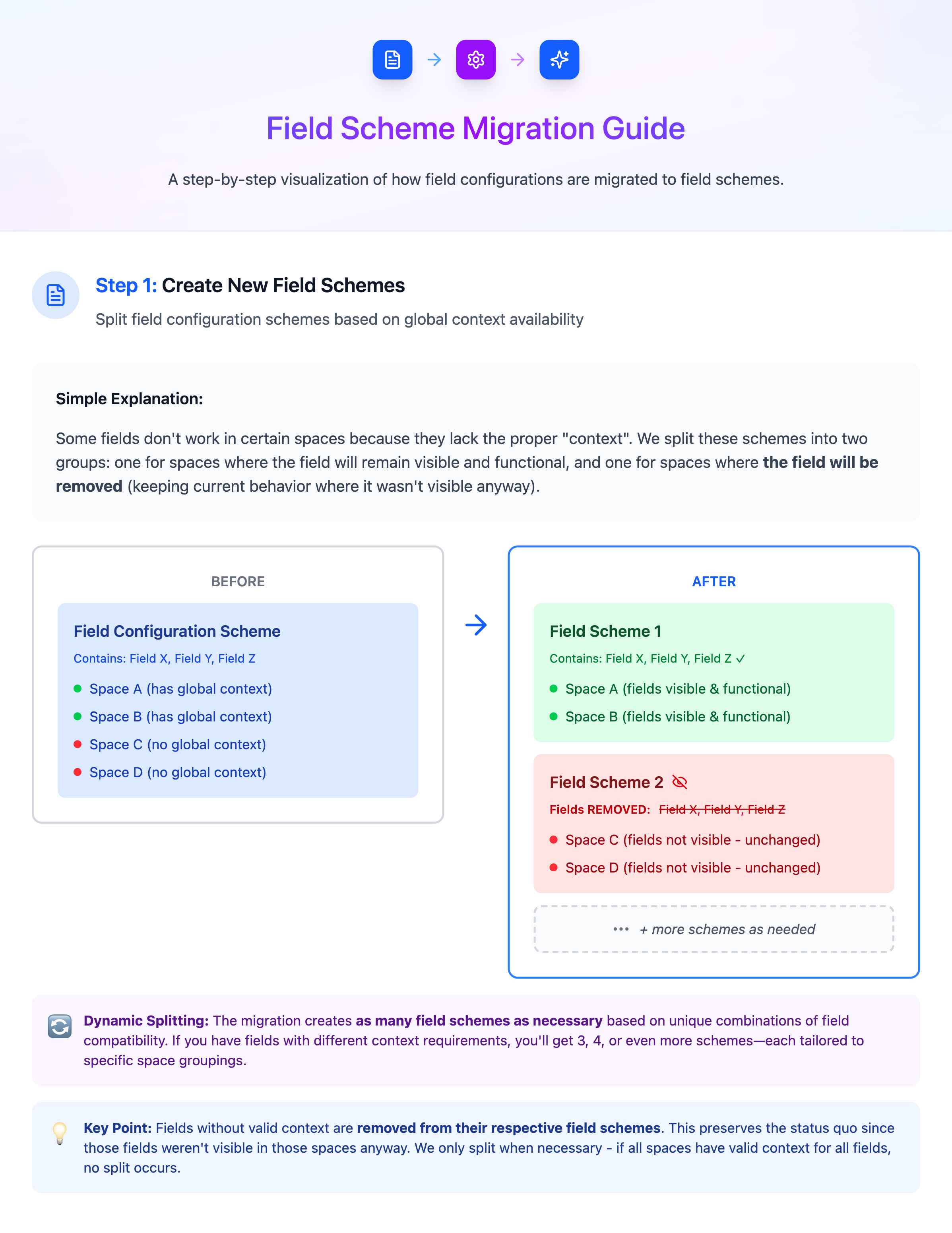
A: It will be automated - no action is need from admins. If you want to have a preview, please sign up for the Open Beta for a test run.
Q: How can I join the Open Beta?
A: If you’re ready to get an early look at Field Schemes and help shape the final release, we’d love to have you! You can sign up by filling out our Expression of Interest (EOI) form. Once submitted, our team will review your request and be in touch with the next steps for enabling it on your instance.
Q: Can we test the ongoing Open Beta on just a sandbox project, or is it an all-or-nothing instance upgrade?
A: During Open Beta, we highly recommend spinning up an Atlassian Cloud Sandbox (available on Premium and Enterprise plans) and opting your Sandbox instance into the Open Beta. This allows you to thoroughly test the migration and your specific scripts without risking your production environment.
Q: Will there be video demonstrations (e.g., Loom) of the new UI before the rollout?
A: Yes! We completely understand the need to see it before you believe it. As we gather feedback from the Open Beta, our enablement teams are working on comprehensive documentation, guided walkthroughs, and video demonstrations showcasing the new UI, common use cases, and best practices. These will be available before the progressive rollout begins.
The Basics
Q: Are Field Contexts going away completely?
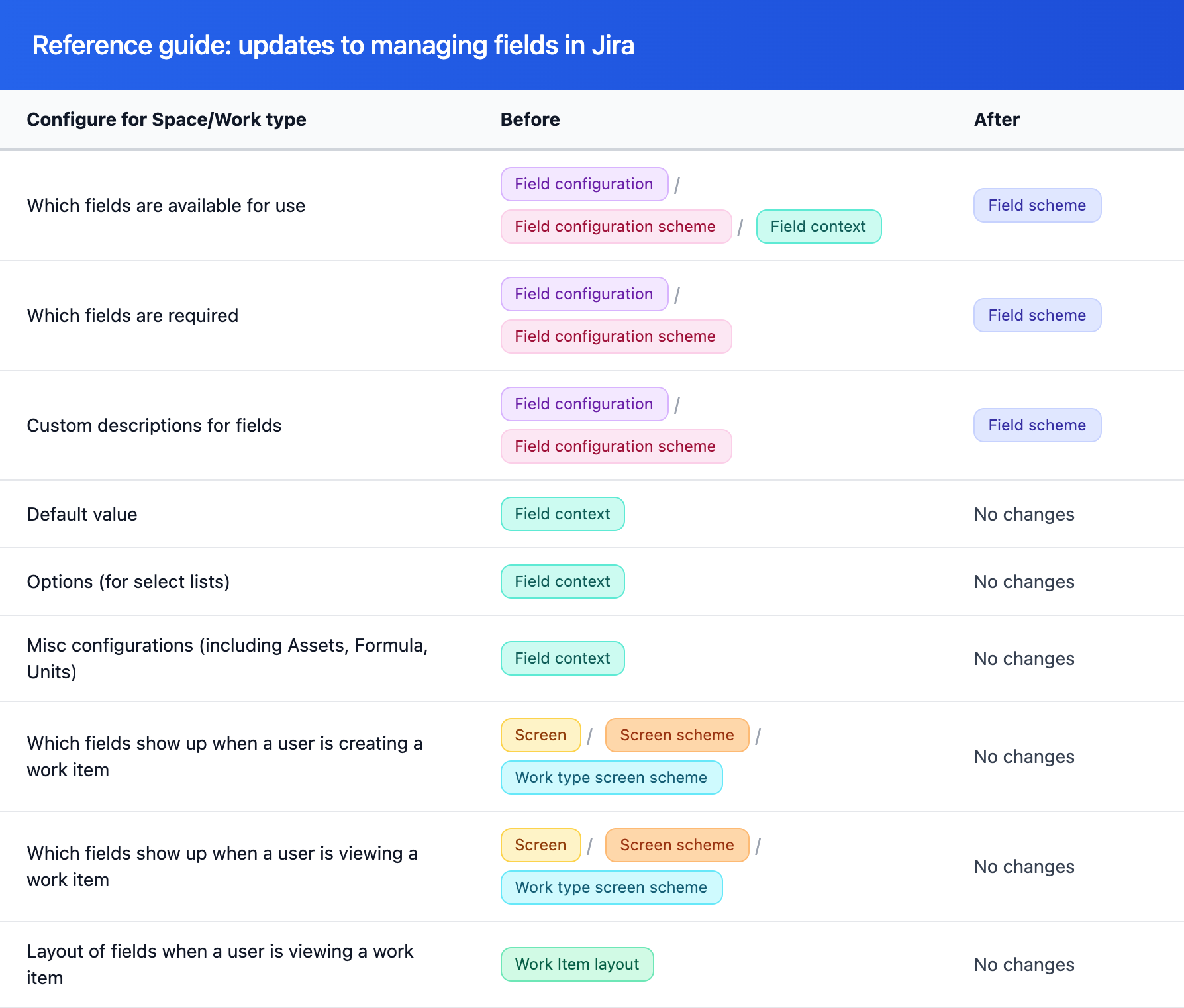
A: No, but their purpose is changing slightly. Field Contexts will remain, and they will define a field's default value, available dropdown options, and other configurations unrelated to visibility of a field.
They will continue to exist and define those settings per space/work types.
They will no longer control whether a field is visible on a specific space or work type.
Since contexts are no longer restricting use to certain spaces/work types, you will no longer be able to delete its global context, but you are still able to modify it's configurations. (note: this also removes previous restriction that a field with no global context could not be used in team-managed spaces)
Q: Will it still be possible to have multiple contexts per field with different dropdown options for different projects/spaces?
A: Yes. You can still have different sets of options for the same field across different spaces.
Q: How will we make a field required for one work type but optional for another, or restrict a field to specific ticket types?
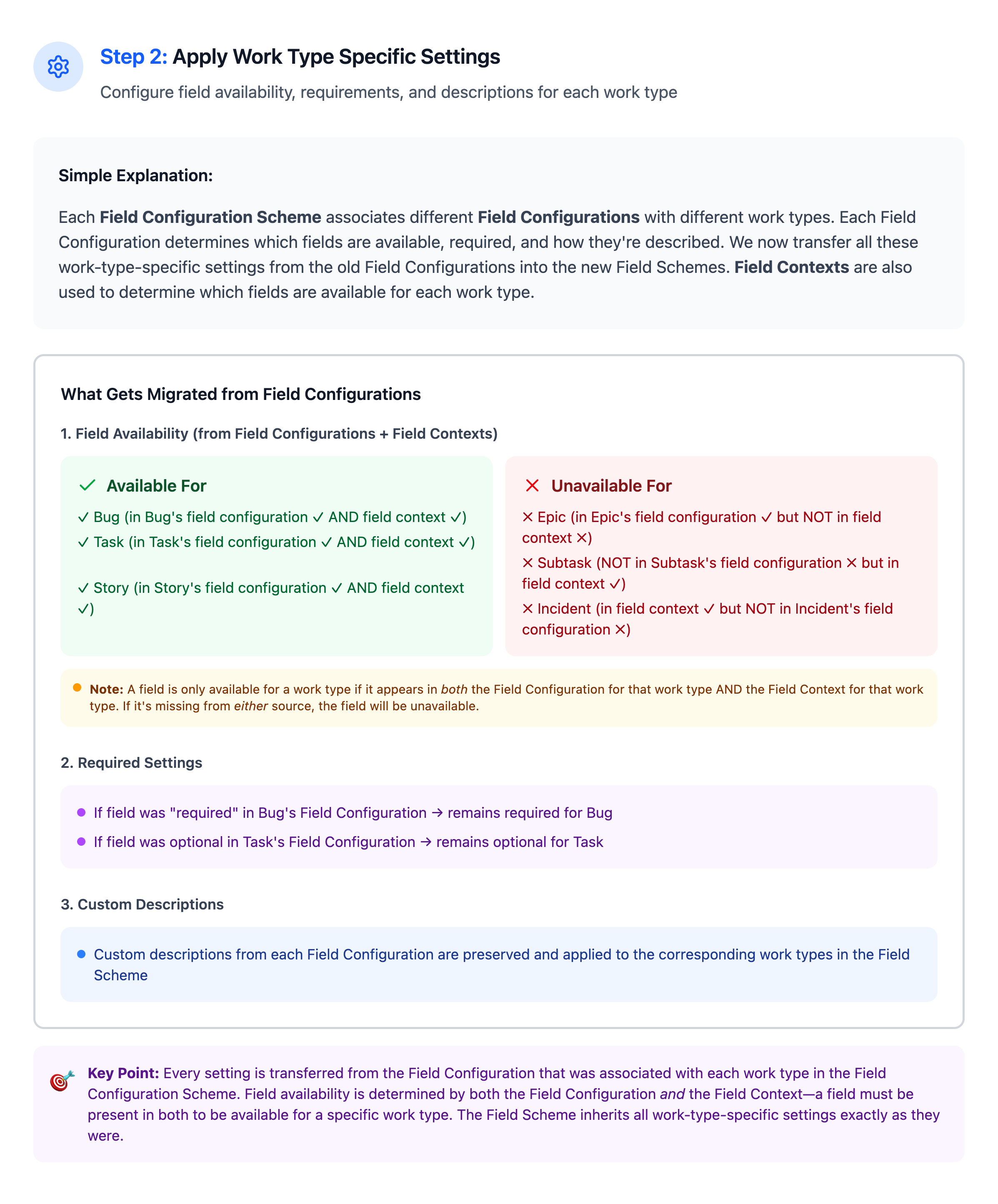
A: With the new Field Schemes UI, you will be able to adjust the availability, required/optional status, and custom descriptions for different work types just as you did before.
Technical & Configuration Concerns
Q: How will we hide fields that are used strictly for backend scripts, automation, or APIs?
A: You can still keep backend fields hidden from end-users by removing them from your Screens. While the new Field Schemes control what work types a field can appear on, your Screens and Screen Schemes will still act as the final gatekeeper for what users actually see and interact with in the UI. Automation rules, APIs, and background scripts will continue to be able to read and update these fields even if they aren't visible to users on the work item view.
Q: How will we handle default values that are tied to specific work types?
A: Your existing field contexts won't suddenly expand to all work types during the transition. If a default value was previously tied strictly to a specific work type (like a "Bug"), it will continue to apply only to that work type. If you later use the new Field Scheme to make that field available on additional work types (like a "Story"), those new work types will simply have no default value unless you explicitly configure a new context for them.
Q: Will we still be able to have "Read-Only" fields on view screens?
A: Yes. The core functionality of Screens and Screen Schemes is not changing. If you need a field to be visible but non-editable to regular users, you can continue to place that field on the "View Screen" while keeping it off the "Edit Screen."
Q: What is the impact on existing custom scripts and API integrations?
A: Because this is a structural change from Field Configurations to Field Schemes, scripts or apps relying on legacy APIs will need to be updated. We have published several RFCs in the Atlassian Developer Community outlining these API changes (such as RFC-105, 104, 103, and 121). We highly recommend reviewing these RFCs and testing your scripts in a sandbox environment to ensure compatibility with the new Field Scheme Model APIs before the broader rollout.
Scale & UI Concerns
Q: How will the new UI prevent "scheme clutter" for large instances with hundreds of spaces?
A: We’ve designed the new UI to make viewing and auditing your configurations easier. With better visibility, you'll be able to make informed decisions about sharing schemes between spaces, turning your setup into a curated set rather than a cluttered web of legacy configurations.
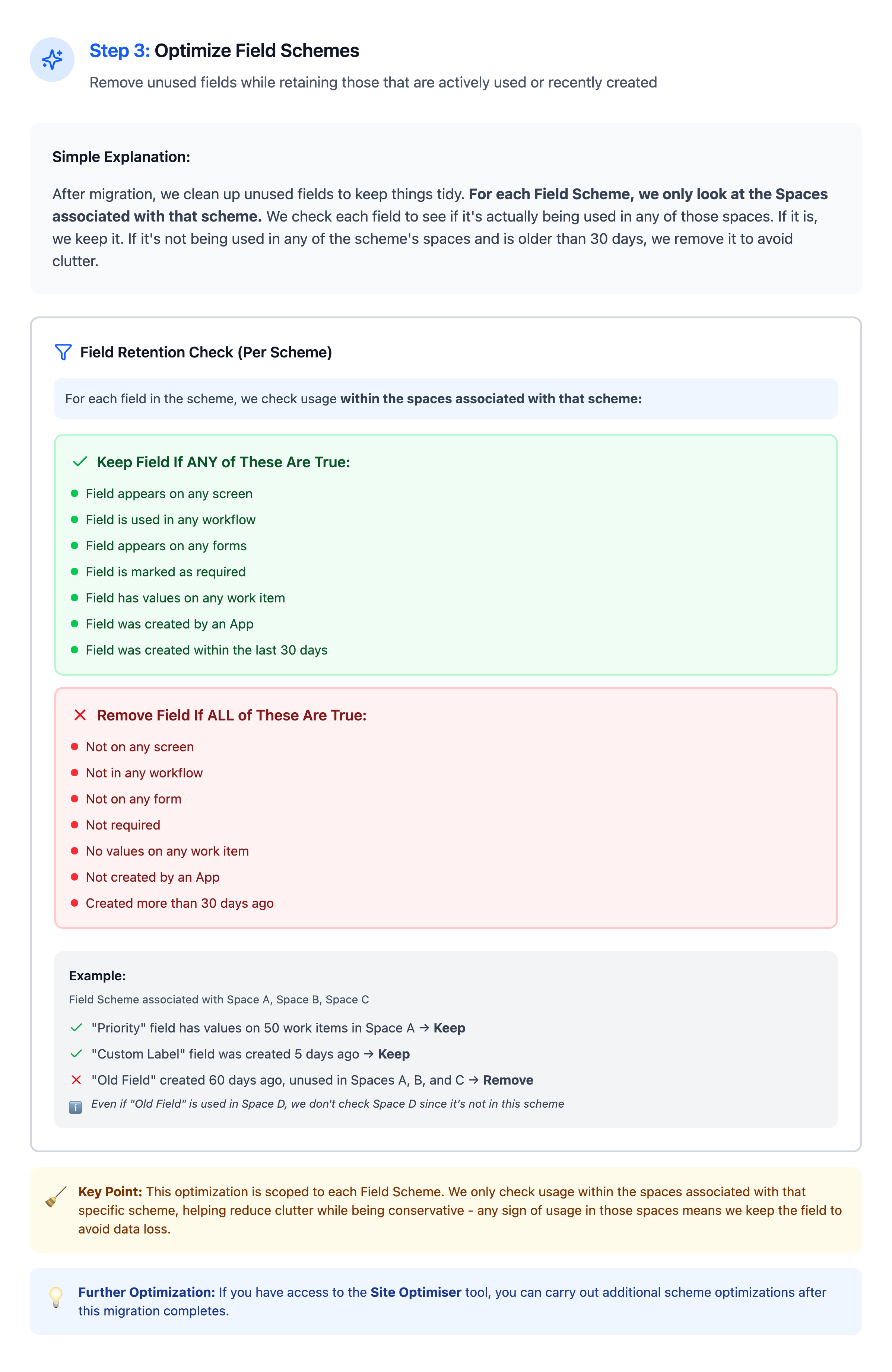
It's also worth noting that having a large number of schemes won't slow down your instance—but having too many fields inside a single scheme can. We encourage keeping only the relevant fields in a scheme for its associated spaces, rather than relying on bloated, "catch-all" schemes that contain every potentially useful field.
Q: How will we know where a Field Scheme is being used before we edit it?
A: Just like the legacy setup, the new Field Schemes UI will clearly display which spaces and work types are currently using a specific scheme.
We've also created the following reference guides to help you understand the scope of the change and also the migration process: