Forums

Articles
Create
cancel
Showing results for 
Search instead for 
Did you mean: 

📣 Introducing native surveys in Jira Service Management Cloud

We’re excited to announce that surveys are now generally available in Jira Service Management Cloud. Over the next few weeks, you’ll see surveys appear in your service spaces on paid plans. Surveys provide a native, streamlined way to capture feedback directly where you manage work — no more switching between separate survey tools, links or spreadsheets.


If you don’t see Surveys in the navigation on the left in your service space, a space admin needs to activate it. Navigate to Space settings, select Features and turn on the toggle next to Surveys


Survey summary GA (2).png

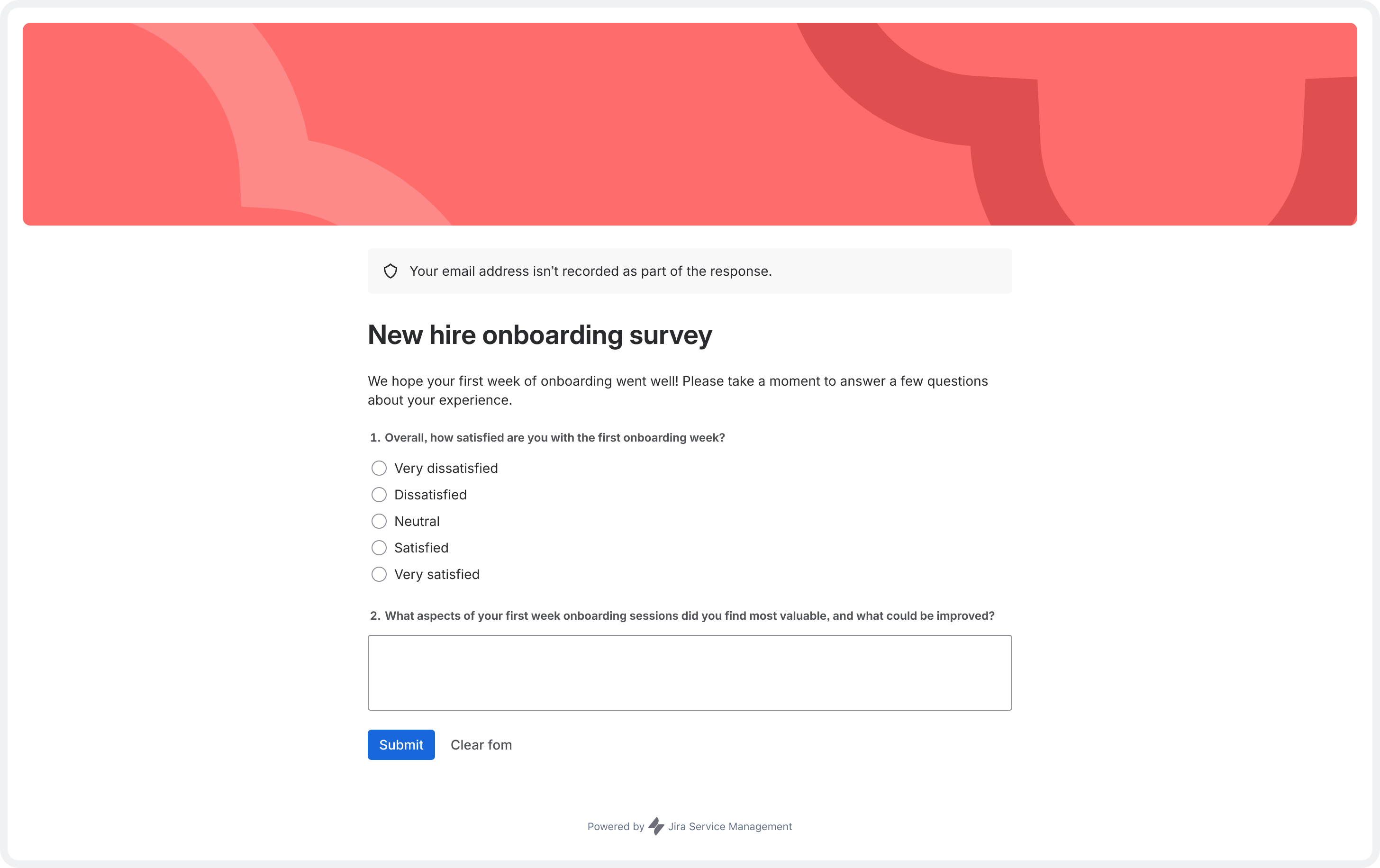
Surveys - responder view (2).png


Centralize feedback across services, engagement and lifecycle moments


Many service teams rely on forms, spreadsheets or external survey tools to gather feedback — whether for service quality, employee engagement or lifecycle events like onboarding and offboarding. Surveys in Jira Service Management go beyond customer satisfaction (CSAT) by centralizing feedback collection across services, key lifecycle moments and employee engagement.

Design surveys fast with flexible question types


Build surveys with our no-code builder, or get started in minutes using templates for HR, business, and IT teams. Choose from multiple question types, including ratings, multiple choice and free text to customize your feedback collection.
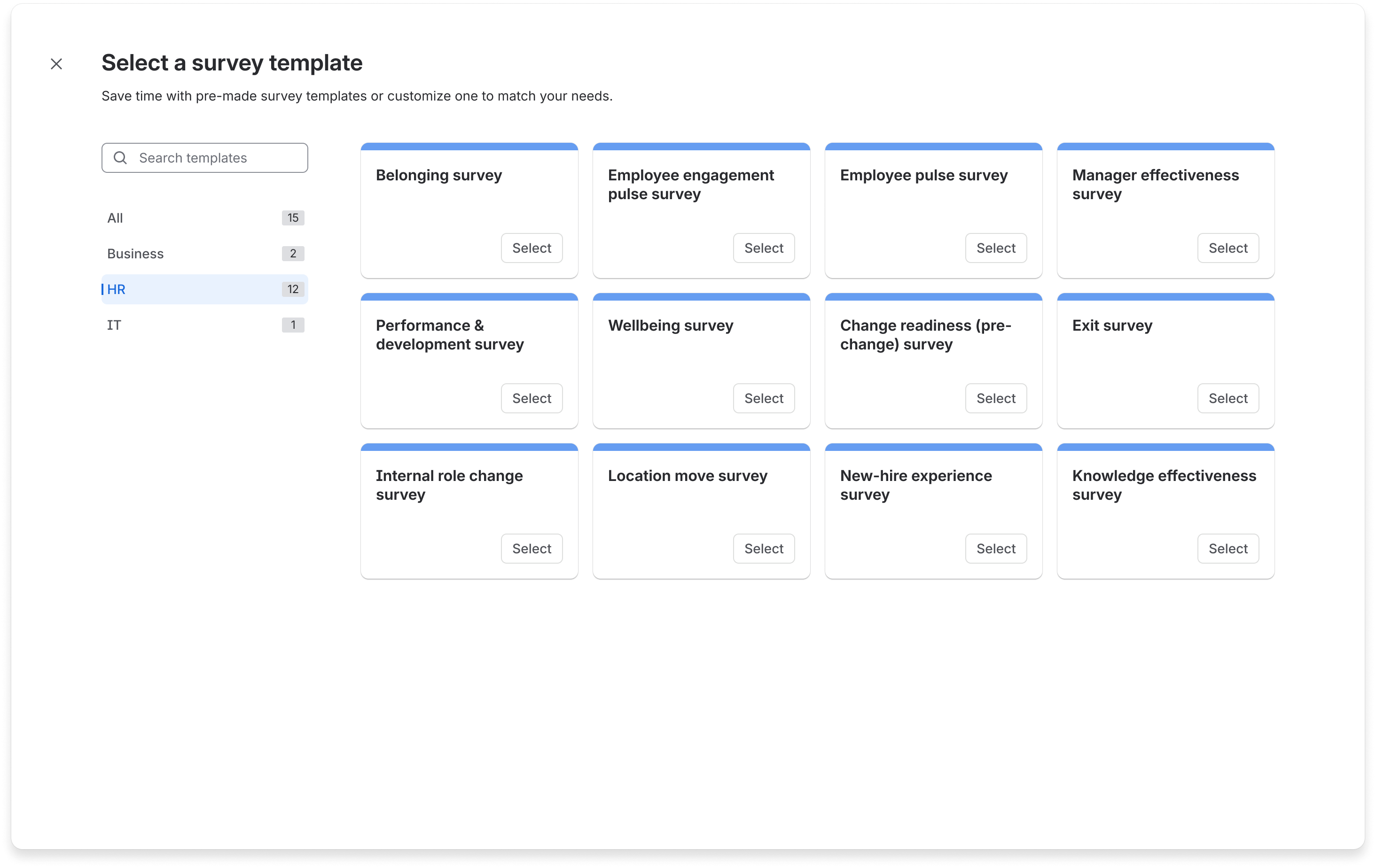
surevy templates (1).png

Control access and protect privacy

Use privacy settings to collect anonymous or identified feedback and control who can create surveys, send them or view results. Preview, publish and share surveys where your teams work – add surveys to automation rules (for example, a post-onboarding “How did it go?” check-in), or share them via email, chat or internal tools.
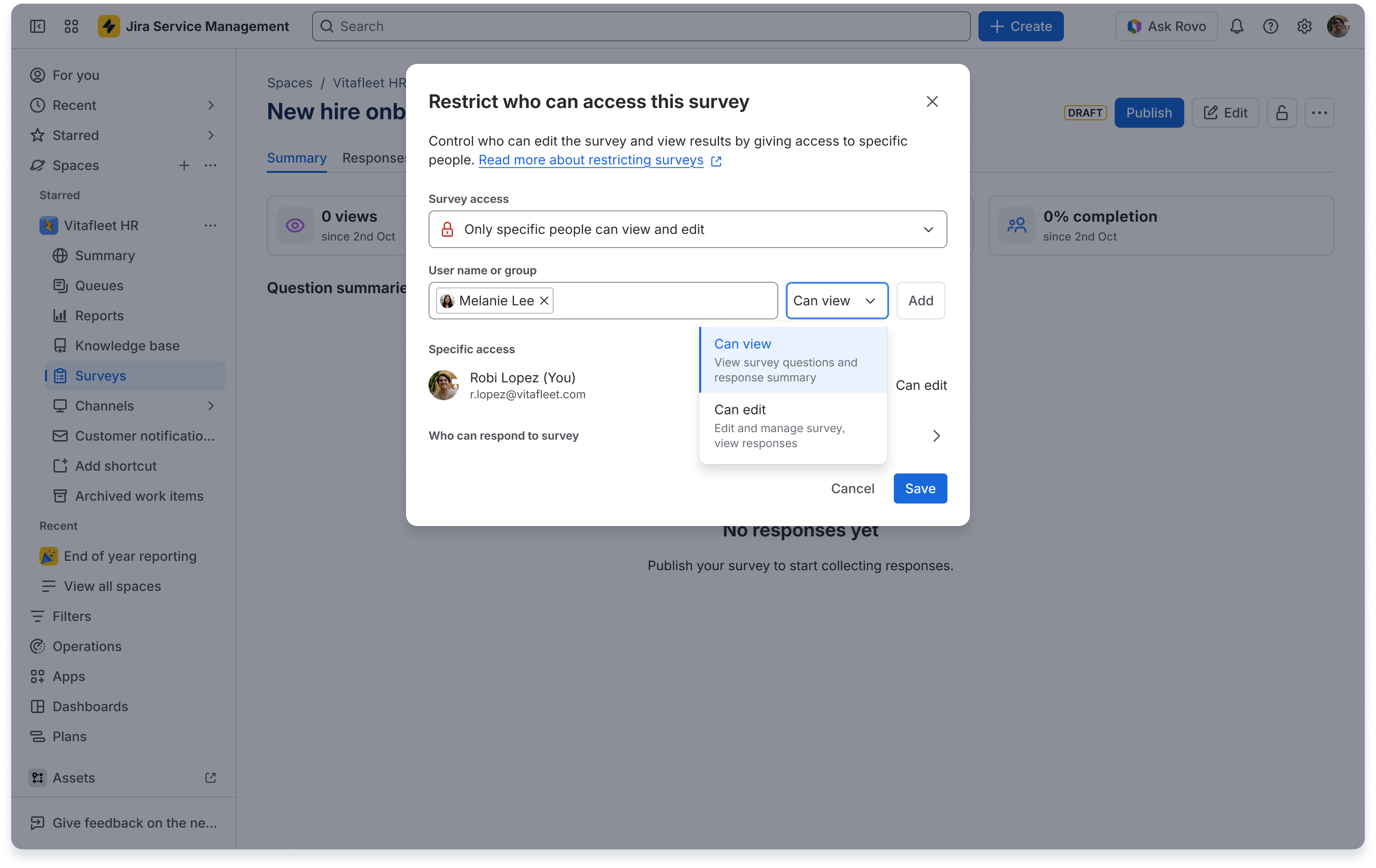
Survey restrictions.png

Turn centralized feedback into actionable insights


View survey data in a single, trusted overview across services and experiences. Filter data to focus on key areas, click to view free-text responses and export results for sharing.
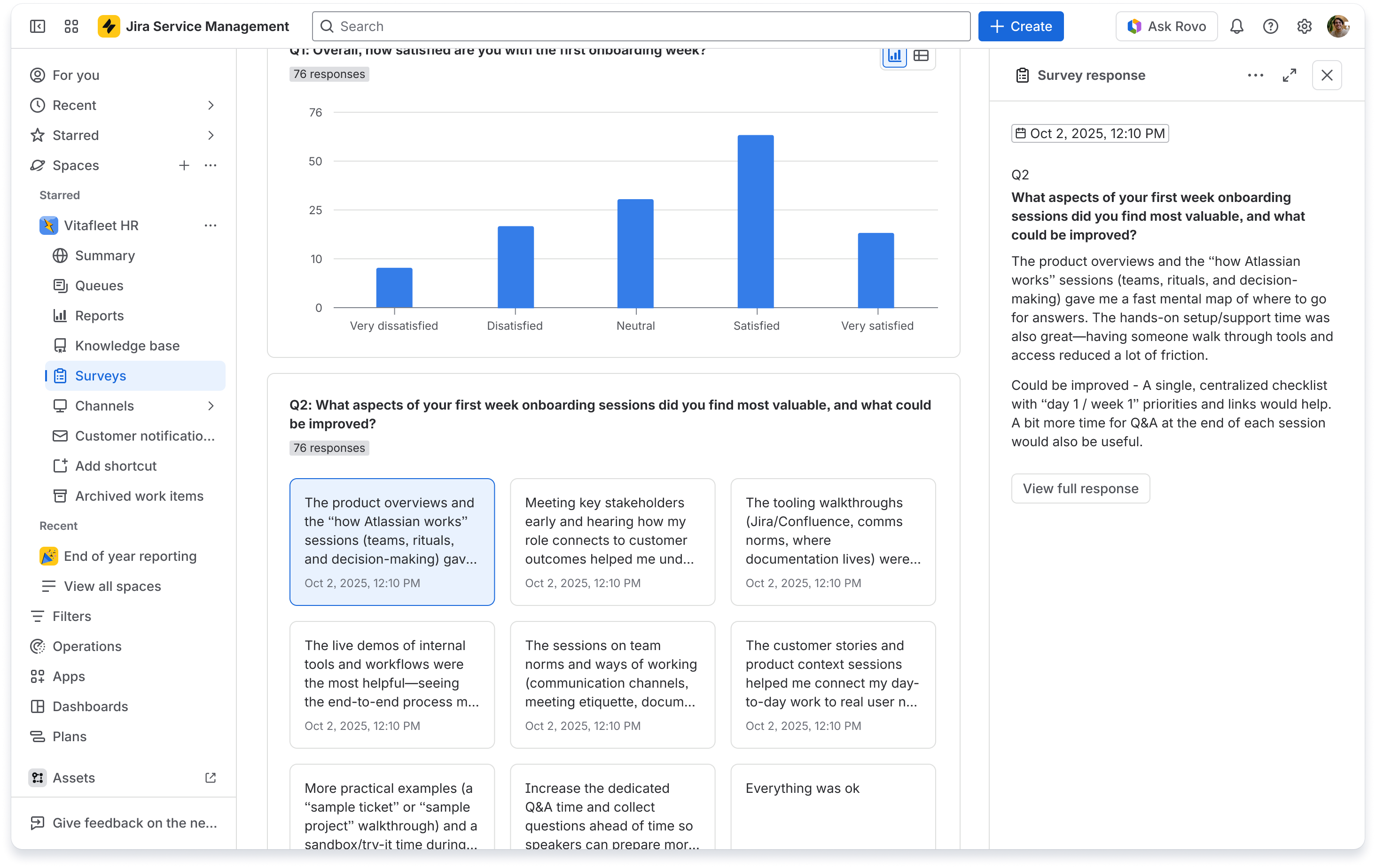
Survey summary - response open.png

Turn everyday employee moments into powerful feedback loops

Here are a few ways teams are using surveys to listen at the moments that matter — and turn feedback into better experiences:

  • End-of-request satisfaction surveys, beyond basic CSAT
    Ask employees how satisfied they were after a request (for example, benefits query or equipment request) to identify service improvements.

  • Lifecycle journey check-ins
    Add surveys at key points in journeys like onboarding, internal transfers, or offboarding. For example "How supported did you feel in your first week?”

  • Knowledge base and help center feedback
    Collect feedback on knowledge base articles or help center content to improve documentation quality.

What’s next: turning feedback into action


We’ve built a strong foundation for capturing feedback natively and centrally. Next, we’ll explore how Rovo  can surface clearer insights, how deeper connections to workflows and automations can drive faster follow-through — all in the same system where work happens.

Share your feedback

We’d love to hear how you’re using surveys in Jira Service Management. Share your examples and questions below. Your feedback will help shape how we evolve surveys.

Kind regards,

Gemma Aldrich

Product Manager, Jira Service Management

10 comments

Tim EddelbĂĽttel
Rising Star
Rising Star
Rising Stars are recognized for providing high-quality answers to other users. Rising Stars receive a certificate of achievement and are on the path to becoming Community Champions.
March 18, 2026

At a first glance it looks / feels like a separate survey tool inside your JSM project. I'll see use-cases for this feature :)

Technically, it looks like it's reusing how Forms work . The editor in forms would have a translate tab. Surveys should be also translatable.

Looking at current JSM CSAT (the non-customisable 5-star on / off toggle) feature. Would it be possible to select a survey and replace the 5-start form with these surveys? Will there be any placeholders that can be used in the JSM customer notification templates (the non html part) based on events (e.g. request resolved)? Sending a separate e-mail via Automation for Jira will look different, these can't be translated and the sender address is different from the service desk project itself (https://jira.atlassian.com/browse/AUTO-76).


Like • # people like this
Gary Spross
Community Champion
March 19, 2026

@Gemma, I enabled the Surveys feature in one of my JSM spaces, but the Surveys menu option isn't appearing. I've refreshed several times, but I'm not seeing it anywhere.

Like • Sid Pathirana likes this
Danilo Gomes
I'm New Here
I'm New Here
Those new to the Atlassian Community have posted less than three times. Give them a warm welcome!
March 20, 2026

As @Tim EddelbĂĽttel comment, 

Can we connect this new feature with Tickets on JSM?

Ok we can use this based end of request trigger but how we gonna map/relate the survey answer to a specific user interaction?

"End-of-request satisfaction surveys, beyond basic CSAT

Ask employees how satisfied they were after a request (for example, benefits query or equipment request) to identify service improvements."

Gemma
Atlassian Team
Atlassian Team members are employees working across the company in a wide variety of roles.
March 22, 2026

Hi @Tim EddelbĂĽttel 

Thanks for your comment and sharing your thoughts. For ease of use we're using JSM forms to power survey builder, multilingual support isn't available right now, but something we're looking at for near future.

Right now, surveys and CSAT are separate capabilities, you can use surveys for CSAT feedback on a closed work item - if you create a survey for each request type active in your space, and configure Automation to trigger the email with survey link included (along with issue key) when a work item is transitioned and the issue type is equal to the request type.

There aren't currently survey-specific smart values or placeholders you can drop into the non-HTML customer notification templates. Distribution today is via a shareable survey link, which you can include in an Automation action (e.g. "Send email" or "Add comment" on resolution).

I'd love to hear more about your specific use case (if broader than CSAT), this can help me feed it into our roadmap priorities.

Thanks!

Gemma
Atlassian Team
Atlassian Team members are employees working across the company in a wide variety of roles.
March 22, 2026

Hi @Gary Spross thanks for your message - if you've enabled surveys in JSM via Features and it's not appearing, please can you raise a support ticket for us to look at? My team have tried to replicate this issue you've raised but we cannot see it. 

https://support.atlassian.com/ 

If possible, please include my name on the support ticket.

Thanks,

Gemma

Gemma
Atlassian Team
Atlassian Team members are employees working across the company in a wide variety of roles.
March 22, 2026

Hi @Danilo Gomes thanks for your comment - I'm hope my reply to Tim in this thread solves your question, but you can use Automation to build rules around conditions and use the survey link for distribution. 

What specific use case are you trying to solve for?

Thanks

Gemma 

Barbara Márkus
March 23, 2026

Hi Gemma,

Great feature. We have two tenants with different licensing setup. One has this Feature available in Space settings but the other doesn't. Can you tell us what license is needed for this?

Also will the results of the surveys be available through the PowerBI connector for Jira for extraction?

Thanks

Regards,

Barbara

Gemma
Atlassian Team
Atlassian Team members are employees working across the company in a wide variety of roles.
March 23, 2026

Hi @Barbara Márkus thanks for your message. Over the next few weeks, you’ll see surveys appear in your service spaces on paid plans - so it might be that one of your tenants has not yet received the capability as we are still rolling it out. 

Right now, surveys response data is only available in the surveys feature itself with charts and responses populating on the Summary tab once feedback is collected. You can export the data as a csv, read more here: https://support.atlassian.com/jira-service-management-cloud/docs/review-and-export-survey-data/

Thanks,

Gemma

Gemma
Atlassian Team
Atlassian Team members are employees working across the company in a wide variety of roles.
March 23, 2026

Hi @Gary Spross  can you please try enabling surveys again on your Space, it should now appear in the space navigation when you toggle surveys on under Features.

Let me know if you're still not seeing it available.

Thanks,

Gemma

Gary Spross
Community Champion
March 23, 2026

@Gemma, I just checked and I see the Surveys feature now. I didn't have to re-enable the feature, it just seems to have appeared. Thanks for taking a look!

Comment

Log in or Sign up to comment
TAGS
AUG Leaders

Atlassian Community Events